Introduzzjoni
Welcome to the Hot Pepper Ghost Smartphone User Manual. This guide provides essential information on setting up, operating, maintaining, and troubleshooting your new device. The Hot Pepper Ghost is a certified unlocked smartphone designed for compatibility with major carriers, featuring 3GB RAM, 32GB ROM, and an expandable microSD slot.
X'hemm fil-Kaxxa
- Smartphone Ghost tal-Bżar jaħraq
- Cable USB
- (Note: Other accessories like charger, headphones, or SIM ejector tool may be sold separately or vary by region.)
Prodott Overview

Figura 1: Quddiem view of the Hot Pepper Ghost smartphone, showcasinid-displej.
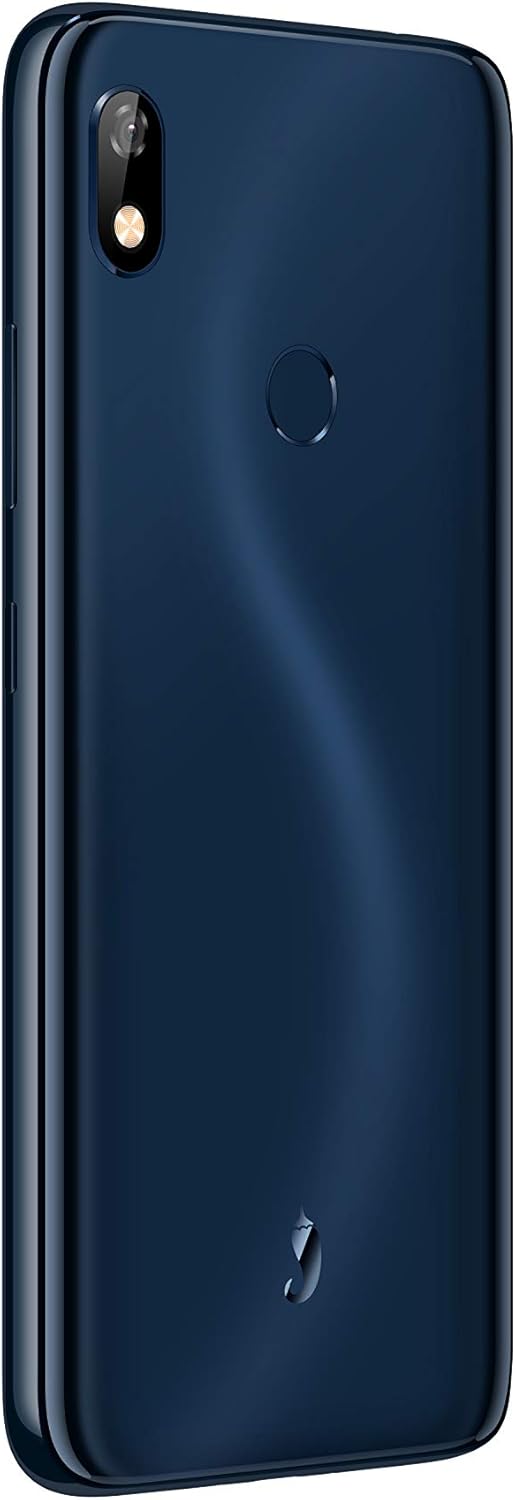
Figura 2: Lura view of the Hot Pepper Ghost smartphone, showing the camera module and fingerprint sensor.
Komponenti Ewlenin:
- Wiri: 6-inch LCD touchscreen.
- Kamera ta' wara: Jinsab fuq ix-xellug ta' fuq tal-pannell ta' wara.
- Sensor tal-marki tas-swaba': Circular sensor located on the back panel for secure unlocking.
- Awdjo Jack: 3.5mm audio jack for headphones.
- Port tal-Iċċarġjar: Port tal-iċċarġjar tat-Tip-C.
- Kelliema: Jinsabu fil-qiegħ tal-apparat.
Setup
1. Installazzjoni ta' SIM Card
- Sib it-trej tas-SIM fuq il-ġenb tat-tagħmir tiegħek.
- Insert a SIM ejector tool (if available) or a small paperclip into the small hole next to the tray to open it.
- Iġbed it-trej tas-SIM 'il barra bir-reqqa.
- Poġġi l-kard(s) Nano-SIM tiegħek fl-islottijiet apposta fuq it-trej, filwaqt li tiżgura li l-kuntatti tad-deheb iħarsu 'l isfel.
- Imbotta t-trej bil-mod lura fit-telefon sakemm tikklikkja f'postu.
2. Installazzjoni tal-Kard MicroSD
The Hot Pepper Ghost supports expandable storage via a microSD slot.
- Follow steps 1-3 for SIM card installation to open the tray.
- Place your microSD card into the dedicated slot on the tray.
- Gently push the tray back into the phone.
3. L-Ewwel Tixgħel u l-Iċċarġjar
- To power on, press and hold the Power button (usually on the right side) until the Hot Pepper logo appears.
- For first use, it is recommended to fully charge the device. Connect the provided USB cable to the Type-C port on your phone and the other end to a compatible USB power adapter (not included) or computer.
- Ċarġ sħiħ jieħu madwar 2.75 sigħat.
Tħaddem l-Apparat Tiegħek
Basic Navigation (Android 9 Pie)
- Skrin tad-dar: Skrolla lejn ix-xellug jew il-lemin biex taċċessa skrins tad-dar differenti.
- App Drawer: Skrolla 'l fuq mill-qiegħ tal-iskrin biex taċċessa l-applikazzjonijiet installati kollha.
- Notifiki u Settings Mgħaġġla: Swipe 'l isfel minn fuq tal-iskrin għal view notifiki u toggles tas-settings veloċi.
- Lura, Dar, Applikazzjonijiet Riċenti: Use the on-screen navigation buttons at the bottom of the display.
Konnettività
- Wi-Fi: Go to Settings > Network & internet > Wi-Fi to connect to available networks. Supports 2.4GHz/5GHz.
- Bluetooth: Go to Settings > Connected devices > Bluetooth to pair with Bluetooth 5.0 compatible devices.
- Data mobbli: Kun żgur li l-karta SIM tiegħek hija attiva u li d-dejta mobbli hija attivata f'Settings > Network & internet > Mobile network.
Użu tal-Kamera
- Iftaħ l-app tal-Kamera mill-iskrin tad-dar tiegħek jew mill-kexxun tal-apps.
- Tektek il-buttuna tax-shutter biex tieħu ritratt.
- Ibdel bejn il-kameras ta' quddiem u ta' wara billi tuża l-ikona tat-toggle tal-kamera.
Sensor tal-marki tas-swaba'
- To set up your fingerprint, go to Settings > Security & location > Fingerprint.
- Segwi l-istruzzjonijiet fuq l-iskrin biex tirreġistra l-marki tas-swaba' tiegħek.
- Once registered, you can use your fingerprint to unlock the device and authorize purchases.
Manutenzjoni
Kura tal-batterija
- Evita temperaturi estremi, li jistgħu jnaqqsu l-ħajja tal-batterija.
- Do not leave the phone charging for extended periods after it reaches 100%.
- Għal saħħa ottimali tal-batterija, ipprova żomm il-livell ta' ċarġ bejn 20% u 80%.
Tindif tat-Tagħmir Tiegħek
- Uża drapp artab u mingħajr suf biex tnaddaf l-iskrin u l-qafas.
- Għal tbajja' iebsa, ftit dampNaddaf id-drapp bl-ilma jew b'prodott tat-tindif tal-iskrin.
- Evita kimiċi ħarxa jew materjali li joborxu.
Aġġornamenti tas-Software
Your Hot Pepper Ghost smartphone runs on Android 9 Pie and receives regular updates for up to 2 years. These updates provide security patches, performance improvements, and new features.
- To check for updates, go to Settings > System > Advanced > System update.
- Ensure your device is connected to Wi-Fi and has sufficient battery life before performing an update.
Issolvi l-problemi
If you encounter issues with your Hot Pepper Ghost smartphone, please refer to the following common solutions:
- L-Apparat Mhux Jirrispondi/Jiffriża: Agħfas u żomm il-buttuna tal-Qawwa għal madwar 10-15-il sekonda biex terġa' tibda.
- Batterija Tbattal malajr: Iċċekkja l-użu tal-app fl-isfond f'Settings > Battery. Naqqas il-luminożità tal-iskrin u iddiżattiva karatteristiċi mhux meħtieġa bħall-GPS jew il-Bluetooth meta ma tkunx qed tużahom.
- Connectivity Issues (Wi-Fi/Bluetooth/Mobile Data):
- Toggle Wi-Fi/Bluetooth/Mobile Data off and on.
- Ibda mill-ġdid it-telefon tiegħek.
- For Wi-Fi, try forgetting the network and reconnecting.
- For mobile data, ensure your APN settings are correct for your carrier (Settings > Network & internet > Mobile network > Advanced > Access Point Names).
- Call Quality Issues (Cannot Hear/Be Heard):
- Ensure nothing is blocking the microphone or earpiece.
- Test with headphones to determine if the issue is with the phone's speaker/mic or the network.
- Ibda mill-ġdid l-apparat.
- Slow Performance/App Loading:
- Agħlaq l-apps mhux użati li jaħdmu fl-isfond.
- Clear app caches (Settings > Apps & notifications > [App Name] > Storage & cache > Clear cache).
- Kun żgur li għandek biżżejjed spazju ta' ħażna ħieles.
- Sensur tal-Marki tas-Swaba' Mhux Jaħdem:
- Kun żgur li subgħajk ikun nadif u niexef.
- Re-register your fingerprint if the issue persists (Settings > Security & location > Fingerprint).
- Text Message Issues:
- Verify your mobile data connection.
- Check your messaging app settings.
- Contact your carrier if the issue persists across different messaging apps.
- Irrisettjar tal-Fabbrika: As a last resort, if software issues persist, you may perform a factory reset. Twissija: Dan se jħassar id-dejta kollha fuq it-telefon tiegħek. Agħmel backup tad-dejta importanti qabel ma tipproċedi. Go to Settings > System > Advanced > Reset options > Erase all data (factory reset).
Speċifikazzjonijiet
| Karatteristika | Dettall |
|---|---|
| Numru tal-Mudell | HPP-GS1 |
| Sistema Operattiva | Android 9 Pie |
| RAM | 3 GB |
| Ħażna Interna | 32 GB |
| Ħażna espansibbli | slot microSD |
| Proċessur | Mediatek MTK6762 8-core |
| Daqs tal-Iskrin | 6 Pulzier |
| Riżoluzzjoni | 1280 x 720 |
| Teknoloġija tal-Wiri | LCD |
| Kapaċità tal-batterija | 3850 mAh Lithium Ion (inkluża) |
| Ħin tal-Iċċarġjar | Appross. 2.75 Sigħat |
| Teknoloġiji mingħajr fili | Bluetooth 5.0, Wi-Fi (2.4GHz/5GHz) |
| Teknoloġija Ċellulari | 4G (Compatible with AT&T, Cricket, T-Mobile, Verizon) |
| Awdjo Jack | 3.5 mm |
| Port tal-Iċċarġjar | Tip-Ċ |
| Dimensjonijiet (L x W x H) | 6.43 x 3.06 x 0.37 pulzieri (163.4mm x 77.7mm x 9.5mm) |
| Piż tal-oġġett | 14.8 uqija (160g) |
| Kulur | Blu |
Informazzjoni dwar Garanzija
The Hot Pepper Ghost smartphone comes with a US Warranty. For specific details regarding warranty coverage, terms, and conditions, please refer to the warranty card included with your product or visit the official Hot Pepper websit. Żomm il-prova tax-xiri tiegħek għal talbiet ta' garanzija.
Appoġġ
For further assistance, technical support, or service inquiries, please contact Hot Pepper customer support.
- Appoġġ onlajn: Visit the official Hot Pepper websit għal FAQs, artikli ta' appoġġ, u formoli ta' kuntatt.
- Appoġġ bl-Email: Irreferi għall-imballaġġ tal-prodott tiegħek jew għall-informazzjoni uffiċjali website for email contact information.
- Appoġġ tat-Telefon: Irreferi għall-imballaġġ tal-prodott tiegħek jew għall-informazzjoni uffiċjali websit għal numri ta' appoġġ bit-telefon.
When contacting support, please have your model number (HPP-GS1) and purchase information ready.


