1. Introduzzjoni
The HUAWEI B311-221 4G LTE WiFi Router is designed to provide high-speed internet access. It supports 4G LTE CAT4 with download speeds up to 150Mbps and Wi-Fi speeds up to 300Mbps (802.11n). This router allows you to share a 3G/4G network connection with up to 32 Wi-Fi enabled devices, including tablets, mobile phones, and laptops. Its plug-and-play functionality makes it suitable for various environments where traditional broadband internet may not be available. The HUAWEI HiLink app offers convenient management of your network and connected devices.
2. Kontenut tal-Pakkett
Jekk jogħġbok iċċekkja l-kontenut tal-pakkett bir-reqqa. Jekk xi oġġett ikun nieqes jew bil-ħsara, ikkuntattja lill-bejjiegħ tiegħek.
- 1 x HUAWEI B311-221 4G LTE WiFi Router
- 1 x Cable Ethernet
- 1 x Adapter tal-Enerġija
- 1 x Gwida Quick Start
3. Prodott Aktarview
3.1 Quddiem View

This image shows the front of the HUAWEI B311-221 router, featuring a clean white design with indicator lights for power, network status, Wi-Fi, and signal strength. The HUAWEI logo is visible at the bottom center.
3.2 Wara View u l-Portijiet
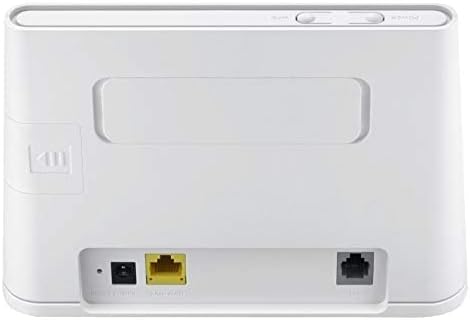
In-naħa ta’ wara view of the router displays the various ports for connectivity. These include the power input, a Gigabit Ethernet LAN/WAN port (yellow), and an RJ11 port for voice services.
3.3 Slot tal-Kard SIM

This image highlights the integrated SIM card slot located on the side of the router, which is essential for 4G LTE connectivity. The slot is shown open, indicating where the SIM card should be inserted.
3.4 Dwal Indikaturi

A close-up of the router's top panel, showing the indicator lights for Power, Wi-Fi, Network Mode, and Signal Strength. These lights provide visual feedback on the router's operational status.
4. Istruzzjonijiet ta' Setup
Follow these steps to set up your HUAWEI B311-221 router:
- Daħħal SIM Card: Locate the SIM card slot on the side of the router. Carefully insert your standard-sized 3G/4G SIM card into the slot until it clicks into place. Ensure the SIM card is activated by your service provider.
- Qabbad l-Enerġija: Connect the power adapter to the router's power input port and then plug it into a power outlet. The router will automatically power on.
- Qawwa Mixgħul: Press the Power button on the router. The Power indicator light should turn on.
- Konnessjoni tan-Netwerk: Wait for the Network Mode and Signal Strength indicator lights to stabilize. A solid blue or green light typically indicates a successful 4G LTE connection.
- Qabbad Apparat:
- Wi-Fi: On your device (laptop, phone, tablet), search for available Wi-Fi networks. Select the network name (SSID) printed on the label at the bottom of your router. Enter the Wi-Fi password (Key) also found on the label.
- Ethernet: For wired connections, connect an Ethernet cable from the router's LAN/WAN port to your computer or other network device.
- Access Management Interface: Iftaħ a web browser on a connected device and enter the default IP address (usually 192.168.8.1) to access the router's web management page. Log in using the default username and password (found on the router label or in the Quick Start Guide).
- HUAWEI HiLink App: For easier management, download the HUAWEI HiLink app from your device's app store. Connect your phone to the router's Wi-Fi and use the app to monitor network status, manage connected devices, and configure settings.
5. Istruzzjonijiet Operattivi
5.1 Apparat li jgħaqqad
The router supports up to 32 Wi-Fi devices simultaneously. Ensure your devices are within the Wi-Fi coverage area for optimal performance.

This diagram illustrates the Wi-Fi coverage provided by the HUAWEI B311-221 router within a typical home environment, showing multiple devices connected wirelessly.
5.2 Aċċess għall-Internet
Once connected, devices can access the internet via the 4G LTE network. The router provides high-speed data for streaming, browsing, and online activities.

This image demonstrates the router's capability to deliver 4G internet at speeds up to 150Mbps to a connected laptop, facilitating fast downloads and online activities.
5.3 Using the HUAWEI HiLink App
The HUAWEI HiLink app allows you to:
- Check network strength and status.
- Read SMS messages received on the router's SIM card.
- Set data usage limits.
- View u timmaniġġja l-apparati kollha konnessi.
- Modify Wi-Fi settings (SSID, password).
Ensure your smartphone is connected to the router's Wi-Fi network to use the app.
6. Manutenzjoni
To ensure optimal performance and longevity of your HUAWEI B311-221 router, follow these maintenance guidelines:
- Pjazzament: Poġġi r-router f'żona miftuħa, 'il bogħod minn ostakli, oġġetti kbar tal-metall, u apparati elettroniċi oħra li jistgħu jikkawżaw interferenza.
- Tindif: Uża drapp artab u niexef biex tnaddaf ir-router. Tużax prodotti tat-tindif likwidi jew aerosols.
- Ventilazzjoni: Kun żgur li l-fetħiet tal-ventilazzjoni tar-router mhumiex imblukkati biex tevita li jisħon iżżejjed.
- Aġġornamenti tal-Firmware: Iċċekkja perjodikament għal aġġornamenti tal-firmware permezz tar-router web management interface or the HUAWEI HiLink app. Keeping the firmware updated ensures the best performance and security.
- Ċiklu tal-Enerġija: If you experience minor issues, try power cycling the router by unplugging it from the power outlet for 10 seconds and then plugging it back in.
7 Issolvi l-problemi
Jekk tiltaqa' ma' problemi bir-router tiegħek, irreferi għall-kwistjonijiet u s-soluzzjonijiet komuni li ġejjin:
| Problema | Soluzzjoni Possibbli |
|---|---|
| Ebda konnessjoni tal-internet |
|
| Veloċità baxxa tal-Wi-Fi |
|
| Cannot access router management page |
|
| Is-sinjal Wi-Fi jinżel ta' spiss |
|
8. Speċifikazzjonijiet
| Karatteristika | Dettall |
|---|---|
| Brand | HUAWEI |
| Isem tal-Mudell | B311-221 |
| Numru tal-Mudell tal-Oġġett | B311-221 |
| Dimensjonijiet tal-Prodott | 18.1 x 12.6 x 3.6 ċm |
| Piż tal-oġġett | 218 gramma |
| Kulur | Abjad |
| Teknoloġija tal-Konnettività | Wi-Fi, 4G LTE |
| Komunikazzjoni mingħajr fili Standard | 802.11n |
| Klassi ta' Banda ta' Frekwenza | Banda Unika (2.4GHz) |
| Veloċità Massima tal-Wi-Fi | Sa 300 Mbps |
| Max 4G LTE Speed | Sa 150 Mbps |
| Portijiet Ethernet | 1 x Gigabit Ethernet LAN/WAN port |
| Voice Port | 1 x port RJ11 |
| Slot tal-Kard SIM | Integrated (Standard SIM) |
| Karatteristika Speċjali | WPS, HUAWEI HiLink App Management |
| Apparati Kompatibbli | Smart TV, Tablet, Personal Computer, Laptops, Phones, Gaming Devices |
| Batteriji Inklużi | Nru |
| Operating System (Compatibility) | Windows (and other OS via Wi-Fi/Ethernet) |
9. Informazzjoni dwar Garanzija
This HUAWEI product is covered by a limited warranty. The specific terms and duration of the warranty may vary depending on your region and local regulations. Please refer to the warranty card included in your product package or visit the official HUAWEI websit għal informazzjoni dettaljata dwar il-garanzija. Żomm il-prova tax-xiri tiegħek għal talbiet ta' garanzija.
10. Appoġġ
For technical support, product inquiries, or service requests, please contact HUAWEI customer support through one of the following methods:
- Appoġġ onlajn: Żur l-appoġġ uffiċjali ta' HUAWEI websit għal FAQs, gwidi għas-soluzzjoni tal-problemi, u għażliet ta’ kuntatt.
- HUAWEI HiLink App: Use the support features available within the HiLink application.
- Hotline tas-Servizz: Refer to your Quick Start Guide or HUAWEI's official website for regional service hotline numbers.
When contacting support, please have your product model (B311-221) and serial number ready.