1. Introduzzjoni
This manual provides detailed instructions for the Jensen PSVCJWM60A Service Pack, designed for use with the JWM60A or JWM62A Wall Mount Stereo systems. This service pack includes essential components to maintain or replace parts of your stereo system, ensuring continued functionality and connectivity.

Figura 1.1: Aktarview of the Jensen JWM60A Service Pack components.
The service pack contains the following key components:
- Arness tal-Enerġija/Speaker: Essential wiring for power supply and speaker connections.
- 3.5mm A/V Cable: Għal konnessjonijiet ta' input/output tal-awdjo u tal-vidjo.
- Remote with Battery: A replacement remote control for convenient operation of your stereo.
2. Komponenti Overview
2.1. Qawwa/Speaker Xedd
The power/speaker harness is a critical component for supplying power to your Jensen stereo and connecting it to your speakers. Each wire is color-coded and labeled for correct identification and connection.

Figura 2.1: Dettaljat view of the power/speaker harness wires.
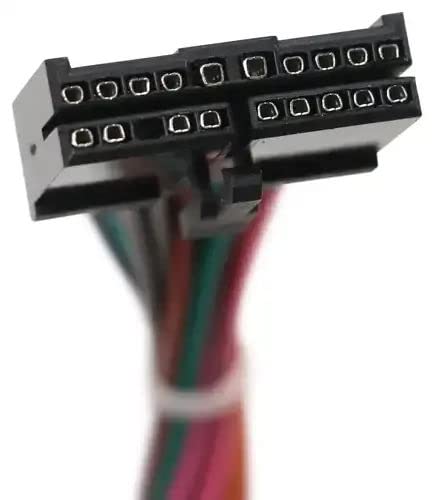
Figure 2.2: The connector plug of the power/speaker harness.
2.2. 3.5mm A/V Cable
This cable facilitates audio and video connections, typically used for auxiliary input or output. It features a 3.5mm jack on one end and standard RCA connectors (red, white, yellow) on the other.
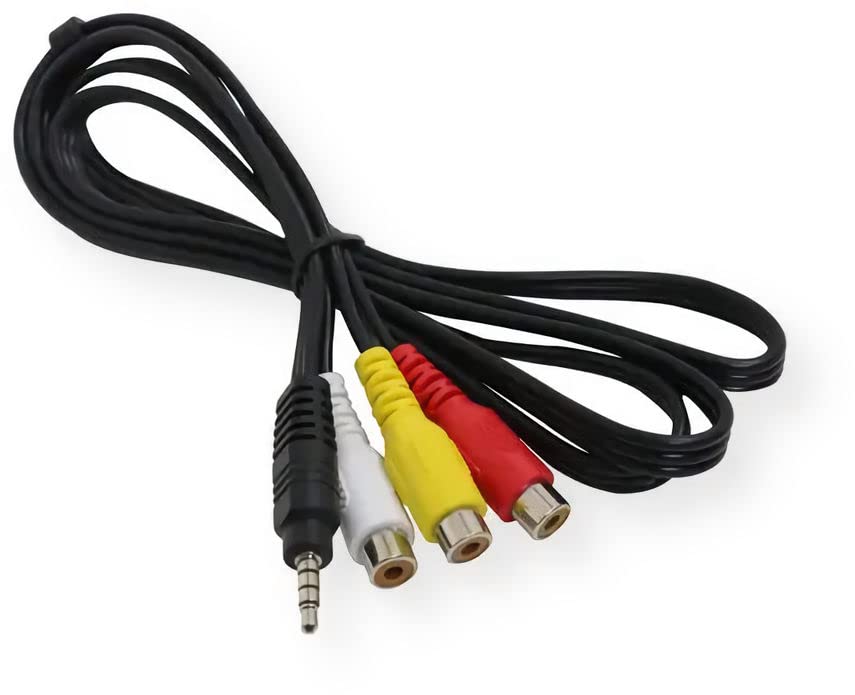
Figure 2.3: The 3.5mm A/V cable.
2.3. Kontroll mill-bogħod
The remote control allows for convenient wireless operation of your Jensen stereo, providing access to various functions from a distance.
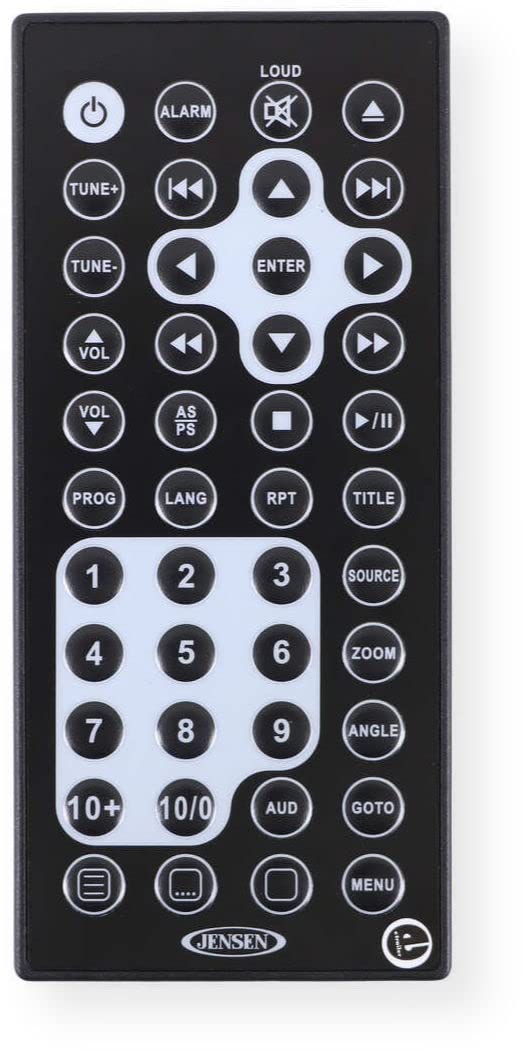
Figura 2.4: Quddiem view tal-kontroll mill-bogħod.
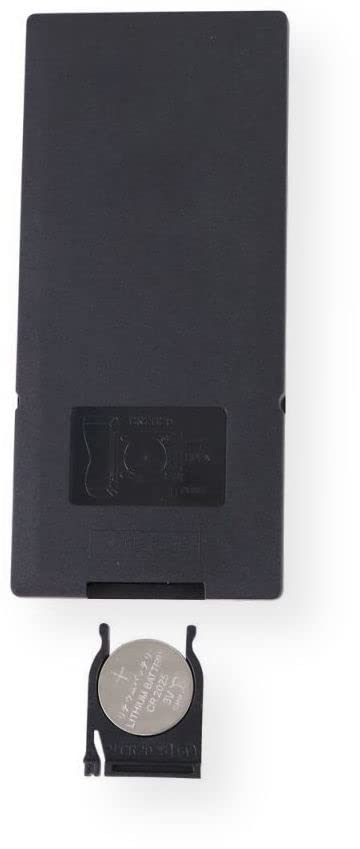
Figura 2.5: Lura view of the remote control with battery compartment open.
3. Setup u Installazzjoni
This service pack is intended for replacement or repair of existing Jensen JWM60A or JWM62A Wall Mount Stereo components. Refer to your original stereo's user manual for detailed installation instructions for the main unit.
3.1. Power/Speaker Harness Installation
- Skonnettja l-Enerġija: Before beginning any installation, ensure the main power to your stereo system is completely disconnected to prevent electrical shock or damage.
- Identifika Konnessjonijiet: Carefully match the wires of the new harness to the corresponding connections on your stereo unit and speakers. Refer to the wiring diagram provided with your original stereo or consult a professional if unsure.
- Konnessjonijiet sikuri: Kun żgur li l-konnessjonijiet tal-wajers kollha huma sikuri u iżolati sew biex tevita short circuits.
- Qabbad l-Arness: Plug the harness connector firmly into the designated port on the back of your Jensen stereo.
3.2. 3.5mm A/V Cable Connection
- Identifika l-Portijiet: Locate the 3.5mm auxiliary input/output jack and the corresponding RCA input/output ports on your stereo or connected devices.
- Qabbad Kejbil: Insert the 3.5mm jack into the stereo's auxiliary port and connect the red, white, and yellow RCA plugs to their respective audio (red for right, white for left) and video (yellow) ports on the external device.
3.3. Installazzjoni tal-Batterija tal-Kontroll mill-bogħod
The remote control typically comes with a pre-installed battery or a battery included separately. If the remote is not functioning, or if replacing the battery:
- Kompartiment miftuħ tal-batterija: On the back of the remote, locate the battery compartment cover. Slide or unclip the cover to open it.
- Daħħal il-batterija: Insert the provided CR2025 lithium coin cell battery (or equivalent) with the positive (+) side facing upwards, as indicated inside the compartment.
- Kompartiment Magħluq: Erġa’ poġġi l-għatu tal-kompartiment tal-batterija, waqt li tiżgura li jikklikkja sew f’postu.
4. It-tħaddim tal-Kontroll mill-bogħod
The remote control provides full functionality for your Jensen JWM60A or JWM62A stereo. Point the remote directly at the stereo's IR receiver for optimal performance.
- Buttuna tal-Qawwa (⏻): Turns the stereo on or off.
- Volume Buttons (VOL +/-): Jaġġusta l-volum tal-ħruġ tal-awdjo.
- Tune/Track Buttons (⏮ / ⏭): Changes radio stations or skips tracks during media playback.
- Play/Pawża (⏸): Jibda jew iwaqqaf il-plejbek tal-midja.
- Buttuna tas-Sors: Cycles through available audio/video sources (e.g., Radio, CD, USB, AUX).
- Numeric Keypad (0-9, 10+, 10/0): For direct input of radio frequencies or track numbers.
- Buttuni tal-Menù/Setup: Jaċċessa s-settings tas-sistema u l-għażliet ta' konfigurazzjoni.
For a comprehensive list of remote functions and their specific uses, refer to the original user manual for your Jensen JWM60A or JWM62A stereo.
5. Manutenzjoni
Proper maintenance ensures the longevity and optimal performance of your service pack components.
- Tindif: Use a soft, dry cloth to clean the remote control and cables. Avoid abrasive cleaners or solvents.
- Ħażna: Store components in a cool, dry place away from direct sunlight and extreme temperatures when not in use.
- Sostituzzjoni tal-batterija: Replace the remote control battery (CR2025) annually or when the remote's range decreases or it stops responding. Dispose of old batteries responsibly.
- Kura tal-Cable: Avoid bending or crimping cables excessively, as this can damage internal wiring.
6 Issolvi l-problemi
If you encounter issues with your Jensen JWM60A Service Pack, consider the following troubleshooting steps:
| Problema | Kawża Possibbli | Soluzzjoni |
|---|---|---|
| Il-kontroll remot mhux qed jirrispondi. | Dead or low battery. Obstruction between remote and stereo. Remote not pointed correctly. | Replace the CR2025 battery. Ensure clear line of sight to the stereo's IR receiver. Point the remote directly at the stereo. |
| No power to stereo after harness replacement. | Incorrect wiring connections. Blown fuse in vehicle/power supply. | Double-check all harness connections against the stereo's wiring diagram. Inspect and replace any blown fuses. |
| No audio/video from A/V cable. | Cable not fully inserted. Incorrect source selected on stereo. Faulty external device. | Ensure the 3.5mm jack and RCA plugs are fully inserted. Select the correct auxiliary or A/V input source on your stereo. Test with another external device. |
If issues persist after attempting these steps, it is recommended to consult a qualified technician or contact Jensen customer support.
7. Speċifikazzjonijiet
| Karatteristika | Dettall |
|---|---|
| Numru tal-Mudell | PSVCJWM60A |
| Kompatibilità | Jensen JWM60A, JWM62A Wall Mount Stereo |
| Dimensjonijiet tal-Pakkett | 9.25 x 5.75 x 1.22 pulzieri |
| Piż tal-oġġett | 5.29 uqija |
| Materjal | Copper, PVC or TPE (for cables) |
| Tip ta' Cable | Awżiljarju |
| Tip ta' Konnettur | 3.5mm Jack (for A/V cable) |
| Tip ta 'Batterija Remota | CR2025 (inkluż) |
8. Garanzija u Appoġġ
For information regarding product warranty, please refer to the warranty documentation included with your original Jensen stereo system or visit the official Jensen websit. It-termini u l-kundizzjonijiet tal-garanzija jistgħu jvarjaw.
For technical support, replacement parts, or further assistance, please contact Jensen customer service. Contact information can typically be found on the manufacturer's website or in your original product documentation.
Riżorsi onlajn: Tista' ssib aktar appoġġ u FAQs fuq Jensen Store on Amazon or the official Jensen brand websit.


