1. Introduzzjoni
This manual provides detailed instructions for the installation, operation, and maintenance of your Cooler Master RR-A71C-18PA-R1 CPU Cooler. This air cooler is designed to efficiently dissipate heat from your desktop CPU, featuring a PWM controlled fan for optimized performance and addressable RGB lighting for customizable aesthetics. Please read this manual thoroughly before proceeding with installation to ensure proper setup and safe operation.
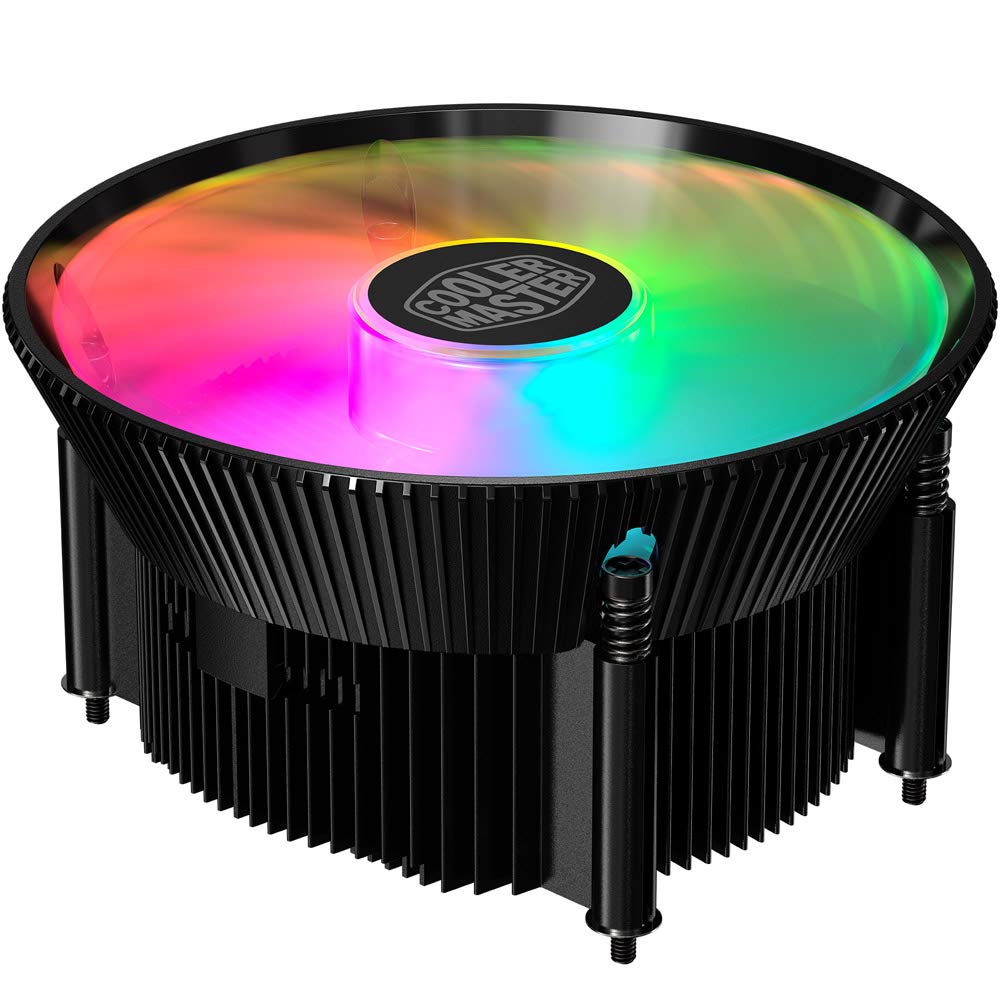
Immaġni 1.1: Fuq view of the Cooler Master RR-A71C-18PA-R1 CPU Cooler showcasing its addressable RGB fan.
2. Informazzjoni dwar is-Sigurtà
Osserva l-prekawzjonijiet ta' sigurtà li ġejjin biex tevita ħsara lill-prodott jew korriment lilek innifsek:
- Kun żgur li s-sistema tal-kompjuter tiegħek tkun mitfija u skonnettjata mis-sokit tal-ħajt qabel l-installazzjoni jew il-manutenzjoni.
- Avoid touching the fan blades while the system is operating.
- Handle the cooler and its components with care to prevent damage.
- Żomm fejn ma jintlaħaqx mit-tfal.
- Tippruvax timmodifika l-cooler jew il-komponenti tiegħu. Modifiki mhux awtorizzati jistgħu jannullaw il-garanzija tiegħek u joħolqu riskji għas-sigurtà.
3. Kontenut tal-Pakkett
Ivverifika li l-oġġetti kollha huma preżenti fil-pakkett tiegħek:
- Cooler Master RR-A71C-18PA-R1 CPU Cooler Assembly
- Mounting Hardware (for compatible CPU sockets)
- Pejst Termali (applikat minn qabel jew f'tubu)
- Manwal għall-Utent (dan id-dokument)
4. Setup u Installazzjoni
Follow these steps for proper installation of the CPU cooler:
- Ipprepara l-Motherboard:
Ensure your motherboard is removed from the PC case or has sufficient access for cooler installation. Refer to your motherboard's manual for specific CPU socket preparation.
- Applika Pejst Termali:
If thermal paste is not pre-applied to the cooler's base, apply a small, pea-sized amount to the center of your CPU's integrated heat spreader (IHS). Do not spread it manually; the pressure from the cooler will distribute it evenly.

Immaġni 4.1: Il-qiegħ view of the CPU cooler, illustrating the fan and copper contact base. Ensure this surface is clean before applying thermal paste.
- Immonta l-Cooler:
Carefully align the cooler with the mounting holes on your motherboard. Gently place the cooler onto the CPU, ensuring even contact. Secure the cooler using the provided mounting hardware. Tighten screws in a diagonal pattern (e.g., top-left, bottom-right, top-right, bottom-left) until snug, but do not overtighten.
- Qabbad il-Kejbil tal-Fann:
Locate the 4-pin PWM fan connector on the cooler. Connect this cable to the "CPU_FAN" header on your motherboard. Refer to your motherboard manual for the exact location of this header.
- Qabbad il-Kejbil RGB:
Locate the addressable RGB (ARGB) connector on the cooler. Connect this cable to a compatible 3-pin 5V ARGB header on your motherboard. Twissija: Do not connect to a 4-pin 12V RGB header, as this will damage the LEDs.
- Kontrolli Finali:
Double-check all connections. Ensure no cables are obstructing the fan blades or other components. Reinstall your motherboard into the PC case if it was removed.
5. Istruzzjonijiet Operattivi
Once installed, the Cooler Master RR-A71C-18PA-R1 CPU Cooler operates automatically, but its performance and aesthetics can be managed:
- Kontroll tal-Veloċità tal-Fann (PWM):
The fan's speed is controlled by your motherboard's BIOS/UEFI settings or through motherboard software. PWM (Pulse Width Modulation) allows for dynamic fan speed adjustments based on CPU temperature, providing optimal cooling and noise levels. Consult your motherboard manual for instructions on configuring fan curves.
- Addressable RGB Lighting Control:
The addressable RGB lighting can be controlled via your motherboard's RGB software (e.g., ASUS Aura Sync, MSI Mystic Light Sync, Gigabyte RGB Fusion, ASRock Polychrome Sync) or a dedicated ARGB controller (not included). Ensure the ARGB cable is correctly connected to a 3-pin 5V ARGB header. Refer to your motherboard's software documentation for lighting customization options.
6. Manutenzjoni
Regular maintenance ensures optimal performance and longevity of your CPU cooler:
- Tneħħija tat-Trab:
Periodically (every 3-6 months, depending on environment) power off your computer and unplug it. Use compressed air to gently blow dust out of the heatsink fins and fan blades. Hold the fan blades to prevent them from spinning rapidly during cleaning, which can damage the bearings.
- Iċċekkja l-Konnessjonijiet:
Occasionally verify that the fan and RGB cables are securely connected to their respective headers on the motherboard.
- Applikazzjoni mill-ġdid tal-Pejst Termali:
If you remove the cooler for any reason, it is recommended to clean off the old thermal paste from both the CPU and the cooler base and apply fresh thermal paste before reinstallation.
7 Issolvi l-problemi
If you encounter issues with your CPU cooler, refer to the following common problems and solutions:
| Problema | Kawża Possibbli | Soluzzjoni |
|---|---|---|
| Fann mhux għażil |
|
|
| L-ebda dawl RGB |
|
|
| Temperaturi għoljin tas-CPU |
|
|
8. Speċifikazzjonijiet
Detailed technical specifications for the Cooler Master RR-A71C-18PA-R1 CPU Cooler:
| Karatteristika | Valur |
|---|---|
| Dimensjonijiet tal-Prodott | 4.72"T x 0.98"W x 4.72"Għ |
| Brand | Cooler Master |
| Tip ta 'Konnettur tal-Enerġija | 4-Pin (PWM) |
| Voltage | 12 Volts |
| Wattage | 1.44 watt |
| Metodu tat-tkessiħ | Arja |
| Apparati Kompatibbli | Desktop |
| Livell ta' Storbju | 24.9 Deċibel |
| Materjal | Aluminju, Ram |
| Veloċità ta' Rotazzjoni Massima | 2500 RPM |
| Piż tal-oġġett | 0.42 Kilogrammi |
| Għadd ta' Unitajiet | 1.0 Għadd |
| UPC | 884102066931 |
9. Garanzija u Appoġġ
Il-prodotti Cooler Master jiġu b'garanzija limitata. Għal informazzjoni dettaljata dwar il-garanzija, jekk jogħġbok irreferi għall-websajt uffiċjali ta' Cooler Master. website or the warranty card included with your product. If you encounter any issues not covered in this manual or require further assistance, please contact Cooler Master customer support:
- Websit: www.coolermaster.com/support/
- Kuntatt: Irreferi għat-taqsima ta 'appoġġ fuq il- websit għal informazzjoni ta' kuntatt reġjonali.


