1. Introduzzjoni
This manual provides detailed instructions for the installation, operation, and maintenance of your Anlapus 1080P Home CCTV Security Camera System. This system includes an 8-channel 2MP Surveillance DVR with a pre-installed 1TB hard drive and four weatherproof 1080P dome cameras, designed for both indoor and outdoor use. The system offers features such as night vision and motion alerts to enhance your security monitoring.

Figure 1.1: Anlapus 1080P Home CCTV Security Camera System components, including the DVR, four dome cameras, and a 1TB hard drive.
2. Kontenut tal-Pakkett
Jekk jogħġbok ivverifika li l-oġġetti kollha elenkati hawn taħt huma inklużi fil-pakkett tiegħek. Jekk xi oġġetti huma neqsin jew bil-ħsara, jekk jogħġbok ikkuntattja l-appoġġ għall-klijenti.
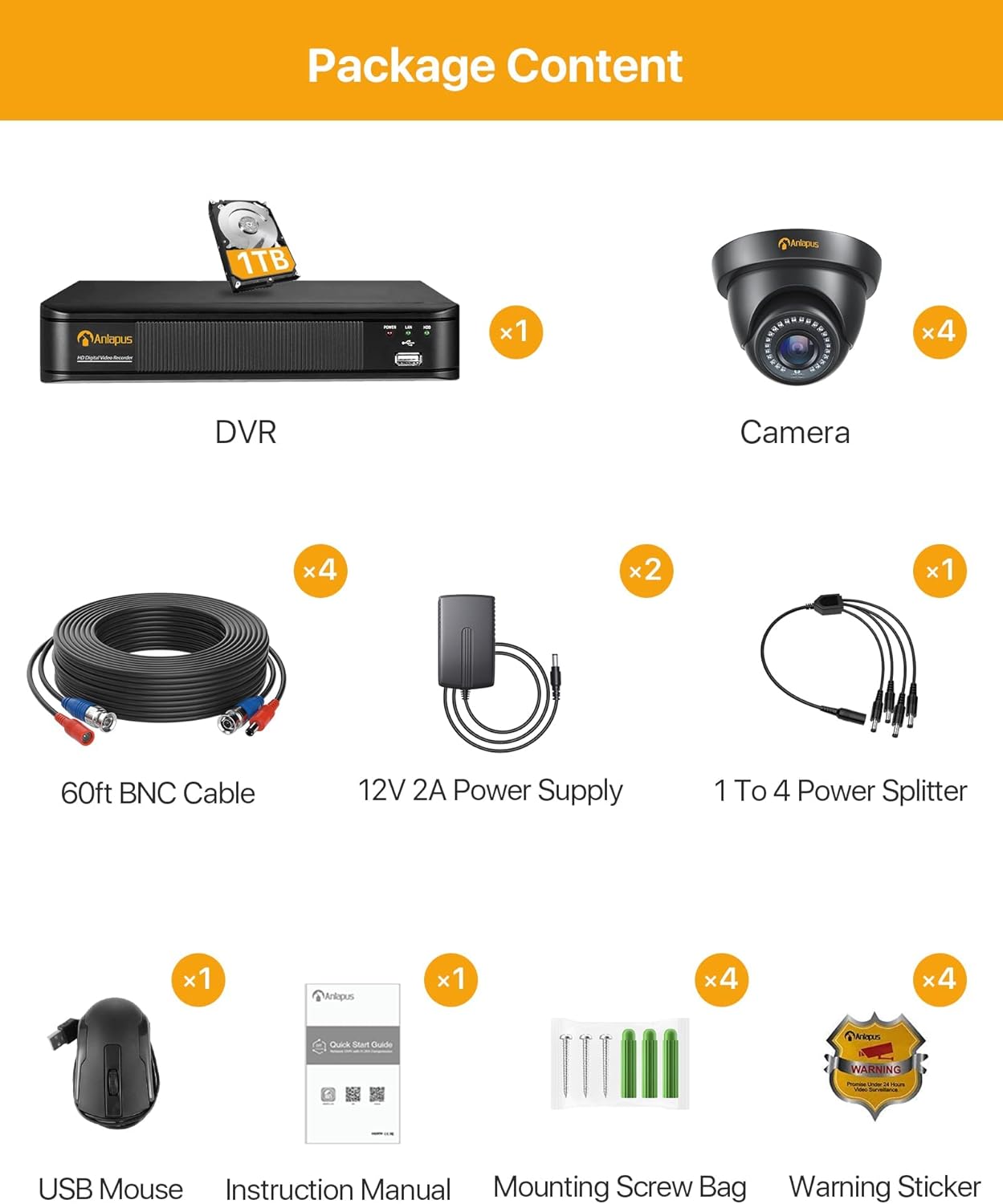
Figura 2.1: Rappreżentazzjoni viżwali tal-kontenut tal-pakkett.
- 1 x Anlapus HD Digital Video Recorder (DVR) with 1TB Hard Drive pre-installed
- 4 x Anlapus 1080P Dome Cameras
- Kejbils BNC 4 x 60ft
- 2 x 12V 2A Power Supplies
- 1 x 1 to 4 Power Splitter
- 1 x USB Mouse
- 1 x Manwal tal-Istruzzjonijiet (dan id-dokument)
- 4 x Boroż tal-Viti tal-Immuntar
- 4 x Stikers ta' Twissija
3. Prodott Aktarview
The Anlapus security system consists of a Digital Video Recorder (DVR) and 1080P dome cameras. Understanding the components and their connections is crucial for proper setup and operation.

Figure 3.1: Anlapus Dome Camera features and DVR rear panel connections.
3.1 Dome Camera Features
- IP66 Reżistenti għat-Temp: Designed for both indoor and outdoor use, resistant to dust and water.
- 24pcs IR-LEDs: Provides up to 80ft (24 meters) of night vision.
- Lenti HD ta' 3.6mm: Offers a 90° wider viewangolu tal-ing.
- Għata tal-Ħġieġ: Protects the lens from rain, dust, and fog.
- Port tal-Enerġija: For connecting the camera to a power supply.
- Output tal-vidjo: For connecting the camera to the DVR via BNC cable.
3.2 DVR Rear Panel Ports
- Input tal-Vidjo (BNC): Connects up to 8 cameras (4 included).
- Audio Input/Output (RCA): For connecting an external microphone (not included) and audio output.
- Monitor (VGA): Tqabbad ma' monitor VGA.
- Monitor (HDMI): Connects to an HDMI monitor or TV.
- Netwerk (RJ45): Connects to your router for remote access.
- USB 2.0: For connecting the USB mouse and for USB backup.
- Input ta' Enerġija DC 12V: For connecting the DVR power supply.
4. Setup u Installazzjoni
The Anlapus system is designed for easy plug-and-play installation. Follow these steps to set up your security system.

Figure 4.1: Easy Installation and Mobile Access Steps.
4.1 Konnessjoni Inizjali tal-Ħardwer
- Qabbad il-Kameras: Connect each camera to the DVR using the provided 60ft BNC cables. Ensure the connections are secure.
- Kameras tal-Enerġija: Use the 1 to 4 power splitter and 12V 2A power supplies to power the cameras. Connect the splitter to the power supply, then connect each camera's power port to the splitter.
- Qabbad id-DVR mal-Monitor: Connect the DVR to a monitor or TV using either an HDMI or VGA cable. Ensure your display supports at least 1080p (1920x1080 pixels) resolution for optimal viewing.
- Qabbad il-Maws USB: Ipplaggja l-maws USB f'wieħed mill-portijiet USB fuq id-DVR.
- Power DVR: Connect the DVR to its dedicated 12V power supply and plug it into a power outlet. The DVR will power on automatically.
- Network Connection (Optional for Remote Access): Għal remoti viewing, connect the DVR's RJ45 network port to your router using an Ethernet cable.
4.2 Konfigurazzjoni tal-App Mobbli għal Aċċess Remot
To access your security system remotely via smartphone or tablet, download the free SANNCE HOME APP.
- Niżżel l-App: Fittex għal "SANNCE HOME" in the Google Play Store (for Android) or Apple App Store (for iOS) and install the application.
- Irreġistra Kont: Open the app and follow the on-screen instructions to register a new account.
- Żid Apparat: In the app, select the option to add a new device. You will typically scan a QR code displayed on your DVR's monitor (found in the network settings) or manually enter the device ID.
- Ikkonfigura Settings: Once the device is added, you can configure various settings, including motion detection alerts and recording schedules, directly from the app.
5. Tħaddim tas-Sistema
This section covers the primary operational features of your Anlapus security system.
5.1 Ħaj View
Tista' view foo ħajtage from your cameras on a connected monitor/TV or remotely via the mobile app or computer software.

Figura 5.1: Ħaj viewing options across various devices.
- Lokali View: Use the USB mouse to navigate the DVR's on-screen menu. You can switch between single-camera view u grilja b'ħafna kameras view.
- Remote View: Access the SANNCE HOME APP on your smartphone/tablet or use compatible client software on your PC/laptop to view live feeds from anywhere with an internet connection.
5.2 Ir-reġistrazzjoni
The system supports continuous 24/7 recording and motion-triggered recording.

Figure 5.2: Motion detection capabilities.
- Reġistrazzjoni 24/7: The pre-installed 1TB hard drive is designed for continuous security recording. It provides approximately 10 days of loop recording for all 4 cameras in FHD 1080p before overwriting the oldest footage awtomatikament.
- Reġistrazzjoni ta 'Sejbien tal-Moviment: Configure the DVR to record only when motion is detected. This saves hard drive space and focuses on important events. You can define specific motion detection areas (masks) to avoid false alarms from constant, non-changing movements.
- Twissijiet ta 'Mozzjoni: Receive instant notifications on your smartphone when motion is detected, ensuring you are aware of any activity in real-time.
5.3 Daqq
Review irreġistrat footage directly from the DVR or remotely via the mobile app.
- Daqq Lokali: Access the playback menu on the DVR using the USB mouse. Select the date and time to review irreġistrat footage.
- Remote Playback: Use the SANNCE HOME APP to access and play back recorded videos stored on the DVR.
5.4 Viżjoni bil-lejl
The cameras are equipped with EXIR LEDs for clear night vision.

Figura 5.3: Kapaċitajiet ta' Viżjoni ta' Binhar u ta' Billejl.
The cameras automatically switch to night vision mode in low-light conditions, providing crisp black and white images up to 100 feet (30 meters).
Kompressjoni tal-Vidjo 5.5 (H.265+)
The DVR utilizes advanced H.265+ video compression technology.

Figure 5.4: Benefits of H.265+ Video Compression.
H.265+ compression significantly reduces file sizes, allowing for up to 4 times longer recording times compared to H.264, while maintaining video quality. This also contributes to faster remote viewing due to reduced bandwidth requirements.
6. Manutenzjoni
Manutenzjoni xierqa tiżgura l-lonġevità u l-prestazzjoni ottimali tas-sistema tas-sigurtà tiegħek.

Figure 6.1: Cameras are designed to work in various weather conditions.
- Tindif tal-Kamera: Naddaf il-lentijiet tal-kamera perjodikament b'drapp artab u dryer.amp drapp biex tneħħi t-trab, il-ħmieġ, jew tbajja’ ta’ ilma li jistgħu jostakolaw viewEvita prodotti tat-tindif li joborxu.
- Ġestjoni tal-Hard Drive: The 1TB hard drive is designed for continuous loop recording. No manual intervention is typically required for overwriting old footage. However, if you experience recording issues, check the DVR's hard drive status in the system settings.
- Aġġornamenti tal-Firmware: Check the Anlapus official website periodically for any available firmware updates for your DVR. Updating firmware can improve system stability and add new features.
- Konsiderazzjonijiet Ambjentali: While cameras are weatherproof (IP66), extreme temperatures (-10°C to 60°C) or direct exposure to harsh elements for prolonged periods should be avoided if possible to maximize lifespan. Ensure proper ventilation for the DVR.
7 Issolvi l-problemi
Din it-taqsima tindirizza kwistjonijiet komuni li tista’ tiltaqa’ magħhom u tipprovdi soluzzjonijiet.
- No Video Display on Monitor:
- Ensure the DVR is powered on and the power adapter is securely connected.
- Check the HDMI/VGA cable connection between the DVR and the monitor.
- Verify the monitor input source is correctly selected (HDMI/VGA).
- Ensure your monitor supports 1080p resolution.
- L-ebda Immaġni tal-Kamera:
- Check if the camera is receiving power. The IR LEDs should glow faintly in the dark if powered.
- Ensure the BNC cable is securely connected at both the camera and DVR ends.
- Try connecting the camera to a different BNC input on the DVR to rule out a faulty DVR port.
- Test the camera with a known working power supply and cable if available.
- Ebda Aċċess Remot:
- Ensure the DVR is connected to your router via an Ethernet cable and the network indicator lights on the DVR's RJ45 port are active.
- Iċċekkja li r-router tiegħek għandu konnessjoni tal-internet attiva.
- Check the network settings on the DVR to ensure it has obtained an IP address.
- Ensure the SANNCE HOME APP is updated to the latest version.
- Confirm the device ID or QR code was correctly added to the app.
- Motion Detection Not Working/Too Sensitive:
- Access the DVR's motion detection settings.
- Aġġusta l-livell tas-sensittività.
- Define or refine the motion detection area (mask) to exclude areas with constant, irrelevant movement (e.g., swaying trees, busy roads).
- Ensure motion recording is enabled for the specific channels.
- Ebda Reġistrazzjoni:
- Check the hard drive status in the DVR's system settings. Ensure it is detected and healthy.
- Verify that recording schedules are properly configured for continuous or motion-triggered recording.
- If the hard drive is full and not set to overwrite, enable the overwrite function.
8. Speċifikazzjonijiet
Detailed technical specifications for the Anlapus 1080P Home CCTV Security Camera System.
| Karatteristika | Speċifikazzjoni |
|---|---|
| Numru tal-Mudell | AM8M4B-4B41K-202S |
| Kanali tad-DVR | 8 Channel (Supports Analog/AHD/TVI/CVI/IP Connection) |
| Input tal-Vidjo | 8CH BNC Input |
| Output tal-vidjo | 1CH HDMI, 1CH VGA |
| Input/Output Awdjo | 1CH/1CH (RCA) |
| Interfaċċa tan-Netwerk | RJ45 10M/100M self-adaption |
| Hard Drive | 1TB Professional Hard Drive Pre-installed (Supports up to 8TB) |
| Riżoluzzjoni tal-Kamera | 1080P (1920x1080 pixels) |
| Camera Image Sensor | CMOS ta' Skennjar Progressiv ta' 1/4" |
| Lenti tal-Kamera | 3.6mm (82.2° Angle View) |
| Distanza tal-Viżjoni bil-lejl | Up to 100 ft (30 meters) with EXIR LED |
| Klassifikazzjoni tal-Kamera li Tirreżisti t-Temp | IP66 (ġewwa / barra) |
| Kompressjoni tal-vidjo | H.265 + |
| Aċċess mill-bogħod | SANNCE HOME APP (iPhone/iPad/Android/Android Pad), IE, Firefox, Chrome Browser |
| Appoġġ tas-Sistema Operattiva | Android, iOS |
| Sors tal-Enerġija | Corded Elettriku |
| Dimensjonijiet tal-Prodott | 40 x 18 x 33 ċm |
| Piż tal-oġġett | 4.98 Kilogrammi |
9. Garanzija u Appoġġ
Anlapus products are designed for reliability and performance. For specific warranty details, please refer to the warranty card included in your package or visit the official Anlapus websit.
If you encounter any issues not covered in this manual or require further assistance, please contact Anlapus customer support through their official website or the contact information provided with your purchase. When contacting support, please have your product model number (AM8M4B-4B41K-202S) and purchase details ready.


