1. Introduzzjoni
The Roccat Vulcan 122 is a high-performance mechanical gaming keyboard designed for precision and durability. It features Roccat's unique Titan switches, advanced AIMO RGB lighting, and a robust aluminum construction. This manual provides detailed instructions for setting up, operating, maintaining, and troubleshooting your keyboard.

Image: The Roccat Vulcan 122 keyboard shown with a Roccat mouse and headset, demonstrating its vivid, dynamic lighting synergy with AIMO.
Karatteristiċi ewlenin:
- Unique design with lowered keycaps and reduced reaction time.
- RGB lighting with configurable LED effects and adjustable AIMO effects.
- High-quality and resistant design with robust materials and an anodized aluminum surface.
- Advanced anti-ghosting with N-Key Rollover (NKRO).
- Programmable macro keys and ROCCAT Easy-Shift[+].
2. Setup
2.1 Konnessjoni tat-Tastiera
To connect your Roccat Vulcan 122 keyboard:
- Unpack the keyboard and its accessories.
- Plug the USB connector from the keyboard into an available USB port on your computer.
- Is-sistema operattiva awtomatikament tiskopri u tinstalla d-drajvers meħtieġa.
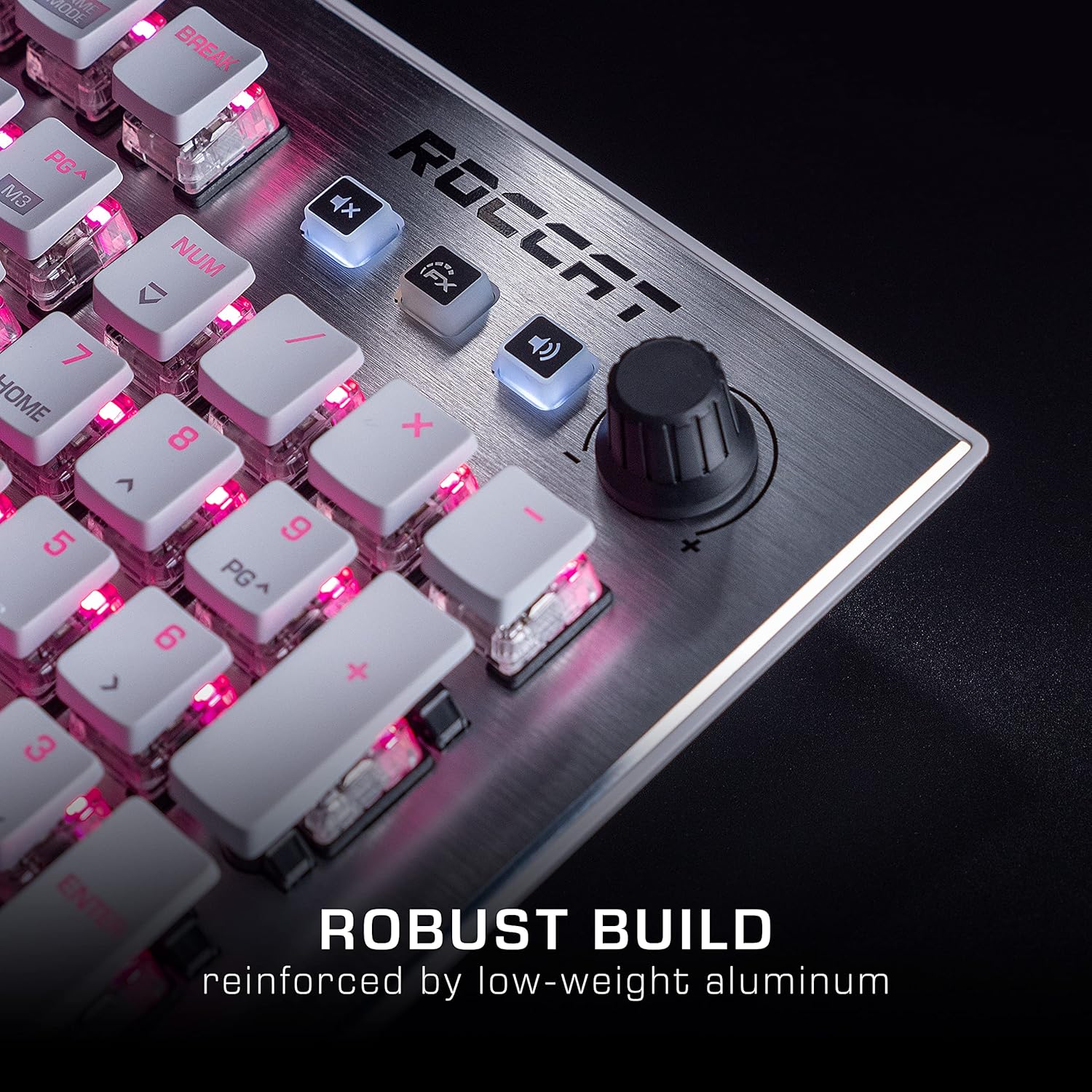
Image: The Roccat Vulcan 122 keyboard shown with its detachable wrist rest, ready for connection.
2.2 Software Installation (ROCCAT Swarm)
For full functionality and customization, install the ROCCAT Swarm software:
- Visit the official ROCCAT websit (www.roccat.com) and navigate to the support section.
- Download the latest version of the ROCCAT Swarm software for your operating system.
- Mexxi l-installatur u segwi l-istruzzjonijiet fuq l-iskrin.
- After installation, launch ROCCAT Swarm to configure your keyboard settings, lighting, and macros.
3. It-Tħaddim tat-Tastiera
3.1 Standard Key Functions
The Vulcan 122 functions as a standard QWERTY keyboard. All alphanumeric keys, function keys (F1-F12), navigation keys, and the numeric keypad operate as expected.
3.2 Kontrolli tal-Midja
It-tastiera għandha kontrolli tal-midja ddedikati għal ġestjoni konvenjenti tal-awdjo.
- Buttuna tal-Volum: Located in the upper right corner, rotate to adjust system volume.
- Buttuna Mute: Agħfas biex titfi/tneħħi l-ħoss mill-awdjo.
- Buttuna FX: Cycles through lighting effects or other programmable functions.

Immaġni: Close-up view of the mixer-style media controls on the Roccat Vulcan 122, including the volume knob and dedicated function keys.
3.3 RGB Lighting Customization (AIMO)
The Vulcan 122 features advanced RGB lighting with Roccat's AIMO intelligent lighting system. Use the ROCCAT Swarm software to:
- Select from various pre-set lighting effects.
- Customize individual key illumination.
- Aġġusta l-luminożità u l-veloċità tal-effetti.
- Synchronize lighting with other AIMO-compatible devices.
3.4 Programmable Macro Keys and Easy-Shift[+]
The keyboard includes programmable macro keys and the Easy-Shift[+] function, allowing you to assign secondary functions to keys.
- Use the ROCCAT Swarm software to record and assign macros to designated keys.
- Easy-Shift[+] allows you to double the number of assignable functions by holding down the Easy-Shift[+] key (usually Caps Lock by default, configurable in Swarm) and pressing another key.
3.5 Anti-Ghosting with NKRO
The Vulcan 122 features advanced anti-ghosting technology with N-Key Rollover (NKRO), ensuring that every key press is registered accurately, even when multiple keys are pressed simultaneously.

Image: A hand demonstrating typing on the Roccat Vulcan 122 keyboard, emphasizing the ergonomic design of the keys for comfortable use.
4. Manutenzjoni
4.1 Tindif tat-Tastiera
To ensure the longevity and optimal performance of your Vulcan 122 keyboard, regular cleaning is recommended.
- Skonnettja t-tastiera mill-kompjuter tiegħek qabel ma tnaddafha.
- Uża drapp ratba u mingħajr ħelu ftit dampened with water or a mild cleaning solution to wipe the keycaps and surface. Avoid harsh chemicals.
- For dust and debris between keys, use compressed air. The raised keycap design makes cleaning easier.
- Kun żgur li t-tastiera tkun niexfa għalkollox qabel ma terġa' tqabbadha.

Image: A close-up of the Roccat Vulcan 122 keyboard keys, illustrating their design which facilitates easy cleaning and resistance to dust and liquids.
5 Issolvi l-problemi
If you encounter issues with your Roccat Vulcan 122 keyboard, refer to the following common problems and solutions:
- It-tastiera ma tirrispondix:
- Kun żgur li l-kejbil USB huwa konness sew kemm mat-tastiera kif ukoll mal-kompjuter.
- Ipprova qabbad it-tastiera ma' port USB differenti.
- Ibda mill-ġdid il-kompjuter tiegħek.
- Check if the keyboard is disabled in your operating system's device manager.
- Id-dawl RGB mhux qed jaħdem jew mhux korrett:
- Ensure the ROCCAT Swarm software is installed and up to date.
- Check lighting settings within the Swarm software.
- Perform a firmware update for the keyboard via Swarm.
- Iċ-ċwievet mhux qed jirreġistraw jew qed jidhru bħal ghosting:
- Clean the affected keys as described in the Maintenance section.
- Ensure the keyboard's firmware is up to date.
- Ittestja t-tastiera fuq kompjuter ieħor biex teskludi problemi speċifiċi tas-sistema.
- ROCCAT Swarm software not detecting keyboard:
- Kun żgur li t-tastiera hija konnessa sew.
- Restart the Swarm software and your computer.
- Reinstall the ROCCAT Swarm software.
- Check for any conflicting software or drivers.
6. Speċifikazzjonijiet
| Karatteristika | Dettall |
|---|---|
| Brand | Roccat |
| Isem tal-Mudell | Vulkan 122 |
| Numru tal-Mudell | ROC-12-940-BN |
| Deskrizzjoni tat-Tastiera | Mekkaniċi |
| Tip ta' Swiċċ | Mess |
| Materjal | Aluminju |
| Karatteristiċi Speċjali | Backlighting |
| Apparati Kompatibbli | Laptop (PC) |
| Appoġġ tas-Sistema Operattiva | Windows 10, Windows 7, Windows 8 |
| Dimensjonijiet tal-Prodott | 46.2 x 23.5 x 3.2 ċm |
| Piż tal-oġġett | 1.15 kg |

Immaġni: Sploda view diagram illustrating the components of a Roccat Titan Tactile mechanical switch, highlighting its design for swift and precise response.
7. Garanzija u Appoġġ
7.1 Informazzjoni dwar Garanzija
Your Roccat Vulcan 122 keyboard is covered by a manufacturer's warranty. The specific terms and duration of the warranty may vary by region and retailer. Please retain your proof of purchase for warranty claims. For detailed warranty information, refer to the warranty card included with your product or visit the official ROCCAT websit.
7.2 Appoġġ Tekniku
For technical assistance, driver updates, or further inquiries, please visit the official ROCCAT support page:
Tista' ssib FAQs, gwidi għas-soluzzjoni tal-problemi, u informazzjoni ta' kuntatt għas-servizz tal-konsumatur fuq tagħhom websit.


