1. Introduzzjoni
The Dragonwar G22 Lancer is a high-performance optical gaming mouse designed for precision and customization. It features an ergonomic design, 7 programmable buttons, and a 7000 DPI optical sensor, providing gamers with enhanced control and accuracy. This manual provides detailed instructions for setting up, operating, and maintaining your Dragonwar G22 Lancer gaming mouse.

Figure 1.1: Dragonwar G22 Lancer Gaming Mouse
2. Karatteristiċi ewlenin
- Disinn Ergonomiku: Engineered for comfort during extended gaming sessions.
- 7 Buttuni tal-Kontroll: Optimize your gameplay with customizable button assignments.
- 7000 DPI Precision Mode: High-resolution optical sensor for accurate tracking and movement.
- Sistema ta' Piż Aġġustabbli: Customize the mouse's weight for personalized feel and control.
- Konnettività bil-fili: Reliable and responsive connection with a nearly two-meter cable.
- Dawl RGB: Customizable lighting effects for aesthetic appeal.
3. Kontenut tal-Pakkett
- Dragonwar G22 Lancer Gaming Mouse
- Adjustable Weight Set (pre-installed or separate)
- Manwal għall-Utent (dan id-dokument)
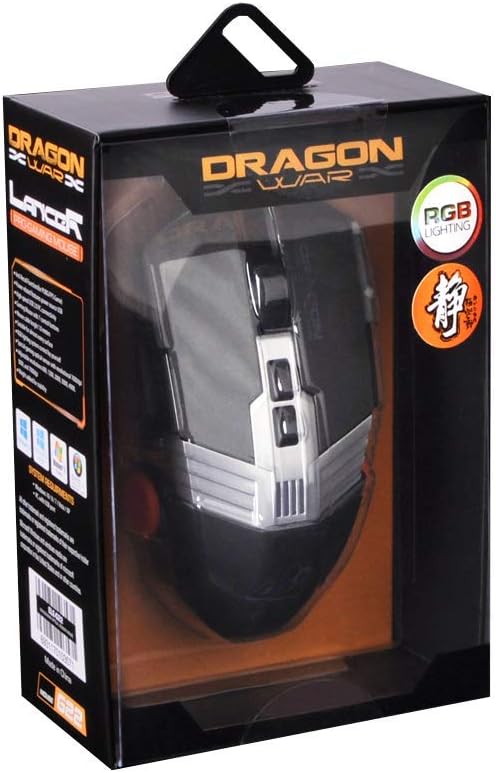
Figura 3.1: Fuq view of the Dragonwar G22 Lancer Gaming Mouse
4. Setup
- Qabbad il-Maws: Plug the USB connector of the Dragonwar G22 Lancer mouse into an available USB port on your computer. The mouse is plug-and-play compatible with most operating systems (Windows XP, Linux).
- Installazzjoni tas-Sewwieq (Mhux obbligatorja): While the mouse functions as a standard HID device, for full customization of buttons, DPI settings, and RGB lighting, it is recommended to download and install the official Dragonwar software from the manufacturer's websit. Segwi l-istruzzjonijiet fuq l-iskrin waqt l-installazzjoni.
- Test Inizjali: Once connected, move the mouse to ensure the cursor responds on your screen. The RGB lighting should illuminate.
5. Istruzzjonijiet Operattivi
5.1 Funzjonijiet tal-buttuni
The Dragonwar G22 Lancer features 7 control buttons. Their default functions are as follows, but can be customized via the Dragonwar software:
- Ikklikkja Xellug: Azzjoni primarja.
- Ikklikkja bil-lemin: Menù sekondarju ta' azzjoni/kuntest.
- Rota tal-Iskrolljar (Klikk): Middle click, often used for opening links in new tabs or specific game functions.
- Rota tal-Iskrolljar ('il Fuq/'l Isfel): Scrolling content.
- DPI Cycle Button (behind scroll wheel): Jiċċikla permezz ta' livelli ta' DPI stabbiliti minn qabel.
- Buttuni tal-Ġenb ('il Quddiem/Lura): Tipikament użat għan-navigazzjoni fi web browsers or assigned to in-game actions.

Figure 5.1: Detail of Scroll Wheel and Side Buttons
5.2 Aġġustament DPI
The mouse supports up to 7000 DPI. Use the dedicated DPI cycle button located behind the scroll wheel to switch between different sensitivity levels. Each press will cycle to the next preset DPI, allowing you to quickly adjust cursor speed for different tasks or game scenarios.
5.3 Dawl RGB
The Dragonwar G22 Lancer features customizable RGB lighting. Lighting modes and colors can be configured through the Dragonwar software, allowing you to personalize the mouse's appearance to match your setup or mood.
6. Customization: Adjustable Weight System
The Lancer mouse includes an adjustable weight system to fine-tune its feel and balance. This allows you to add or remove small weights to achieve your preferred mouse weight for optimal control and comfort.
- Locate Weight Compartment: The weight compartment is typically located on the underside of the mouse. Refer to Figure 6.1 for its approximate location.
- Kompartiment Miftuħ: Gently open the cover of the weight compartment.
- Add/Remove Weights: Insert or remove the small metal weights as desired. Experiment with different configurations to find the balance that suits your grip and play style.
- Kompartiment Magħluq: Securely close the weight compartment cover after making adjustments.

Figure 6.1: Adjustable Weight System Components
7. Manutenzjoni
- Tindif: Uża drapp artab u niexef biex timsaħ il-wiċċ tal-maws. Għal ħmieġ iebes, nixxef ftit.ampLaħlaħ id-drapp bl-ilma. Evita li tuża kimiċi ħarxa jew materjali li joborxu.
- Kura tas-Sensor: Żomm is-senser ottiku fuq in-naħa ta' taħt tal-maws nadif u ħieles mit-trab jew mill-fdalijiet biex tiżgura traċċar preċiż.
- Ġestjoni tal-Kejbil: Evita liwjiet qawwija jew ġbid eċċessiv tal-kejbil tal-maws biex tevita l-ħsara.
8 Issolvi l-problemi
- Il-Maws Mhux Jirrispondi:
- Ensure the USB cable is securely plugged into a working USB port.
- Ipprova port USB differenti fuq il-kompjuter tiegħek.
- Ibda mill-ġdid il-kompjuter tiegħek. - Cursor Movement is Erratic:
- Naddaf is-sensor ottiku fuq in-naħa ta' taħt tal-maws.
- Ensure you are using the mouse on a suitable surface (e.g., a mouse pad, not highly reflective surfaces).
- Check DPI settings; a very high DPI might feel erratic if you are not used to it. - Buttuni ma Jaħdmux:
- Ensure the Dragonwar software is installed correctly if you have customized button functions.
- Try resetting the mouse to factory defaults via the software, if available. - Dawl RGB Mhux Taħdim:
- Check the lighting settings within the Dragonwar software.
9. Speċifikazzjonijiet
| Karatteristika | Speċifikazzjoni |
|---|---|
| Brand | Dragonwar |
| Serje tal-Mudell | G22 LANCER |
| Numru tal-Mudell tal-Oġġett | 6931170103571 |
| Teknoloġija ta 'Sejbien tal-Moviment | Ottiċi |
| DPI | Sa 7000 DPI |
| Numru ta' Buttuni | 7 |
| Teknoloġija tal-Konnettività | Bil-fili |
| Tul tal-Cable | Appross. 2 metru |
| Kompatibilità tas-Sistema Operattiva | Linux, Windows XP (u verżjonijiet aktar ġodda) |
| Kulur | Iswed |
| Dimensjonijiet tal-Prodott (L x W x H) | 19.4 x 7.7 x 36 ċm |
| Piż tal-oġġett | 248 g |
10. Garanzija u Appoġġ
For warranty information and technical support, please refer to the official Dragonwar webis-sit jew ikkuntattja s-servizz tal-konsumatur tagħhom. Żomm l-irċevuta tax-xiri tiegħek bħala prova tax-xiri għal talbiet ta' garanzija.
Appoġġ onlajn: Visit the official Dragonwar websit għal FAQs, downloads ta' sewwieqa, u informazzjoni ta' kuntatt.
