Introduzzjoni
This instruction manual provides essential information for the safe and correct installation, operation, and maintenance of the FAAC 5ST3010 Auxiliary Power Switch. The 5ST3010 is a push-button, 1-way auxiliary switch designed for surface mounting, featuring an ON-ON-OFF operating mode and rated for 230 Volts at 10 Amperes. Please read this manual thoroughly before proceeding with any installation or operation.
Setup u Installazzjoni
1. Prekawzjonijiet tas-Sigurtà
- Always disconnect the main power supply before beginning any installation or wiring work to prevent electric shock.
- Installation should be performed by a qualified electrician or technician in accordance with local electrical codes and regulations.
- Tiżgura l-vol operattivtage and current rating of the switch (230V, 10A) are compatible with your application.
2. Immuntar tas-Swiċċ
The FAAC 5ST3010 is designed for surface mounting. Choose a suitable, stable, and dry location for installation, away from direct moisture or excessive heat.
- Mark the desired mounting points on the surface using the switch's base as a template.
- Drill pilot holes if necessary, suitable for the mounting screws.
- Secure the switch firmly to the surface using appropriate fasteners.
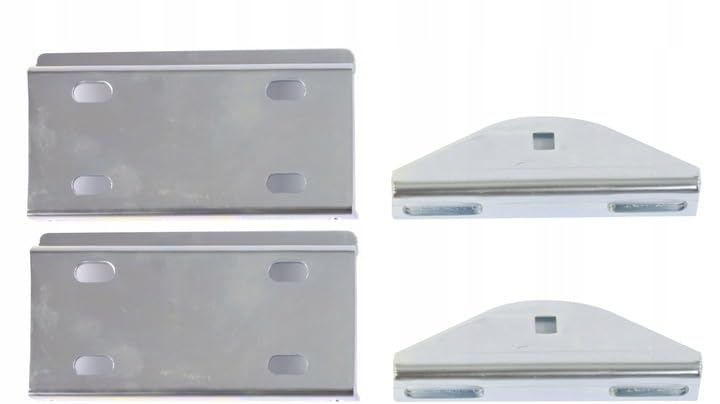
Figura 1: Example mounting brackets for surface installation. These brackets can be used to securely attach the switch to a wall or panel.
3. Konnessjonijiet tal-Wiring
The switch utilizes screw terminals for electrical connections. Ensure all connections are tight and secure.
- Identify the input and output terminals on the switch. The contact type is Normally Open.
- Strip approximately 7-10mm of insulation from the ends of the electrical wires.
- Insert the stripped wires into the corresponding screw terminals and tighten the screws securely.
- Verify that no bare wire strands are exposed outside the terminals to prevent short circuits.
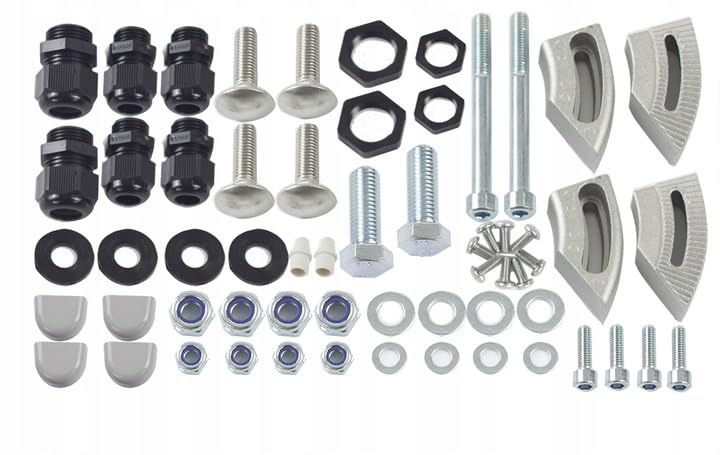
Figura 2: Various fasteners and cable glands. These components are essential for securing wiring and ensuring a professional, safe electrical installation.
Istruzzjonijiet Operattivi
The FAAC 5ST3010 Auxiliary Power Switch operates in an ON-ON-OFF mode. This means it has two 'ON' positions and one 'OFF' position, typically achieved through a push-button mechanism.
- To activate (ON): Press the button to engage the first 'ON' state. The switch will maintain this state until pressed again.
- To switch to alternate ON state: Press the button again to engage the second 'ON' state.
- To deactivate (OFF): Press the button a third time to return the switch to the 'OFF' position.
Familiarize yourself with the tactile feedback of the button to understand its current state. Always ensure the switch is in the desired position for your application.
Manutenzjoni
The FAAC 5ST3010 Auxiliary Power Switch requires minimal maintenance. Regular inspection can help ensure its longevity and reliable operation.
- Tindif: Periodically wipe the exterior of the switch with a soft, dry cloth. Do not use abrasive cleaners, solvents, or excessive moisture, as these can damage the plastic material or internal components.
- Spezzjoni: Regularly check the switch for any signs of physical damage, such as cracks in the casing, loose connections, or discoloration.
- Verifika tal-Wajers: Ensure that all wiring connections remain tight and secure. Loose connections can lead to intermittent operation or overheating.
- Kundizzjonijiet Ambjentali: Ensure the switch is not exposed to conditions beyond its specified operating environment, such as extreme temperatures or humidity.
If any damage or malfunction is observed, disconnect power immediately and consult a qualified technician for repair or replacement.
Issolvi l-problemi
If you encounter issues with your FAAC 5ST3010 Auxiliary Power Switch, refer to the following common troubleshooting steps:
| Problema | Kawża Possibbli | Soluzzjoni |
|---|---|---|
| Switch does not respond (no ON/OFF action) | No power supply; Loose wiring connections; Internal fault. | Check main power supply; Verify all wiring connections are secure; If power and wiring are correct, the switch may be faulty and require replacement. |
| Operazzjoni intermittenti | Loose wiring connections; Damaged internal contacts. | Tighten all screw terminals; If the problem persists, the switch may be damaged and require replacement. |
| Switch feels stiff or stuck | Accumulation of dirt/debris; Mechanical damage. | Gently clean the button area with a dry cloth; If mechanical damage is suspected, replace the switch. |
If troubleshooting steps do not resolve the issue, do not attempt further repairs yourself. Contact a qualified technician or FAAC customer support for assistance.
Speċifikazzjonijiet
| Manifattur | FAAC |
| Numru tal-Mudell | 5ST3010 |
| Referenza tal-Prodott | 104575 |
| Materjal | Plastik |
| Modalità Operattiva | ON-ON-OFF |
| Klassifikazzjoni kurrenti | 10 A |
| Vol Operattivtage | 230 Volts |
| Tip ta' Kuntatt | Normalment Miftuħ |
| Tip ta' Swiċċ | Push-button, 1-way |
| Tip ta' Terminal | Invita |
| Tip ta 'Immuntar | Immuntar tal-wiċċ |
| Numru ta' oġġetti fil-pakkett | 1 |
| Batteriji Inklużi | Nru |
Informazzjoni dwar Garanzija
Specific warranty information for the FAAC 5ST3010 Auxiliary Power Switch is not provided in the product details. For details regarding warranty terms, duration, and claims, please retain your proof of purchase and contact your authorized FAAC retailer or FAAC customer service directly.
Appoġġ għall-Klijent
For technical assistance, installation queries, or any other support related to your FAAC 5ST3010 Auxiliary Power Switch, please contact your authorized FAAC dealer. You may also visit the official FAAC website for comprehensive product information, FAQs, and customer service contact details.


