Introduzzjoni
This manual provides detailed instructions for the assembly, operation, and maintenance of your FLEXISPOT EN2 Electric Standing Desk. Please read this manual thoroughly before assembly and use to ensure safe and efficient operation. This model features a 48x30 inch maple top and a white frame, designed to enhance your workspace with adjustable height functionality and integrated power solutions.
Informazzjoni dwar is-Sigurtà
- Exceeding the maximum weight limit of 176 pounds may cause damage or injury. Always adhere to the specified weight limit for safety.
- Proper assembly is required for stability. Ensure all components are securely fastened according to the assembly instructions.
- Poġġi l-iskrivanija fuq wiċċ stabbli u livellat biex tevita li tinqaleb.
- The desk is equipped with overload and overheat protection to prevent undue overuse. Do not attempt to bypass these safety features.
- Żomm it-tfal u l-annimali domestiċi 'l bogħod mill-iskrivanija waqt it-tħaddim biex tevita inċidenti.
- Ensure there are no obstructions in the desk's path when adjusting height. The anti-collision system is designed to detect obstacles, but caution is always advised.
Kontenut tal-Pakkett
Your FLEXISPOT EN2 desk will arrive in two separate packages. Please verify all components are present before beginning assembly.

Image: The desk components are shipped in two separate packages for the desktop and the frame.
- 48x30" Maple Desktop (Whole-piece)
- White Electric Desk Frame
- 6-Button Digital Controller
- Integrated Desk Clamp Power Strip (with 3 AC outlets and 2 USB charging ports)
- Sistema ta 'Ġestjoni tal-Kejbils
- Assembly Hardware and Tools (some tools may not be included, an electric drill is recommended for faster assembly)
Istruzzjonijiet ta' Armar
Assembly typically requires two people for ease and safety, especially when handling the desktop and frame. An electric drill (not included) is recommended for quicker assembly of certain components.
- Ħoll il-Komponenti: Carefully remove all parts from both packages and lay them out on a clean, soft surface to prevent scratches. Verify all items listed in the 'Package Contents' section are present.
- Arma l-Qafas tal-Iskrivanija: Follow the detailed instructions provided in the separate assembly guide for connecting the desk legs, crossbars, and feet. Ensure all screws are tightened securely.
- Waħħal id-Desktop: Carefully place the desktop upside down on a soft surface. Position the assembled desk frame onto the desktop, aligning the pre-drilled holes. Secure the desktop to the frame using the provided screws.
- Install Controller and Power Strip: Mount the 6-button digital controller and the clamp power strip to the underside or edge of the desktop as desired. The power strip can be clipped to the back or side.
- Qabbad il-Wiring: Connect all motor and controller cables according to the wiring diagram in the assembly guide. Ensure connections are firm.
- Immaniġġja l-Kejbils: Utilize the included cable management system to organize and secure all wires, preventing tangles and ensuring a tidy workspace.
- Dawwar l-Iskrivanija: With assistance, carefully flip the assembled desk upright and place it in its desired location.

Image: Effective cable management transforms a cluttered workspace into an organized one.
Istruzzjonijiet Operattivi
Your FLEXISPOT EN2 desk features an intuitive digital controller for easy height adjustments and memory presets.
Digital Controller Functions

Image: The digital controller allows for precise height adjustments and saving preferred positions.
- Buttuni 'l fuq/'l isfel (▲ / ▼): Press and hold these buttons to smoothly adjust the desk height. The desk adjusts from 28.1 inches to 45.7 inches. Release the button at your desired height. The motor operates quietly, typically below 50 dB.
- Presets tal-Memorja (1, 2, 3, 4): To save a preferred height, adjust the desk to the desired position, then press the 'M' button (if present, or a similar 'Set' button) followed by one of the numbered preset buttons (1-4). To recall a saved height, simply press the corresponding numbered button.
- Sistema Kontra l-Ħabtiet: The desk is equipped with a smart anti-collision system. If the desk encounters an obstruction during height adjustment, it will automatically stop and reverse slightly to prevent damage or injury.
Integrated Power Strip
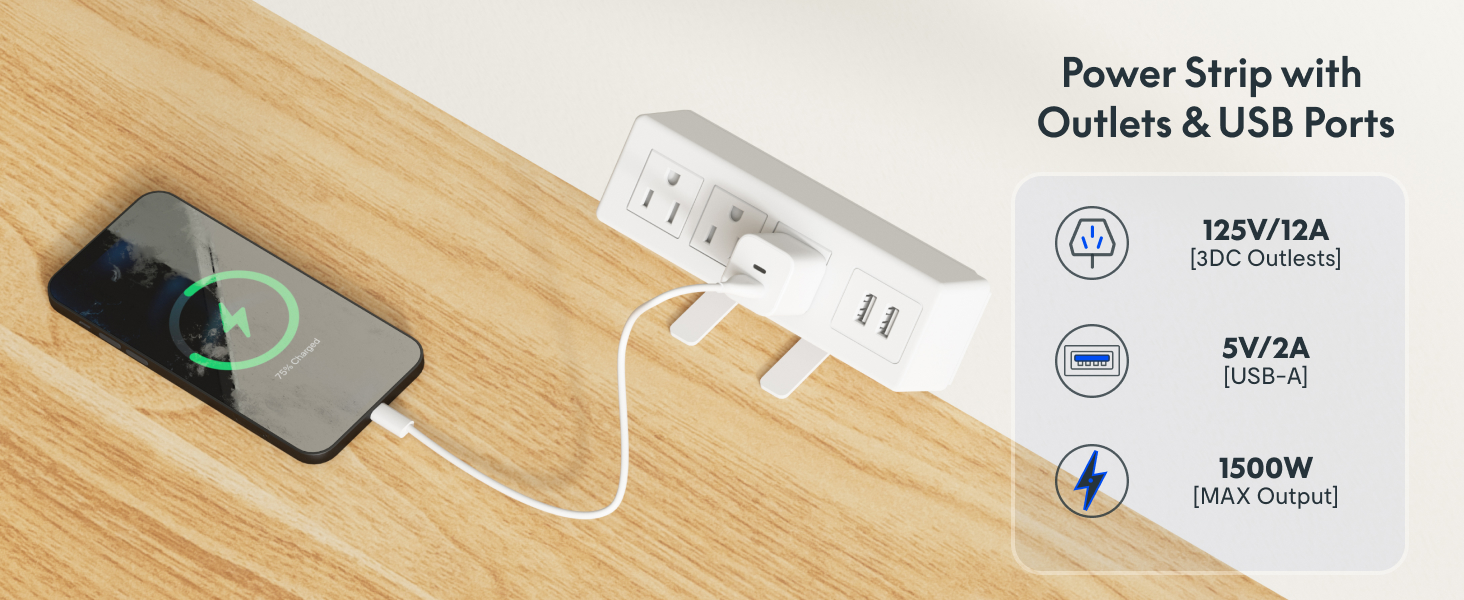
Image: The clamp power strip provides convenient access to power and USB charging.
The removable desktop power outlet provides convenient access to power for your devices.
- It includes 3 AC outlets (125V/12A) and 2 USB charging ports (5V/2A).
- The power strip can be clipped to the back or side of your desk.
- Ensure the power strip is securely clamped and connected to a wall outlet before use.
Manutenzjoni
- Tindif: Imsaħ id-desktop u l-qafas b'ċarruta ratba u damp drapp. Evita prodotti tat-tindif li joborxu jew kimiċi ħarxa li jistgħu jagħmlu ħsara lill-finitura.
- Kontrolli regolari: Iċċekkja l-viti u l-konnessjonijiet kollha perjodikament biex tiżgura li jibqgħu ssikkati. Erġa' ssikka jekk meħtieġ.
- Ġestjoni tal-Kejbil: Ensure cables remain neatly organized and are not pinched or tangled, which could affect desk operation or damage wires.
- Kura tal-Mutur: The motor is designed for durability. Avoid overloading the desk or operating it continuously for extended periods without rest to prevent overheating.
Issolvi l-problemi
If you encounter issues with your FLEXISPOT EN2 desk, refer to the following common solutions:
- L-Iskrivanija Mhux Tiċċaqlaq:
- Iċċekkja jekk il-korda tal-enerġija hijiex imdaħħla sew kemm fl-iskrivanija kif ukoll f'sokit tal-ħajt li jaħdem.
- Ensure all cables connecting the motor, controller, and power supply are firmly attached.
- Try plugging the desk into a different power outlet to rule out an issue with the original outlet.
- If an error code is displayed on the controller, consult the full product manual or contact customer support for specific instructions.
- Uneven Movement or Noise:
- Iċċekkja li l-iskrivanija titqiegħed fuq wiċċ livellat.
- Check for any obstructions under or around the desk legs.
- Kun żgur li l-viti kollha tal-assemblaġġ huma ssikkati.
- Anti-Collision System Triggering Frequently:
- Ensure there are no objects near the desk that could be mistaken for an obstruction during movement.
- The sensitivity of the anti-collision system may be adjustable in advanced settings (refer to the full manual if available).
Jekk dawn il-passi ma jsolvux il-problema, jekk jogħġbok ikkuntattja l-appoġġ għall-klijenti ta' FLEXISPOT għal aktar assistenza.
Speċifikazzjonijiet

Image: Key dimensions and features of the FLEXISPOT EN2 desk.
| Brand | FLEXISPOT |
| Mudell | EN2 |
| Desktop Dimensions (D x W) | 30" x 48" |
| Materjal tad-Desktop | Maple Wood (Whole-piece) |
| Kulur tal-qafas | Abjad |
| Medda ta 'Aġġustament Għoli | 28.1" - 45.7" |
| Kapaċità massima tal-piż | 176 lbs (79.8 kg) |
| Livell tal-Istorbju tal-Mutur | Inqas minn 50 dB |
| Power Strip Outlets | 3 AC (125V/12A), 2 USBs (5V/2A) |
| Assemblea Meħtieġa | Iva (2 persuni rakkomandati) |
| Karatteristiċi Speċjali | 4 Memory Presets, Anti-Collision System, Cable Management |
Garanzija u Appoġġ
FLEXISPOT provides comprehensive warranty coverage for your EN2 Electric Standing Desk:
- Garanzija ta' sena: Ikopri frejms, muturi, u apparati mekkaniċi oħra.
- Garanzija ta' sena: Ikopri kontrolluri, swiċċijiet, u elettronika.
For warranty claims, technical support, or any questions not covered in this manual, please contact FLEXISPOT customer service through their official website or the retailer where the product was purchased. Please have your model number (EN2) and proof of purchase ready.


