Introduzzjoni
The Renogy Phoenix 300 Solar Generator is a compact and lightweight portable power station designed for various applications, including home backup, camping, and emergency use. With a 337Wh capacity, it features multiple charging ports, including AC, USB-A, USB-C Power Delivery, and D-Tap, to power a wide range of devices. Its high energy density battery cells and robust design ensure reliable performance.
Setup
1. Unboxing u Spezzjoni Inizjali
Carefully open the packaging and remove the Renogy Phoenix 300 Portable Power Station and all included accessories. Inspect the unit for any signs of damage. The package should contain the Phoenix 300 Power Station, a user's manual, AC adapter, car charger cable, and solar charging cable.
Vidjow: Unboxing and initial setup of the Renogy Phoenix 300 Portable Power Station. This video demonstrates opening the product box, identifying the main unit and included accessories such as the user manual and various charging cables, and briefly shows the power station being turned on and a phone being charged.
2. Iċċarġjar Inizjali
Before first use, it is recommended to fully charge the Phoenix 300 to 100%. This helps calibrate the battery management system (BMS) for optimal performance and accurate battery level readings. Use the provided AC adapter for the fastest initial charge.
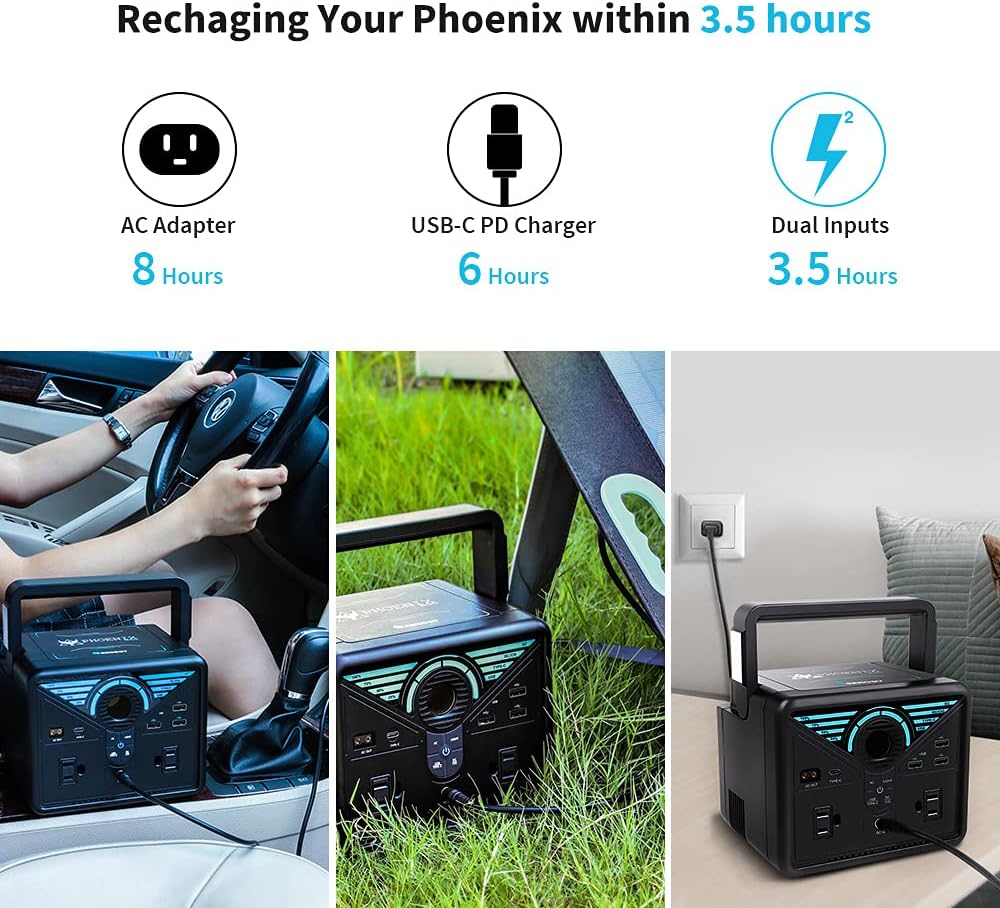
Immaġni: The Renogy Phoenix 300 can be recharged within 3.5 hours using dual inputs. It shows recharging options via AC Adapter (8 hours), USB-C PD Charger (6 hours), and Dual Inputs (3.5 hours), with accompanying images of the power station being charged in a car, with a solar panel, and via a wall outlet.
Istruzzjonijiet Operattivi
1. Tixgħil / Mitfi
Press and hold the main power button located on the front panel to turn the unit on or off. The LCD display will illuminate, showing the battery status and other relevant information.
2. LCD Display Overview
Id-displej LCD jipprovdi informazzjoni f'ħin reali:
- Livell tal-batterija: Juri l-perċentwal tal-iċċarġjar attwalitage.
- Input/Output Wattage: Displays the power being drawn in or out.
- Ħin li Fadal: Estimates the remaining runtime or charging time.
3. Portijiet tal-Ħruġ
The Phoenix 300 offers a variety of output ports:
- Ħwienet AC: Two 120V AC ports for standard appliances. Press the 'AC' button to activate.
- Portijiet USB-A: Multiple USB-A ports, including 18W Quick Charge ports, for charging mobile devices.
- Port USB-C: One 60W Power Delivery (PD) USB-C port for fast charging compatible devices.
- Output D-Tap: For specialized equipment.
- Port CIG: 12V car cigarette lighter port.
- Prodott DC: Two 12V/10A DC ports.
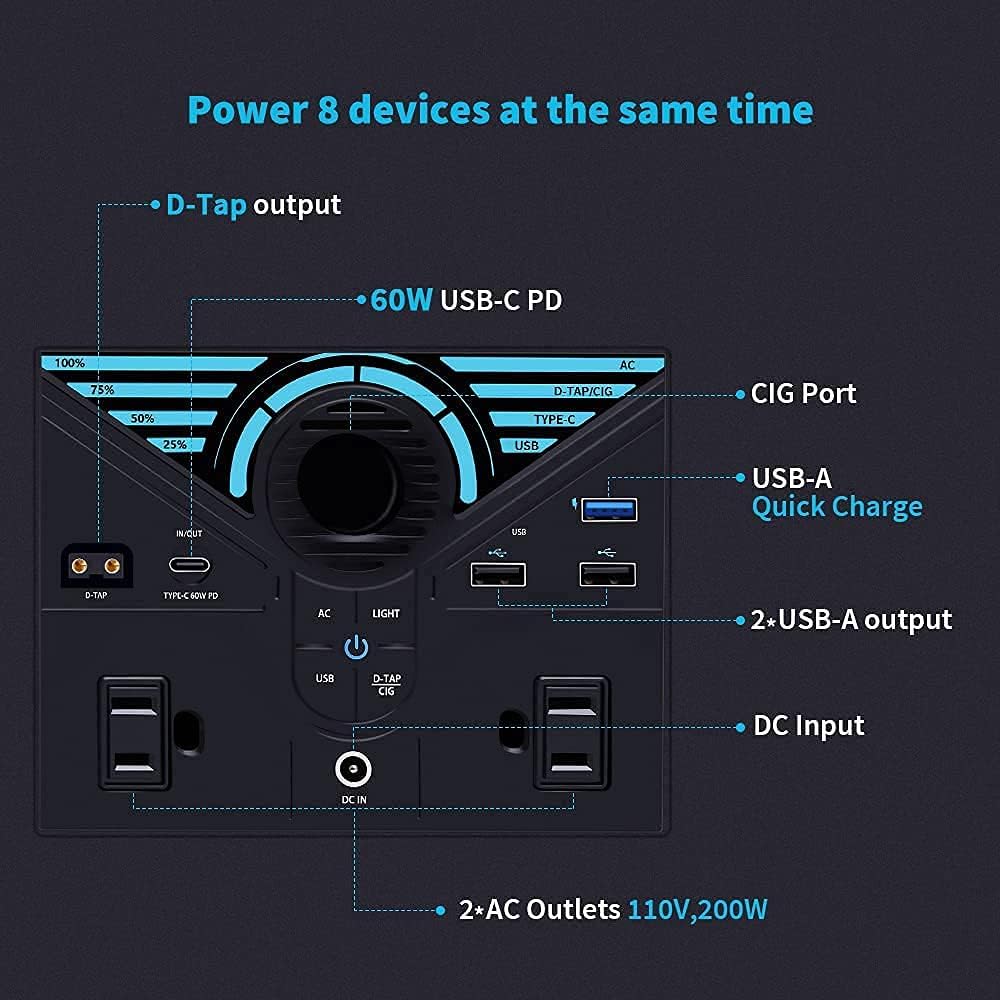
Immaġni: A detailed diagram illustrating the various input and output ports on the Renogy Phoenix 300. It highlights the D-Tap output, 60W USB-C PD, CIG Port, USB-A Quick Charge, 2x USB-A output, DC Input, and 2x AC Outlets (110V, 200W).
4. Charging the Phoenix 300
The unit can be charged using multiple methods:
- Adapter tal-AC: Connect the provided AC adapter to a wall outlet.
- USB-C PD Charger: Use a compatible USB-C PD charger for faster charging.
- Panel Solari: Connect a compatible solar panel (not included) using the provided solar charging cable.
- Ċarġer tal-Karozza: Use the provided car charger cable to charge from your vehicle's 12V cigarette lighter port.
5. Fast/Slow Charge Modes
The Phoenix 300 supports both fast and slow charging modes. Refer to the user manual for specific instructions on how to switch between these modes, typically involving a combination of button presses.
6. Modalità Spinta
The Phoenix 300 features a boost mode that allows it to temporarily output up to 450W for devices with high startup power requirements, while maintaining a continuous output of 300W. This is useful for appliances like air compressors or refrigerators that have a momentary power surge when starting. However, it is not recommended for sensitive electronics like TVs or computers.
7. Emergency Flashlight
The unit includes an emergency flashlight with multiple modes: Bright, Dim, Flashing, and SOS. Activate and cycle through modes using the dedicated light button.

Immaġni: The Renogy Phoenix 300 features an emergency flashlight with multiple modes: Bright, Dim, Flashing, and SOS, providing versatile lighting options for various situations.
8. Kontroll tal-App
The Phoenix 300 can be controlled via a smartphone app using Bluetooth or Wi-Fi connectivity. Scan the QR code on the unit to download the app and follow the in-app instructions for pairing. The app allows for remote monitoring and control of various functions.
Manutenzjoni
- Kalibrazzjoni tal-batterija: To maintain battery health and accurate readings, it is recommended to fully discharge the unit to 0% and then fully recharge it to 100% periodically.
- Ħażna: Store the Phoenix 300 in a cool, dry place away from direct sunlight and extreme temperatures. For long-term storage, ensure the battery is charged to approximately 50-80%.
- Tindif: Uża drapp artab u niexef biex tnaddaf il-barra tal-unità. Tużax prodotti tat-tindif li joborxu jew tgħaddasx l-unità fl-ilma.
Issolvi l-problemi
- Unregulated 12V Output: The 12V CIG port output is unregulated, meaning its voltage varies with the battery's state of charge (approximately 11V to 17V). This may not be suitable for sensitive 12V electronics that require a stable voltage.
- USB-C Output Issues: Some users have reported that the USB-C port may not function correctly when the battery level drops below 50%. Ensure the unit is sufficiently charged for optimal USB-C performance.
- AC Output Not Activating: If the AC outlets do not activate, check the battery level. Some users have experienced issues with AC output below 75% charge. Ensure the unit is adequately charged.
- L-Unità Mhux Qed Tiċċarġja: Verify that all charging cables are securely connected and that the power source (wall outlet, solar panel, car) is active. Check the input wattage murija fuq l-iskrin LCD.
Speċifikazzjonijiet
| Karatteristika | Dettall |
|---|---|
| Brand | Renogy |
| Isem tal-Mudell | Phoenix 300 |
| Wattage | 337 watts (337Wh) |
| Output Wattage | 300 Watts (Continuous), 450 Watts (Peak) |
| Tip ta' Fjuwil | Solari |
| Sors tal-Enerġija | Mħaddma bil-batterija |
| Piż tal-oġġett | 6.39 Liri |
| Voltage | 110 Volts |
| Ħwienet tal-Enerġija Totali | 2 (AC) |
| Dimensjonijiet tal-Prodott | 7.1 x 6.1 x 5.6 pulzieri |
| Batteriji | 1 batteriji tal-jone tal-litju meħtieġa (inklużi) |
Garanzija u Appoġġ
The Renogy Phoenix 300 Portable Power Station comes with a garanzija ta 'sena. For any technical assistance, troubleshooting, or warranty claims, please contact Renogy customer support. Their customer service is highly regarded for its responsiveness and helpfulness.
You can find more information and contact details on the official Renogy websit: Visit the Renogy Store


