1. Introduzzjoni
Thank you for choosing the Kaidi KD-750 Bluetooth Headphones. This manual provides essential information for the proper setup, operation, and maintenance of your device. Please read it thoroughly before use to ensure optimal performance and longevity of your headphones.
2. Kontenut tal-Pakkett
Ivverifika li l-oġġetti kollha huma preżenti fil-pakkett tiegħek:
- 1 x Kaidi KD-750 Bluetooth Headphones
- 1 x USB Iċċarġjar Cable
- 1 x Reinforced 3.5mm Audio Cable with Microphone (P2 Cable)
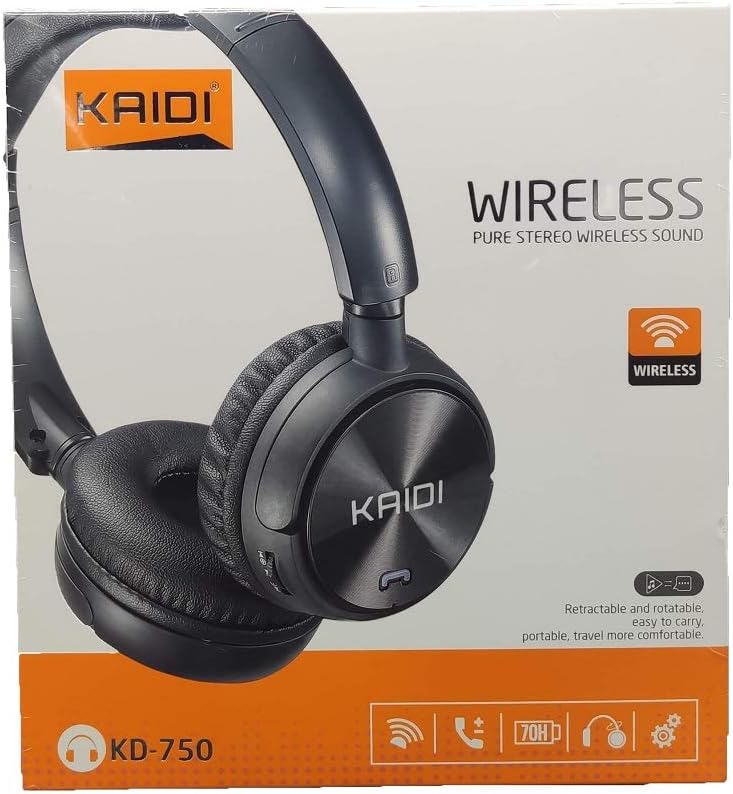
Immaġni: Quddiem view of the Kaidi KD-750 retail packaging, showing the headphones and branding.
3. Prodott Aktarview
Familiarize yourself with the various parts and controls of your Kaidi KD-750 headphones.

Immaġni: Quddiem view of the Kaidi KD-750 Bluetooth Headphones, showcasing the earcups with Kaidi logo and the adjustable headband.
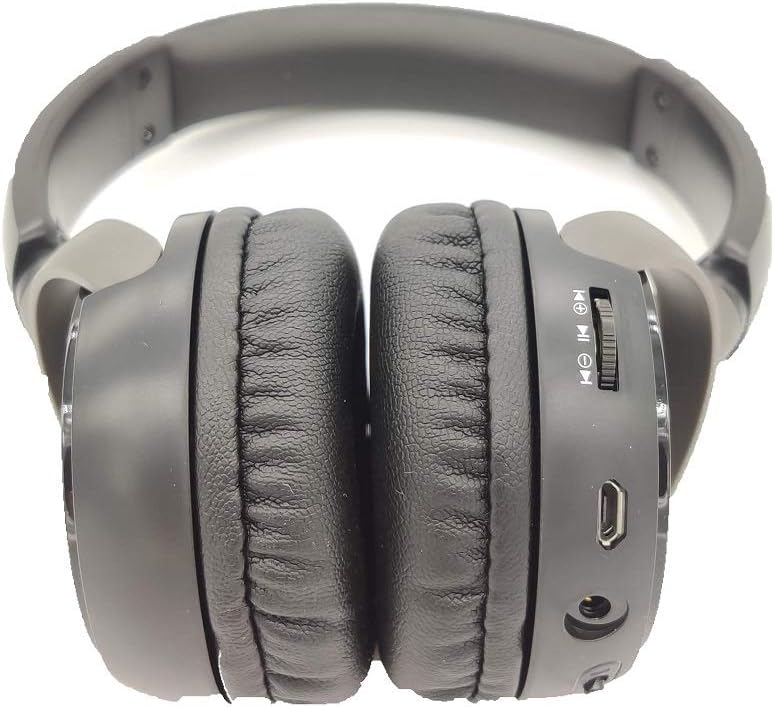
Immaġni: Ġenb view of the Kaidi KD-750 Bluetooth Headphones, highlighting the control buttons, charging port, and audio jack on the earcup.

Image: Back of the Kaidi KD-750 retail box, featuring a diagram of the headphone controls and key product features.
3.1. Kontrolli u Portijiet
- Buttuna tal-Enerġija / Buttuna b'ħafna funzjonijiet: Power On/Off, Play/Pause, Answer/End Call.
- Buttuna tal-Volum 'il Fuq / tat-Trakka li Jmiss: Short press for Volume Up, Long press for Next Track.
- Buttuna Volum 'l isfel / Trakka Preċedenti: Short press for Volume Down, Long press for Previous Track.
- Buttuna tal-Modalità (M): Switch between Bluetooth, FM Radio, and SD Card modes.
- Mikro USB Charging Port: Għall-iċċarġjar tal-headphones.
- Input AUX 3.5mm: Għal konnessjoni bil-fili bl-użu tal-kejbil awdjo inkluż.
- Slott tal-Karta Mikro SD: Biex iddoqq il-mużika direttament minn kard Micro SD.
- Mikrofonu: Għal sejħiet hands-free.
4. Setup
4.1. Iċċarġjar tal-Headphones
Qabel l-ewwel użu, iċċarġja l-headphones tiegħek kompletament.
- Qabbad it-tarf tal-Micro USB tal-kejbil tal-iċċarġjar mal-port tal-iċċarġjar fuq il-headphones.
- Qabbad it-tarf USB-A tal-kejbil tal-iċċarġjar ma' adapter tal-enerġija USB (mhux inkluż) jew mal-port USB tal-kompjuter.
- The LED indicator will illuminate (usually red) during charging.
- Once fully charged (approximately 2 hours), the LED indicator will change color or turn off (refer to specific LED behavior in the specifications).
Nota: Il-ħajja tal-batterija hija ta' madwar 5 sigħat b'ċarġ sħiħ.
4.2. Tqabbil tal-Bluetooth
Pair your headphones with a Bluetooth-enabled device.
- Kun żgur li l-headphones huma mitfija.
- Press and hold the Power Button for approximately 3-5 seconds until the LED indicator flashes blue and red alternately, indicating pairing mode.
- Fuq l-apparat tiegħek (smartphone, tablet, kompjuter), attiva l-Bluetooth u fittex apparati disponibbli.
- Select "KD-750" from the list of found devices.
- Once paired, the LED indicator will typically flash blue slowly or remain solid blue.
- Jekk teħtieġ password, daħħal "0000".
Il-firxa effettiva tal-Bluetooth hija ta' madwar 10 metri (33 pied).
5. Istruzzjonijiet Operattivi
5.1. Power On/Off
- Qawwa Mixgħul: Press and hold the Power Button for 2-3 seconds until the LED indicator lights up.
- Itfi: Press and hold the Power Button for 3-4 seconds until the LED indicator turns off.
5.2. Music Playback (Bluetooth Mode)
- Play/Pawsa: Agħfas qasir il-buttuna tal-enerġija.
- Track li jmiss: Agħfas fit-tul il-buttuna Volume Up.
- Track preċedenti: Agħfas fit-tul il-buttuna Volum 'l isfel.
- Volum 'il fuq: Agħfas fil-qosor il-buttuna Volume Up.
- Volum 'l isfel: Agħfas fil-qosor il-buttuna Volum 'l isfel.
5.3. Telefonati
- Irrispondi Sejħa: Short press the Power Button when an incoming call rings.
- Tmiem Sejħa: Agħfas qasir il-Buttuna tal-Qawwa waqt telefonata.
- Irrifjuta Sejħa: Long press the Power Button when an incoming call rings.
- Isemmi mill-ġdid l-Aħħar Numru: Agħfas darbtejn il-Buttuna tal-Qawwa.
5.4. Mode Switching (FM Radio / SD Card / AUX)
Agħfas il- Buttuna tal-Modalità (M). to cycle through available modes: Bluetooth, FM Radio, and SD Card playback.
5.4.1. Modalità tar-Radju FM
- Switch to FM mode using the Mode (M) Button.
- Long press the Power Button to automatically scan and save available FM stations.
- Short press the Volume Up/Down buttons to adjust volume.
- Long press the Volume Up/Down buttons to switch between saved stations.
5.4.2. Daqq tal-Karta Mikro SD
- Insert a Micro SD card (with MP3 files) into the SD card slot.
- Switch to SD Card mode using the Mode (M) Button. The headphones will automatically begin playing music from the card.
- Use the Play/Pause, Volume Up/Down, and Next/Previous Track controls as in Bluetooth mode.

Immaġni: Close-up view of the Micro SD card slot on the Kaidi KD-750 headphones.
5.4.3. AUX Wired Mode
- Connect one end of the included 3.5mm audio cable to the AUX input on the headphones.
- Qabbad it-tarf l-ieħor mal-output tal-awdjo ta' 3.5mm tat-tagħmir tiegħek.
- Il-headphones jaqilbu awtomatikament għall-modalità AUX.
- In AUX mode, controls on the headphones (volume, track control) may not function; use your connected device for control.
6. Manutenzjoni u Kura
- Naddaf il-headphones b'ċarruta ratba u niexfa. Tużax prodotti tat-tindif jew solventi li joborxu.
- Evita li tesponi l-headphones għal temperaturi estremi, umdità, jew dawl tax-xemx dirett.
- Tgħaddix il-headphones fl-ilma jew f'xi likwidu ieħor.
- Aħżen il-headphones f'post frisk u niexef meta ma tkunx qed tuża.
- Iċċarġja l-headphones regolarment, anke jekk ma jintużawx għal perjodi twal, biex iżżomm il-batterija f'saħħitha.
7 Issolvi l-problemi
7.1. Headphones do not power on.
Soluzzjoni: The battery may be depleted. Connect the headphones to a power source using the USB charging cable and allow them to charge for at least 30 minutes before attempting to power on again.
7.2. Cannot pair with a Bluetooth device.
- Soluzzjoni 1: Ensure the headphones are in pairing mode (LED flashing blue and red alternately).
- Soluzzjoni 2: Kun żgur li l-Bluetooth huwa attivat fuq l-apparat tiegħek u li jinsab f'distanza ta' 10 metri mill-headphones.
- Soluzzjoni 3: Itfi l-Bluetooth fuq l-apparat tiegħek, imbagħad erġa' ixgħelu u erġa' pprova fittex.
- Soluzzjoni 4: If previously paired, try "forgetting" or "unpairing" the headphones from your device's Bluetooth list and then re-pairing.
7.3. L-ebda ħoss jew volum baxx.
- Soluzzjoni 1: Iċċekkja l-livelli tal-volum kemm fuq il-headphones kif ukoll fuq l-apparat konness tiegħek.
- Soluzzjoni 2: Ensure the headphones are properly connected via Bluetooth or the 3.5mm AUX cable.
- Soluzzjoni 3: If using AUX mode, ensure the cable is fully inserted into both the headphones and the audio source.
7.4. FM radio reception is poor.
Soluzzjoni: Move to an open area away from obstructions or electronic interference. The 3.5mm audio cable can sometimes act as an antenna; try connecting it even if not using AUX mode for improved reception.
8. Speċifikazzjonijiet
| Verżjoni Bluetooth: | v4.2 |
| Protokolli Appoġġjati: | AVRCP1.3, A2DP1.0, HFP1.5, HSP1.0 |
| Firxa Effettiva: | 10 metru (33 pied) |
| Frekwenza tax-Xogħol: | 2.402GHz - 2.480GHz |
| Tip ta 'batterija: | Batterija tal-litju rikarikabbli ta' 3.7V 300mAh integrata |
| Iċċarġjar Voltage: | DC 4.2V - 5.5V |
| Ħin tal-Iċċarġjar: | Madwar sagħtejn |
| Tul tal-batterija: | Approximately 5 hours (playback) |
| Impedenza tal-Ispeaker: | 32 Ohms |
| Kontroll tal-Ħsejjes: | Kanċellazzjoni tal-Istorbju Passiv |
| Teknoloġija tal-Konnettività: | Bluetooth, 3.5mm Jack |
| Apparati Kompatibbli: | Any device supporting Bluetooth connectivity |
| Piż tal-Prodott: | 190 g |
| Kulur: | Iswed |
9. Garanzija u Appoġġ
The Kaidi KD-750 Bluetooth Headphones come with a standard manufacturer's warranty against defects in materials and workmanship. Please refer to the warranty card included with your purchase for specific terms and conditions, including the warranty period.
For technical support, troubleshooting assistance, or warranty claims, please contact your retailer or the official Kaidi customer service. Contact information can typically be found on the product packaging or the official Kaidi websit.
Jekk jogħġbok żomm il-prova tax-xiri tiegħek għal skopijiet ta' garanzija.


