1. Introduzzjoni
Welcome to the user manual for your Fujitsu FMV LIFEBOOK A574 laptop. This guide provides essential information to help you set up, operate, maintain, and troubleshoot your device. Please read this manual thoroughly to ensure proper use and to maximize the performance and longevity of your laptop.
2. Setup
2.1 Tneħħija tal-kaxxa u Spezzjoni Inizjali
Carefully remove the laptop and all accessories from the packaging. Verify that all components are present: the Fujitsu FMV LIFEBOOK A574 laptop, AC adapter, and power cord. Inspect the laptop for any physical damage. If any damage is found or components are missing, contact your vendor immediately.
2.2 Qawwa tal-Konnessjoni
- Connect the AC adapter to the power input port on the side of the laptop.
- Ipplaggja l-korda tal-enerġija fl-adapter tal-AC.
- Ipplaggja t-tarf l-ieħor tal-korda tad-dawl fi żbokk elettriku ertjat.
The laptop battery will begin charging automatically. It is recommended to fully charge the battery before initial use.
2.3 L-Ibbutjar Inizjali u s-Setup tal-Windows 10
Press the power button to turn on the laptop. The system will guide you through the initial setup process for Windows 10. Follow the on-screen instructions to configure language, region, user accounts, and privacy settings.
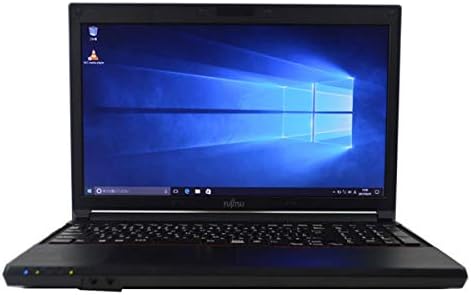
Figure 2.3.1: Fujitsu FMV LIFEBOOK A574 laptop powered on, displaying the Windows 10 desktop.
2.4 Konnessjoni mal-Wi-Fi
- After Windows 10 setup, click the Wi-Fi icon in the taskbar (usually in the bottom-right corner).
- Agħżel in-netwerk mingħajr fili mixtieq tiegħek mil-lista ta' netwerks disponibbli.
- Click 'Connect' and enter the network security key (password) if prompted.
- Ladarba tkun konness, l-ikona tal-Wi-Fi tindika konnessjoni attiva.
2.5 Tqabbil tal-Bluetooth
- Mur fuq Settings > Apparati > Bluetooth u apparat ieħor.
- Kun żgur li l-Bluetooth huwa mixgħul On.
- Poġġi l-apparat Bluetooth tiegħek fil-modalità ta 'tqabbil.
- Ikklikkja Żid Bluetooth jew apparat ieħor u agħżel Bluetooth.
- Agħżel it-tagħmir tiegħek mil-lista u segwi kwalunkwe struzzjonijiet fuq l-iskrin biex tlesti t-tqabbil.
3. Istruzzjonijiet Operattivi
3.1 Tastiera u Touchpad
The Fujitsu FMV LIFEBOOK A574 features a full-size keyboard with a dedicated numeric keypad for efficient data entry. The integrated touchpad allows for precise cursor control and supports multi-touch gestures.

Figura 3.1.1: Dettaljat view of the laptop's keyboard and touchpad area.
Funzjonijiet tat-Tastiera:
- Ċwievet tal-Funzjoni (F1-F12): Often combined with the 'Fn' key for special functions like brightness control, volume adjustment, Wi-Fi toggle, etc.
- Tastiera numerika: Provides a convenient layout for number input, similar to a desktop keyboard.
Ġesti tat-touchpad:
- Tektek Uniku: Ikklikkja fuq ix-xellug.
- Tektek b'Żewġ Swaba': Ikklikkja bil-lemin.
- Skrolljar b'Żewġ Swaba': Skrollja 'l fuq jew' l isfel.
- Agħfas biex Tiżżumja: Agħmel zoom in jew out fuq il-kontenut.
3.2 Optical Drive (DVDROM)
Your laptop is equipped with a DVDROM drive, allowing you to read CDs and DVDs.

Figure 3.2.1: The optical drive tray extended from the side of the laptop.
Using the Optical Drive:
- Press the eject button on the drive or right-click the drive icon in 'This PC' and select 'Eject'.
- Carefully place a CD or DVD onto the tray with the label side facing up.
- Gently push the tray back into the laptop until it clicks into place.
- The disc content should automatically appear or can be accessed via 'This PC'.
3.3 USB Ports and Audio Output
The laptop includes multiple USB ports for connecting peripherals such as external hard drives, mice, and keyboards. A 3.5mm audio jack is provided for connecting headphones or external speakers.
3.4 Pre-installed Office Software
This laptop comes with office software pre-installed, enabling you to perform productivity tasks such as word processing, spreadsheets, and presentations immediately.
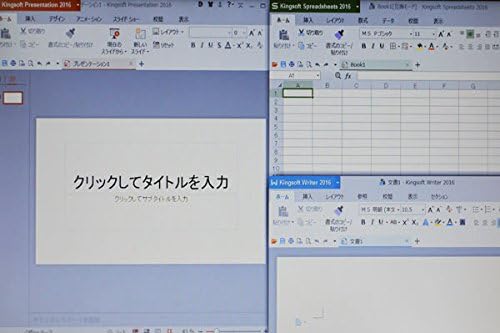
Figure 3.4.1: The laptop display showing multiple office applications running simultaneously.
4. Manutenzjoni
4.1 Istruzzjonijiet għat-Tindif
- Skrin: Uża drapp ratba u mingħajr ħelu ftit dampLaħlaħ bl-ilma jew b'tindif tal-iskrin. Evita kimiċi ħarxa.
- Tastiera u Ċasing: Uża drapp artab u niexef. Għal ħmieġ iebes, neħħi ftit drapp.amp Tista' tintuża drapp b'soluzzjoni ta' sapun ħafif, biex tiżgura li l-ebda likwidu ma jidħol fl-apparat.
- Portijiet: Uża arja kkompressata biex tneħħi t-trab mill-portijiet.
4.2 Aġġornamenti tas-Software
Regularly update your Windows 10 operating system and drivers to ensure optimal performance, security, and compatibility. Go to Settings > Aġġornament u Sigurtà > Aġġornament tal-Windows biex tiċċekkja u tinstalla aġġornamenti.
4.3 Kura tal-Batterija
- Evita li tiċċarġja l-batterija kompletament ta' spiss.
- Aħżen il-laptop f'post frisk u niexef meta ma jkunx qed jintuża għal perjodi twal.
- Jekk taħżen għal żmien twil, kun żgur li l-batterija tkun iċċarġjata għal madwar 50-60%.
5 Issolvi l-problemi
This section addresses common issues you might encounter with your Fujitsu FMV LIFEBOOK A574.
5.1 Ebda Qawwa
- Kun żgur li l-adapter tal-AC huwa konness sew kemm mal-laptop kif ukoll ma' sokit tal-enerġija li jaħdem.
- Iċċekkja jekk is-sokit tal-enerġija hux qed jaħdem billi tqabbad apparat ieħor.
- Ipprova żbokk tad-dawl differenti.
5.2 Il-Wi-Fi Mhux Qed Jikkonnettja
- Ivverifika li l-Wi-Fi huwa attivat fis-settings tal-Windows.
- Erġa' ibda r-router u l-modem mingħajr fili tiegħek.
- Kun żgur li qed iddaħħal il-password korretta tal-Wi-Fi.
- Ipprova qabbad ma' netwerk Wi-Fi differenti jekk disponibbli.
5.3 Prestazzjoni bil-mod
- Agħlaq l-applikazzjonijiet bla bżonn li jkunu qed jaħdmu fl-isfond.
- Iċċekkja u installa kwalunkwe aġġornament pendenti tal-Windows.
- Mexxi tindif tad-diska u deframmentazzjoni (għall-HDD).
- Skennja għal malware jew viruses billi tuża softwer antivirus ta’ fama tajba.
If you continue to experience issues, please refer to the official Fujitsu support webis-sit jew ikkuntattja s-servizz tal-klijenti tagħhom għal aktar assistenza.
6. Speċifikazzjonijiet
Below are the key technical specifications for the Fujitsu FMV LIFEBOOK A574 laptop:
| Karatteristika | Speċifikazzjoni |
|---|---|
| Brand | Fujitsu |
| Isem tal-Mudell | A574 |
| Fattur tal-Formola | Laptop |
| Sistema Operattiva | Windows 10 |
| Tip ta' CPU | Intel Core i3 4000M (4th Gen) |
| Kapaċità RAM | 8 GB DDR3 |
| Ħażna | 500 GB HDD |
| Daqs tal-Wiri | 15.6 pulzieri |
| Riżoluzzjoni | 1366 x 768 pixel |
| Proċessur tal-Grafika | Grafika Integrata Intel |
| Drive ottiku | DVDROM |
| Konnettività bla fili | Wi-Fi, Bluetooth |
| Portijiet | USB, Headphone Jack |
7. Garanzija u Appoġġ
Your Fujitsu FMV LIFEBOOK A574 laptop is covered by a manufacturer's warranty. Please refer to the warranty card included with your product for specific terms and conditions, including warranty duration and coverage details.
For technical support, driver downloads, or service inquiries, please visit the official Fujitsu support website or contact their customer service department. Keep your product's serial number handy when seeking support.
Appoġġ Fujitsu Websit: https://www.fujitsu.com/global/support/