1. Introduzzjoni
The TESmart HSW0501A1U is a 5x1 HDMI switch designed to connect up to five HDMI source devices to a single HDMI display. This device supports high-resolution video up to 4K@60Hz, including HDCP 2.2, Deep Color, 3DTV, HDR, and Dolby Vision. It is suitable for various applications such as home theater, gaming setups, meeting rooms, and classrooms, allowing for easy switching between multiple video sources.
The switch features automatic input detection, front panel push-button control, and an infrared (IR) remote control for convenient operation.

Image 1.1: The TESmart 5x1 HDMI Switch and its accompanying IR remote control. The switch features multiple input ports and a single output port, with indicator lights for selected inputs.
2. Karatteristiċi
- Connects up to 5 HDMI input devices to 1 HDMI output display.
- Jappoġġja riżoluzzjonijiet tal-vidjo sa 4K@60Hz.
- Compatible with HDCP 2.2, Deep Color, 3DTV, HDR, and Dolby Vision.
- Data transfer rate up to 18 Gbps.
- Supports lossless audio formats including LPCM 7.1, Dolby TrueHD, and DTS-HD Master Audio.
- Automatic input detection and switching to the newly connected source.
- Multiple switching methods: front panel button and IR remote control.
- Compact design with durable ABS material and gold-plated interfaces for enhanced signal integrity.

Image 2.1: A monitor displaying high-quality 4K@60Hz Ultra HD content, illustrating the video resolution capabilities of the HDMI switch.
3. Kontenut tal-Pakkett
Jekk jogħġbok ivverifika li l-oġġetti kollha huma inklużi fil-pakkett tiegħek:
- 1 x TESmart 5x1 HDMI Switch (HSW0501A1U)
- 1 x IR Remote Control (CR2025 battery required, not included)
- 1 x IR Riċevitur Cable
- 1 x USB Power Cable (DC 5V)
- 1 x Gwida Quick Start

Image 3.1: An illustration of the items included in the product package: the HDMI switch, user manual, USB charging cable, IR receiver cable, and IR remote control (note: batteries are not included).
4. Setup u Installazzjoni
Follow these steps to set up your TESmart 5x1 HDMI Switch:
- Qabbad Sorsi HDMI: Plug your HDMI source devices (e.g., Xbox, PS4, Blu-ray player, laptop) into the HDMI INPUT ports (INPUT1 to INPUT5) on the switch.
- Qabbad mal-Display: Connect one end of an HDMI cable to the HDMI OUTPUT port on the switch and the other end to the HDMI input of your display (TV, monitor, projector).
- Qabbad ir-Riċevitur tal-IR: Plug the IR receiver cable into the 'IR' port on the switch. Position the IR receiver in a location where it has a clear line of sight to your remote control.
- Installa l-Batterija tar-Remot: Open the battery compartment of the IR remote control and insert a CR2025 battery (not included), ensuring correct polarity.
- Qawwa Mixgħul: Connect the USB power cable to the DC 5V port on the switch and plug the other end into a USB power source (e.g., a USB port on your TV, a USB wall adapter). The switch will power on automatically.

Image 4.1: A diagram illustrating how to connect multiple HDMI source devices (such as Blu-ray players, Fire Sticks, PS3/PS4 consoles, Apple TVs, and laptops) to a single television display using the TESmart 5x1 HDMI switch.
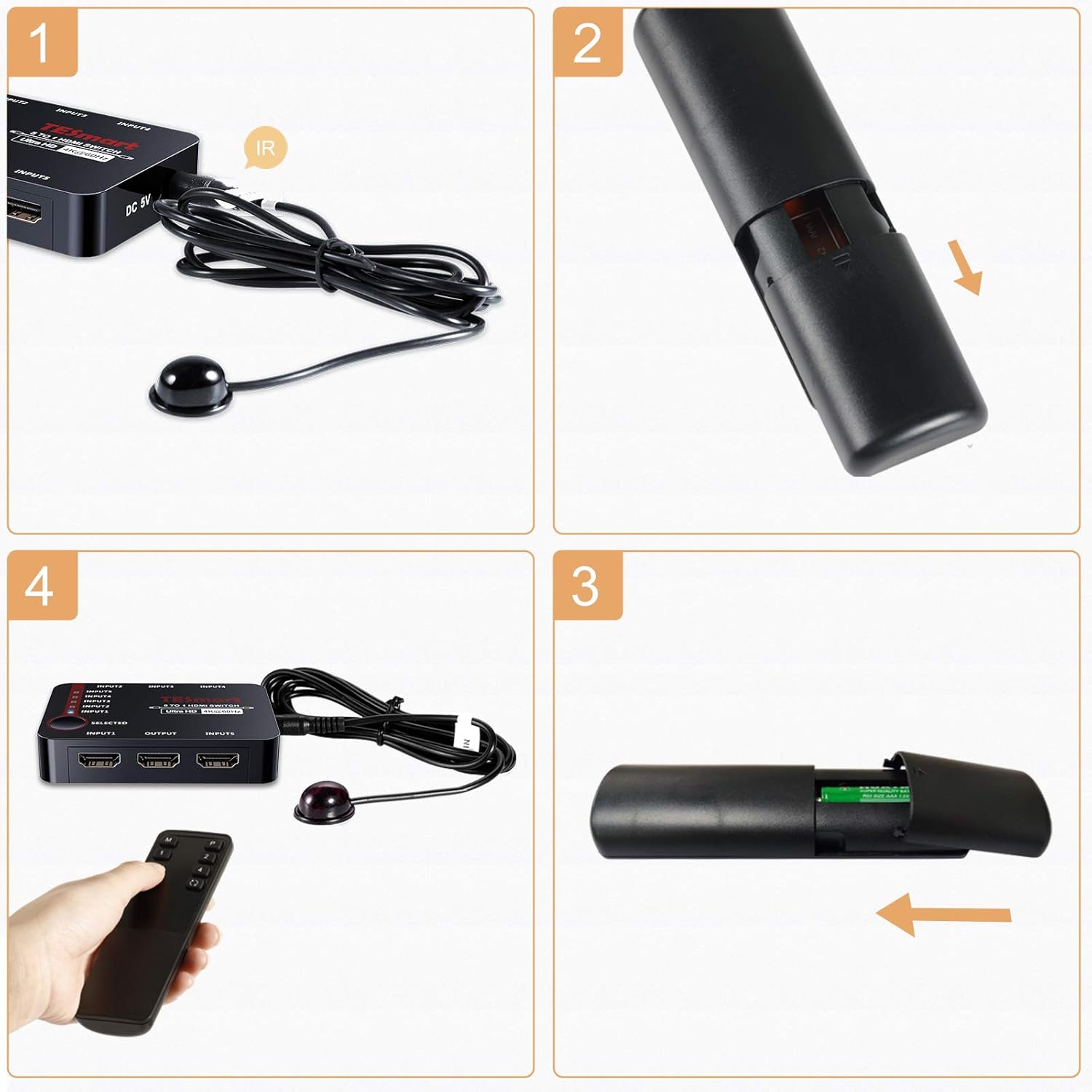
Image 4.2: A four-panel image demonstrating the installation of the battery into the IR remote control. It shows connecting the IR cable, opening the battery compartment, inserting the CR2025 battery, and using the remote with the switch.
5. Istruzzjonijiet Operattivi
The TESmart 5x1 HDMI Switch offers multiple methods for switching between connected HDMI sources:
- Buttuna tal-Panew ta' Quddiem: Press the 'SELECTED' button on the front panel of the switch to cycle through the HDMI input sources (INPUT1 to INPUT5). The corresponding LED indicator will light up to show the currently active input.
- Kontroll mill-bogħod IR: Use the provided IR remote control to directly select an input. Press the numbered buttons (1-5) on the remote to switch to the desired HDMI input.
- Qlib Awtomatiku: The switch supports automatic input detection. When a new HDMI source device is powered on or connected, the switch will automatically detect it and switch to that input. If the currently active source is turned off, the switch may automatically switch to the next active source.

Image 5.1: An illustration of the various methods for switching inputs on the HDMI switch, including using the front panel push buttons, the IR remote control, and the automatic switching feature.
6 Issolvi l-problemi
If you encounter issues with your TESmart 5x1 HDMI Switch, refer to the following common problems and solutions:
- L-ebda Ħruġ tal-Vidjo/Awdjo:
- Kun żgur li l-kejbils HDMI kollha huma konnessi sew kemm mal-apparati tas-sors, kif ukoll mas-swiċċ, u mad-displej.
- Verify that the switch is powered on and the correct input is selected.
- Try using different HDMI cables, as faulty cables can cause signal loss.
- Check your display's input settings to ensure it is set to the correct HDMI port connected to the switch.
- Erġa' ibda l-apparati kollha konnessi (sors, swiċċ, display).
- Il-Kontroll mill-bogħod Mhux Jaħdem:
- Ensure the CR2025 battery is correctly installed in the remote control and is not depleted.
- Verify that the IR receiver cable is securely plugged into the switch and positioned with a clear line of sight to the remote.
- Remove any obstructions between the remote and the IR receiver.
- Sinjal/Teptip Intermittenti:
- This can sometimes be caused by long or low-quality HDMI cables. Use certified high-speed HDMI cables, especially for 4K resolutions.
- Ensure the power supply to the switch is stable.
- Check if the resolution or refresh rate of your source device exceeds the capabilities of your display or the switch.
- Automatic Switching Issues:
- Some source devices may not fully power down, preventing the switch from detecting a change. Manually switch inputs using the front panel button or remote if auto-switching is inconsistent.
7. Speċifikazzjonijiet
| Karatteristika | Speċifikazzjoni |
|---|---|
| Brand | TESmart |
| Numru tal-Mudell | HSW0501A1U |
| Kulur | Iswed |
| Materjal | Plastik (ABS) |
| Portijiet tad-dħul | 5 x HDMI |
| Portijiet tal-ħruġ | 1 x HDMI |
| Riżoluzzjoni massima | 4K@60Hz (3840 x 2160) |
| Konformità HDCP | HDCP 2.2 |
| Rata tad-Data | 18 Gbps |
| Karatteristiċi appoġġjati | Deep Color, 3DTV, HDR, Dolby Vision |
| Appoġġ Awdjo | LPCM 7.1, Dolby TrueHD, DTS-HD Master Audio |
| Metodi tal-Qlib | Front Panel Button, IR Remote, Auto-Switching |
| Provvista tal-Enerġija | DC 5V (via USB cable) |
| Dimensjonijiet (L x W x H) | 8.8 x 6 x 1.9 ċm |
| Apparati Kompatibbli | PS3 / PS4, PS4 Pro, Xbox, TV Box, Fire TV Stick, DVD Player |
8. Garanzija u Appoġġ
The TESmart HSW0501A1U 5x1 HDMI Switch comes with a one-year manufacturer's warranty from the date of purchase. This warranty covers defects in materials and workmanship under normal use.
For technical assistance or warranty claims, please contact the TESmart customer support team. Lifetime free technical support is provided to ensure you get the most out of your product.
Informazzjoni ta' Kuntatt: Please refer to the contact details provided in your Quick Start Guide or visit the official TESmart websit għall-appoġġ.


