1. Introduzzjoni
This user manual provides comprehensive instructions for the Anlapus 1080P Outdoor Wireless Battery IP Camera (Model C306W4). It covers everything from initial setup and installation to daily operation, maintenance, and troubleshooting. Please read this manual carefully before using the camera to ensure proper functionality and safety.
The Anlapus C306W4 is a high-definition 1080P wireless security camera designed for outdoor use. It features a long-lasting 7800mAh rechargeable battery, PIR motion detection for accurate alerts, two-way audio communication, and advanced night vision capabilities, including color night vision. Its weather-resistant housing ensures reliable performance in various environmental conditions.
2. Kontenut tal-Pakkett
Upon opening the box, please verify that all the following accessories are included:

Figure 2.1: Anlapus C306W4 Package Contents
- 1 x Anlapus Battery Camera
- 1 x USB Cable
- 1 x Reset Needle
- 1 x Borża tal-Invita tal-Immuntar
- 1 x Gwida Quick Start
- 1 x Stiker ta 'Twissija
3. Prodott Aktarview
Familiarize yourself with the various components of your Anlapus C306W4 camera:

Figure 3.1: Anlapus C306W4 Component Diagram
- Antenna: Għal konnettività mingħajr fili.
- Mikrofonu: Jaqbad l-awdjo għal komunikazzjoni f'żewġ direzzjonijiet.
- Lenti HD ta' 3.6mm: Qbid ta' vidjow b'definizzjoni għolja.
- LED abjad: Jipprovdi dawl għal viżjoni bil-lejl bil-kulur.
- Sensor PIR: Sensor infra-aħmar passiv għad-detezzjoni tal-moviment.
- Rubber Plug (Power Port inside): Protects the charging port from elements.
- LED tal-Istatus tal-Batterija: Jindika l-livell tal-iċċarġjar tal-batterija.
- Durable Lithium-ion Battery: 7800mAh capacity for extended operation.
- Slott tal-Karta Mikro SD: Għall-ħażna lokali tal-vidjow.
- Buttuna Irrisettja: Użat biex reset l-apparat għas-settings tal-fabbrika.
- Lawdspiker: For two-way audio and alerts.
- Connect Key: Used during the setup process.

Figure 3.2: 7800mAh Rechargeable Battery
The camera is equipped with a powerful 7800mAh rechargeable battery, providing super capacity and longer battery life. It can work continuously for up to 6 months (triggering the alarm 10 times a day) and standby for one year.
4. Gwida ta' Setup
Follow these steps to set up your Anlapus C306W4 camera:
Video 4.1: Anlapus 1080P Outdoor Wireless Battery IP Camera Setup Guide
This video demonstrates the unboxing, physical setup, and app configuration for the Anlapus C306W4 camera.
4.1 Setup Inizjali
- Unbox and Verify Contents: Open the product box and check that all items listed in Section 2 are present.
- Install Antenna and Activate Device:
Attach the antenna to the designated port on the camera. Then, locate the rubber plug on the camera's base, remove it to access the power port, and insert the provided reset needle or a small tool into the reset hole for 4-5 seconds to activate the device. The camera will provide a voice prompt when activated.
4.2 Installazzjoni u Konnessjoni tal-App
- Download and Register the CloudEdge App:
Download the 'CloudEdge' app from your smartphone's app store (iOS or Android). Open the app and register for a new account, then log in. - Żid Apparat:
In the CloudEdge app, tap the "Add Device" icon (usually a '+' symbol) and select "Battery Camera" from the list of device types. - Follow Voice Prompts to Start Device:
The app will guide you through starting the device. Hold the device power button to start it. If the device is asleep, press the battery camera button to wake it up. Stay near your router for the best signal during setup. - Reset Device (if prompted):
If instructed by the app, hold the RESET button on your device for 4-5 seconds. Wait for a flashing RED indicator light, then tap "Next" in the app. - Set up Wi-Fi and Scan QR Code:
Enter your 2.4GHz Wi-Fi network name and password in the app (5GHz networks are not supported). The app will then display a QR code. Hold your phone with the QR code 5-8 inches (15-25 cm) in front of the camera lens. The camera will emit a tone when the QR code is successfully scanned. - Konferma tal-Konnessjoni:
Once the camera successfully connects to your Wi-Fi network, the app will confirm "Device Found!". Tap "Done" to complete the setup. You can now enjoy the live view mill-kamera tiegħek.
5. Istruzzjonijiet Operattivi
5.1 Ħaj View
After successful setup, you can access the live video feed from your camera through the CloudEdge app. Simply select your camera from the device list to view foo f'ħin realitage.
5.2 Sejbien tal-Moviment
The camera features a PIR (Passive Infrared) sensor for accurate motion detection. When motion is detected, the camera will automatically record and send instant alerts to your smartphone, effectively avoiding false alarms.

Figure 5.1: Human Detection - Instant & Accurate Alerts
5.3 Awdjo b'żewġ direzzjonijiet
The built-in microphone and loudspeaker enable two-way audio communication. You can listen to what's happening around your camera and speak through the camera using the app, allowing for direct interaction with visitors or deterring intruders.

Figura 5.2: Komunikazzjoni Awdjo f'Żewġ Direzzjonijiet
5.4 Viżjoni bil-lejl
The Anlapus C306W4 provides clear 1080P HD images both day and night. It features advanced night vision, including infrared for black and white footage in low light, and can activate its white LED for full-color night vision when needed.

Figure 5.3: HD 1080p Image and Night Vision
5.5 Għażliet ta' Ħażna
Il-kamera tappoġġja żewġ metodi primarji ta' ħażna għal ikel irreġistrattage:
- Ħażna tal-Kard SD: Insert a Micro SD card (not included) into the designated slot for local storage of recordings.
- Ħażna Cloud: Subscribe to the CloudEdge cloud service for secure, remote storage of your video footage.
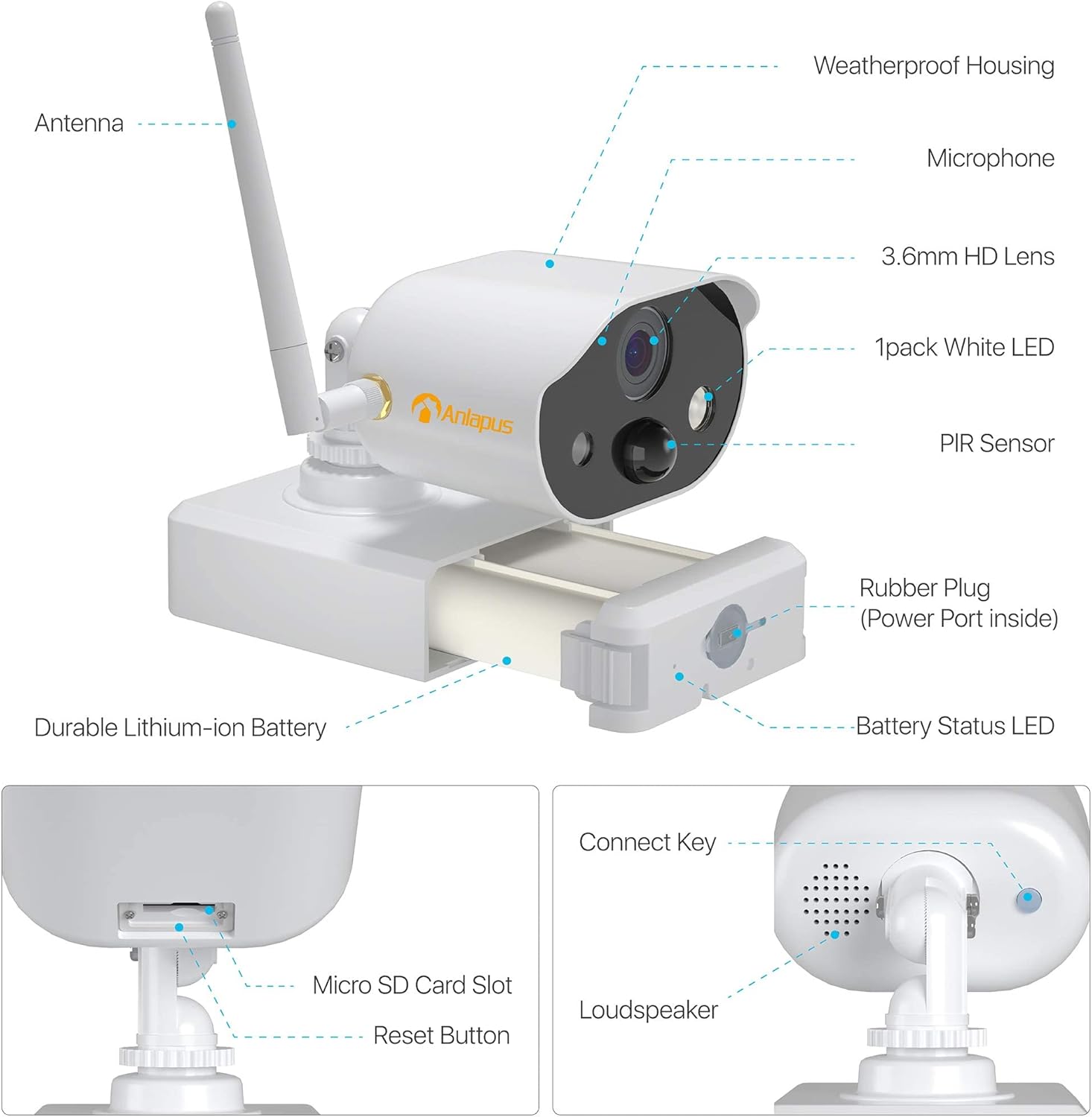
Figure 5.4: Two Storage Ways Optional
5.6 Daqq Intelliġenti
Faċilment mill-ġdidview recorded events and important details from anywhere using the smart playback feature in the CloudEdge app. You can access historical footage stored on your SD card or in the cloud.
Figure 5.5: Smart Playback Interface
5.7 Multi-User Viewing
Share access to your camera's live feed and recordings with family members or trusted individuals. The CloudEdge app allows multiple users to view the camera simultaneously, ensuring everyone stays informed.

Figure 5.6: Multi-Users Viewing
6. Manutenzjoni
6.1 Iċċarġjar tal-batterija
The camera's 7800mAh battery provides long-lasting power. When the battery status LED indicates low power, charge the camera using the provided USB cable and a standard 5V USB power adapter (not included). Ensure the rubber plug is securely closed after charging to maintain weather resistance.
6.2 Tindif
To ensure optimal performance, regularly clean the camera lens and housing. Use a soft, dry cloth to wipe away dust and dirt. For stubborn marks, a slightly damp cloth can be used, but avoid harsh chemicals or abrasive materials that could damage the lens or finish.
7 Issolvi l-problemi
- Il-kamera mhux qed tikkonnettja mal-Wi-Fi: Ensure your Wi-Fi network is 2.4GHz. Check that the Wi-Fi password is entered correctly in the app. Move the camera closer to your Wi-Fi router during setup to ensure a strong signal.
- Ebda ħaj view or recordings: Check the camera's battery level. Ensure the camera is powered on and connected to Wi-Fi. Verify that the Micro SD card is inserted correctly and not full, or check your cloud storage subscription status.
- Is-sejbien tal-moviment mhux qed jaħdem: Adjust the PIR sensitivity settings in the app. Ensure there are no obstructions blocking the PIR sensor's view.
- Kwalità ħażina tal-viżjoni bil-lejl: Ensure the camera lens is clean. Check for any strong light sources directly facing the camera at night, which can interfere with night vision.
- Problemi bl-awdjo f'żewġ direzzjonijiet: Check the microphone and speaker settings in the app. Ensure your phone's volume is up and the camera's speaker is not obstructed.
- Camera frequently goes offline: This could indicate a weak Wi-Fi signal. Consider relocating the camera closer to the router or using a Wi-Fi extender.
8. Speċifikazzjonijiet
| Karatteristika | Speċifikazzjoni |
|---|---|
| Numru tal-Mudell | C306W4 |
| Protokoll tal-Konnettività | Wi-Fi (2.4GHz biss) |
| Tip ta' Kontrollur | iOS, Android |
| Tip ta 'Immuntar | Mount Wall |
| Riżoluzzjoni tal-Qbid tal-Vidjo | 1080p |
| Numru ta 'Kanali | 2 |
| Teknoloġija tal-Komunikazzjoni mingħajr Fili | WLAN |
| Fattur tal-Formola | Bullet |
| Riżoluzzjoni tal-Vidjo Effettiva | 1080 |
| Medda tal-Viżjoni Lejl | 10 Meters |
| Materjal | Metall |
| Voltage | 5 Volts |
| Wattage | 5 Watts |
| Dimensjonijiet tal-oġġett (L x W x H) | 25.4 x 5.1 x 7.6 ċm |
| Livell ta 'Reżistenza għall-Ilma | Waterproof |
| Piż tal-oġġett | 880 g |
| Batteriji | 3 Lithium-Metal Batteries required (included) |
| Karatteristiċi Speċjali | Viżjoni bil-lejl |
9. Garanzija u Appoġġ
Anlapus provides a standard warranty for this product. For detailed warranty information, including terms and conditions, please refer to the warranty card included in your package or visit the official Anlapus website. If you encounter any issues or have questions not covered in this manual, please contact Anlapus customer support through their official channels for assistance.


