1. Introduzzjoni
The Gustard C16 is a high-performance 10MHz master clock designed to provide precise and stable timing signals for audio systems. It features a customized SC-cut OCXO (Oven Controlled Crystal Oscillator) for superior accuracy and low phase noise, enhancing the performance of compatible digital audio devices.
This manual provides essential information for the proper setup, operation, and maintenance of your C16 unit.
2. Karatteristiċi ewlenin
- 10MHz high-performance, low phase noise clock generator.
- Utilizes a customized SC-cut OCXO for stable quality and superior timing accuracy.
- True low jitter design with significantly better near-end phase noise compared to traditional SPXO femtosecond crystal oscillators.
- Six BNC interface outputs (3 direct, 3 isolated) for versatile connectivity.
- Outputs square wave signals, ensuring broad compatibility with various audio devices.
- Features a discrete linear power supply for low ripple, low temperature drift, and fast response.
- Built-in audio-dedicated toroidal transformer.
- Selectable Vivid and Gentle output modes.
3. Kontenut tal-Pakkett
Jekk jogħġbok kun żgur li l-oġġetti kollha huma preżenti meta tiftaħ il-pakkett:
- Gustard C16 10MHz Master Clock Unit
- Kejbil tal-Enerġija AC
- Clock Signal Cable (BNC to BNC)
- Dan il-Manwal ta' Istruzzjoni

Figure 3.1: Included clock signal cable with BNC connectors.
4. Setup
4.1 Front Panel Overview
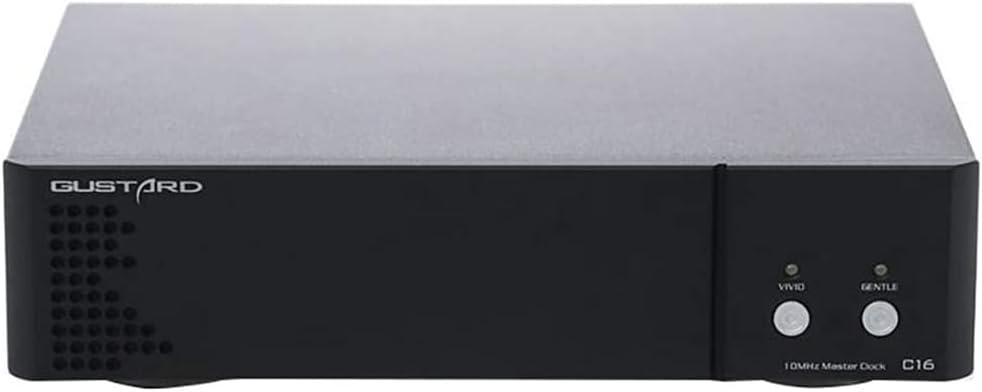
Figura 4.1: Quddiem view of the Gustard C16 unit, showing the 'Vivid' and 'Gentle' buttons and indicator LEDs.
- Vivid Button/LED: Activates/deactivates the 'Vivid' output mode. The LED indicates the status.
- Gentle Button/LED: Activates/deactivates the 'Gentle' output mode. The LED indicates the status.
4.2 Panel ta' wara Overview

Figura 4.2: Wara view of the Gustard C16 unit, showing power input, power switch, and BNC output connectors.
- Input tal-Enerġija AC: Connect the provided AC power cable here. Supports 115V/230V AC.
- Swiċċ tal-Enerġija: Toggles the unit's power on or off.
- 50 Ohm Isolated Output (Gentle): Three BNC connectors for 'Gentle' mode clock output.
- 50 Ohm Direct Output (Vivid): Three BNC connectors for 'Vivid' mode clock output.
4.3 Istruzzjonijiet ta' Konnessjoni
- Pjazzament: Place the C16 unit on a stable, level surface, ensuring adequate ventilation. Avoid placing it near heat sources or in direct sunlight.
- Konnessjoni tal-Enerġija: Connect the AC power cable to the AC power input on the rear panel of the C16, then plug it into a suitable wall outlet. Ensure the power switch is in the 'Off' position before connecting.
- Clock Output Connection: Use high-quality 50 Ohm BNC cables to connect the C16's output ports to the 10MHz clock input ports of your compatible audio devices (e.g., DACs, streamers).
- For 'Vivid' output, connect to the "50 Ohm Direct Output" BNC ports.
- For 'Gentle' output, connect to the "50 Ohm Isolated Output" BNC ports.
5. Istruzzjonijiet Operattivi
- Qawwa Mixgħul: Flip the power switch on the rear panel to the 'On' position.
- Perjodu ta' Tisħon: Upon initial power-on, the dual LEDs on the front panel will flash for approximately fifteen minutes. During this warm-up period, all clock output ports on the rear panel will not provide an output. This allows the OCXO to stabilize for optimal performance.
- Operation After Warm-up: After the 15-minute warm-up, the dual LEDs will remain steadily lit, indicating that all clock outputs are automatically enabled and stable.
- Bypassing Warm-up (Immediate Output): If immediate output is required during the warm-up period, press either the 'Vivid' or 'Gentle' button on the front panel. This will activate the corresponding output mode and bypass the remaining warm-up time.
- Selecting Output Mode: Press the 'Vivid' button to enable the direct output mode, or the 'Gentle' button to enable the isolated output mode. The corresponding LED will illuminate to indicate the active mode. The 'Vivid' mode is generally recommended for most applications.
- Itfi: To turn off the unit, flip the power switch on the rear panel to the 'Off' position.
6. Manutenzjoni
- Tindif: Uża drapp artab u niexef biex tnaddaf il-barra tal-unità. Tużax prodotti tat-tindif likwidi jew materjali li joborxu.
- Ventilazzjoni: Ensure that the ventilation holes are not obstructed to prevent overheating.
- Ħażna: Jekk se taħżen l-unità għal perjodu estiż, skonnettjaha mill-provvista tal-enerġija u aħżenha f'post frisk u niexef.
- L-ebda Partijiet li jistgħu jservu mill-utent: The C16 contains no user-serviceable parts. Do not attempt to open the casing, as this may void your warranty and could result in electric shock.
7 Issolvi l-problemi
| Problema | Kawża Possibbli | Soluzzjoni |
|---|---|---|
| L-unità ma tixgħelx. | Power cable not connected or loose. No power from outlet. | Check power cable connection. Verify outlet has power. Ensure rear power switch is 'On'. |
| No clock output after power on. | Unit is in warm-up period. Output mode not selected. | Wait 15 minutes for warm-up (LEDs flashing). Press 'Vivid' or 'Gentle' button to activate output immediately. Ensure BNC cables are securely connected. |
| LEDs flashing continuously after 15 minutes. | Indicates an internal issue or failure to stabilize. | Power cycle the unit. If the issue persists, contact customer support. |
| Audio quality issues when using C16. | Incorrect BNC cable impedance (should be 50 Ohm). Incompatible receiving device. | Ensure all BNC cables are 50 Ohm. Verify your audio device is compatible with a 10MHz square wave clock input. Try switching between 'Vivid' and 'Gentle' modes. |
8. Speċifikazzjonijiet
| Frekwenza tal-ħruġ | 10 MHz |
| Output Waveform | Mewġa Pjazza |
| Output Ampil-lititudni | 7dBm @ 50 Ohm |
| Portijiet tal-ħruġ | 6 x BNC (3 x Direct, 3 x Isolated) |
| Provvista tal-Enerġija | AC 115V/230V, 50/60Hz |
| Konsum tal-Enerġija | <15W |
| Dimensjonijiet (W x H x D) | 220mm x 50mm x 170mm (excluding protruding parts) |
| Piż | 2.5 Kg (including packaging) |
| Tip ta' oxxillatur | SC-cut OCXO |

Figura 8.1: Dettaljat view of the C16's internal components, including the SC-cut OCXO and toroidal transformer.
9. Garanzija u Appoġġ
For warranty information and technical support, please refer to the policies provided by your retailer or the official Gustard distributor. General support may include:
- Online customer service.
- Return policies (e.g., 30-day return).
- Repair periods (e.g., one-year free repair).
For specific inquiries, please contact the vendor from whom you purchased the product or visit the official Gustard websit.


