1. Prodott Aktarview
The Picun S9 Neckband Bluetooth Headphones are designed for wireless audio playback and hands-free communication. They feature a neckband design, in-ear earbuds, and Bluetooth 5.0 connectivity.

Image 1.1: Picun S9 Neckband Bluetooth Headphones (Rose Gold color variant).
2. Kontenut tal-Pakkett
Ivverifika li l-oġġetti kollha huma preżenti fil-pakkett:
- Picun S9 Bluetooth Earbuds
- Cable tal-Iċċarġjar tal-USB
- Manwal għall-Utent
- Ear Caps (various sizes)
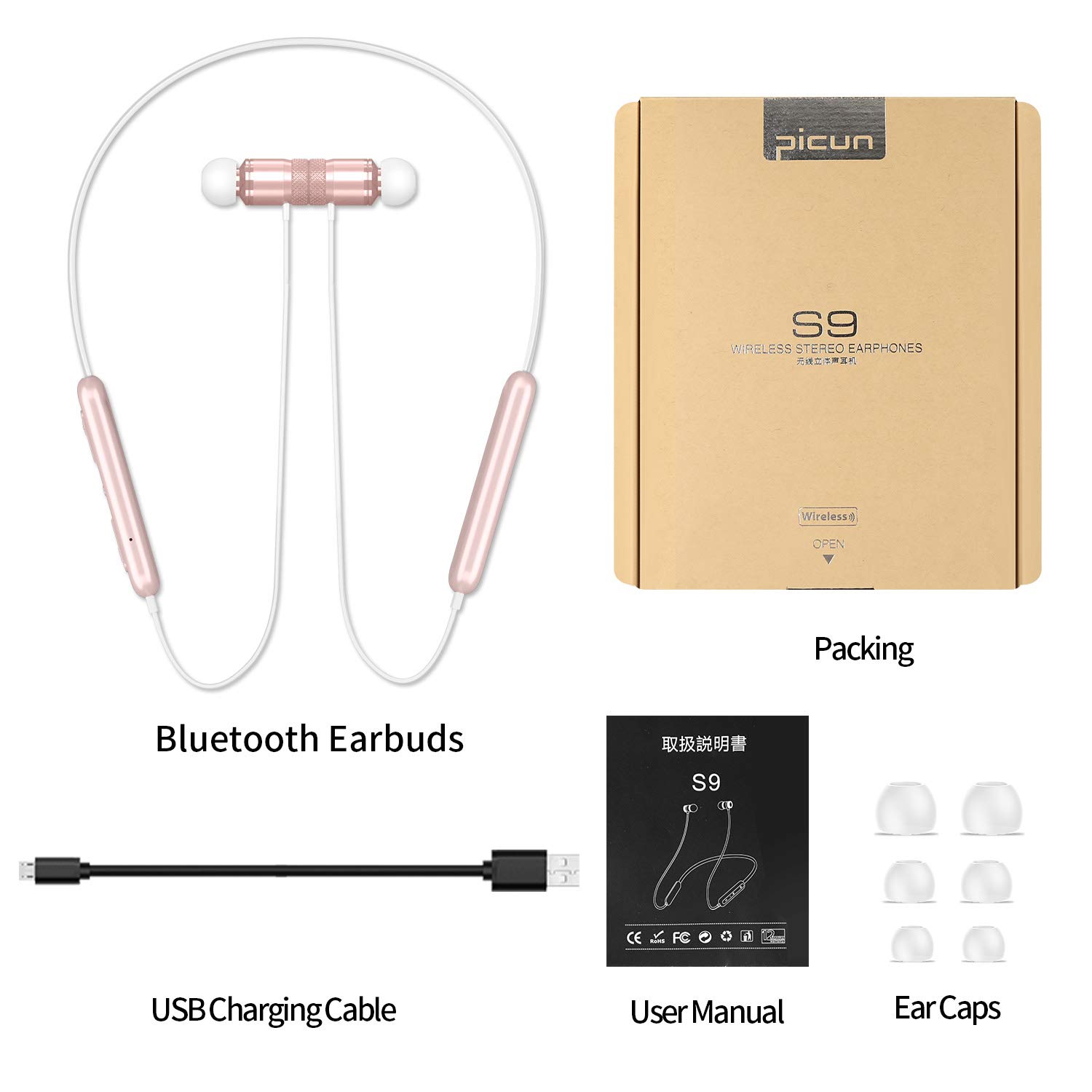
Image 2.1: Contents of the Picun S9 headphone package, including the headphones, charging cable, user manual, and ear caps.
3. Karatteristiċi tal-prodott
The Picun S9 headphones incorporate several design elements for audio quality and user comfort.
3.1 Graphene Diaphragm
The earbuds utilize a Graphene diaphragm for audio reproduction.

Immaġni 3.1: Splodiet view illustrating the internal components of the earbud, highlighting the Graphene diaphragm.
4. Setup
4.1 Iċċarġjar tal-Headphones
Before first use, fully charge the headphones. Connect the provided USB charging cable to the charging port on the control panel and to a USB power source.
- Ċarġ sħiħ jipprovdi sa 20 siegħa ta' ħin ta' daqq.
- A 10-minute charge can provide approximately 1 hour of playtime.

Image 4.1: The headphones connected to a smartphone, indicating up to 20 hours of playtime.
4.2 Tqabbil tal-Bluetooth
The headphones use Bluetooth 5.0 for a stable wireless connection.
- Kun żgur li l-headphones huma ċċarġjati.
- Press and hold the Multifunction Button (MFB) for 2-3 seconds to power on the headphones. The LED indicator light will flash, indicating pairing mode.
- Fuq l-apparat tiegħek (smartphone, tablet, eċċ.), attiva l-Bluetooth u fittex apparati disponibbli.
- Select "Picun S9" from the list of found devices.
- Once connected, the LED indicator will stop flashing or show a steady light (refer to LED indicator section for details).

Image 4.2: Close-up of an earbud, highlighting the Bluetooth 5.0 technology for stable transmission.
5. Istruzzjonijiet Operattivi
5.1 Funzjonijiet tal-Panew tal-Kontroll
The control panel on the neckband allows for managing music playback and calls.

Image 5.1: Detailed diagram of the control panel, showing button layout and corresponding functions.
| Buttuna / Karatteristika | Funzjoni |
|---|---|
| MFB (Butuna Multifunzjonali) | Long press for 2-3s: Power On/Off Agħfas qasir: Daqq/Pawża l-mużika Short press: Answer/Hang up call |
| Vol + / Track Li jmiss | Short press: Increase Volume Long press: Next Track |
| Vol - / Previous Track | Short press: Decrease Volume Pressa twila: Track Preċedenti |
| Mikrofonu | Built-in for calls |
| Dawl Indikatur LED | Indicates power, pairing status, and charging status |
| Port tal-Iċċarġjar tal-USB | Għall-iċċarġjar tal-apparat |
| Swiċċ tal-Lingwa | When powered on without pairing, double press Vol + |
5.2 L-Ilbies tal-Headphones
Place the neckband around your neck and insert the earbuds into your ears. The headphones are designed with earwings and ear covers for a secure and comfortable fit. The earbuds feature magnets to prevent tangling when not in use.

Image 5.2: Illustration showing the magnetic function of the earbuds, allowing them to connect for secure storage around the neck.
6. Manutenzjoni
6.1 Tindif
Imsaħ il-headphones b'ċarruta ratba u niexfa. Evita li tuża kimiċi ħarxa jew materjali li joborxu.
6.2 Reżistenza għall-Ilma
The headphones are rated IPX5, providing protection against sweat and light rain. They are suitable for exercise and various weather conditions but should not be submerged in water.

Image 6.1: Close-up of an earbud with water droplets, demonstrating its IPX5 sweatproof capability.
7 Issolvi l-problemi
If you encounter issues with your Picun S9 headphones, refer to the following common solutions:
- Ebda Qawwa: Ensure the headphones are fully charged. Connect them to a power source and check the LED indicator.
- Ma tistax tqabbad:
- Ensure the headphones are in pairing mode (LED flashing).
- Itfi u ixgħel il-Bluetooth tat-tagħmir tiegħek.
- Mexxi l-headphones eqreb lejn l-apparat tiegħek.
- Neħħi l-konnessjonijiet Bluetooth preċedenti fuq l-apparat tiegħek.
- Ebda Ħoss/Volum Baxx:
- Iċċekkja l-livelli tal-volum kemm fuq il-headphones kif ukoll fuq l-apparat konness tiegħek.
- Kun żgur li l-headphones huma mqabbdin u konnessi sew.
- Try re-pairing the headphones.
- Kwistjonijiet ta' Kwalità tas-Sejħiet:
- Kun żgur li l-mikrofonu mhux ostakolat.
- Mexxi lejn żona b'inqas storbju ambjentali.
- Check the Bluetooth connection stability.
8. Speċifikazzjonijiet
Technical specifications for the Picun S9 Neckband Bluetooth Headphones:
| Karatteristika | Speċifikazzjoni |
|---|---|
| Isem tal-Mudell | S9 |
| Brand | Picun |
| Teknoloġija tal-Konnettività | Bluetooth |
| Verżjoni Bluetooth | 5.0 |
| Tqegħid tal-widnejn | Fil-widnejn |
| Fattur tal-Formola | Fil-widnejn |
| Format tal-Mikrofonu | Mibnija fil- |
| Livell ta 'Reżistenza għall-Ilma | IPX5 (Reżistenti għall-Ilma) |
| Materjal | Plastik |
| Piż tal-oġġett | 120 g |
| Tip ta 'batterija | Polimeru tal-litju |
| Manifattur | Picun |
| L-Ewwel Data Disponibbli | 5 ta’ Awwissu 2019 |
9. Garanzija u Appoġġ
The Picun S9 Neckband Bluetooth Headphones come with a 10-il xahar garanzija. Additionally, a 30-day return policy is offered for any reason.
For technical support, warranty claims, or further assistance, please contact Picun customer service through their official channels or the retailer where the product was purchased.


