1. Introduzzjoni
The eKids Frozen 2 Bluetooth Karaoke Machine with Light Show is designed to provide an interactive music experience. This portable device allows users to stream audio wirelessly via Bluetooth, sing along with the included wired microphone, and expand content through a USB port. It features a multi-colored LED light show and built-in memory for storing music.
2. X'hemm fil-Kaxxa
- Bluetooth MP3 Karaoke Machine
- Mikrofonu bil-fili
- Cable tal-Iċċarġjar tal-USB
3. Karatteristiċi tal-prodott
- Konnettività Bluetooth: Connect to any compatible Bluetooth device to stream audio wirelessly.
- Mikrofonu bil-fili: Includes one real working wired microphone for singing along. An additional mic jack is available for a second microphone (sold separately).
- Plejer tal-Awdjo USB: Features a USB port to play MP3 files from a USB flash drive (not included).
- Funzjoni ta' Reġistrazzjoni: Record performances while singing along to streaming music. Requires a USB flash drive (not included).
- Multi-colored LED Light Show: Integrated light show to enhance the performance experience.
- Memorja Inkorporata: Store hours of music directly on the device.
- Batterija rikarikabbli: Portable design with a built-in rechargeable battery for on-the-go use.

Figura 1: Aktarview of the Karaoke Machine's Controls and Features.

Figure 2: Bluetooth Compatibility with various devices.
4. Setup
4.1 L-Ixgħel tal-Unità
The karaoke machine operates on a built-in rechargeable battery. Ensure the unit is fully charged before first use for optimal performance.
- Connect the supplied USB charging cable to the USB charging port on the back of the unit.
- Qabbad it-tarf l-ieħor tal-kejbil USB ma' adapter tal-enerġija USB standard (mhux inkluż) jew port USB li jaħdem bl-enerġija.
- The charging indicator will illuminate. Allow sufficient time for a full charge.
4.2 Konnessjoni tal-Mikrofonu
The wired microphone connects to the microphone jack on the unit.
- Locate the microphone jack on the side or back of the karaoke machine.
- Insert the microphone plug firmly into the jack.

Figure 3: Karaoke Machine with Microphone Connected.
5. Istruzzjonijiet Operattivi
5.1 Power On/Off
Agħfas u żomm il- Qawwa buttuna li tinsab fuq il-pannell tal-kontroll biex tixgħel jew titfi l-unità.
5.2 Tqabbil tal-Bluetooth
- Turn on the karaoke machine. The Bluetooth indicator on the display will flash, indicating it is in pairing mode.
- Fuq it-tagħmir tiegħek li jaħdem bil-Bluetooth (smartphone, tablet, eċċ.), mur fis-settings tal-Bluetooth u attiva l-Bluetooth.
- Select "eKids Frozen 2 Karaoke" (or similar name) from the list of available devices.
- Once paired, the Bluetooth indicator will stop flashing and remain solid. You can now stream audio from your device.
5.3 Playing Music via USB
- Daħħal USB flash drive li jkun fih MP3 files fil-port USB fuq l-unità.
- The unit should automatically switch to USB mode and begin playing music. If not, press the Modalità buttuna biex tagħżel il-modalità USB.
- Uża l- Play/Pawsa, Track li jmiss, u Track Preċedenti buttuni biex jikkontrollaw daqq.
5.4 Użu tal-Mikrofonu
- Ensure the microphone is securely plugged into the mic jack.
- Agħfas il- Mikrofonu ON / OFF button to activate the microphone.
- Adjust the microphone volume using the dedicated volume controls if available, or the main volume controls.
5.5 Wirja tad-Dawl
Agħfas il- Dawl mixgħul/mitfi button to activate or deactivate the multi-colored LED light show.
5.6 Recording Performances
To record your singing, a USB flash drive (not included) must be inserted into the USB port.
- Kun żgur li hemm flash drive tal-USB imdaħħal.
- Start playing your desired music (via Bluetooth or USB).
- Agħfas il- REC buttuna biex tibda tirrekordja.
- Sing into the microphone.
- Agħfas il- REC button again to stop recording. Your performance will be saved to the USB flash drive.
6. Manutenzjoni
- Naddaf l-unità b'ċarruta ratba u niexfa. Tużax prodotti tat-tindif jew solventi li joborxu.
- Żomm l-unità 'l bogħod mix-xemx diretta, minn sorsi ta' sħana, u minn umdità.
- Store the microphone in its designated compartment on the back of the unit when not in use to prevent loss or damage.
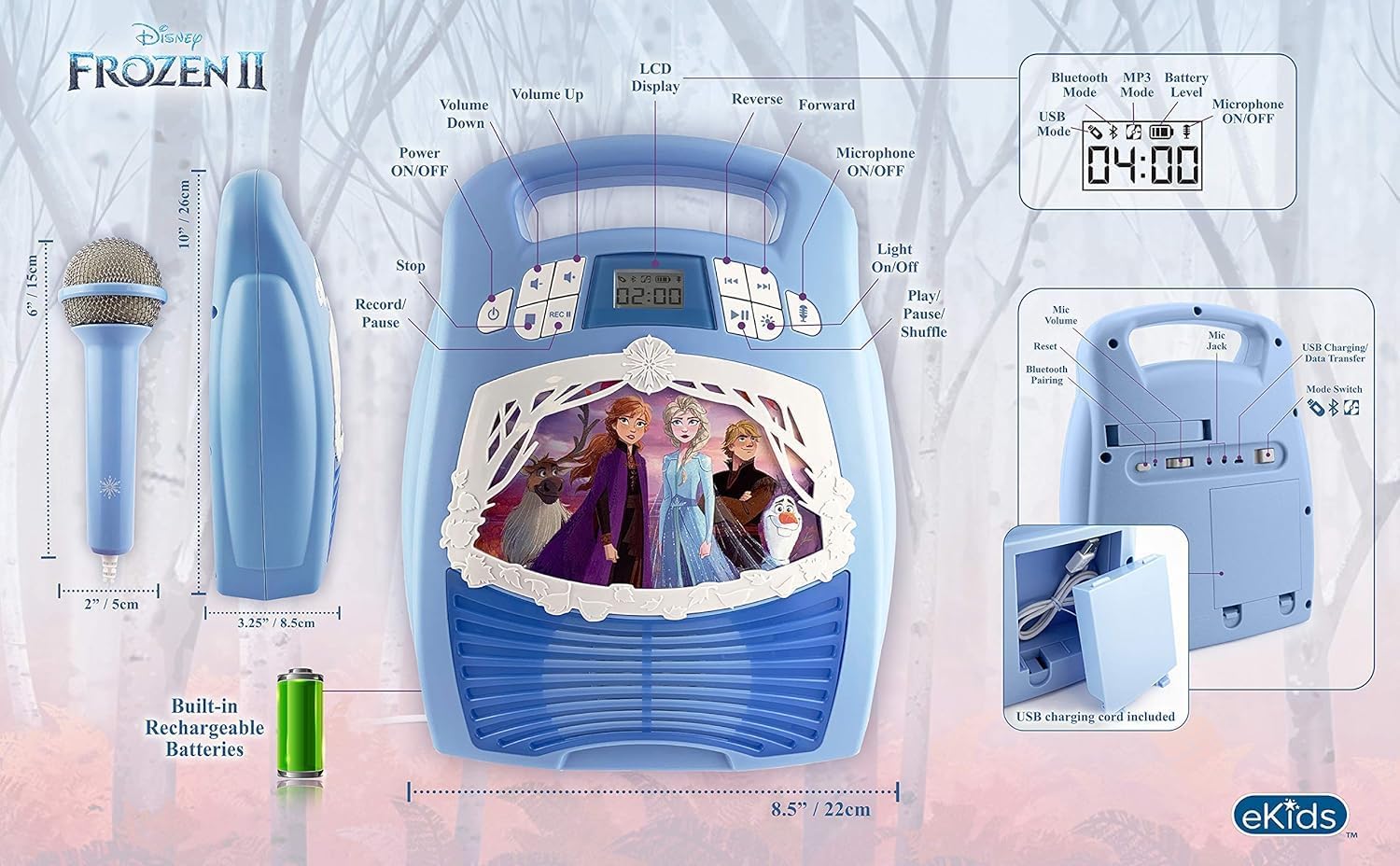
Figura 4: Wara view with microphone storage compartment.
7 Issolvi l-problemi
- Ebda Qawwa: Ensure the unit is charged. Connect the USB charging cable and allow it to charge.
- Ebda Ħsejjes: Check the volume levels on both the karaoke machine and your connected Bluetooth device. Ensure the microphone is turned on if using it.
- Bluetooth Mhux Konnessjoni: Make sure Bluetooth is enabled on your device and the karaoke machine is in pairing mode. Try restarting both devices. Ensure no other devices are currently connected to the karaoke machine.
- Mikrofonu Mhux Jaħdem: Verify the microphone is securely plugged into the correct jack and the microphone ON/OFF button is activated.
- Kwistjonijiet ta' Reġistrazzjoni: Ensure a compatible USB flash drive is inserted and has sufficient free space.
8. Speċifikazzjonijiet
| Karatteristika | Dettall |
|---|---|
| Dimensjonijiet tal-Prodott | 8 x 3 x 10 pulzieri |
| Piż tal-oġġett | 2.64 liri |
| Numru tal-Mudell | FR-553v9M |
| Età Rakkomandata | 3 - 35 xahar |
| Batteriji | 3 AA batteries required (included) - Note: Product description also mentions built-in rechargeable battery. Please refer to packaging for exact battery type. |
| Karatteristika Speċjali | Portabbli, Rikarikabbli |
| Kulur | Older Version |
| Manifattur | KIDdisinji |
9. Informazzjoni dwar is-Sigurtà
Please read and follow all safety instructions provided with the product packaging. This product is intended for use by children aged 3 and up, under adult supervision.
10. Garanzija u Appoġġ
Dan il-prodott jiġi ma 'a Garanzija Limitata ta' Sena. For warranty claims or technical support, please refer to the contact information provided in your product packaging or visit the eKids official websit.
11. Vidjo tal-Prodott
Video 1: An official product video from KIDdesigns, Inc. showcasing the eKids Frozen 2 Bluetooth Karaoke Machine with Light Show, highlighting its features and design.


