Prodott Overview
The VMAI Video Baby Monitor is designed to provide parents with peace of mind, offering clear video and audio monitoring of their child. This system includes a parent unit with a 4.3-inch LCD screen and two baby units (cameras) for comprehensive coverage. Key features include automatic night vision, two-way talk, temperature sensing, and built-in lullabies.

Figure 1: VMAI Video Baby Monitor System Components.
Gwida ta' Setup
1. Unboxing and Initial Check
Neħħi l-komponenti kollha mill-imballaġġ bir-reqqa. Kun żgur li l-oġġetti kollha elenkati hawn taħt huma preżenti:
- Unità tal-Ġenituri (Monitor)
- Baby Unit (Camera) x2
- Power Adapters x3 (one for monitor, two for cameras)
- Manwal għall-Utent
- Wall Mounting Kit (screws and anchors)

Figure 2: Package Contents of the VMAI Baby Monitor.
2. Tixgħel
- Connect one power adapter to the Parent Unit and plug it into a power outlet. The monitor will automatically turn on.
- Connect the remaining two power adapters to each Baby Unit and plug them into power outlets. The cameras will power on and automatically attempt to pair with the Parent Unit.
3. It-Tqegħid tal-Kamera
Place the Baby Unit(s) in a location that provides a clear view of your baby. Ensure the camera is at least 3 feet (1 meter) away from the baby to prevent entanglement with cords. The camera features a 360-degree manual rotation for optimal positioning.
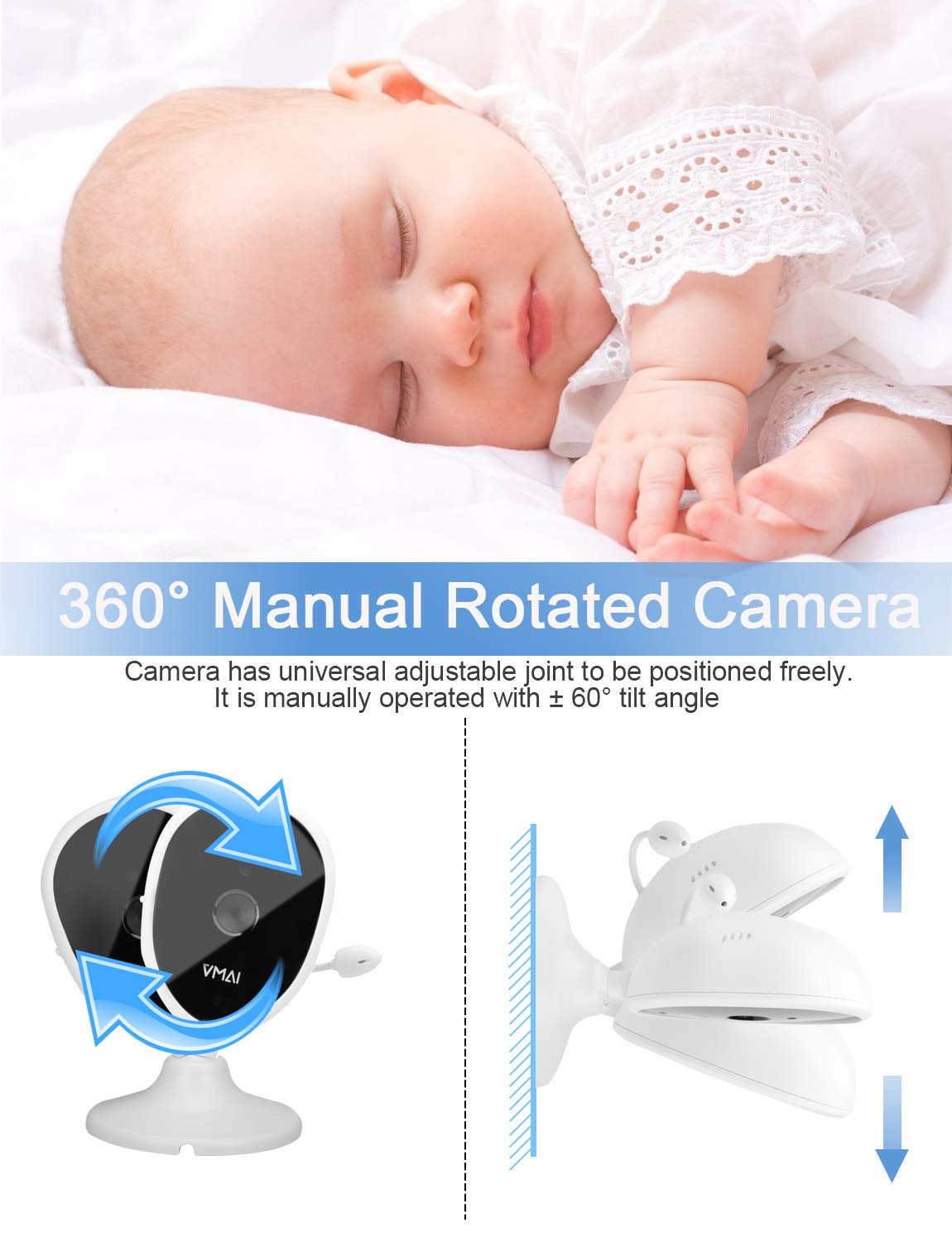
Figure 3: Manual Camera Adjustment for Optimal View.
For wall mounting, use the provided kit. Ensure the camera is securely fastened and the power cord is routed safely away from the crib or play area.
Istruzzjonijiet Operattivi
1. Parent Unit Display and Controls
The 4.3-inch LCD screen on the Parent Unit provides a clear view of your baby. Use the navigation buttons to access various functions and settings.
Vidjo 1: Overview of the VMAI Baby Monitor's features, including the 4.3-inch display, night vision, VOX mode, two-way talk, and multi-camera support.
2. Viżjoni bil-lejl
The monitor features automatic infrared night vision, providing a clear black-and-white image in low-light conditions. This ensures you can monitor your baby effectively, day or night.

Figure 4: Automatic Day and Night Vision Transition.
3. VOX Mode (Sound Detection)
VOX mode conserves battery by turning off the screen when no sound is detected. The screen will automatically turn on and alert you when your baby makes a sound, such as crying. You can adjust the sensitivity levels of this feature.

Figure 5: VOX Mode for Sound-Activated Monitoring.
4. Diskors f'Żewġ Direzzjonijiet
Press and hold the talk button on the Parent Unit to speak to your baby through the camera's speaker. Release the button to hear your baby's response.

Figure 6: Engaging in Two-Way Communication.
5. Built-in Lullabies
The monitor includes 5 built-in lullabies to help soothe your baby to sleep. Access this feature through the Parent Unit's menu.

Figure 7: Soothing Lullabies for Your Baby.
6. Monitoraġġ tat-Temperatura
The Baby Unit features a temperature sensor that displays the room temperature on the Parent Unit. You can set high and low temperature alarms to ensure your baby's comfort.
7. Multi-Camera Support
The system supports up to 4 cameras simultaneously. Use the scan mode to cycle through views from each connected camera, allowing you to monitor multiple rooms or children.

Figure 8: Monitoring Multiple Locations with Additional Cameras.
8. Range and Transmission
The monitor utilizes 2.4GHz FHSS Technology for stable and secure transmission, with an ultra-long range of up to 1000 feet in open space. An alarm will sound if the unit goes out of range.

Figure 9: Extended Range for Flexible Monitoring.
Manutenzjoni
- Tindif: Uża drapp artab u niexef biex tnaddaf il-monitor u l-unitajiet tal-kamera. Tużax prodotti tat-tindif jew solventi li joborxu.
- Kura tal-batterija: The Parent Unit has a high-capacity battery. For optimal battery life, avoid fully discharging the unit frequently. Charge it regularly.
- Ħażna: If storing the unit for an extended period, ensure it is fully charged and stored in a cool, dry place.
Issolvi l-problemi
| Problema | Kawża Possibbli | Soluzzjoni |
|---|---|---|
| No signal on Parent Unit | Camera is out of range or not powered on. | Move the Parent Unit closer to the Baby Unit. Ensure the Baby Unit is plugged in and powered on. Re-pair if necessary (refer to manual for pairing instructions). |
| Kwalità ta 'immaġni fqira | Low light conditions, interference, or camera lens is dirty. | Ensure adequate lighting or rely on night vision. Reduce interference from other 2.4GHz devices. Clean the camera lens with a soft cloth. |
| Low volume from Parent Unit | L-issettjar tal-volum huwa baxx wisq. | Increase the volume using the dedicated buttons on the Parent Unit. |
| Il-batterija tal-Unità tal-Ġenituri tixxotta malajr | VOX mode is off, screen is constantly on, or battery is aging. | Enable VOX mode to conserve battery. Reduce screen brightness. Ensure the unit is fully charged before use. Consider battery replacement if significantly degraded. |
Speċifikazzjonijiet
| Karatteristika | Dettall |
|---|---|
| Numru tal-Mudell | BMD1909 |
| Daqs tal-Iskrin | 4.3 Pulzier |
| Teknoloġija tal-Konnettività | Wireless (2.4GHz FHSS) |
| Firxa | Sa 1000 pied (spazju miftuħ) |
| Viżjoni bil-lejl | Infra-aħmar awtomatiku |
| Taħdita b'żewġ direzzjonijiet | Iva |
| Lullabies | 5 Inkorporat |
| Sensor tat-Temperatura | Yes, with alarm function |
| Appoġġ b'ħafna kameras | Sa 4-il kamera |
| Sors tal-Enerġija | Imħaddem bil-batterija (Unità tal-Ġenituri), Imħaddem bl-AC (Unitajiet tat-Trabi) |
| Piż tal-oġġett | 1.74 liri |
| Dimensjonijiet tal-Prodott | 8.27 x 3.91 x 7.7 pulzieri |
Garanzija u Appoġġ
VMAI offers a garanzija tul il-ħajja for this product. If you encounter any questions or problems, please do not hesitate to contact VMAI customer support. We are committed to providing dedicated service and will reply within 24 hours.
For support, please refer to the contact information provided in your product packaging or visit the official VMAI websit.


