1. Introduzzjoni
This manual provides comprehensive instructions for the Gvirtue Universal Replacement Remote Control, model PN-15+EL. Designed as a direct replacement for various Panasonic TV remote controls, this device offers broad compatibility and essential functions for your television viewing experience. Please read this manual carefully to ensure proper setup and operation.
2. Prodott Aktarview
The Gvirtue PN-15+EL remote control is engineered to provide a seamless replacement experience for your Panasonic TV. It features a user-friendly design with essential buttons and a learning function for advanced customization.
2.1 Karatteristiċi ewlenin
- Kompatibilità Universali: Works with a wide range of Panasonic LCD, LED, 3D, Smart, and 4K Ultra HD TV models.
- Funzjoni ta' Tagħlim: Ability to learn functions directly from your original remote control.
- Buttuni backlit: Designed for convenient use in low-light conditions.
- Disinn Ergonomiku: Lightweight and comfortable to grip, reducing the chance of slipping.
- Ebda Programmazzjoni Meħtieġa: Often works directly out of the box for basic functions.
- Rispons malajr: Stable performance with a fast response time of 0.2 seconds.
2.2 Kompatibilità
This remote is compatible with numerous Panasonic TV models and replaces many original Panasonic remote control models. A partial list of compatible TV models includes:
- TC-40AS520, TC-39AS530, TC-55AS530
- TC-42AS630, TC-50AS630, TC-60AS630
- TC-40AS520U, TC-39AS530U, TC-50AS530U, TC-55AS530U, TC-60AS530U
- TC-50AS530UE
- TC-42AS630U, TC-50AS630U, TC-60AS640U
- TC-50ASU534, TC-55LET64
- TC-32LX24, TC-42LD24, TC-42LS24
- TC-50PS24, TC-58PS24, TC-65PS24
- TC-L42ET60, TC-L47ET60, TC-L50ET60, TC-L55ET60
- TC-L32C22, TC-L22X2
- TC-L42U22, TC-L32U22, TC-L37U22, TC-L42U25
- TC-P42C2, TC-P50C2, TC-P46C2
- TC-P42U2, TC-P50U2
- TC-P42X2, TC-P50X2
- TC-P50GT50, TC-P55GT50, TC-P60GT50, TC-P65GT50
- TC-P55ST50, TC-P60ST
This remote also replaces original Panasonic remote models such as N2QAYB000100, N2QAYB000102, N2QAYB000221, N2QAYB000485, N2QAYB000779, and many others.
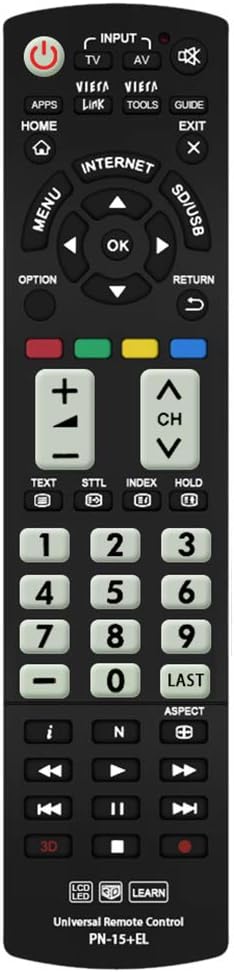
Immaġni: Quddiem view of the Gvirtue PN-15+EL Universal Replacement Remote Control.
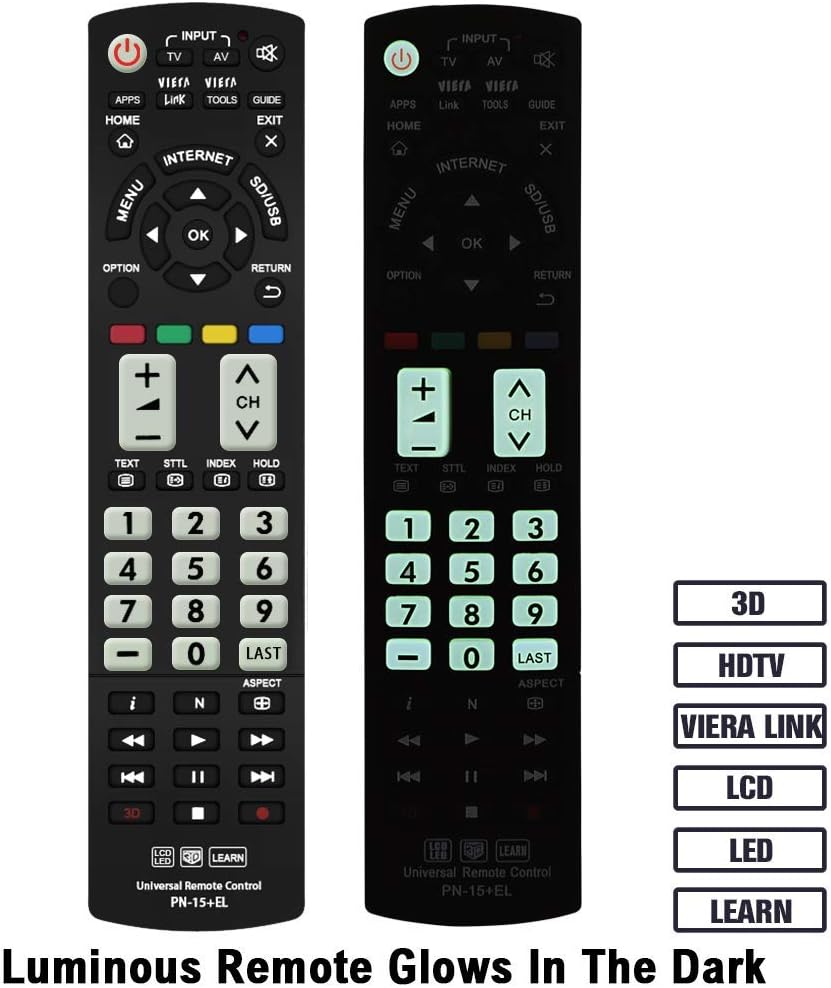
Image: The Gvirtue PN-15+EL remote control highlighting its luminous buttons for use in the dark.

Image: The Gvirtue PN-15+EL remote control shown alongside a list of compatible Panasonic TV models.
3. Setup
3.1 Installazzjoni tal-batterija
Il-kontroll remot jeħtieġ żewġ (2) batteriji AAA (mhux inklużi) biex jaħdem. Segwi dawn il-passi biex tinstalla l-batteriji:
- Sib l-għatu tal-kompartiment tal-batterija fuq wara tal-kontroll remot.
- Żerżaq l-għatu 'l isfel jew agħfas il-lukkett (jekk preżenti) biex tiftaħ il-kompartiment.
- Insert two fresh AAA batteries, ensuring the positive (+) and negative (-) terminals align correctly with the markings inside the compartment.
- Agħlaq l-għatu tal-kompartiment tal-batterija billi tiżżerżaqha lura f'postu sakemm tikklikkja sew.
Note: This remote control does not include batteries. Please purchase them separately.

Image: Illustration showing how to open the battery compartment and insert two AAA batteries into the Gvirtue PN-15+EL remote control.
3.2 Użu Inizjali
For most compatible Panasonic TV models, the Gvirtue PN-15+EL remote control is designed to work immediately after battery installation without any additional programming or pairing. Simply point the remote at your TV and test its functions.
If the remote does not function correctly out of the box, or if you wish to customize specific buttons, refer to the "Learning Function" section below.
4. Istruzzjonijiet Operattivi
This section details the functions of the buttons on your Gvirtue PN-15+EL remote control.

Image: Diagram illustrating the various function buttons on the Gvirtue PN-15+EL remote control.
4.1 Funzjonijiet tal-buttuni
- Buttuna tal-Qawwa (●): Ixgħel u jitfi t-TV.
- INPUT / TV / AV: Selects the TV input source directly.
- Link tal-VIERA: Activates Panasonic's Viera Link feature for integrated control of connected devices.
- GĦODOD: Displays frequently used functions or quick settings.
- GWIDA: Displays the Electronic Program Guide (EPG).
- DAR: Enters the TV's home menu or smart TV interface.
- ĦRUĠ: Joħroġ mill-menù jew mill-applikazzjoni kurrenti.
- MENU: Juri l-menu prinċipali fuq l-iskrin.
- GĦAŻLA: Displays available options for the current selection.
- RITORN: Jirritorna għall-menu jew l-iskrin preċedenti.
- Directional Pad (Up, Down, Left, Right) & OK: Jinnaviga fil-menus u jikkonferma l-għażliet.
- Buttuni tal-Kulur (Aħmar, Aħdar, Isfar, Blu): Tasti ta' shortcut għal funzjonijiet interattivi, ħafna drabi jiddependu mill-kuntest.
- VOL +/-: Jaġġusta l-livell tal-volum.
- CH +/-: Tibdel il-kanali.
- Siekta: Iċċekkja jew jaqleb is-sordina l-awdjo tat-TV.
- Tastiera tan-Numri (0-9): Għażla diretta tal-kanal.
- L-AĦĦAR: Jirritorna għall-qabel viewkanal ed.
- 3D: Toggles the 3D function on or off (for compatible 3D TVs).
- Media Playback Controls (Play, Pause, Stop, Rewind, Fast Forward, Skip): Controls media playback on compatible devices or TV functions.
4.2 Funzjoni tat-Tagħlim
The Gvirtue PN-15+EL remote control features a learning function, allowing you to program specific buttons to mimic functions from your original remote control. This is useful if certain advanced functions are not pre-programmed or if you want to consolidate controls.
Detailed instructions for activating and using the learning function are typically provided on a separate instruction sheet included with the product. Generally, the process involves:
- Entering a learning mode on the Gvirtue remote.
- Pointing your original remote at the Gvirtue remote.
- Pressing the desired button on the original remote, then the corresponding button on the Gvirtue remote to be programmed.
- Exiting the learning mode.
Refer to the specific learning function instructions provided with your remote for precise steps.
5. Manutenzjoni
Biex tiżgura l-lonġevità u l-prestazzjoni ottimali tal-kontroll remot tiegħek, segwi dawn il-linji gwida ta' manutenzjoni:
- Tindif: Wipe the remote control with a soft, dry cloth. Do not use abrasive cleaners, solvents, or alcohol, as these can damage the surface and buttons.
- Sostituzzjoni tal-batterija: Ibdel il-batteriji meta r-rispons tar-remote isir kajman jew jieqaf jaħdem. Dejjem ibdel iż-żewġ batteriji fl-istess ħin b'oħrajn ġodda tal-istess tip (AAA).
- Ħażna: If the remote control will not be used for an extended period, remove the batteries to prevent leakage, which can damage the device. Store in a cool, dry place.
- Evita l-Ħsara: Do not drop the remote control, expose it to extreme temperatures, or immerse it in water. Keep it away from direct sunlight and heat sources.
6 Issolvi l-problemi
If you encounter issues with your Gvirtue PN-15+EL remote control, refer to the following troubleshooting tips:
- Remote Mhux Jirrispondi:
- Iċċekkja jekk il-batteriji humiex imdaħħla sew bil-polarità korretta (+/-).
- Ibdel batteriji qodma b'batteriji AAA friski.
- Kun żgur li m'hemm l-ebda ostaklu bejn il-kontroll remot u s-senser infra-aħmar tat-TV.
- Make sure you are within the effective operating range (approximately 10 meters / 30 feet) and pointing the remote directly at the TV.
- Buttuni Speċifiċi Mhux Jaħdmu:
- If you used the learning function, try re-programming the problematic button.
- Some advanced functions might require specific TV settings or may not be supported by all Panasonic TV models.
- Remote Works Intermittently:
- Dan spiss jindika li l-batterija hija baxxa. Ibdel il-batteriji.
- Kun żgur li l-kuntatti tal-batterija huma nodfa u ħielsa mill-korrużjoni.
If the issue persists after trying these steps, please contact Gvirtue customer support for further assistance.
7. Speċifikazzjonijiet
| Mudell | PN-15+EL |
| Brand | Gvirtu |
| Materjal | ABS & Plastic |
| Teknoloġija tal-Konnettività | Infra-aħmar (IR) |
| Apparati Kompatibbli | Panasonic Televisions (LCD, LED, 3D, Smart, 4K UHD) |
| Sors tal-Enerġija | 2 x Batteriji AAA (mhux inklużi) |
| Dimensjonijiet tal-Prodott | Madwar 6 x 2 x 0.7 pulzieri (15.2 x 5.1 x 1.8 cm) |
| Piż tal-oġġett | Madwar 3.2-il uqija (90.7 gramma) |
| Karatteristiċi Speċjali | Backlit buttons, Ergonomic design, Learning function |

Image: Visual representation of the Gvirtue PN-15+EL remote control's key specifications.

Immaġni: Minn quddiem, mill-ġenb, u minn wara views of the Gvirtue PN-15+EL remote control with dimensions indicated.
8. Garanzija u Appoġġ
Gvirtue products are designed for reliability and performance. While specific warranty details may vary, please retain your proof of purchase for any warranty claims.
For technical support, troubleshooting assistance, or inquiries regarding your Gvirtue PN-15+EL remote control, please contact Gvirtue customer service through their official channels or the retailer from whom you purchased the product.
You may find additional support resources by visiting the Gvirtue Store on Amazon.


