1. Introduzzjoni
The Alpine X308U Mech-Less Navigation Receiver is designed to provide advanced smartphone integration and a reliable built-in navigation system for your vehicle. This manual provides essential information for the proper installation, operation, and maintenance of your device.
Karatteristiċi ewlenin:
- 8-inch WVGA High-Resolution Capacitive Touch Display
- Compatibility with Apple CarPlay and Android Auto
- Embedded Navigation with 3D & 2D mapping and Pinch-to-Zoom interface
- Bluetooth hands-free calling and audio streaming
- Built-In HD Radio Tuner and SiriusXM Satellite Radio readiness
- Multiple connectivity options including HDMI input/output and USB
- Advanced audio tuning features: 9-band parametric EQ and 6-channel time correction
- Support for FLAC, AAC, MP3, WMA, HE-AC Playback
- Accessory Control Ready (KAC-001 Required) and iDatalink Maestro Module compatibility
2. Prodott Aktarview

Figura 2.1: Quddiem View with Navigation Display. This image shows the Alpine X308U unit with its 8-inch high-resolution capacitive touch display active, presenting a detailed 3D navigation map. The screen displays street names, distances, and navigation icons, demonstrating the unit's integrated GPS capabilities. Control buttons are visible along the bottom edge of the screen.

Figura 2.2: Quddiem View with Media Interface. This image illustrates the Alpine X308U's user interface for media playback and radio tuning. The display shows current FM radio frequency (105.8 MHz), preset stations, and options for HDMI, Music, Pandora, and Bluetooth Audio. Album art and song information are also visible, highlighting the unit's multimedia capabilities.

Figure 2.3: Audio Settings Interface. This image displays the "BASS ENGINE SQ" audio adjustment screen on the Alpine X308U. Users can select from various sound presets like Standard, Punch, Rich, Mid Bass, and Low Bass, and adjust levels for Bass Engine, Navi Audio, and Back Audio. This interface demonstrates the unit's comprehensive audio customization options.

Figura 2.4: Konnessjonijiet tal-Panel ta' Wara. Din l-immaġni tipprovdi deskrizzjoni dettaljata view of the rear panel of the Alpine X308U, highlighting its various input and output ports. Visible connections include GPS antenna input, USB ports, HDMI In, HDMI Out, and the main wiring harness connector. A cooling fan is also visible on the left side, indicating thermal management features.
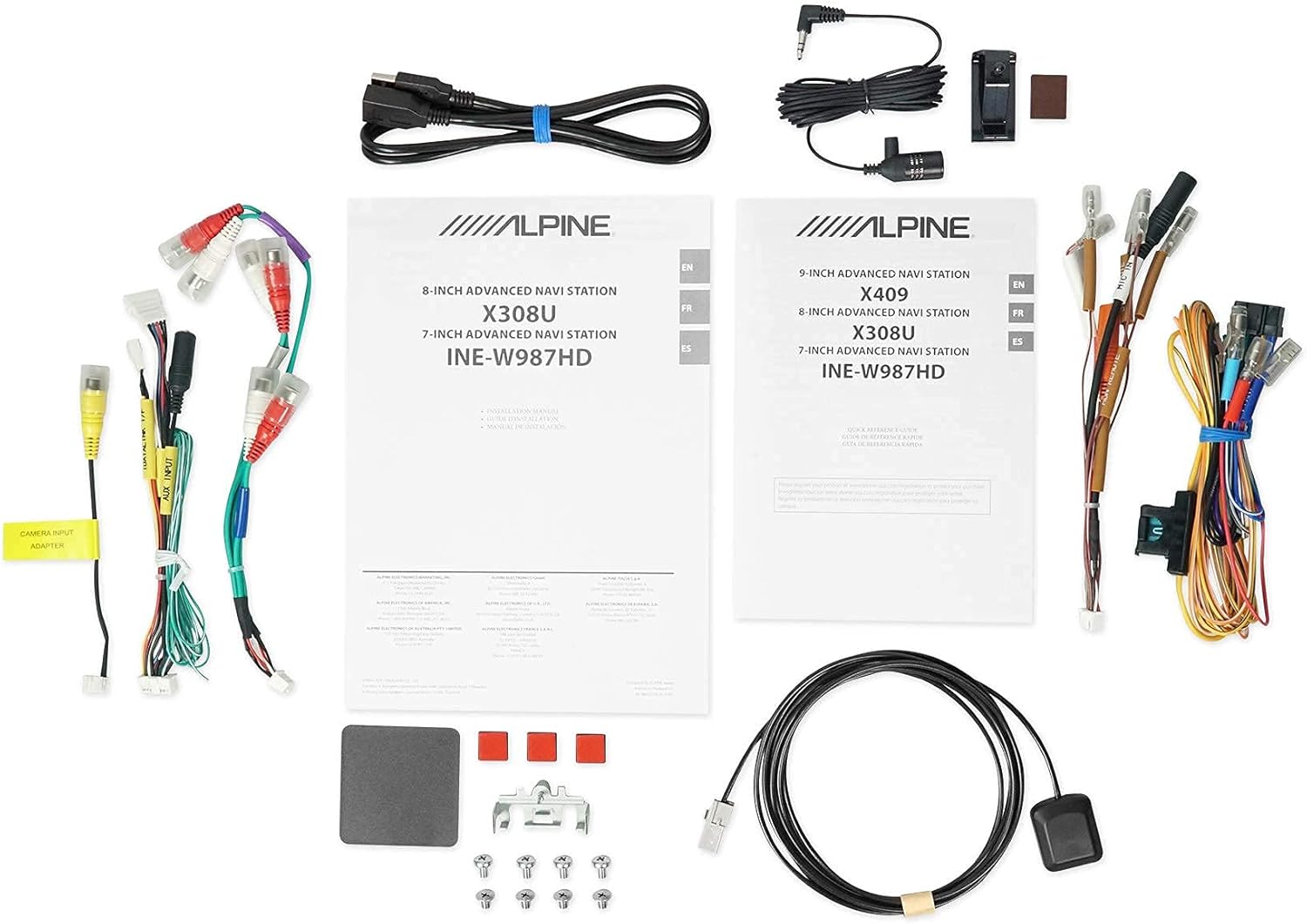
Figura 2.5: Komponenti Inklużi. This image displays a selection of cables and accessories that come with the Alpine X308U unit. These include various wiring harnesses, RCA cables for audio/video connections, a USB extension cable, and a GPS antenna. These components are essential for the proper installation and functionality of the receiver.
3. Setup u Installazzjoni
Proper installation is crucial for the optimal performance of your Alpine X308U. It is highly recommended that installation be performed by a qualified professional car audio installer.
3.1. Lista ta' Kontroll ta' Qabel l-Installazzjoni:
- Kun żgur li l-komponenti kollha elenkati fit-taqsima "X'hemm fil-Kaxxa" huma preżenti.
- Skonnettja t-terminal negattiv tal-batterija tal-vettura qabel tibda kwalunkwe xogħol elettriku.
- Review your vehicle's specific wiring diagrams and dash disassembly instructions.
3.2. Konnessjonijiet tal-Wiring:
Connect the main wiring harness to the vehicle's power, ground, and speaker wires. Utilize the provided connectors for a secure fit. Refer to the wiring diagram included with your unit for specific color codes and pin assignments.
- Konnessjonijiet tal-Enerġija: Connect the yellow wire (constant 12V), red wire (switched 12V), and black wire (ground).
- Riżultati tal-Ispeaker: Qabbad il-wajers tal-ispiker mal-ispikers tal-vettura korrispondenti. Kun żgur li l-polarità hija korretta.
- Input/Output HDMI: Use the HDMI ports for connecting external video sources or outputting video to a rear entertainment system. Note that HDMI output functionality may be limited to specific Alpine accessories.
- Input USB: Connect USB devices for media playback or smartphone integration (CarPlay/Android Auto).
- Input tal-Kamera: Connect a rear-view camera to the dedicated input for enhanced safety. The unit supports up to 3 cameras with the optional KCX-C250MC Multi-camera selector.
- qabelamp Outputs: Utilize the 6-channel pre-amp outputs għall-konnessjoni esterna ampliifikaturi.
- Antenna tal-GPS: Immonta l-antenna tal-GPS f'post b'dawl ċar view of the sky for optimal navigation performance.
3.3. Immuntar tal-Unità:
Securely mount the X308U in your vehicle's dashboard using the provided mounting hardware. Ensure adequate ventilation around the unit to prevent overheating.
4. Istruzzjonijiet Operattivi
4.1. Operazzjoni Bażika:
- Power On/Off: Press and hold the power button (usually located on the front panel) to turn the unit on or off.
- Kontroll tal-Volum: Adjust volume using the dedicated volume buttons or on-screen controls.
- Interface touchscreen: Navigate through menus and select functions by tapping icons on the capacitive touch display. The unit supports 4-Way Swipe Action Control.
- Buttuna tal-menu: Access the main menu to switch between different sources and settings.
4.2. Sistema ta' Navigazzjoni:
- Aċċess għan-Navigazzjoni: Tap the "Navigation" icon on the main menu.
- Dħul ta' Destinazzjonijiet: Use the on-screen keyboard to input addresses, points of interest, or select from recent destinations.
- Mappa View: Switch between 2D and 3D map views. Use pinch-to-zoom gestures to adjust the map scale.
- Gwida tal-Vuċi: Follow spoken turn-by-turn directions for guidance.
4.3. Smartphone Integration (CarPlay & Android Auto):
- Connecting Your Smartphone: Connect your compatible iPhone or Android phone to the unit's USB port using a certified USB cable.
- Activating CarPlay/Android Auto: Once connected, the respective interface will automatically launch or prompt you to activate it on the screen.
- Uża l-Apps: Access supported navigation, music, messaging, and communication apps directly from the unit's display.
4.4. Bluetooth Functions:
- Tqabbil ta' Apparat: Go to the Bluetooth settings menu, enable pairing mode on the X308U, and search for the unit on your smartphone. Select "Alpine X308U" and confirm the pairing code.
- Sejħat mingħajr idejn: Make and receive calls directly through the unit's microphone and vehicle speakers.
- Streaming tal-Awdjo: Stream music wirelessly from your paired smartphone.
4.5. Settings tal-awdjo:
- Equalizer: Access the 9-band parametric EQ to fine-tune audio frequencies.
- Korrezzjoni tal-Ħin: Adjust the sound stage for optimal listening position using the 6-channel time correction feature.
- TuneIt App: For advanced audio tuning and sharing settings, download and use the Alpine TuneIt App on your smartphone.
5. Manutenzjoni
Regular maintenance ensures the longevity and optimal performance of your Alpine X308U.
- Tindif tal-iskrin: Use a soft, lint-free cloth specifically designed for electronic screens to gently wipe the display. Do not use abrasive cleaners or solvents.
- Tindif Ġenerali: Keep the unit free from dust and debris. Use a soft, dry cloth to wipe the exterior.
- Aġġornamenti tas-Software: Iċċekkja l-Alpine perjodikament website for firmware updates to ensure your unit has the latest features and bug fixes. Follow the instructions provided with the update carefully.
- Kundizzjonijiet Ambjentali: Evita li tesponi l-unità għal temperaturi estremi, dawl tax-xemx dirett għal perjodi twal, jew umdità eċċessiva.
6 Issolvi l-problemi
If you encounter issues with your Alpine X308U, refer to the following common troubleshooting steps before contacting support.
| Problema | Kawża Possibbli | Soluzzjoni |
|---|---|---|
| Ebda enerġija/L-unità ma tixgħelx. | Konnessjoni tal-enerġija maħlula, fjus maħruq, problema bil-batterija tal-vettura. | Check all power wiring connections. Inspect and replace any blown fuses. Ensure vehicle battery is charged. |
| L-ebda ħoss mill-kelliema. | Speaker wires disconnected, incorrect audio settings, unit in mute mode. | Verify speaker wire connections. Check audio settings (e.g., fader/balance, EQ). Ensure unit is not muted. |
| Navigation not working or inaccurate. | GPS antenna not properly connected or obstructed, outdated map data. | Kun żgur li l-antenna tal-GPS hija konnessa sew u għandha viżibilità ċara view of the sky. Check for available map updates. |
| L-apparat Bluetooth mhux qed jingħaqad. | Device not in pairing mode, incorrect pairing procedure, interference. | Kun żgur li ż-żewġ apparati jinsabu fil-modalità ta' tqabbil. Ħassar il-tqabbil preċedenti u erġa' pprova. Ersaq eqreb lejn l-unità. |
| Touchscreen ma jirrispondix. | Temporary software glitch, screen calibration needed. | Perform a soft reset (refer to manual for specific method). If issue persists, contact support. |
7. Speċifikazzjonijiet
| Karatteristika | Dettall |
|---|---|
| Numru tal-Mudell | X308U |
| Daqs tal-Iskrin | 8 Pulzier (21 ċm djagonali) |
| Tip ta 'Wiri | WVGA High-Resolution Capacitive Touch Display |
| Output ta 'Qawwa Max | 50 Watts x 4 channels |
| CTA-2006 Power Rating | 18 Watts x 4 channels |
| qabelamp Outputs | 3 (4-Volt) |
| Teknoloġija tal-Konnettività | Bluetooth, USB, HDMI |
| Tip ta' Mappa | Satellite, North America (Built-in 3D & 2D Navigation) |
| Dimensjonijiet tal-Prodott | 12 x 12 x 12 pulzieri |
| Piż tal-oġġett | 6.4 liri |
| Komponenti Inklużi | HDMI input, USB input, composite A/V input, rear-view camera input, HDMI output, 6-channel preamp outputs, USB source |
8. Garanzija u Appoġġ
This product is covered by a manufacturer's warranty. Please refer to the warranty card included with your purchase for specific terms and conditions, including warranty period and coverage details.
Appoġġ għall-Klijent:
For technical assistance, troubleshooting beyond this manual, or warranty claims, please contact Alpine customer support. Visit the official Alpine webis-sit għall-aktar informazzjoni ta' kuntatt u riżorsi ta' appoġġ aġġornati.
Nota: Żomm il-prova tax-xiri tiegħek għall-validazzjoni tal-garanzija.


