1. Setup u Installazzjoni
Din it-taqsima tipprovdi overview of the components and general installation guidance. Professional installation is recommended for optimal performance and safety.
1.1 Lista ta' Kontroll tal-Komponenti
Kun żgur li l-komponenti kollha huma preżenti qabel tibda l-installazzjoni:
- Modulu Prinċipali tal-Kontroll
- Remote Key Fobs (2)
- Imbotta l-buttuna Start
- Ċineg tal-Wajers
- PKE Antennas
- Antenna ta' Allarm
- Relay
- Irrisettja Swiċċ

Immaġni: Fuqview of the GIORDON MP913 remote starter kit components, including the main module, two remote key fobs, the push start button, and various wiring harnesses and antennas.
1.2 Konsiderazzjonijiet ta' qabel l-Installazzjoni
- Verify compatibility with your vehicle's DC12V system.
- If your car has an original remote start button, it must be removed and replaced with the provided push start button.
- Vehicles with a keyhole ignition that cannot be fully removed may not be compatible.
- A bypass module may be required for vehicles with immobilizer systems. Consult a professional installer.
1.3 Wiring and Module Programming
Installation involves connecting various wiring harnesses to the vehicle's electrical system and programming the control module. Detailed wiring diagrams are typically provided in the full installation guide. The following videos offer general guidance on module programming and antenna installation, which are crucial steps for proper system function.
Video: Idatalink BLADE Remote Start/Security Bypass Module Flashing. This video demonstrates the process of flashing and updating a bypass module, a common step in remote starter installations.
Video: PKE antenna installation. This video illustrates the proper placement and installation of PKE antennas for optimal keyless entry functionality.
Video: How To Install The KR-RS-FL8. This video provides a quick installation guide for a plug-in remote start system, demonstrating key connection points.
2. Istruzzjonijiet Operattivi
2.1 Bidu mill-bogħod tal-Magna
The system allows for remote engine starting to pre-warm or pre-cool your vehicle's interior. This function can be activated via the remote key fob or the dedicated smartphone application.
- Automatic Transmission Vehicles: With the car in 'P' or 'N' position and the hand-brake engaged, press the start button on the remote for 2 seconds. The LED on the transmitter will flash slowly. The remote start function is activated after shutting down the engine and locking the car.
- Manual Transmission Vehicles: Step on the foot brake, then long-press the third and fourth buttons on the key fob simultaneously for 4 seconds.
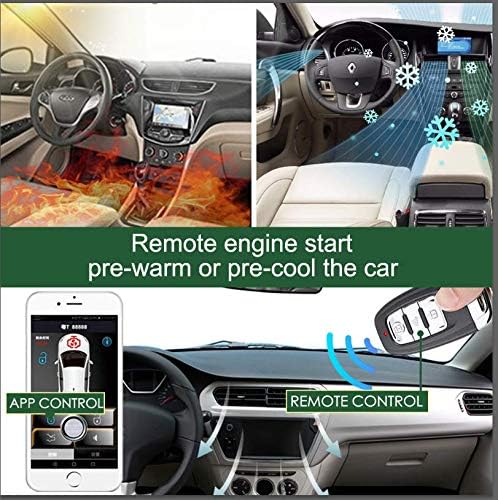
Image: Illustration of remote engine start functionality, showing a car being pre-warmed or pre-cooled using either a remote control or a smartphone application.
Video: Functions of PKE and remote start. This video demonstrates the passive keyless entry and remote start features of the system.
Video: Warm Up & Cool Down with Compustar Long-Range Remote Starters. This video highlights the convenience of remote starting to adjust cabin temperature before entering the vehicle.
Video: PKE & remote start video for EASYGUARD EC003 series PKE remote starter. This video showcases the passive keyless entry and remote start functions.
2.2 Passive Keyless Entry (PKE)
The PKE feature automatically locks or unlocks your vehicle as you approach or walk away, provided the remote key fob or smartphone with the app is within range.

Image: Depiction of the 4-way keyless entry system, illustrating how the car automatically locks/unlocks when the remote key or smartphone app is within proximity.
2.3 Push Button Start/Stop
Once inside the vehicle, the engine can be started or stopped with a simple press of the button.
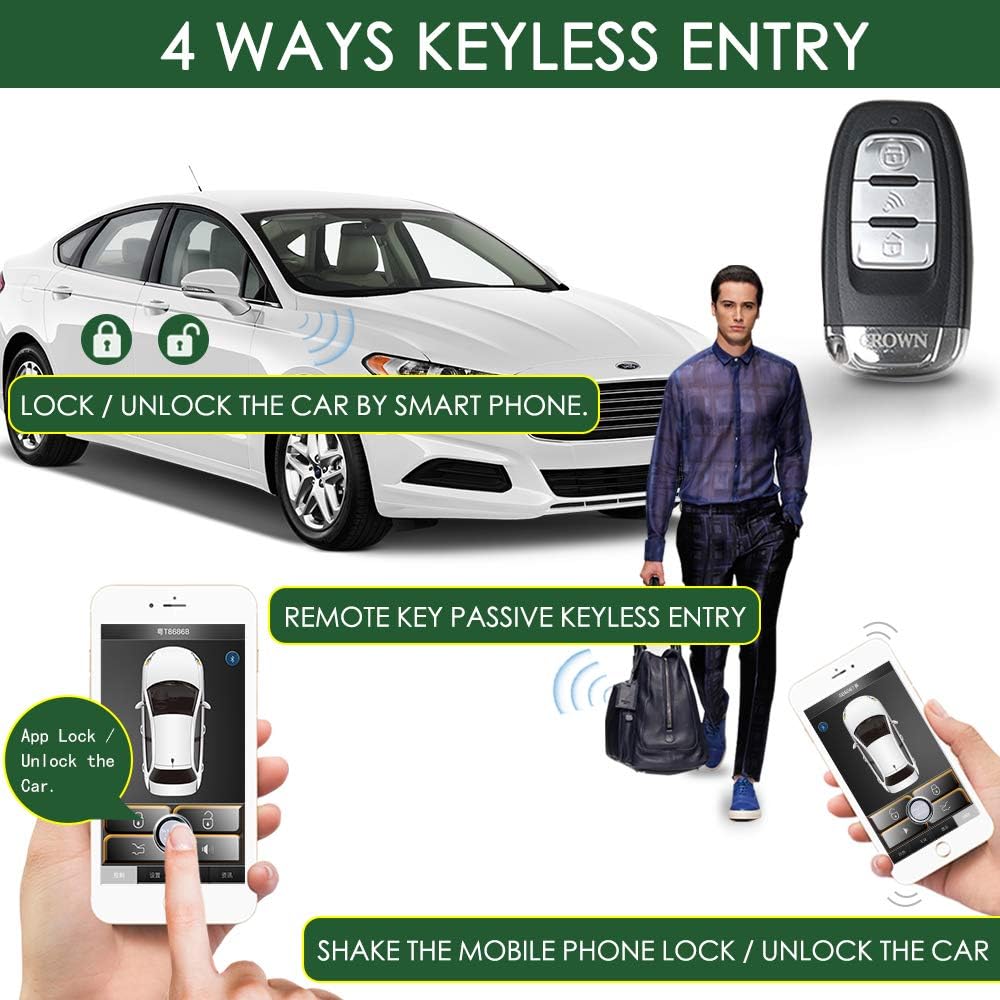
Image: Close-up of the engine start/stop push button in a vehicle's dashboard. Important notices regarding compatibility and replacement of original buttons are also shown.
2.4 App Control
The dedicated smartphone application (compatible with Android and iOS) provides additional control over your vehicle's functions, including remote engine start, lock/unlock, trunk release, and car locator.

Image: Introduction to the main page of the smartphone application, showing the interface for both Apple and Android devices with controls for remote start, lock, unlock, trunk release, and car locator.

Image: Features of the intelligent central control system, including app car locator and universal fit for various car types. It also highlights safety for children by preventing accidental door opening.
Video: Bluetooth Mobile Phone APP Control Car Alarm Start Stop Kit. This video demonstrates the use of a smartphone app to control car alarm functions, including start and stop.
3. Manutenzjoni
3.1 Kura Ġenerali
To ensure the longevity and proper functioning of your remote starter kit, follow these general care guidelines:
- Keep the main control module and remote key fobs dry and away from extreme temperatures.
- Avoid dropping the remote key fobs or subjecting them to strong impacts.
- Clean the components with a soft, dry cloth. Do not use harsh chemicals or abrasive cleaners.
3.2 Remote Key Fob Battery Replacement
If the range or responsiveness of your remote key fob decreases, the battery may need replacement. Refer to the detailed product manual for specific battery type and replacement instructions.
4 Issolvi l-problemi
This section addresses common issues you might encounter with the GIORDON MP913 remote starter kit.
4.1 Kwistjonijiet Komuni u Soluzzjonijiet
- Engine does not start with key:
- For automatic cars: Ensure the gear is in 'P' or 'N' and the hand-brake is engaged. Press the start button for 2 seconds. The remote start function activates after engine shutdown and car lock.
- For manual cars: Step on the foot brake, then long-press the third and fourth buttons on the key fob simultaneously for 4 seconds.
- Cannot lock/unlock the car:
- Check the brake wire connection. The yellow brake line should not light up with a test pencil unless the foot brake is pressed. If it lights up directly, it is not the correct wire.
- App shows 'Please scanning again':
- Ensure location information is enabled for the app. Navigate to Settings > Application Management > Application Permissions > Find the Crown app > Open location information. Then, relaunch the app.
- Bypass for starter function:
- If your car has an immobilizer, after inserting the key into the igniter, keep the metal part of the key inserted and saw off the key. Bind the chip part of the non-metal part with the anti-theft coil.
5. Speċifikazzjonijiet
| Karatteristika | Dettall |
|---|---|
| Piż tal-oġġett | 1.3 liri |
| Dimensjonijiet tal-Pakkett | 9.06 x 6.61 x 1.77 pulzieri |
| Remote bla fili | Iva |
| Apparati Kompatibbli | Compact, Sedan, Coupe, SUV, Pick-up Truck |
| Medda Massimu | 150 Meters |
| Kontroll mill-bogħod Inkluż? | Iva |
| Manifattur | GIORDON |
6. Garanzija u Appoġġ
For specific warranty details, please refer to the product packaging or contact GIORDON customer support directly. For technical assistance or further inquiries, please reach out to the manufacturer's support channels.


