1. Introduzzjoni
This manual provides essential information for the safe and efficient operation of your TCL 55P8 55-inch AI 4K UHD Android Smart LED TV. Please read it thoroughly before using the product and retain it for future reference. This television combines advanced display technology with smart features for an enhanced viewing esperjenza.

Stampa 1.1: Quddiem view of the TCL 55P8 TV displaying a vibrant image.
2. Informazzjoni dwar is-Sigurtà
Biex tiżgura tħaddim sikur u tevita ħsara, osserva l-prekawzjonijiet li ġejjin:
- Provvista tal-Enerġija: Qabbad it-TV biss ma' sors ta' enerġija AC fil-volum speċifikattage range. Ensure the power cord is not damaged or pinched.
- Ventilazzjoni: Do not block ventilation openings. Maintain adequate space around the TV for proper airflow to prevent overheating.
- Ilma u Umdità: Tesponix it-TV għax-xita, għall-umdità, u tpoġġix oġġetti mimlijin b'likwidi fuq jew viċin it-TV.
- Tindif: Skonnettja t-TV qabel ma tnaddaf. Uża drapp artab u niexef. Tużax prodotti tat-tindif likwidi jew aerosol.
- Pjazzament: Poġġi t-TV fuq wiċċ stabbli u livellat jew waħħalha sew mal-ħajt. Evita li tpoġġiha fid-dawl tax-xemx dirett jew ħdejn sorsi ta’ sħana.
- Servizzi: Tippruvax tagħmel manutenzjoni tat-TV int stess. Irreferi għal kull manutenzjoni f'idejn persunal tas-servizz kwalifikat.
3. X'hemm fil-Kaxxa
Upon unpacking your TCL 55P8 TV, verify that all the following components are included:
- 1 x TCL 55P8 LED TV
- 1 x Table Top Stand (set)
- 1 x Wall Mount Bracket (Note: Wall mount is provided, but installation service is separate for TVs above 55 inches.)
- 1 x Manwal għall-Utent
- 1 x Karta tal-Garanzija
- 1 x Kontroll mill-bogħod
- 2 x Batteriji AAA (għall-kontroll remot)
- 1 x AV-RCA Adapter
4. Setup
4.1 Installazzjoni Fiżika
You can install your TV using the included tabletop stand or a wall mount bracket.
Tabletop Stand Installation:
- Poġġi t-TV b'attenzjoni wiċċu 'l isfel fuq wiċċ artab u ċatt biex tevita li tagħmel ħsara lill-iskrin.
- Attach the stand bases to the designated slots at the bottom of the TV.
- Waħħal l-istands bil-viti pprovduti.
- Poġġi t-TV wieqfa fuq wiċċ stabbli u livell.

Image 4.1: The TCL 55P8 TV securely placed on its tabletop stand.
Installazzjoni tal-Immonta fuq il-ħajt:
If you choose to wall mount the TV, use the provided wall mount bracket. For TVs above 55 inches, professional installation is recommended. Ensure the wall can support the TV's weight (approximately 12 kg). Refer to the wall mount bracket's specific instructions for detailed steps.
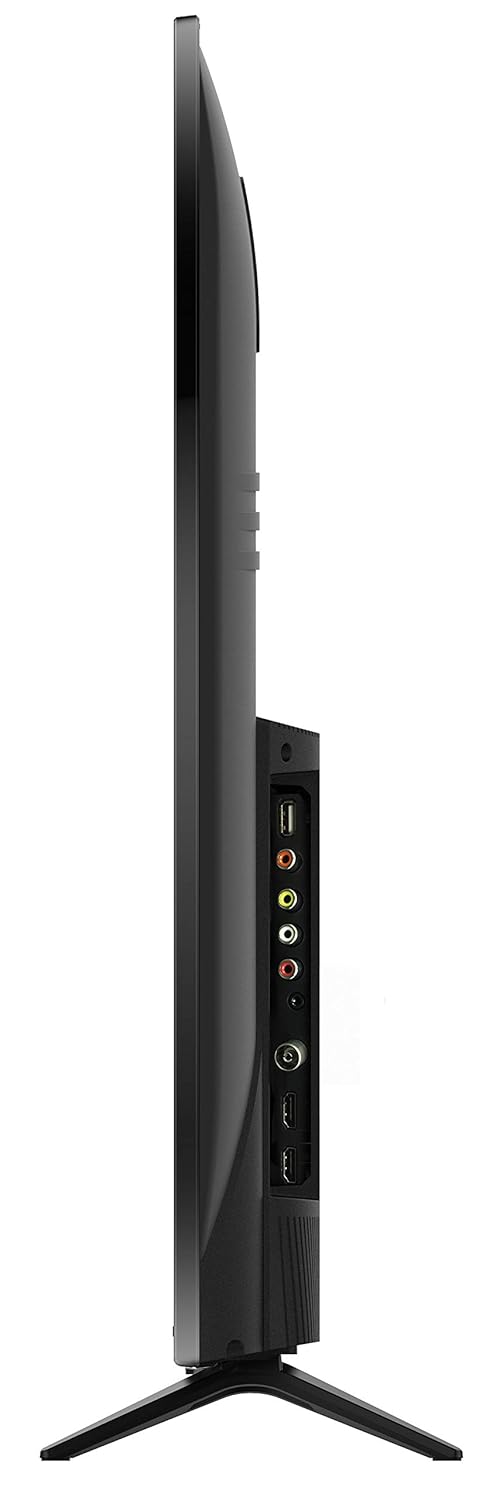
Stampa 4.2: Wara view of the TCL 55P8 TV, indicating VESA mounting points for wall installation.
4.2 Konnessjoni ta' Apparati Esterni
Your TCL 55P8 TV offers various ports for connecting external devices:
- Portijiet HDMI (x3): Qabbad set-top boxes, Blu-ray players, consoles tal-logħob, jew apparati oħra li jaħdmu bl-HDMI.
- Portijiet USB (x2): Qabbad flash drives USB jew hard drives esterni għad-daqq tal-midja.
- Port tal-LAN: Qabbad kejbil Ethernet għal konnessjoni tal-internet bil-fili.
- Input AV: Use the provided AV-RCA adapter to connect older devices with composite video and stereo audio outputs.
- Jack tal-headphone: Qabbad headphones għal smigħ privat.
- Awdjo Diġitali Out: Qabbad ma' soundbar jew sistema ta' home theater għal awdjo mtejjeb.

Image 4.3: Diagram illustrating the various connectivity ports available on the TCL 55P8 TV.
5. Istruzzjonijiet Operattivi
5.1 Power On/Off
Press the power button on the remote control or on the TV to turn it on or off. The TV may take a few moments to boot up due to its Android operating system.
5.2 Kontroll mill-Bogħod
The included remote control allows you to navigate the TV's features. It supports both IR and Bluetooth technology. Insert the two AAA batteries into the remote control, ensuring correct polarity.
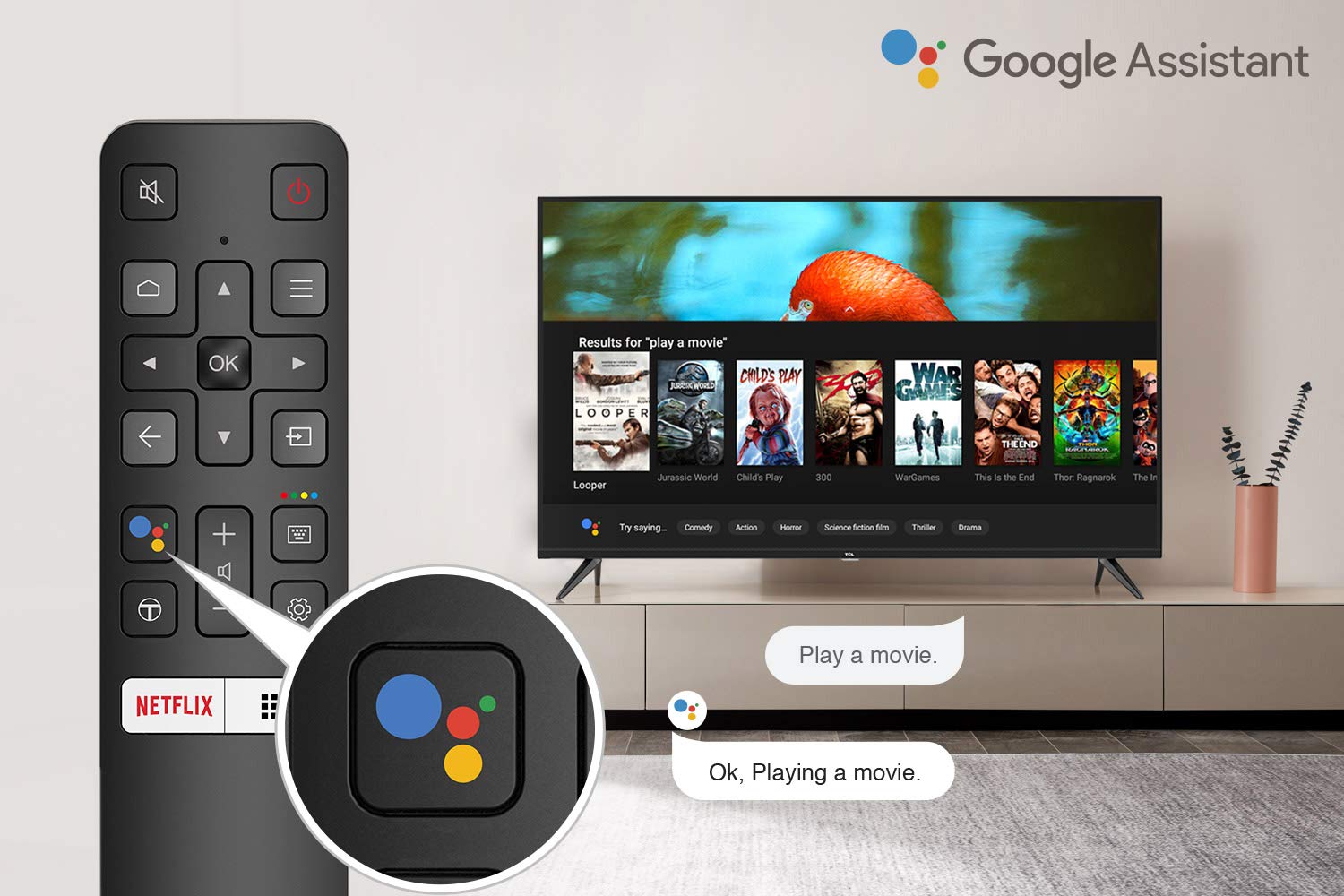
Image 5.1: The remote control for the TCL 55P8 TV, highlighting the Google Assistant button for voice commands.
5.3 Karatteristiċi tat-TV Intelliġenti (Android TV 9.0)
Your TCL 55P8 TV runs on Android TV 9.0, offering a wide range of smart functionalities:
- AI-Google Assistant: Uża kmandi tal-vuċi permezz tal-kontroll remot biex tfittex kontenut, tikkontrolla apparati tad-dar intelliġenti, u tikseb informazzjoni.
- Google Cast (Chromecast built-in): Itfa’ kontenut mill-ismartphone, tablet, jew kompjuter kompatibbli tiegħek direttament fuq l-iskrin tat-TV.
- T-cast: Utilize the T-cast app for additional smart features and screen mirroring.
- Bluetooth: Connect Bluetooth-enabled devices such as headphones or game controllers.
- Aċċess għall-App: Download and install various applications from the Google Play Store, including streaming services like Netflix, Amazon Prime Video, YouTube, Hotstar, Sony Liv, and Zee5.
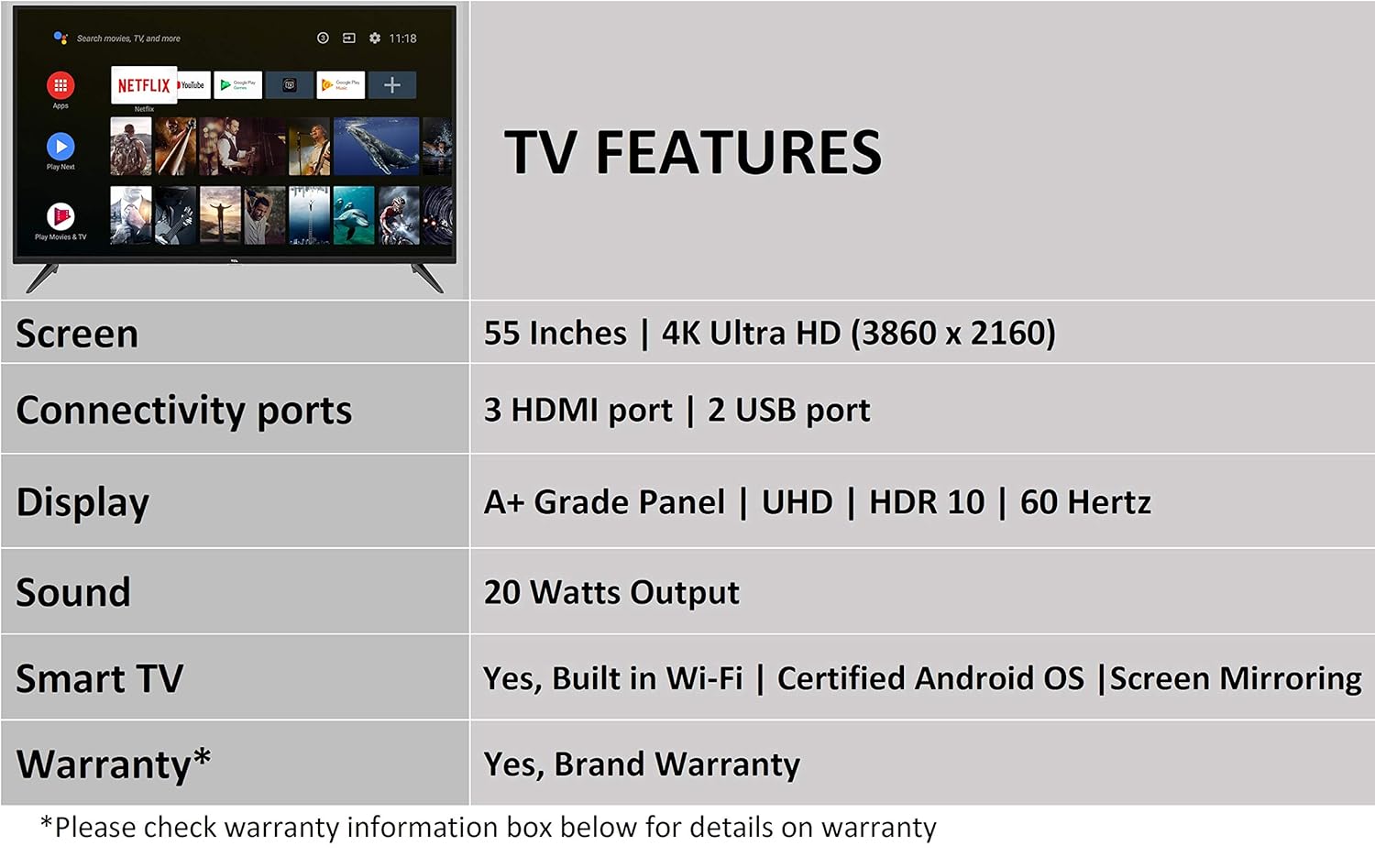
Image 5.2: The Android TV home screen on the TCL 55P8, displaying icons for popular streaming applications.
5.4 Issettjar tal-Immaġni u l-Ħoss
- Stampa: Navigate to the picture settings menu to adjust brightness, contrast, color, and sharpness. The TV supports 4K Ultra HD resolution, HDR10, and features Micro Dimming for enhanced contrast.
- Ħoss: Access sound settings to adjust volume, equalizer, and select audio output modes. The TV provides 20 Watts of audio output and supports Dolby Audio.
6. Manutenzjoni
6.1 Tindif tat-TV
- Skrin: Gently wipe the screen with a soft, lint-free, dry cloth. For stubborn marks, slightly dampen the cloth with water (do not spray directly on the screen).
- Korp: Imsaħ il-qafas u l-istand tat-TV b'ċarruta ratba u niexfa.
- Attenzjoni: Do not use abrasive cleaners, alcohol, benzene, or thinners, as these can damage the TV's surface.
6.2 Aġġornamenti tas-Software
Your Android TV may receive periodic software updates. Ensure your TV is connected to the internet to receive these updates, which can improve performance and add new features. You can usually check for updates in the TV's settings menu.
7 Issolvi l-problemi
Jekk tiltaqa' ma' problemi bit-TV tiegħek, irreferi għas-soluzzjonijiet komuni li ġejjin:
| Problema | Soluzzjoni Possibbli |
|---|---|
| Ebda Qawwa | Iċċekkja jekk il-korda tal-enerġija hijiex imdaħħla sew fit-TV u fis-sokit tal-ħajt. Kun żgur li s-sokit tal-enerġija jaħdem sew. |
| L-ebda Stampa, iżda l-Ħoss huwa Preżenti | Verify the correct input source is selected. Check HDMI/AV cable connections. Try restarting the TV. |
| L-ebda ħoss, iżda l-istampa hija preżenti | Check the volume level and ensure the TV is not muted. Verify audio cable connections if using external speakers. Check audio output settings. |
| Il-Kontroll Remot Mhux Jaħdem | Replace batteries. Ensure there are no obstructions between the remote and the TV's IR sensor. Re-pair the Bluetooth remote if necessary. |
| Kwistjonijiet ta' Konnessjoni tan-Netwerk | Check Wi-Fi password. Restart your router. Ensure the TV is within range of the Wi-Fi signal or the Ethernet cable is properly connected. |
| Prestazzjoni bil-mod / Ħabtiet fl-App | Close unused applications. Clear cache for problematic apps. Restart the TV. Consider a factory reset if issues persist (note: this will erase all data). |
Jekk il-problema tippersisti wara li tipprova dawn is-soluzzjonijiet, jekk jogħġbok ikkuntattja l-appoġġ għall-klijenti tat-TCL.
8. Speċifikazzjonijiet
Detailed technical specifications for the TCL 55P8 55-inch AI 4K UHD Android Smart LED TV:
| Karatteristika | Speċifikazzjoni |
|---|---|
| Mudell | 55P8 |
| Daqs tal-Iskrin | 55 Pulzier (138.78 ċm) |
| Riżoluzzjoni | 4K Ultra HD (3840 x 2160 pixels) |
| Riffriskar Rata | 60 Hz |
| ViewIng Angolu | 178 Grad |
| Tip ta 'Wiri | LED, A+ Grade Panel |
| Appoġġ HDR | HDR 10 |
| Sistema Operattiva | Android 9.0 |
| Proċessur | Quad-core A55 (1.1GHz) |
| Koproċessur tal-Grafika | Mali470x3 (600MHz-800MHz) |
| RAM | 2 GB |
| Ħażna Interna | 16 GB |
| Output Awdjo | 20 Watts |
| Teknoloġija Awdjo | AI Sound Engine, Dolby Audio |
| Portijiet HDMI | 3 (HDMI 2.0, HDCP2.2, ARC on Port 1) |
| Portijiet USB | 2 (USB 2.0) |
| Konnettività | Wi-Fi (2x2 b/g/n 2.4GHz), Ethernet, Bluetooth 5.0 |
| Karatteristiċi Speċjali | AI-Google Assistant, Google Cast, T-cast, Micro Dimming |
| Dimensjonijiet tal-Prodott (LxWxH) | 124.4 x 23.9 x 77.5 ċm (bl-istand) |
| Piż tal-oġġett | 12 kg |

Image 8.1: Dimensional diagram of the TCL 55P8 TV, showing height, width, and depth measurements.
9. Garanzija u Appoġġ
9.1 Informazzjoni dwar Garanzija
Your TCL 55P8 TV comes with an 18-il xahar garanzija provided by TCL from the date of purchase. Please retain your purchase receipt and warranty card for any warranty claims.
9.2 Installation and Customer Support
For requesting installation, wall mounting, or a product demonstration after delivery, please contact TCL customer service:
- Numri bla ħlas: 18004190622 jew 18001020622
For any other technical assistance or support, please refer to the contact information provided on your warranty card or the official TCL websit.
9.3 Politika ta' Ritorn
This product is eligible for replacement or refund within 10 days of delivery in case of any product defects, damage, or features not matching the description provided. Please refer to the retailer's return policy for detailed terms and conditions.


