1. Introduzzjoni
This manual provides detailed instructions for the installation, operation, maintenance, and troubleshooting of your TMEZON 4-channel 1080P HD-TVI Digital Video Recorder (DVR) and accompanying 4-camera CCTV security system. This system is designed for both indoor and outdoor surveillance, offering high-definition video recording and remote monitoring capabilities.

Image: Comparison illustrating the enhanced clarity of 1080P resolution over 720P, highlighting the high-definition capability of the system.
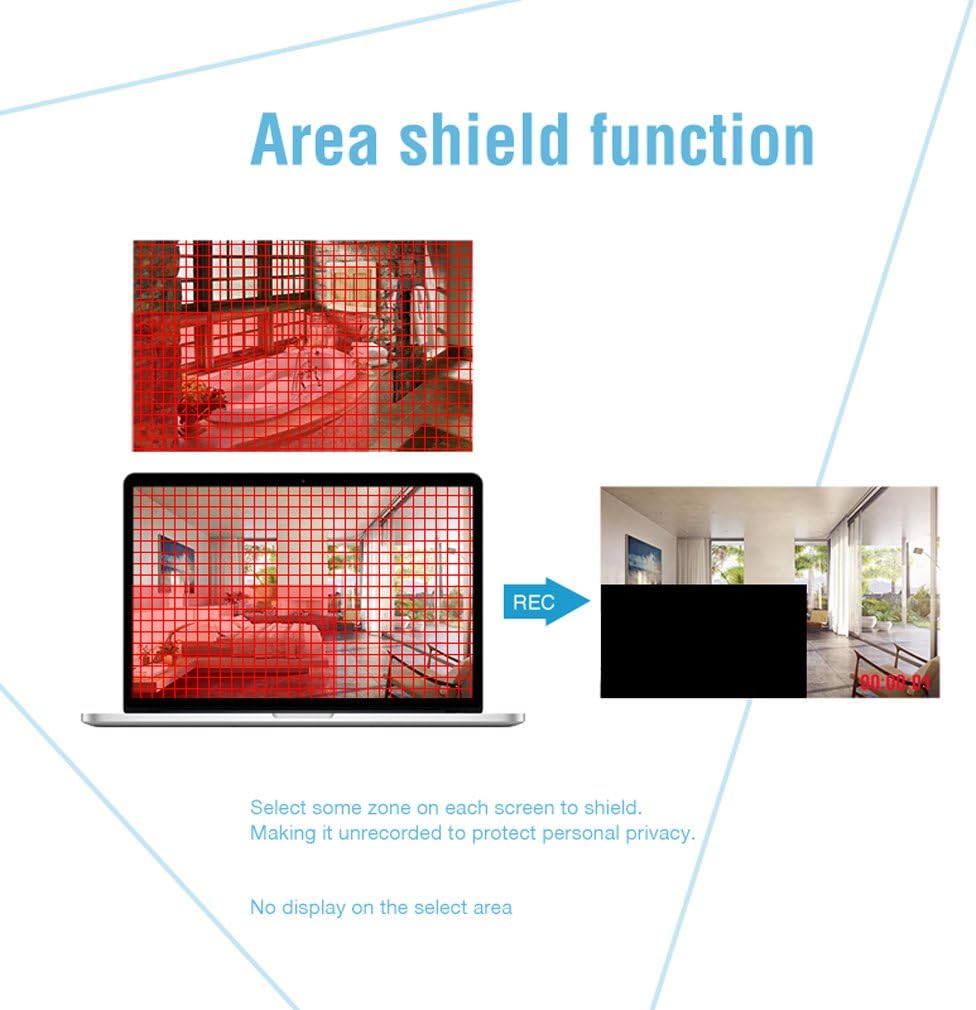
Image: An outdoor camera demonstrating its night vision and rainproof design, suitable for various weather conditions.
2. Kontenut tal-Pakkett
Iċċekkja li l-oġġetti kollha elenkati hawn taħt huma inklużi fil-pakkett tiegħek. Jekk xi oġġetti huma neqsin jew bil-ħsara, jekk jogħġbok ikkuntattja l-appoġġ għall-klijenti.
- 1 x 4-Channel HD-TVI DVR
- 4 x 1080P Weatherproof CCTV Cameras
- 4 x Kejbils BNC ta' 18.3m
- 1 x USB Mouse
- 1 x 4-Way Power Splitter Cable
- 1 x Adapter tal-Enerġija għad-DVR
- Viti tal-Immuntar u Plugs tal-Ħajt
- Manwal għall-Utent (dan id-dokument)

Image: Visual representation of the complete package contents, including the DVR, cameras, cables, mouse, and power accessories.
3. Informazzjoni dwar is-Sigurtà
- Aqra l-istruzzjonijiet kollha bir-reqqa qabel l-installazzjoni u t-tħaddim.
- Use only the power adapters provided with the system.
- Ensure proper ventilation for the DVR to prevent overheating.
- Avoid placing the DVR in direct sunlight, near heat sources, or in areas with high humidity.
- Tippruvax tiżżarma jew timmodifika l-prodott. Dan jannulla l-garanzija.
- Keep cables organized and secured to prevent tripping hazards and accidental disconnections.
- For outdoor camera installation, ensure all connections are waterproofed and protected from environmental elements.
- Consult a qualified professional for complex installations or wiring.
4. Setup
4.1 Hard Disk Drive (HDD) Installation (HDD Not Included)
This system requires a 3.5-inch SATA HDD (500GB to 2TB) for video recording. Follow these steps to install the HDD:
- Skonnettja d-DVR mis-sors tal-enerġija.
- Neħħi l-għatu ta' fuq tad-DVR billi tneħħi l-viti fuq wara u fuq il-ġnub.
- Qabbad il-kejbil tad-dejta SATA u l-kejbil tal-enerġija mid-DVR mal-HDD.
- Secure the HDD to the bottom of the DVR casing using the provided screws.
- Erġa' poġġi l-għatu ta' fuq u waħħalha bil-viti.
4.2 Konnessjoni tad-DVR
Connect the DVR to your monitor, power, and network as follows:
- Output tal-vidjo: Connect the DVR to a monitor or TV using an HDMI or VGA cable.
- Netwerk: Qabbad id-DVR mar-router tiegħek billi tuża kejbil Ethernet għal aċċess remot.
- USB: Connect the included USB mouse to a USB port on the DVR for navigation.
- Qawwa: Connect the power adapter to the DVR and then to a power outlet.

Immaġni: Wara view of the DVR, detailing connection points for cameras, monitor, network, and peripherals.
4.3 Installazzjoni tal-Kamera
Mount the cameras in desired locations, ensuring optimal viewing angles and coverage. The cameras feature a 3-axis mounting bracket for flexible adjustment.
- Immuntar: Cameras can be wall-mounted or ceiling-mounted. Use the provided screws and wall plugs.
- Aġġustament tal-Angolu: Adjust the camera angle using the 3-axis bracket to cover the desired area. Ensure the bracket screws are tightened after adjustment to prevent movement.
- Konnessjoni tal-Cable: Connect each camera to the DVR using the provided BNC cables. Ensure connections are secure.

Immaġni: Eżamples of camera mounting options (wall and ceiling) and the flexibility of the 3-axis mounting bracket for precise positioning.
5. Istruzzjonijiet Operattivi
5.1 Setup Inizjali
Upon first power-on, the DVR will guide you through an initial setup wizard. This includes setting the language, date/time, and creating a password for the administrator account. It is crucial to set a strong password for security.
5.2 Ħaj View
After initial setup, the system will display the live feed from all connected cameras on the monitor. You can switch between single-camera view u grilja b'ħafna kameras view using the DVR interface.
5.3 Ir-reġistrazzjoni
Id-DVR jappoġġja diversi modi ta' reġistrazzjoni:
- Reġistrazzjoni Kontinwa: Rekords 24/7.
- Reġistrazzjoni ta 'Sejbien tal-Moviment: Jirrekordja biss meta jinstab moviment.
- Reġistrazzjoni Skedata: Records during specific time periods.
Recording settings can be configured in the DVR's menu. The DVR can be set to automatically overwrite older footage when the HDD is full.
5.4 Sejbien tal-Mozzjoni u Twissijiet
Configure motion detection to trigger recording and send alerts when unexpected activity occurs. You can customize detection zones to minimize false alarms.
- Żoni li jistgħu jiġu personalizzati: Iddefinixxi żoni speċifiċi fil-kamera view where motion detection is active.
- Twissijiet: Receive push notifications on your smartphone via the app or email alerts when motion is detected.
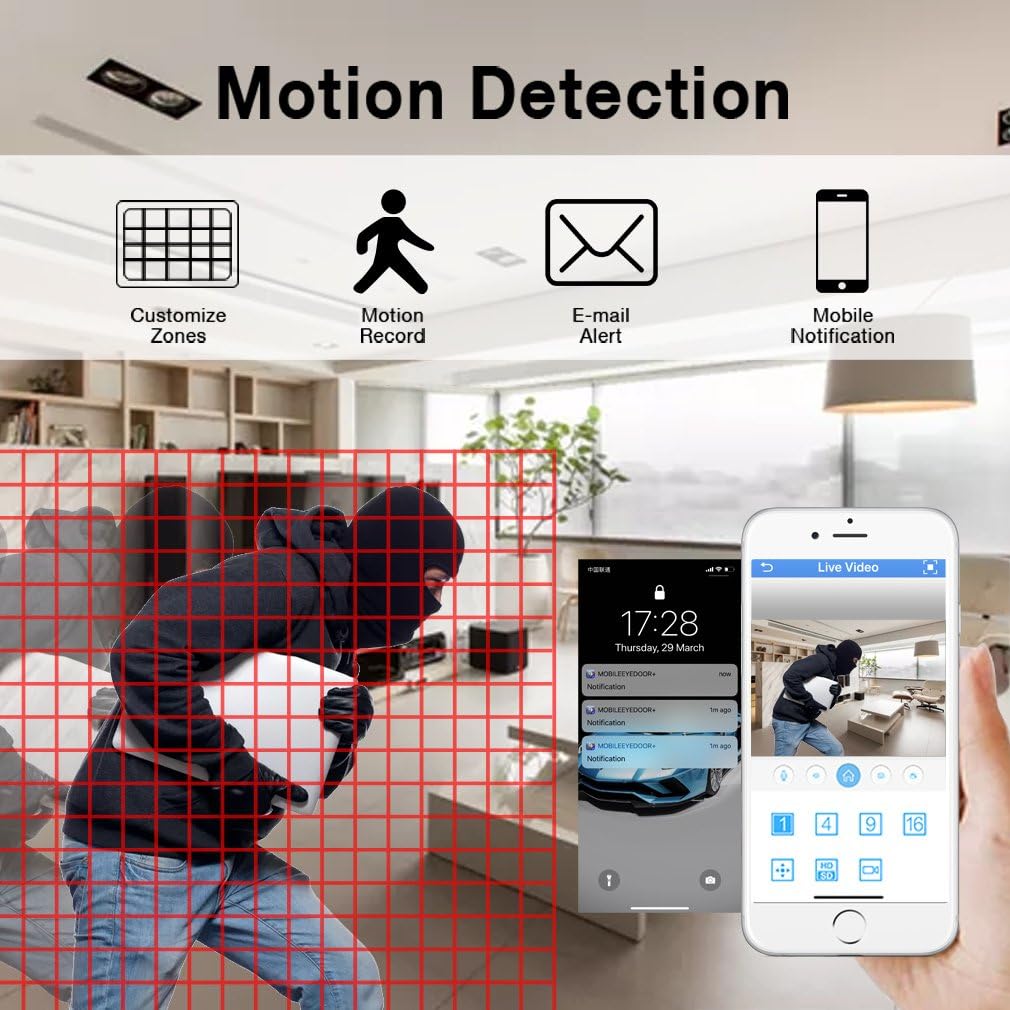
Image: Motion detection interface, demonstrating how to set custom zones and receive alerts on a mobile device.
5.5 Aċċess mill-Bogħod
Monitor your property from anywhere using the free mobile application "XMEYE" on your smartphone or tablet, or via PC software.
- App mobbli: Download the "XMEYE" app from your device's app store. Register an account and add your DVR using its unique ID.
- Aċċess għall-PC: Install the client software on your computer for remote viewing u ġestjoni.
- Konnettività: Ensure your DVR is connected to the internet. Remote access is supported over WiFi, 2G, 3G, or 4G networks.

Image: Remote access capabilities, allowing live viewing and playback on smartphones, tablets, and personal computers.
5.6 Playback and Backup
Aċċess irreġistrat footage and back up important video files.
- Daqq: Navigate to the playback menu on the DVR to review recorded video by date and time.
- Backup: Connect a USB memory stick or external hard drive to the DVR's USB port to transfer and back up video files.
5.7 Privacy Masking (Area Shield Function)
To protect personal privacy, you can define specific areas within the camera's view that will not be recorded or displayed.

Image: The area shield function, showing how to select and mask specific zones to ensure privacy by preventing their recording.
5.8 Day and Night Monitoring
The cameras are equipped with automatic IR-cut filters, providing clear images both day and night.

Image: Day and night monitoring, illustrating the system's ability to capture clear video in varying light conditions.
6. Manutenzjoni
- Tindif: Regularly clean camera lenses and DVR surfaces with a soft, dry cloth. Avoid abrasive cleaners.
- Aġġornamenti tal-Firmware: Check the TMEZON webis-sit jew ikkuntattja l-appoġġ għal aġġornamenti tal-firmware disponibbli biex tiżgura prestazzjoni u sigurtà ottimali.
- Spezzjoni tal-Cable: Spezzjona l-kejbils kollha perjodikament għal xedd, ħsara, jew konnessjonijiet laxki, speċjalment għal installazzjonijiet ta' barra.
- HDD Health: Monitor the health of your installed HDD through the DVR's system settings. Replace if signs of failure appear.
7 Issolvi l-problemi
| Problema | Kawża Possibbli | Soluzzjoni |
|---|---|---|
| L-ebda wiri tal-vidjo fuq il-monitor | Loose video cable connection; Incorrect input source on monitor; DVR not powered on. | Check HDMI/VGA cable connections; Select correct input on monitor; Ensure DVR power adapter is connected and power light is on. |
| L-ebda reġistrazzjoni | No HDD installed; HDD full; Recording schedule not set; HDD not initialized. | Install a compatible HDD; Check HDD status and format if necessary; Configure recording schedule/mode. |
| L-aċċess remot mhux qed jaħdem | DVR not connected to network; Incorrect network settings; Firewall blocking connection; App not configured correctly. | Ensure Ethernet cable is connected to router; Check DVR network settings (DHCP enabled); Verify router firewall settings; Reconfigure app with correct DVR ID. |
| Camera angle cannot be adjusted | Mounting screws are too tight or stuck. | Loosen the adjustment screws on the 3-axis bracket. If screws are seized, apply a small amount of penetrating oil carefully. Do not force adjustment as this may damage the bracket. |
| Kwalità ta 'immaġni fqira | Dirty lens; Low light conditions; Cable interference. | Clean camera lens; Ensure adequate lighting or verify night vision is active; Check BNC cable connections for damage or interference. |
8. Speċifikazzjonijiet
| Karatteristika | Dettall |
|---|---|
| Brand | TMEZON |
| Numru tal-Mudell | MZ-HD1004M-K4 |
| Kanali tad-DVR | 4 Kanali |
| Riżoluzzjoni tal-Kamera | 1080P (2 Megapixels) |
| Riżoluzzjoni tal-Qbid tal-Vidjo | 1080p |
| Tip ta' Kamera | Outdoor/Indoor Weatherproof CCTV |
| Teknoloġija tal-Konnettività | Wired (Cameras to DVR), Wireless (Remote Access via App) |
| Sors tal-Enerġija | Corded Elettriku |
| Appoġġ għall-HDD | 3.5-inch SATA, 500GB to 2TB (HDD not included) |
| DVR Product Dimensions | 30 x 30 x 30 ċm (madwar) |
| Piż tal-oġġett | 3.88 Kilogrammi |
| Kulur | Iswed |
| Karatteristiċi Speċjali | Motion Alert, Smartphone/PC Remote Monitoring, Night Vision, Weatherproof |
9. Garanzija u Appoġġ
TMEZON offers comprehensive support for its products:
- Garanzija: Dan il-prodott jiġi b'garanzija ta' 2 snin.
- Politika ta' Ritorn: A 30-day money-back guarantee is provided.
- Appoġġ għall-Klijent: For any issues or inquiries, please contact TMEZON customer service.
- Appoġġ bl-Email: Tista' tilħaq lit-tim ta' appoġġ tagħna fuq tmezoncctvsystem@yahoo.com.
- Bulk Purchase: For purchases of 2 sets or more, please contact us for special discounts.


