Prodott Overview
The ASRock X570 Steel Legend motherboard is designed to support AMD AM4 Socket Ryzen 2000 and 3000 Series processors. It features a Hyper M.2 socket for next-generation PCIe Gen4 x4 M.2 SSDs, complemented by a full-coverage M.2 heatsink for efficient heat dissipation. This ensures optimal performance for high-speed M.2 SSDs. The motherboard is built with a 10 Power Phase Design and supports DDR4 4666+ (OC) memory, providing a stable and high-performance foundation for your system.

Image: ASRock X570 Steel Legend Motherboard and its retail packaging.
Karatteristiċi Ewlenin
- Appoġġ għall-proċessur: Compatible with AMD AM4 Socket Ryzen 2000 and 3000 Series processors.
- Disinn tal-Enerġija: Features a 10 Power Phase Design for stable power delivery.
- Memorja: Supports DDR4 memory up to 4666+ (OC) speeds.
- Slots ta' Espansjoni: Includes 2 PCIe 4.0 x16 slots, 3 PCIe 4.0 x1 slots, and 1 M.2 (Key E) slot for Wi-Fi modules.
- Appoġġ Multi-GPU: Supports AMD Quad CrossFireX and CrossFireX technologies.
- Output tal-Grafika: Equipped with HDMI and DisplayPort for video output.
- Awdjo: Features 7.1 CH HD Audio (Realtek ALC1220 Audio Codec) with Nichicon Audio Caps for high-quality sound.
- Ħażna: Provides 8 SATA3 ports, 1 Hyper M.2 (PCIe Gen4 x4 & SATA3) slot, and 1 Hyper M.2 (PCIe Gen4 x4) slot.
- Konnettività USB: Offers 2 USB 3.2 Gen2 ports (Rear Type A+C) and 10 USB 3.2 Gen1 ports (4 Front, 6 Rear).
- Netwerking: Integrated Intel Gigabit LAN for reliable network connectivity.
- Dawl RGB: Supports ASRock Polychrome SYNC for customizable RGB lighting.

Immaġni: Dettaljata view of the motherboard's power delivery components, M.2 heatsink, and gold-plated contacts in critical slots.
Speċifikazzjonijiet
| Karatteristika | Dettall |
|---|---|
| Brand | ASRock |
| Isem tal-Mudell | Leġġenda tal-Azzar X570 |
| Socket tas-CPU | Sokit AM4 |
| Proċessuri Kompatibbli | AMD Ryzen 2000 Series, AMD Ryzen 3000 Series |
| Tip ta' Ċipset | AMD X570 |
| Teknoloġija tal-Memorja RAM | DDR4 |
| Veloċità tal-Memorja | 2400 MHz (sa 4666+ MHz OC) |
| Max RAM | 128GB (4 DIMM slots) |
| Output tal-Grafika | HDMI, DisplayPort |
| Portijiet USB 3.2 Gen2 | 2 (Rear Type A+C) |
| Portijiet USB 3.2 Gen1 | 10 (4 Front, 6 Rear) |
| LAN | Intel Gigabit LAN |
| Awdjo | 7.1 CH HD Audio (Realtek ALC1220) |
| Dimensjonijiet (LxWxH) | 15.1 x 3.4 x 13.1 pulzieri |
| Piż tal-oġġett | 2.86 liri |
Immaġni: Fuqview of the motherboard's layout with key components such as the CPU socket, RAM slots, and various expansion slots clearly marked.
Setup u Installazzjoni
Proper installation of your ASRock X570 Steel Legend motherboard is crucial for system stability and performance. Always ensure your system is powered off and unplugged before handling any components. Refer to the detailed diagrams below for component placement.
1. Installazzjoni tas-CPU
Carefully open the CPU socket lever. Align the triangular marker on your AMD AM4 processor with the corresponding marker on the motherboard's socket. Gently place the CPU into the socket without forcing it, then close the lever to secure it.
2. Installazzjoni tal-Memorja (RAM)
Unlock the clips on the DDR4 DIMM slots. Align the notch on your RAM module with the key in the DIMM slot. Press down firmly on both ends of the RAM module until the clips snap into place. For optimal dual-channel performance, consult your motherboard manual for recommended slot configurations.
3. Installazzjoni tal-SSD M.2
The motherboard features Hyper M.2 slots. Remove the M.2 heatsink if present. Insert your M.2 SSD into the slot at an angle, then gently push it down and secure it with the provided screw. Reattach the M.2 heatsink for optimal thermal performance.
4. Konnessjoni tal-Periferali u l-Enerġija
Connect the 24-pin ATX power connector and the 8-pin CPU power connector from your power supply to the motherboard. Attach your storage devices to the SATA3 ports and connect front panel headers (USB, audio, power buttons, LEDs) according to the motherboard's pin layout.
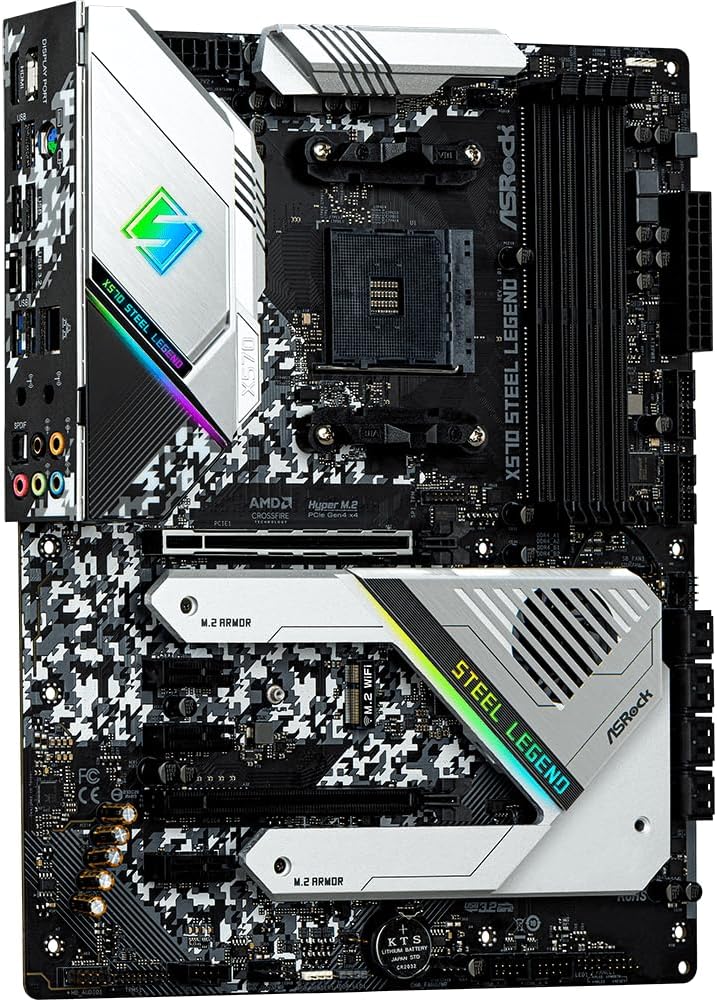
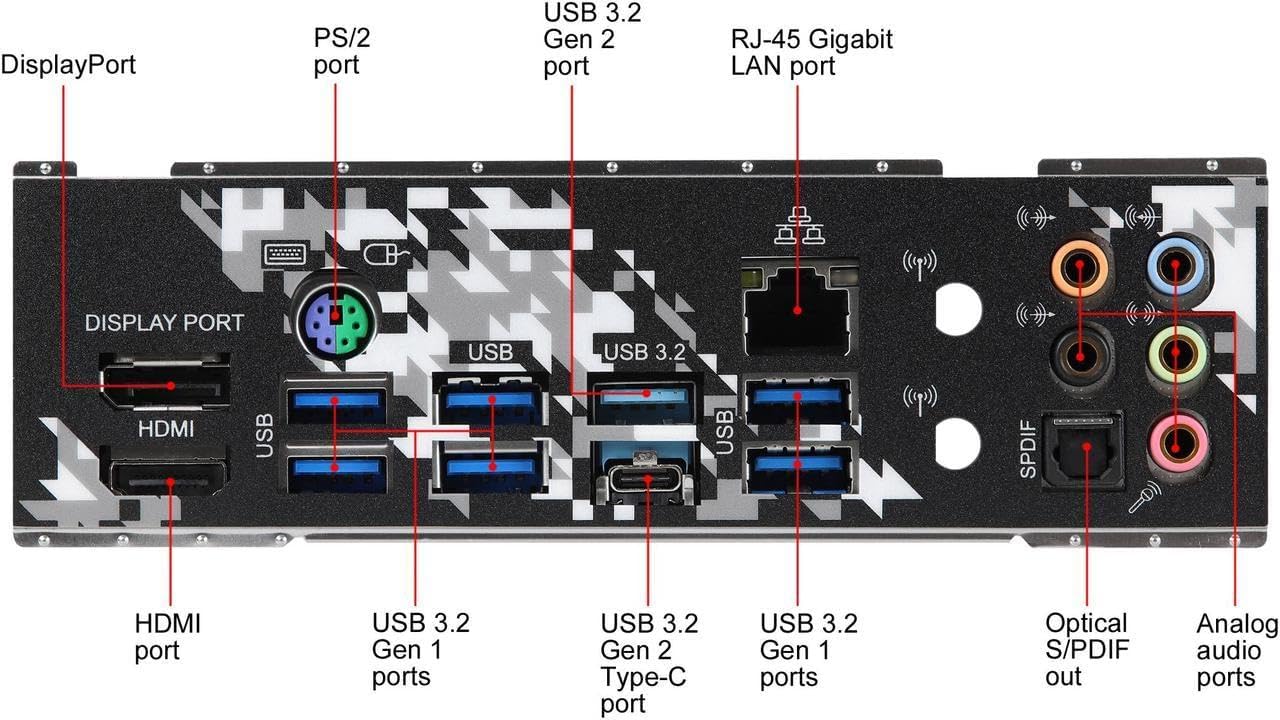
Image: The rear I/O panel, featuring HDMI, DisplayPort, USB 3.2 Gen2 Type-A and Type-C, USB 3.2 Gen1, Intel Gigabit LAN, and 7.1 channel audio jacks.
Linji Gwida Operattivi
Once all components are installed and connected, power on your system. The motherboard's UEFI BIOS provides extensive options for system configuration, including memory profiles, fan control, and boot device selection. Utilize the ASRock Polychrome SYNC software to customize the integrated RGB lighting effects.
- Aċċess għall-BIOS/UEFI: Agħfas Del or F2 during system startup to enter the UEFI setup utility.
- Installazzjoni tas-sewwieq: Install all necessary drivers from the ASRock support website or the included driver CD for optimal performance and functionality.
- Software Utilities: Use ASRock's utility software for system monitoring, fan tuning, and RGB lighting customization.
Manutenzjoni
Regular maintenance helps prolong the lifespan of your motherboard and ensures consistent performance.
- Tneħħija tat-Trab: Naddaf it-trab mill-motherboard u l-komponenti perjodikament bl-użu ta' arja kkompressata. Kun żgur li l-fannijiet u s-sinkijiet tas-sħana jkunu ħielsa minn ostakli.
- Aġġornamenti tal-BIOS: Iċċekkja l-ASRock website for the latest BIOS updates. Updating the BIOS can improve compatibility, stability, and performance. Follow the instructions carefully to avoid system damage.
- Ġestjoni tal-Kejbil: Ensure all cables are neatly routed and secured to promote good airflow within your PC case.
Issolvi l-problemi
Jekk tiltaqa' ma' problemi bil-motherboard tiegħek, ikkunsidra l-passi komuni li ġejjin għas-soluzzjoni tal-problemi:
- Ebda Qawwa/Ebda Boot:
- Ivverifika li l-kejbils tal-enerġija kollha (24-pin ATX, 8-pin CPU) huma konnessi sew.
- Iċċekkja jekk il-provvista tal-enerġija tkunx qed taħdem sew.
- Ensure the CPU, RAM, and graphics card are properly seated.
- Kwistjonijiet tal-Wiri:
- Confirm your monitor is connected to the graphics card (if dedicated) or the motherboard's video output (if using an APU).
- Ipprova kejbil tal-vidjo jew monitor differenti.
- Instabbiltà/Ħsarat tas-Sistema:
- Kun żgur li s-sewwieqa kollha huma aġġornati.
- Test RAM modules individually or run a memory diagnostic tool.
- Immonitorja t-temperaturi tas-CPU u l-GPU biex tevita li jisħnu żżejjed.
- Periferali Mhux Rilevat:
- Ipprova qabbad il-periferali ma' port USB differenti.
- Iċċekkja l-maniġer tal-apparat għal problemi tas-sewwieq.
For more detailed troubleshooting, refer to the official ASRock support websit jew ikkuntattja lis-servizz tal-konsumatur tagħhom.
Garanzija u Appoġġ
ASRock tipprovdi garanzija limitata għall-motherboards tagħha. It-termini speċifiċi u t-tul tal-garanzija jistgħu jvarjaw skont ir-reġjun u l-bejjiegħ bl-imnut. Jekk jogħġbok żomm il-prova tax-xiri tiegħek għal talbiet ta' garanzija.
- Informazzjoni dwar il-garanzija: For detailed warranty terms and conditions, please visit the official ASRock website or consult your product documentation.
- Appoġġ Tekniku: If you require technical assistance, drivers, or BIOS updates, visit the ASRock support page at www.asrock.com/support/.


