1. Introduzzjoni
The AIYIMA DAC-A2 is a versatile Digital-to-Analog Converter (DAC) and headphone amplifier designed to enhance your audio experience. It features multiple digital input options and provides both RCA line-out and a 3.5mm headphone output, along with adjustable bass and treble controls for personalized sound. This manual provides detailed instructions for setup, operation, and maintenance of your DAC-A2.

Figure 1: AIYIMA DAC-A2 Headphone AmpDAC aktar b’saħħtu
2. Karatteristiċi ewlenin
- Integrated DAC and Headphone Amplifier: Built-in Hi-Fi headphone amplifier chip capable of driving 16ohm to 200ohm headphones.
- Advanced Chipset: Utilizes SA9023+CS8416+97220+NE5532 for optimal audio performance.
- Multiple Digital Inputs: Supports PC-USB, Optical, and Coaxial S/PDIF inputs, compatible with most home audio systems, PCs, and Macs.
- Versatile Outputs: Features RCA line-out for connecting to powered speakers or external amplifiers, and a 3.5mm headphone output.
- High-Resolution Audio: PC-USB input supports up to 24Bit/96KHz; Optical/Coaxial inputs support up to 24Bit/192kHz.
- Tone Controls: Independent bass and treble controls to customize your audio output.
- Compact and Portable: DC 5V power input allows for a portable and professional desktop audio device.

Figure 2: Internal Chipset and Features Overview
3. Kontenut tal-Pakkett
Jekk jogħġbok iċċekkja l-pakkett għall-oġġetti li ġejjin:
- AIYIMA DAC-A2 Unit
- Kejbil USB (Tip A għal Tip B)
- Optical Cable (Toslink)
- DC 5V Power Cable (USB-C for power)
- Manwal għall-Utent
4. Kontrolli u Interfaces

Figura 3: Tqassim tal-Panew ta 'quddiem u ta' wara
4.1 Panel ta 'Quddiem
- Swiċċ tad-dħul: Toggle between USB, Optical (OPT), and Coaxial (COA) inputs.
- Ħruġ tal-headphones ta' 3.5mm: Qabbad il-headphones tiegħek hawn.
- Buttuna tal-Kontroll tal-Bass: Adjust the low-frequency response.
- Treble Control Knob: Adjust the high-frequency response.
- Buttuna tal-Kontroll tal-Volum: Adjust the overall output volume. This knob also acts as the power switch (push to turn on/off) and has a power indicator light.
4.2 Panel ta 'wara
- Input ta' Enerġija DC 5V: Connect the provided DC 5V power cable.
- RCA Audio Output (L/R): Connect to powered speakers or an external ampaktar ħaj.
- Coaxial Input (COA): Connect a coaxial digital audio source.
- Optical Input (OPT): Connect an optical digital audio source.
- PC-USB Input: Connect to your computer for USB audio.
5. Konfigurazzjoni u Konnessjonijiet
Follow these steps to connect your AIYIMA DAC-A2 to your audio system:
- Konnessjoni tal-Enerġija: Connect the provided DC 5V power cable to the "DC 5V" input on the rear panel of the DAC-A2. Connect the other end to a suitable 5V power source (e.g., a USB wall adapter, not included). Ensure the power indicator light on the front panel illuminates when the volume knob is pressed to turn on.
- Konnessjoni tas-Sors tal-Input: Agħżel wieħed mill-metodi ta' input li ġejjin:
- PC-USB: Connect the provided USB cable from your computer's USB port to the "PC-USB" input on the DAC-A2.
- Ottiċi: Connect an optical cable from your audio source (e.g., TV, game console) to the "OPTICAL" input.
- Koassjali: Connect a coaxial cable from your audio source to the "COAXIAL" input.
- Konnessjoni tal-Output: Choose one of the following output methods:
- Output RCA: Connect RCA cables from the "AUDIO OUT" (L/R) ports on the DAC-A2 to your powered speakers or an external ampl-input tal-lifer.
- Ħruġ tal-headphones ta' 3.5mm: Ipplaggja l-headphones tiegħek fil-jack ta' 3.5mm fuq il-pannell ta' quddiem. Note: The headphone output takes priority. If headphones are connected, sound will be routed to them and not the RCA outputs.
- Agħżel Input: Use the input switch on the front panel to select the desired audio source (USB, OPT, or COA).
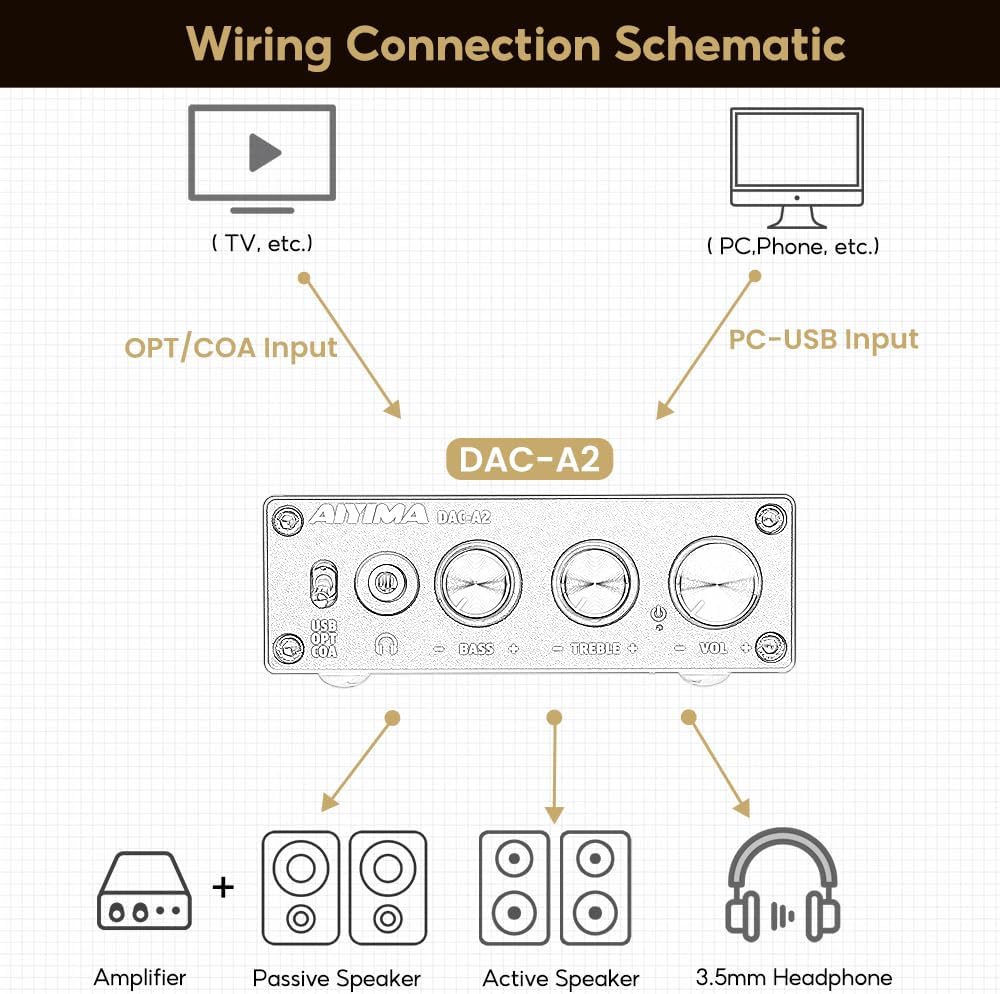
Figura 4: Dijagramma tal-Konnessjoni
Video 1: Demonstrates connecting the AIYIMA DAC-A2 to a laptop and an amplifier, showing the audio output to speakers and headphones. It illustrates switching between PC-USB input and adjusting volume, bass, and treble controls.
6. Istruzzjonijiet Operattivi
- Power On/Off: Press the Volume Control Knob to turn the unit on or off. The power indicator light will illuminate when on.
- Għażla tal-Input: Use the Input Switch (USB/OPT/COA) on the front panel to select your active audio source.
- Aġġustament tal-Volum: Rotate the Volume Control Knob clockwise to increase volume and counter-clockwise to decrease it.
- Aġġustament tal-bass: Rotate the Bass Control Knob to increase or decrease the bass frequencies according to your preference.
- Aġġustament Treble: Rotate the Treble Control Knob to increase or decrease the treble frequencies according to your preference.

Figure 5: Adjustable Bass and Treble Controls
Video 2: Shows the AIYIMA DAC-A2 in a desktop setup, demonstrating the connection of headphones and the adjustment of volume, bass, and treble controls for an enhanced audio experience.
7. Speċifikazzjonijiet

Figura 6: Dimensjonijiet tal-Prodott
| Karatteristika | Speċifikazzjoni |
|---|---|
| Brand | AIYIMA |
| Numru tal-Mudell | DAC-A2 |
| Chipset | SA9023+CS8416+97220+NE5532 |
| Input PC-USB SampRata tal-linarda | 24Bit/96KHz |
| Input ottiku/koassjali SampRata tal-linarda | 24Bit/192kHz |
| Firxa tal-Impedenza tal-Headphones | 16ohm to 200ohm |
| Provvista Massima Voltage | 5 Volts |
| Provvista Minima Voltage | 5 Volts (DC) |
| Tip ta' Interface | Coaxial, USB, Optical |
| Numru ta 'Kanali | 1 |
| Dimensjonijiet tal-Prodott (T x W) | 3.86"L x 2.89"W (approx. 98mm x 73mm) |
| Piż tal-oġġett | 14.8 uqija (madwar 420g) |
8 Issolvi l-problemi
If you encounter issues with your DAC-A2, please refer to the following common problems and solutions:
- Ebda Ħsejjes tal-Ħsejjes:
- Ensure the DAC-A2 is powered on and the power indicator is lit.
- Verify that the correct input source (USB, OPT, COA) is selected using the front panel switch.
- Check all cable connections (input and output) are secure.
- If using headphones, ensure they are fully plugged into the 3.5mm jack. Remember the headphone output has priority over RCA.
- Adjust the volume knob on the DAC-A2 and ensure your connected speakers/amplifier also have their volume turned up.
- For PC-USB input, check your computer's sound settings to ensure the DAC-A2 is selected as the default playback device.
- Kwalità tal-Ħoss Mgħawġa jew Fqira:
- Kun żgur li l-kejbils kollha huma konnessi sew u mhux bil-ħsara.
- Iċċekkja s-sors tal-awdjo għal problemi ta' kwalità.
- Adjust the Bass and Treble controls to see if they are set to extreme levels causing distortion.
- Ensure the power supply is stable and providing sufficient 5V power. An unstable power supply can cause noise.
- Ħoss intermittenti:
- Iċċekkja għal konnessjonijiet tal-kejbil maħlula.
- Ensure the power supply is consistent.
- If using PC-USB, try a different USB port on your computer or a different USB cable.
9. Manutenzjoni
- Tindif: Uża drapp artab u niexef biex tnaddaf il-barra tal-unità. Tużax prodotti tat-tindif likwidi jew solventi.
- Ħażna: Aħżen l-unità f'post frisk u niexef 'il bogħod mix-xemx diretta u minn temperaturi estremi.
- Immaniġġjar: Evita li twaqqa' l-unità jew li tissottomettiha għal impatti qawwija.
- Ventilazzjoni: Kun żgur li jkun hemm ventilazzjoni adegwata madwar l-unità biex tevita li tissaħħan iżżejjed.
10. Garanzija u Appoġġ
AIYIMA products are designed for reliability and performance. For warranty information, technical support, or service inquiries, please refer to the contact information provided with your purchase or visit the official AIYIMA websit. Jekk jogħġbok żomm il-prova tax-xiri tiegħek għal talbiet ta' garanzija.
11. Informazzjoni Importanti dwar is-Sigurtà
- Do not expose this unit to rain, moisture, or extreme temperatures.
- Tiftaħx is-casing. Ġewwa m'hemm l-ebda partijiet li jistgħu jiġu rranġati mill-utent. Irreferi għal kull manutenzjoni f'idejn persunal kwalifikat.
- Use only the specified power supply (DC 5V).
- Evita li tpoġġi l-unità ħdejn sorsi ta’ sħana jew fid-dawl tax-xemx dirett.
- Żomm fejn ma jintlaħaqx mit-tfal.


