1. Introduzzjoni
This manual provides detailed instructions for the setup, operation, maintenance, and troubleshooting of your ipega PG-9078 Universal Wireless Bluetooth Game Controller. Please read this manual carefully before use to ensure proper functionality and to extend the lifespan of your device. The PG-9078 is designed to provide a versatile gaming experience across multiple platforms including Android, iOS, Tablet, TV, and PC.

Figure 1.1: Package Contents - ipega PG-9078 Controller, detachable bracket, USB cable, and user manual.
2. Setup
2.1. Iċċarġjar tal-Kontrollur
Before initial use, fully charge the controller. Connect the supplied USB cable to the Micro-USB port on the controller and the other end to a USB power source (e.g., computer USB port, USB wall adapter). The charging indicator light will illuminate during charging and turn off when fully charged.
2.2. Attaching the Phone Bracket
The PG-9078 comes with a detachable bracket for holding smartphones. To attach, align the bracket's base with the slot on the top of the controller and slide it into place until it clicks securely. To remove, gently press the release button (if present) or slide it off in the opposite direction.

Figure 2.1: Controller with Phone Bracket Attached.
2.3. Tqabbil tal-Bluetooth
The pairing process varies slightly depending on the operating system. Ensure the controller is charged before attempting to pair.
- Android/PC Mode: Press and hold the 'X' button + 'HOME' button simultaneously until the indicator light flashes rapidly. On your device, enable Bluetooth, search for "PG-9078" and select it to pair.
- Modalità iOS: Press and hold the 'Y' button + 'HOME' button simultaneously until the indicator light flashes rapidly. On your iOS device, enable Bluetooth, search for "PG-9078" and select it to pair.
- Direct Play Mode (Android/iOS): For certain games, press and hold the 'A' button + 'HOME' button. This mode is designed for direct connection without mapping.
- PC Wired Mode: Connect the controller directly to your PC using the USB cable. The controller will be recognized as a standard gamepad.

Figure 2.2: Controller Paired with a Smartphone.
3. Istruzzjonijiet Operattivi
3.1. It-Tqassim tal-Kontrollur
Familiarize yourself with the buttons and controls of the PG-9078 controller:
- Stick Analogu tax-Xellug: Kontroll tal-moviment.
- D-Pad (Pad Direzzjonali): Input direzzjonali.
- Buttuna Agħżel: Function varies by game/system.
- Buttuna HOME: Power on/off, pairing mode, return to home screen.
- Buttuna START: Function varies by game/system.
- Stick Analogu tal-Lemin: Kontroll tal-kamera jew moviment sekondarju.
- Buttuni ta' Azzjoni (A, B, X, Y): Primary game actions.
- Buttuni tal-ispalla (L1, R1): Top triggers.
- Trigger Buttons (L2, R2): Bottom triggers.
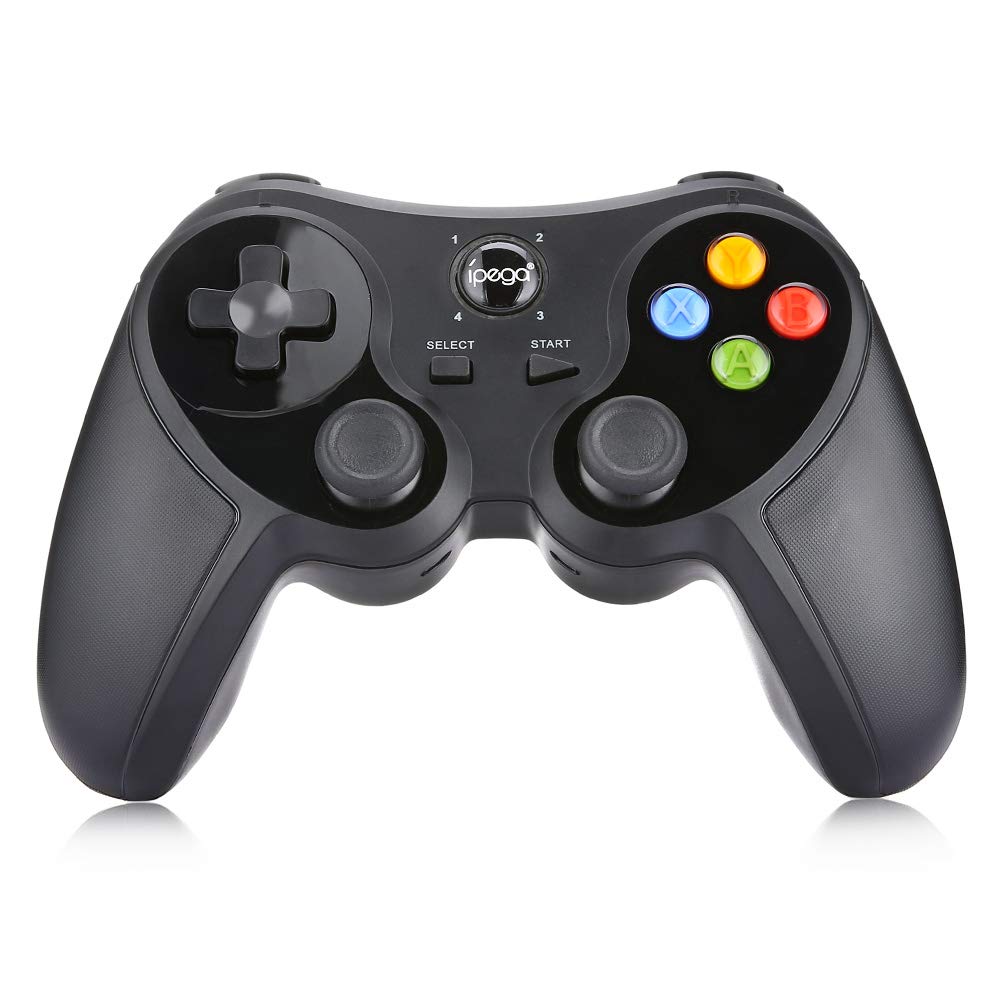
Figura 3.1: Quddiem View tal-Kontrollur.
3.2. Esperjenza tal-Logħob
Once paired, the controller should be recognized by compatible games and applications. For optimal performance, ensure your device's operating system and game applications are up to date. Some games may require in-game controller settings adjustments.

Figure 3.2: Hands-on View of the Controller in Use.
4. Manutenzjoni
- Tindif: Uża drapp artab u niexef biex tnaddaf il-kontrollur. Għal ħmieġ iebes, neħħi ftit drapp.amp Ċarruta tista' tintuża, imma kun żgur li ma tidħolx umdità fl-apparat. Tużax kimiċi ħarxa jew prodotti tat-tindif li joborxu.
- Ħażna: Store the controller in a cool, dry place away from direct sunlight and extreme temperatures. If storing for extended periods, ensure the battery is partially charged (around 50%) to preserve battery health.
- Kura tal-batterija: Avoid fully discharging the battery frequently. Recharge the controller when the low battery indicator appears. Do not attempt to replace the internal battery yourself.
5 Issolvi l-problemi
| Problema | Kawża Possibbli | Soluzzjoni |
|---|---|---|
| Il-kontrollur ma jixgħelx. | Batterija baxxa. | Iċċarġja l-kontrollur kompletament. |
| Ma tistax tqabbad permezz tal-Bluetooth. | Incorrect pairing mode; Bluetooth interference; device not discoverable. | Ensure correct pairing mode (Android/iOS) is selected. Turn off and on Bluetooth on your device. Move closer to the device. Try resetting the controller (if a reset button is available, usually a small pinhole). |
| Il-buttuni ma jirrispondux jew huma laggy. | Low battery; software conflict; distance from device. | Recharge the controller. Restart the game/device. Ensure no other Bluetooth devices are causing interference. |
| Il-kontrollur jiskonnettja ta' spiss. | Low battery; distance from device; interference. | Charge the controller. Stay within effective Bluetooth range. Reduce wireless interference. |
6. Speċifikazzjonijiet
- Mudell: PG-9078
- Konnettività: Bluetooth Wireless
- Kompatibilità: Android, iOS, Tablet, TV, PC
- Input Voltage: DC5V
- Kurrent tad-Dħul: 500mA
- Kurrent tax-Xogħol: 30mA
- Manifattura: Magħmul fiċ-Ċina

Figure 6.1: Controller Back Panel with Specifications.
7. Garanzija u Appoġġ
Għal informazzjoni dwar il-garanzija u appoġġ tekniku, jekk jogħġbok irreferi għad-dokumentazzjoni pprovduta fil-ħin tax-xiri jew ikkuntattja lill-bejjiegħ tiegħek. Żomm il-prova tax-xiri tiegħek għal kwalunkwe talba ta' garanzija.


