Istruzzjonijiet Importanti dwar is-Sigurtà
Please read this manual carefully before operating the fan and retain it for future reference. Failure to follow these instructions may result in electric shock, fire, or serious injury.
- Tiżgura l-provvista tal-enerġija voltage jaqbel mat-tikketta tal-klassifikazzjoni fuq il-fann.
- Tgħaddasx il-fann, il-plagg, jew il-korda fl-ilma jew f'likwidi oħra.
- Aqla’ l-fann mill-plagg meta ma jkunx qed jintuża, meta ċċaqlaqh minn post għall-ieħor, u qabel ma tnaddfu.
- Żomm il-fann fejn ma jintlaħaqx mit-tfal u l-annimali domestiċi.
- Tħaddimx il-fann b'korda jew plagg bil-ħsara.
- Daħħalx subgħajk jew oġġetti oħra mill-gradilja meta l-fann ikun qed jaħdem.
- Poġġi l-fann fuq wiċċ stabbli u ċatt biex tevita li jinqaleb.
Komponenti tal-Prodott
Familiarize yourself with the parts of your Midea FS40-15AR Pedestal Fan.

Immaġni: The Midea FS40-15AR Pedestal Fan, showing its main body, fan head, base, and the included remote control.
- Ras tal-Fann: Includes front and rear grilles, fan blades, and motor housing.
- Panel tal-Kontroll: Located on the fan body, with LED display and control buttons.
- Stand aġġustabbli: Allows for height adjustment.
- Bażi: Jipprovdi stabbiltà għall-fann.
- Kontroll mill-bogħod: Għal tħaddim konvenjenti mill-bogħod.
Setup u Assemblea
Follow these steps to assemble your Midea FS40-15AR Pedestal Fan.
- Assemblaġġ tal-Bażi: Attach the fan stand to the base. Ensure it is securely fastened.
- Aġġustament Għoli: The fan features an adjustable stand. Loosen the height adjustment knob, extend or retract the stand to the desired height, and then tighten the knob securely.

Immaġni: Illustration of the fan's adjustable height mechanism, showing arrows indicating upward and downward movement.
- Assemblaġġ tar-ras tal-fann: Secure the rear grille, fan blades, and front grille to the motor housing according to the diagrams in the full manual (not provided here). Ensure all components are correctly aligned and locked into place.
- Pjazzament: Place the assembled fan on a firm, level surface. Ensure there is adequate space around the fan for optimal airflow and oscillation.
- Konnessjoni tal-Enerġija: Ipplaggja l-korda tal-enerġija f'sokit elettriku adattat (220-240V).
Istruzzjonijiet Operattivi
Your Midea FS40-15AR fan can be operated using the control panel on the unit or the included remote control.
Panel tal-Kontroll


Immaġni: Icons illustrating key features: 3 modes, 26 speeds, and a low noise level of 30 dB.
- Buttuna tal-Qawwa: Agħfas biex tixgħel jew titfi l-fann.
- Aġġustament tal-veloċità: Use the speed control buttons to select from 26 available speed settings. The current speed will be displayed on the LED screen.
- Buttuna tal-Modalità: Cycle through the available modes:
- Modalità Normali: Provides continuous airflow at the selected speed.
- Modalità Naturali: Jissimula żiffa naturali billi jvarja l-veloċità tal-fann.
- Modalità Sleep: Operates at a very low speed and noise level (as low as 27 dB) for quiet operation, ideal for sleeping.
- Modalità ECO: Adjusts fan speed automatically based on room temperature to optimize energy consumption.
- Buttuna ta 'oxxillazzjoni: Press to activate or deactivate the 80-degree oscillation function, which distributes air across a wider area.
- Buttuna tat-Tajmer: Set the fan to automatically turn off after a specified period, up to 12 hours. Each press typically increases the timer by 1 hour.
Kontroll mill-bogħod
The remote control allows for convenient operation of all fan functions from a distance.

Immaġni: The remote control for the Midea FS40-15AR fan, highlighting the power button and the 12-hour timer function.

Immaġni: A hand holding the remote control, pointing towards the Midea FS40-15AR fan, demonstrating wireless operation.
- Insert batteries into the remote control (type and orientation usually indicated inside the battery compartment).
- Point the remote control towards the fan's receiver for optimal response.
- All functions available on the control panel are also accessible via the remote control.
Manutenzjoni
Tindif u manutenzjoni regolari jiżguraw prestazzjoni ottimali u lonġevità tal-fann tiegħek.
- Tindif ta' barra:
- Dejjem aqla l-fann qabel it-tindif.
- Imsaħ l-uċuħ ta 'barra b'artab, damp drapp. Tużax tindif jew solventi li joborxu.
- Ensure no water enters the motor housing or electrical components.
- Tindif tal-Gradilji u x-Xfafar:
- Periodically remove the front grille (refer to assembly instructions for removal) to clean dust from the fan blades.
- Use a soft cloth or a vacuum cleaner with a brush attachment to remove dust.
- Kun żgur li l-partijiet kollha huma niexfa għalkollox qabel ma terġa' tgħaqqad u tħaddem il-fann.
- Ħażna:
- Jekk se taħżen il-fann għal perjodu twil ta' żmien, naddfu sewwa.
- Store it in its original packaging or cover it to protect it from dust.
- Aħżen f'post frisk u niexef.
Issolvi l-problemi
If you encounter any issues with your Midea FS40-15AR fan, refer to the following common problems and solutions.
| Problema | Kawża Possibbli | Soluzzjoni |
|---|---|---|
| Il-fann ma jixgħelx. | Ebda provvista ta 'enerġija. Il-korda tal-enerġija mhux imdaħħla sew. | Iċċekkja jekk l-iżbokk tad-dawl hux qed jaħdem. Ensure the power cord is securely plugged into the outlet and the fan. |
| Fluss ta 'arja dgħajjef. | Il-veloċità tal-fann hija baxxa wisq. Grilles or blades are dusty. | Żid l-issettjar tal-veloċità tal-fann. Skonnettja l-fann u naddaf il-gradilji u x-xfafar skont l-istruzzjonijiet tal-manutenzjoni. |
| Il-fann jagħmel ħoss mhux tas-soltu. | Partijiet sfużi. Ostruzzjoni fix-xfafar tal-fann. | Unplug the fan and check for any loose components or foreign objects. Ensure the fan is on a stable surface. |
| Il-kontroll mill-bogħod ma jaħdimx. | Batteriji mejta. Ostruzzjoni bejn ir-remote u l-fann. | Ibdel il-batteriji fil-kontroll remot. Ensure there is a clear line of sight between the remote and the fan's receiver. |
| L-oxxillazzjoni mhux qed taħdem. | Il-funzjoni tal-oxxillazzjoni hija mitfija. Ostruzzjoni mekkanika. | Press the oscillation button to activate it. Check for any obstructions preventing the fan head from rotating. |
Jekk il-problema tippersisti wara li tipprova dawn is-soluzzjonijiet, jekk jogħġbok ikkuntattja l-appoġġ għall-klijenti.
Speċifikazzjonijiet
Technical details for the Midea FS40-15AR DC Pedestal Fan.
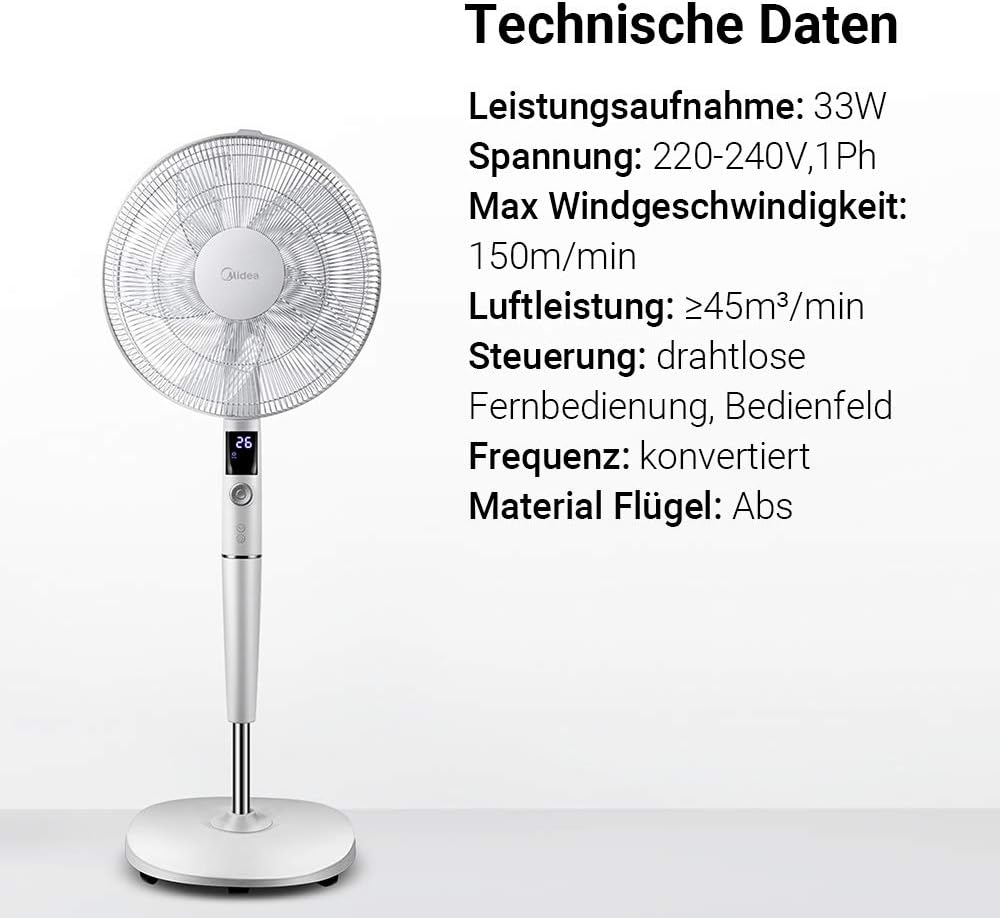
Immaġni: A visual representation of the Midea FS40-15AR fan alongside its technical data, including power consumption, voltage, and control methods.
| Karatteristika | Dettall |
|---|---|
| Numru tal-Mudell | FS40-15AR |
| Brand | Midea |
| Tip | Fann tal-Pedestall DC |
| Konsum tal-Enerġija | 30 Watts |
| Voltage | 220-240V |
| Veloċità massima tar-Riħ | 150 m/min |
| Fluss tal-arja | ≥45 m³/min |
| Numru ta' Veloċitajiet | 26 |
| Livell ta' Storbju | 27 Deċibel (min) |
| Angolu ta 'Oxxillazzjoni | 80 grad |
| Funzjoni Timer | Sa 12 sigħat |
| Metodu ta' Kontroll | Wireless Remote Control, On-unit Control Panel |
| Materjal (Xfafar) | Plastic ABS |
| Dimensjonijiet tal-Prodott (L x W x H) | 45.3 x 40 x 137 ċm |
| Piż | 7.8 kg |
| Karatteristiċi Speċjali | Adjustable Height, Tiltable Head, ECO Mode, Sleep Mode |
Garanzija u Appoġġ
Għal informazzjoni dwar il-garanzija u appoġġ għall-klijenti, jekk jogħġbok irreferi għall-karta tal-garanzija inkluża mal-prodott tiegħek jew żur is-sit uffiċjali ta' Midea. websit. Żomm l-irċevuta tax-xiri tiegħek bħala prova tax-xiri.
For technical assistance or service inquiries, please contact Midea customer service through their official channels.
- Appoġġ onlajn: www.midea.com/global/support
- Informazzjoni ta' Kuntatt: Refer to your regional Midea websit għad-dettalji ta' kuntatt lokali.


