1. Introduzzjoni
The Xiaomi Mi Router 4A Gigabit Edition (Model: R4AC) is a high-performance dual-band wireless router designed for home and small office environments. It features Gigabit Ethernet ports and supports both 2.4GHz and 5GHz Wi-Fi bands, providing fast and stable internet connectivity for multiple devices. This manual provides detailed instructions for the proper setup, operation, and maintenance of your router.
2. Kontenut tal-Pakkett
Qabel ma tipproċedi bis-setup, jekk jogħġbok ivverifika li l-oġġetti kollha huma preżenti fil-pakkett tiegħek:
- Xiaomi Mi Router 4A Gigabit Edition (Host)
- Adapter tal-Enerġija
- Manwal għall-Utent (dan id-dokument)

Image: Visual representation of the router, power cable, and instruction manual included in the package.
3. Prodott Aktarview
The Xiaomi Mi Router 4A Gigabit Edition features a minimalist design with four external antennas for enhanced signal coverage. It includes multiple ports for wired connections and LED indicators for status monitoring.
3.1 Quddiem View

Immaġni: Quddiem view of the Xiaomi Mi Router 4A Gigabit Edition, showing its sleek white casing and four antennas.
3.2 Angolat View with Antennas

Immaġni: Angolata view of the Xiaomi Mi Router 4A, highlighting its four external antennas in an upright position.
3.3 Dimensjonijiet
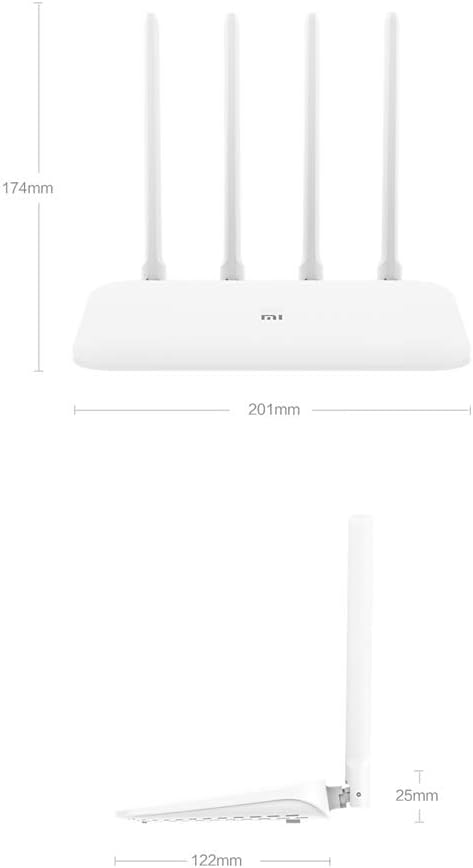
Image: Technical drawing displaying the dimensions of the Xiaomi Mi Router 4A, with measurements in millimeters.
3.4 Portijiet u Indikaturi
The router features:
- Port WAN: 1x 10/100/1000M adaptive port for connecting to your modem or internet service provider.
- Portijiet LAN: 2x 10/100/1000M adaptive ports for connecting wired devices like computers or gaming consoles.
- Input ta' Enerġija: Għall-konnessjoni tal-adapter tal-enerġija.
- System Reset Button: Użat biex jirrestawra s-settings tal-fabbrika.
- Indikaturi LED: Two indicators for system status and network activity.
4. Setup
4.1 Konnessjoni tal-Ħardwer
- Qabbad l-Adapter tal-Enerġija: Plug the power adapter into the router's power input and then into a power outlet.
- Qabbad mal-Internet: Connect an Ethernet cable from your modem's LAN port to the router's WAN port.
- Qabbad Apparati bil-Wajer (Mhux obbligatorju): For wired connections, connect Ethernet cables from your devices to the router's LAN ports.
4.2 Konfigurazzjoni Inizjali
Tista' tikkonfigura r-router billi tuża web browser or the Mi Wi-Fi mobile application.
- Qabbad mal-Wi-Fi tar-Router: On your computer or smartphone, connect to the default Wi-Fi network broadcast by the router. The network name (SSID) and password are usually found on a label on the bottom of the router.
- Access the Configuration Interface:
- Web Browser: Iftaħ a web browser u daħħal l-indirizz IP default (eż.
192.168.31.1ormiwifi.com) into the address bar. Follow the on-screen instructions to set up your internet connection and Wi-Fi network. - Mi Wi-Fi App: Download and install the Mi Wi-Fi app on your smartphone. Open the app and follow the prompts to detect and configure your new router.
- Web Browser: Iftaħ a web browser u daħħal l-indirizz IP default (eż.
- Set Up Wi-Fi Name and Password: During the initial setup, you will be prompted to create a new Wi-Fi network name (SSID) and a strong password for both the 2.4GHz and 5GHz bands. The router supports a unified Wi-Fi name for both frequencies, allowing devices to automatically switch to the optimal band.

Image: Diagram illustrating the unified Wi-Fi name feature, where both 2.4GHz and 5GHz bands share a single SSID for seamless connectivity.
5. Istruzzjonijiet Operattivi
5.1 Apparat li jgħaqqad
- Konnessjoni Wi-Fi: On your wireless devices (smartphones, tablets, laptops), search for your Wi-Fi network name (SSID) and enter the password you set during configuration.
- Konnessjoni Ethernet: For devices requiring a wired connection, plug an Ethernet cable from the device into one of the router's LAN ports.
5.2 Network Management Features
The router offers several features to manage and optimize your home network:
- Ġestjoni tat-Tagħmir: Control internet access times and accessible websites for specific devices.
- Intelligent Speed Limit: Allocate bandwidth on demand to ensure a smooth online experience for critical applications.
- Ottimizzazzjoni tal-Wi-Fi: Perform a one-click detection to improve network performance and resolve common Wi-Fi issues.
- Sigurtà tan-Netwerk: Active interception features help eliminate the risk of unauthorized access or network attacks.

Image: Icons representing various router features, including network management, speed measurement, bandwidth control, Wi-Fi optimization, and network security.
5.3 Kapaċità tal-Apparat
The Xiaomi Mi Router 4A Gigabit Edition is equipped with 128MB of DDR3 memory, supporting stable data transmission for up to 128 connected devices simultaneously. This makes it suitable for smart homes with numerous connected gadgets.

Image: Illustration showing the router's 128MB memory capacity, capable of supporting up to 128 connected devices, surrounded by various smart home devices.
6. Manutenzjoni
6.1 Aġġornamenti tal-Firmware
Iċċekkja u installa regolarment aġġornamenti tal-firmware biex tiżgura prestazzjoni ottimali, sigurtà, u aċċess għal karatteristiċi ġodda. L-aġġornamenti tal-firmware tipikament jistgħu jsiru permezz tar-router. web interface or the Mi Wi-Fi app.
6.2 Ir-Resetjar tar-Router
If you encounter persistent issues or wish to clear all configurations, you can perform a factory reset:
- With the router powered on, locate the System Reset Button (usually a small pinhole button).
- Use a paperclip or a similar pointed object to press and hold the reset button for approximately 5-10 seconds until the LED indicators change behavior.
- Release the button. The router will restart with factory default settings. You will need to reconfigure it.
6.3 Konsiderazzjonijiet Ambjentali
To ensure the longevity and stable operation of your router, adhere to the following environmental guidelines:
- Temperatura operattiva: 0°C sa 40°C (32°F sa 104°F)
- Umdità Operattiva: 10% sa 90% RH (mhux kondensazzjoni)
- Temperatura tal-Ħażna: -40°C sa 70°C (-40°F sa 158°F)
- Umdità tal-Ħażna: 5% sa 90% RH (mhux kondensazzjoni)
Avoid placing the router in direct sunlight, near heat sources, or in areas with high humidity.
Image: Details on recommended operating and storage temperature and humidity ranges for the router.
7 Issolvi l-problemi
This section addresses common issues you might encounter with your Xiaomi Mi Router 4A Gigabit Edition.
- Ebda Aċċess għall-Internet:
- Check if the WAN port cable is securely connected to your modem.
- Ivverifika li l-modem tiegħek qed jaħdem sew u għandu konnessjoni tal-internet attiva.
- Erġa' ibda kemm il-modem kif ukoll ir-router tiegħek.
- Ensure the router's internet settings (e.g., PPPoE, DHCP, Static IP) are correctly configured according to your ISP.
- Wi-Fi Signal Weak or Unstable:
- Relocate the router to a central location, away from obstructions and interference sources (e.g., microwaves, cordless phones).
- Aġġusta l-antenni tar-router għad-direzzjoni ottimali tas-sinjal.
- Use the Wi-Fi Optimization feature in the router's interface or app.
- Ensure your devices are connecting to the appropriate 2.4GHz or 5GHz band.
- Cannot Access Router Configuration Page:
- Kun żgur li t-tagħmir tiegħek huwa konness man-netwerk tar-router (jew permezz tal-Wi-Fi jew tal-Ethernet).
- Verify that you are entering the correct IP address (e.g.,
192.168.31.1) jew dominju (miwifi.com). - Neħħi l-cache tal-brawżer tiegħek jew ipprova brawżer ieħor.
- Iddiżattiva temporanjament kwalunkwe settings tal-VPN jew tal-proxy fuq l-apparat tiegħek.
- Veloċità baxxa tal-Internet:
- Iċċekkja l-veloċità tal-fornitur tas-servizz tal-internet tiegħek.
- Ensure no other devices are consuming excessive bandwidth. Use the Intelligent Speed Limit feature if necessary.
- Perform a Wi-Fi Optimization scan.
- If using Wi-Fi, try connecting via Ethernet to determine if the issue is wireless-related.
8. Speċifikazzjonijiet
Detailed technical specifications for the Xiaomi Mi Router 4A Gigabit Edition:

Image: Table detailing the router's internal specifications, including processor, memory, Wi-Fi standards, and port configuration.
| Karatteristika | Deskrizzjoni |
|---|---|
| Numru tal-Mudell | R4AC |
| Proċessur | MT7621A MPIS Dual Core 880MHz |
| ROM | 16MB |
| Product Memory (RAM) | 128MB DDR3 |
| Wi-Fi 2.4G | 2x2 (supports IEEE 802.11n protocol, up to 300Mbps) |
| Wi-Fi 5G | 2x2 (supports IEEE 802.11ac protocol, up to 867Mbps) |
| Antenna tal-Prodott | 2x 2.4G (max gain 5dBi), 2x 5G (max gain 6dBi) |
| Interface tal-Magni | 1x 10/100/1000M adaptive WAN port (Auto MDI/MDIX), 2x 10/100/1000M adaptive LAN ports (Auto MDI/MDIX) |
| Indikatur LED | 2 |
| Buttuna Reset tas-Sistema | 1 |
| Interface tal-Input tal-Enerġija | 1 |
| Standard tal-Protokoll | IEEE 802.11a/b/g/n/ac, IEEE 802.3/3u |
| Frekwenza doppja | 2.4GHz u 5GHz |
| Wireless Channels (2.4GHz) | 1, 2, 3, 4, 5, 6, 7, 8, 9, 10, 11, 12, 13 |
| Wireless Channels (5GHz) | 36, 40, 44, 48, 149, 153, 157, 161, 165 |
| Sistema Operattiva | RouterOS (Custom Xiaomi firmware) |
| Kulur | Abjad |
| Dimensjonijiet (L x W x H) | 201mm x 122mm x 174mm (with antennas up) |
| Apparati Kompatibbli | Personal computer, laptop, tablet, smartphone, game console |
| Użu Rakkomandat | Dar |
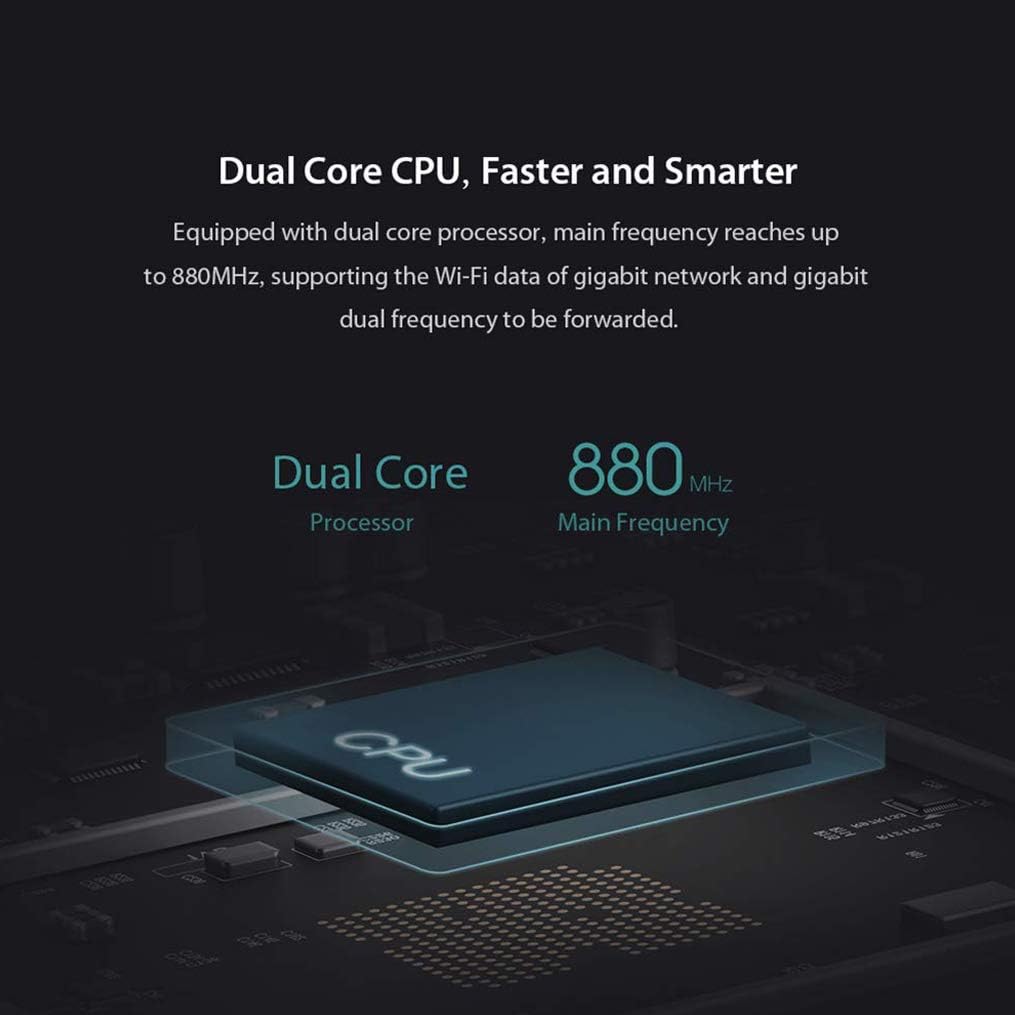
Image: Diagram illustrating the router's dual-core CPU with an 880MHz main frequency, emphasizing its processing capabilities.
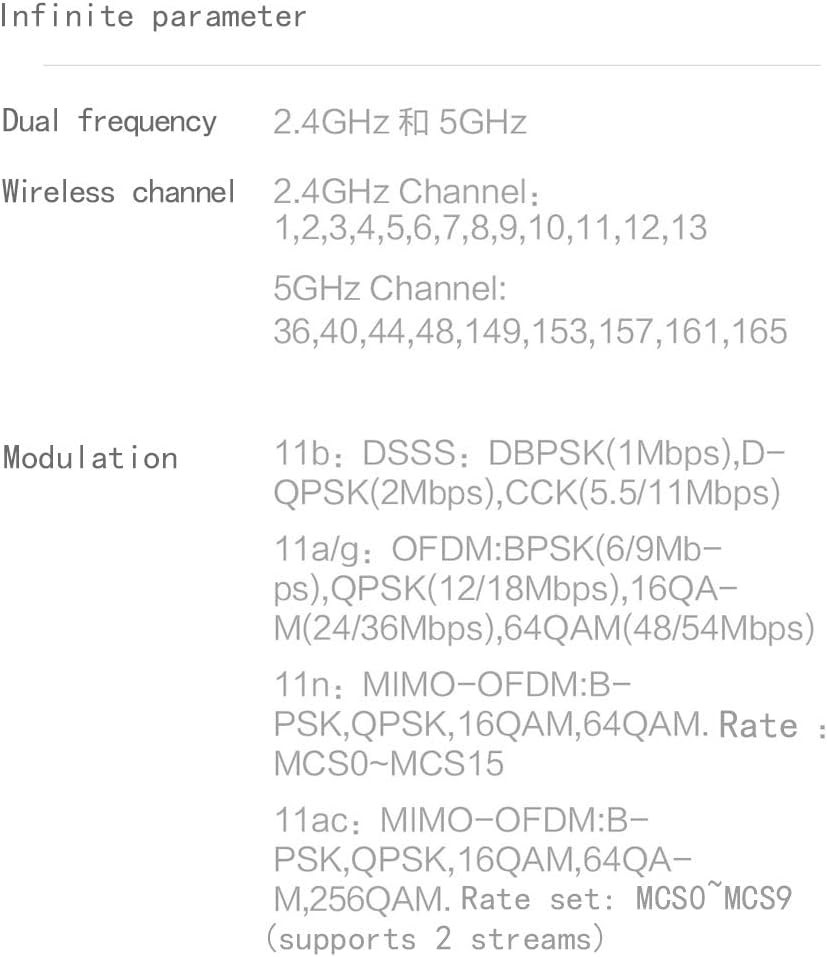
Image: Information on the specific wireless channels available for 2.4GHz and 5GHz bands, along with supported modulation types.
9. Garanzija u Appoġġ
Għal informazzjoni dwar il-garanzija, jekk jogħġbok irreferi għall-karta tal-garanzija inkluża mal-prodott tiegħek jew żur is-sit uffiċjali ta' Xiaomi website for your region. Support resources, including FAQs and contact information, can also be found on the official Xiaomi support pages. Please retain your proof of purchase for warranty claims.