1. Introduzzjoni
Grazzi tax-xiriasing the Acme Cargo Metal Frame Desk and Hutch. This manual provides essential information for the safe assembly, proper use, and maintenance of your new furniture. Please read these instructions carefully before beginning assembly and retain this manual for future reference.
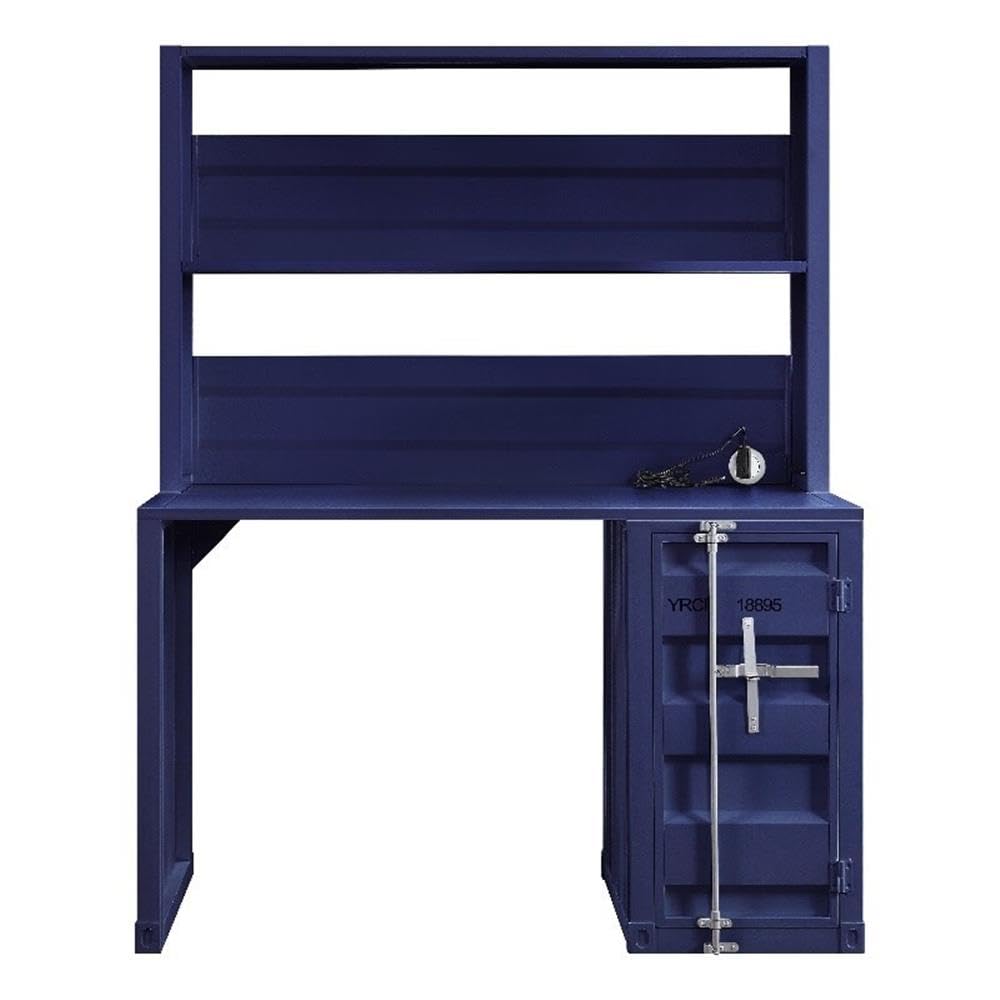
Figure 1: Fully assembled Acme Cargo Metal Frame Desk and Hutch.
The Acme Cargo Desk and Hutch features a robust metal frame design, offering a functional workspace with integrated storage. It includes a rectangular writing desk surface, an overhead hutch with open compartments, and a storage base with a door and internal shelving.
2. Informazzjoni dwar is-Sigurtà
TWISSIJA: Jekk ma ssegwix dawn l-istruzzjonijiet ta’ sigurtà, dan jista’ jirriżulta fi korriment jew ħsara lill-prodott.
- Dejjem arma l-prodott fuq wiċċ artab u nadif biex tevita l-grif.
- Ensure all parts are present and undamaged before beginning assembly. Do not proceed with assembly if any parts are missing or damaged.
- Assembly requires two adults. Do not attempt to assemble alone.
- Żomm il-partijiet żgħar u l-materjali tal-ippakkjar 'il bogħod mit-tfal u l-annimali domestiċi.
- Do not exceed the maximum weight capacity of 208 pounds (94 kg) for the desk surface.
- Do not climb on the desk or hutch.
- Place the desk on a level surface to prevent wobbling and instability.
- Regularly check and tighten all fasteners to ensure stability.
- If the product includes anti-tip hardware, it is highly recommended to install it to prevent tipping, especially in households with children.
3. Kontenut tal-Pakkett
Before assembly, verify that all components listed below are included in your package. If any parts are missing or damaged, please contact customer support immediately.
- Desk Frame (Left and Right Supports)
- Panel tad-Desktop
- Hutch Frame (Top and Side Panels)
- Hutch Shelves (2)
- Storage Base Unit
- Storage Base Door
- Internal Storage Shelf (1)
- Hardware Pack (screws, bolts, cam locks, hinges, etc.)
- Assembly Tools (Hex Key, etc. - Note: Additional tools like a screwdriver may be required and are not included)
4. Istruzzjonijiet ta' Twaqqif u Assemblaġġ
Please follow these steps carefully. Assembly is recommended for two people.
Għodod Meħtieġa (Mhux Inklużi):
- Tornavit tar-ras Phillips
- Mazza tal-gomma (mhux obbligatorja, għal tapping ġentili)
Passi tal-Assemblea:
- Iftaħ u Identifika l-Partijiet: Carefully remove all components from the packaging. Lay them out on a clean, soft surface (e.g., carpet or blanket) to prevent scratches. Identify each part using the provided parts list.
- Assemble Desk Base: Attach the left and right desk support frames to the desktop panel using the provided bolts and hex key. Ensure all connections are secure but do not overtighten initially.
- Assemble Storage Base: Attach the storage base unit to the right side of the desktop panel. Secure it with the appropriate fasteners.
- Install Storage Door: Attach the hinges to the storage base door and then to the storage base unit. Ensure the door opens and closes smoothly. Install the internal storage shelf as desired.
- Attach Hutch Frame: Position the hutch frame onto the back of the desktop panel, aligning the pre-drilled holes. Secure the hutch frame to the desktop and the rear of the desk supports using the designated fasteners.
- Installa l-ixkafef tal-Hutch: Insert the two hutch shelves into the designated slots or attach them to the hutch frame using the provided hardware.
- Issikkar finali: Once all components are assembled, carefully move the desk to its desired location. On a level surface, gradually tighten all bolts and screws until secure. Do not overtighten.
- Kontroll tal-Istabbiltà: Gently push and pull the desk to ensure it is stable and does not wobble. If wobbling occurs, recheck all connections and ensure the desk is on a level surface.

Figure 2: Storage base with door open, revealing internal shelf.
5. Istruzzjonijiet Operattivi (Użu)
Your Acme Cargo Desk and Hutch is designed for versatile use in a home office, dorm, or bedroom.
- Wiċċ tal-Iskrivanija: Use the main desk surface for your computer, writing, or other tasks. Ensure the weight distributed on the surface does not exceed 208 pounds (94 kg).
- Hutch Shelves: The open hutch shelves are ideal for storing books, decorative items, or small office supplies. Distribute weight evenly and avoid placing excessively heavy items on the upper shelves.
- Bażi tal-Ħażna: The enclosed storage base with a door provides discreet storage for files, larger items, or personal belongings. The internal shelf can be used to organize items within the compartment.
- Ġestjoni tal-Kejbil: While not explicitly designed with cable management features, you can use cable ties or adhesive clips (not included) to organize power cords and data cables behind the desk for a tidy workspace.
6. Manutenzjoni
Kura xierqa se testendi l-ħajja u d-dehra tal-iskrivanija tiegħek.
- Tindif: Imsaħ l-uċuħ b'artab, damp cloth. Avoid abrasive cleaners, harsh chemicals, or solvents, as these can damage the painted finish. Dry immediately with a clean cloth.
- Spezzjoni regolari: Periodically check all bolts, screws, and fasteners to ensure they remain tight. Retighten as necessary to maintain structural integrity and prevent wobbling.
- Evita l-umdità: Do not place hot items directly on the desk surface without protection. Wipe up spills immediately to prevent water damage or staining.
- Espożizzjoni għad-dawl tax-xemx: Avoid prolonged exposure to direct sunlight, which can cause fading or discoloration of the finish over time.
7 Issolvi l-problemi
| Problema | Kawża Possibbli | Soluzzjoni |
|---|---|---|
| L-iskrivanija titħarrek jew mhix stabbli. | Uneven floor surface; loose fasteners; incorrect assembly. | Ensure the desk is on a level surface. Check and tighten all assembly fasteners. Review passi tal-assemblaġġ biex tiżgura installazzjoni korretta. |
| Storage door does not close properly. | Hinges are misaligned or loose; obstruction. | Check hinge alignment and tighten screws. Ensure nothing is obstructing the door's path. |
| Il-partijiet jidhru mgħawġin jew bil-ħsara mal-wasla. | Ħsara bil-baħar. | Do not proceed with assembly. Contact customer support immediately with photos of the damage for replacement parts or a return. |
| Ħardwer jew komponenti nieqsa. | Żball fl-ippakkjar. | Carefully check all packaging materials. If still missing, contact customer support for replacement parts. |
8. Speċifikazzjonijiet
| Karatteristika | Dettall |
|---|---|
| Ditta: | Acme |
| Numru tal-Mudell: | AC-37907 |
| Dimensjonijiet tal-Prodott (P x W x H): | 24"D x 47"W x 60"Għ (61 ċm D x 119 ċm W x 152 ċm Għ) |
| Piż tal-oġġett: | 104 Lira (47.2 kg) |
| Materjal: | Metal (Frame, Top, Base, Hutch) |
| Kulur: | Blu |
| Tip ta 'Finish: | Finitura Miżbugħa |
| Rakkomandazzjoni tal-Piż Massimu: | 208 Lira (94 kg) |
| Numru ta' Xkafef: | 2 (Hutch) + 1 (Internal Storage) |
| Numru ta' Kabinetti: | 1 |
| Assemblaġġ Meħtieġa: | Iva |
| Numru Rakkomandat ta' Nies għall-Assemblea: | 2 |

Figure 3: Product dimensions for the Acme Cargo Desk and Hutch.
9. Informazzjoni dwar Garanzija
This Acme Cargo Metal Frame Desk and Hutch is covered by a Garanzija Limitata from the manufacturer. The specific terms and duration of the warranty may vary. For detailed information regarding your product's warranty, including coverage, limitations, and how to make a claim, please refer to the official Acme Furniture webis-sit jew ikkuntattja lis-servizz tal-klijenti tagħhom direttament.
Jekk jogħġbok żomm il-prova tax-xiri tiegħek għal kwalunkwe talba ta' garanzija.
10. Appoġġ għall-Klijent
If you have any questions, require assistance with assembly, or need to report missing or damaged parts, please contact Acme Furniture customer support:
- Websit: Visit the official Acme Furniture websit għal FAQs, reġistrazzjoni tal-prodott, u formoli ta' kuntatt.
- Bejjiegħa bl-imnut: If purchased from a retailer, you may also contact their customer service department for assistance.
When contacting support, please have your model number (AC-37907) and proof of purchase readily available.


