Introduzzjoni
The Amazon Echo Show 8 (1st Gen, 2019 release) is a smart display designed to enhance your daily life with Alexa. Featuring an 8-inch HD screen and stereo sound, it allows you to manage your day, connect with loved ones through video calls, enjoy entertainment, control smart home devices, and personalize your experience. This manual provides detailed instructions to help you get the most out of your device.
X'hemm fil-Kaxxa
Upon unboxing your Echo Show 8, ensure all components are present:
- Apparat Echo Show 8
- Power adapter (30W) with cable (4.9 ft.)
- Gwida tal-bidu ta 'malajr
Setup
Setting up your Echo Show 8 is a straightforward process, often simplified by Amazon Wi-Fi simple setup technology.
- Qawwa Mixgħul: Connect the power adapter to your Echo Show 8 and plug it into a wall outlet. The device will power on automatically.
- Għażla tal-Lingwa: Segwi l-istruzzjonijiet fuq l-iskrin biex tagħżel il-lingwa preferuta tiegħek.
- Konnessjoni Wi-Fi: Select your Wi-Fi network from the list and enter the password. The Echo Show 8 supports dual-band Wi-Fi (802.11a/b/g/n/ac).
- Login tal-Kont tal-Amazon: Log in with your Amazon account credentials. If you don't have one, you will be prompted to create one.
- Reġistrazzjoni tal-Apparat: Your device will register to your Amazon account.
- Żona tal-Ħin u Lokazzjoni: Ikkonferma ż-żona tal-ħin u s-settings tal-post tiegħek.
- Tutorja: The device may offer a brief tutorial on how to navigate and use its features.
The Alexa app is compatible with Fire OS, Android, and iOS devices and is also accessible via your web browser for further management and customization.
Kif Tħaddem l-Echo Show 8 Tiegħek
The Echo Show 8 can be operated using voice commands with Alexa or through its touch screen interface.
Voice Commands (Alexa)
Sempliċement għid "Alexa" segwit mill-kmand tiegħek. Eż.amples jinkludu:
- "Alexa, x'temp qed jagħmel?"
- "Alexa, daqq il-mużika."
- "Alexa, call [contact name]."
- "Alexa, show me my photos."
- "Alexa, turn off the lights."

Image: Echo Show 8 displaying current weather conditions, demonstrating its ability to provide glanceable information.
Touch Screen Navigazzjoni
Swipe down from the top of the screen to access quick settings and the home menu. Swipe left from the right edge to view cards with suggestions and information. Tap on icons and options to interact with the device.
Karatteristiċi
The Echo Show 8 offers a wide range of features to simplify and enrich your daily routines:
- Video Calling & Messaging: Connect with friends and family who have the Alexa app or an Echo device with a screen. Make announcements to other devices in your home.

Image: A user making a video call on the Echo Show 8, highlighting its communication capabilities.
- Divertiment: Ask Alexa to show you movie trailers, TV shows, movies, or the news. Listen to radio stations, podcasts, and audiobooks.
- Kontroll tad-Dar Intelliġenti: Voice control compatible devices or manage them on the easy-to-use display. Ask Alexa to show you security cameras, control lights, and adjust thermostats.

Image: The Echo Show 8 displaying a live feed from a nursery camera, illustrating its smart home monitoring feature.
- Personalizzazzjoni: Show off your albums from Amazon Photos. Customize your home screen. Create morning routines to start your day.
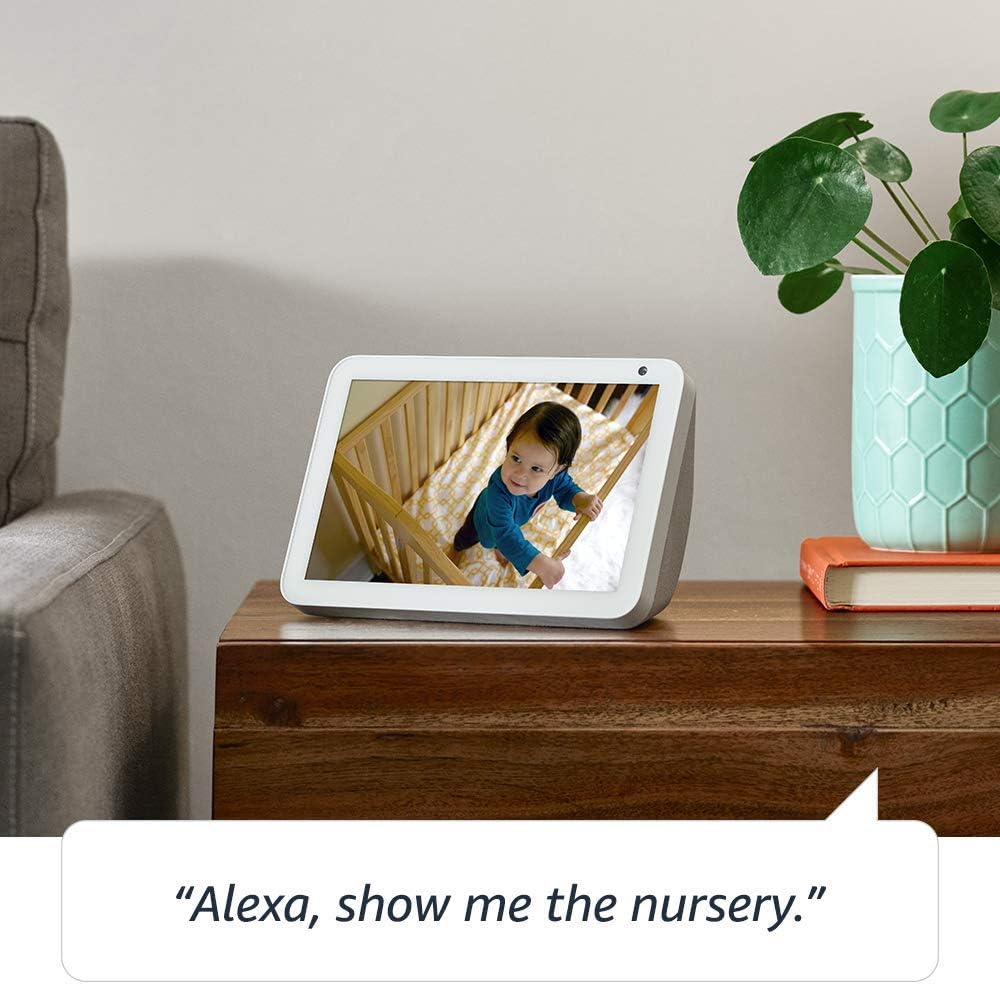
Image: The Echo Show 8 displaying a scenic photo from a user's Amazon Photos album, demonstrating its personalization options.
- Daily Assistance: Cook along to step-by-step recipes. Easily update to-do lists and calendars. Glance at weather and traffic on your way out.
Karatteristiċi tal-Privatezza
The Echo Show 8 is designed with privacy in mind, offering several controls:
- Buttuna Mitfija tal-Mikrofonu/Kamera: Electronically disconnect the microphones and camera with one press of a button.
- Xater tal-Kamera Mibni: Slide the built-in shutter to physically cover the camera lens.

Image: A finger activating the physical camera shutter on the Echo Show 8, demonstrating a privacy control feature.
- Teknoloġija tal-Wake Word: Alexa devices are designed to detect only your chosen wake word (e.g., "Alexa").
- Indikaturi tal-istriming: Visual indicators show when Alexa is streaming your request to the cloud.
- Ġestjoni tar-Reġistrazzjoni tal-Vuċi: Il-ħila li view and delete your voice recordings through the Alexa app or Alexa Privacy Hub.
For more information, visit the Alexa Privacy Hub.
Manutenzjoni
Biex tiżgura l-lonġevità u l-prestazzjoni ottimali tal-Echo Show 8 tiegħek, segwi dawn il-linji gwida tal-manutenzjoni:
- Tindif: Use a soft, lint-free cloth to clean the screen and exterior. Avoid abrasive cleaners or sprays directly on the device.
- Pjazzament: Place the device on a stable, flat surface away from direct sunlight, heat sources, and moisture. Ensure proper ventilation.
- Aġġornamenti tas-Software: The device automatically receives software updates. Ensure it is connected to Wi-Fi to receive these updates, which improve performance and add new features.
Issolvi l-problemi
Jekk tiltaqa' ma' problemi bl-Echo Show 8 tiegħek, ipprova l-passi li ġejjin:
- Ebda Qawwa:
- Kun żgur li l-adapter tal-enerġija huwa konness sew kemm mal-apparat kif ukoll ma' sokit tal-enerġija li jaħdem.
- Ipprova żbokk tad-dawl differenti.
- Kwistjonijiet ta' Konnessjoni Wi-Fi:
- Iċċekkja li l-password tal-Wi-Fi tiegħek hija korretta.
- Erġa' ibda r-router u l-modem tal-Wi-Fi tiegħek.
- Mexxi l-Echo Show 8 eqreb lejn ir-router tal-Wi-Fi tiegħek.
- Alexa Mhux qed Tirrispondi:
- Ensure the microphone is not muted (check the microphone/camera off button).
- Tkellem b'mod ċar u b'volum normali.
- Ipprova erġa' ibda l-apparat billi tneħħih mill-plagg għal ftit sekondi u mbagħad terġa' tqabbdu.
- Kwistjonijiet tal-iskrin:
- Jekk l-iskrin ma jirrispondix, ipprova erġa' ibda l-apparat.
- Ensure the screen is clean and free of smudges.
- Irrisettjar tal-Fabbrika: As a last resort, you can perform a factory reset. This will erase all your personal data and settings. To do this, go to Settings > Device Options > Reset to Factory Defaults.
Speċifikazzjonijiet
| Karatteristika | Dettall |
|---|---|
| Daqs | 7.9”x 5.4”x 3.9” (200mm x 135mm x 99mm) |
| Piż | 36.6 oz (1037 gramma) |
| Wiri | Touch screen ta ’8.0” |
| Kamera | 1MP camera with built-in shutter |
| Konnettività Wi-Fi | Il-Wi-Fi dual-band jappoġġja netwerks Wi-Fi 802.11a/b/g/n/ac. Ma jappoġġjax il-konnessjoni ma' netwerks Wi-Fi ad-hoc (jew peer-to-peer). |
| Konnettività Bluetooth | Distribuzzjoni Avvanzata tal-Awdjo Profile (A2DP) support for audio streaming from your mobile device to Echo Show 8 or from Echo Show 8 to your Bluetooth speaker. Audio/Video Remote Control Profile (AVRCP) għall-kontroll tal-vuċi ta' apparati mobbli konnessi. Il-kontroll tal-vuċi hands-free mhux appoġġjat għal apparati Mac OS X. L-ispikers Bluetooth li jeħtieġu kodiċijiet PIN mhumiex appoġġjati. |
| Awdjo | 2.0” (52 mm) neodymium speakers with passive bass radiator |
| Rekwiżiti tas-Sistema | Echo Show 8 comes ready to connect to your WiFi. The Alexa app is compatible with Fire OS, Android, and iOS devices and also accessible via your web browser. Supported operating systems. Certain skills and services may require subscription or other fees. |
| Proċessur | MediaTek MT 8163 |
| Lingwa | Alexa titkellem bl-Ingliż u bl-Ispanjol |
Karatteristiċi ta' Aċċessibilità
The Echo Show 8 includes various accessibility features to personalize Alexa to your abilities:
- Tektek għal Alexa: Access Alexa via touch through on-screen tiles or a keyboard.
- Smigħ Adattiv: Jipprovdi aktar ħin biex jintemm it-taħdit qabel ma Alexa tirrispondi.
- Rata Preferuta tat-Tkellem: Ikkontrolla kemm Alexa titkellem malajr jew bil-mod.
- Sottotitli Alexa, Sottotitli għal Sejħiet, Sottotitli Magħluqa: Ipprovdi sottotitoli għal kontenut appoġġjat.
- Uri u Għid: Helps customers who are blind or visually impaired identify products by saying “Alexa, what am I holding.”
- LeħenView Screen Reader: Enables access for customers who are blind or visually impaired.
- Lenti tal-Iskrin: Enables zooming in/out and panning around the screen.
- Avża Meta Jkun Fil-Qrib: Plays notification sounds when you’re detected near your Echo device.
- Aqra b'leħen għoli fuq Kindle: Alexa tista’ taqra l-kotba Kindle tiegħek b’leħen għoli.
- Test f'Ħin Reali: Enables typing live text in a video call.
- Settings addizzjonali jinkludu Inverżjoni tal-Kulur, Korrezzjoni tal-Kulur, Talba għall-Ħoss, u aktar.
To enable these features, go to Settings → Accessibility on your Echo Show 8.
Garanzija u Appoġġ
Your Certified Refurbished Echo Show 8 comes with a 1-year limited warranty and service, similar to a new device. Use of Echo Show 8 is subject to Amazon's terms and conditions.
For further assistance, visit the Amazon Device Support page or contact Amazon Customer Service.


