1. Introduzzjoni
This manual provides instructions for the PowerA Spectra Enhanced Illuminated Wired Controller. This controller is designed for use with Xbox One, Xbox Series X|S, and Windows 10/11, offering enhanced features such as customizable LED lighting, mappable advanced gaming buttons, and adjustable trigger locks.
2. Kontenut tal-Pakkett
- PowerA Spectra Enhanced Illuminated Wired Controller
- Detachable 9.8ft (3m) Braided USB Cable with Snap-Lock and Inline Release

Figure 2.1: Controller and detachable USB cable.
3. Setup u Konnessjoni
- Qabbad il-Cable USB: Insert the small end of the detachable braided USB cable into the micro USB port on the top of the controller. Ensure it clicks securely into place with the snap-lock mechanism.
- Connect to Console/PC: Plug the standard USB end of the cable into an available USB port on your Xbox One, Xbox Series X|S console, or Windows 10/11 PC.
- Qawwa Mixgħul: The controller will automatically power on and connect to your device. The LED illumination will activate.

Figure 3.1: USB cable connection point on the controller.
4. Istruzzjonijiet Operattivi
4.1 Tqassim tal-Kontrollur
The PowerA Spectra Enhanced controller features a standard Xbox layout with additional enhancements. Refer to the diagram below for key components.

Figura 4.1: Quddiem u wara view of the controller with feature callouts.
4.2 Advanced Gaming Buttons (Mappable)
The controller includes two mappable Advanced Gaming Buttons on the back. These can be programmed to replicate any standard button input for quick access.
- Modalità tal-Programm: Press and hold the Program Button (located on the back, near the center) for 2 seconds. The LED indicator will flash to signal program mode.
- Select Button to Map: Press the button you wish to map (A, B, X, Y, LB, RB, LT, RT, Left Stick Click, Right Stick Click, D-pad).
- Assign to Advanced Button: Press one of the Advanced Gaming Buttons (AGB1 or AGB2) on the back of the controller. The LED indicator will stop flashing, confirming the button has been mapped.
- Immappjar ċar: To clear a single Advanced Gaming Button, repeat the mapping process but do not press any button after entering program mode. Instead, press the Advanced Gaming Button you wish to clear twice. To clear all mappings, hold the Program Button for 5 seconds.
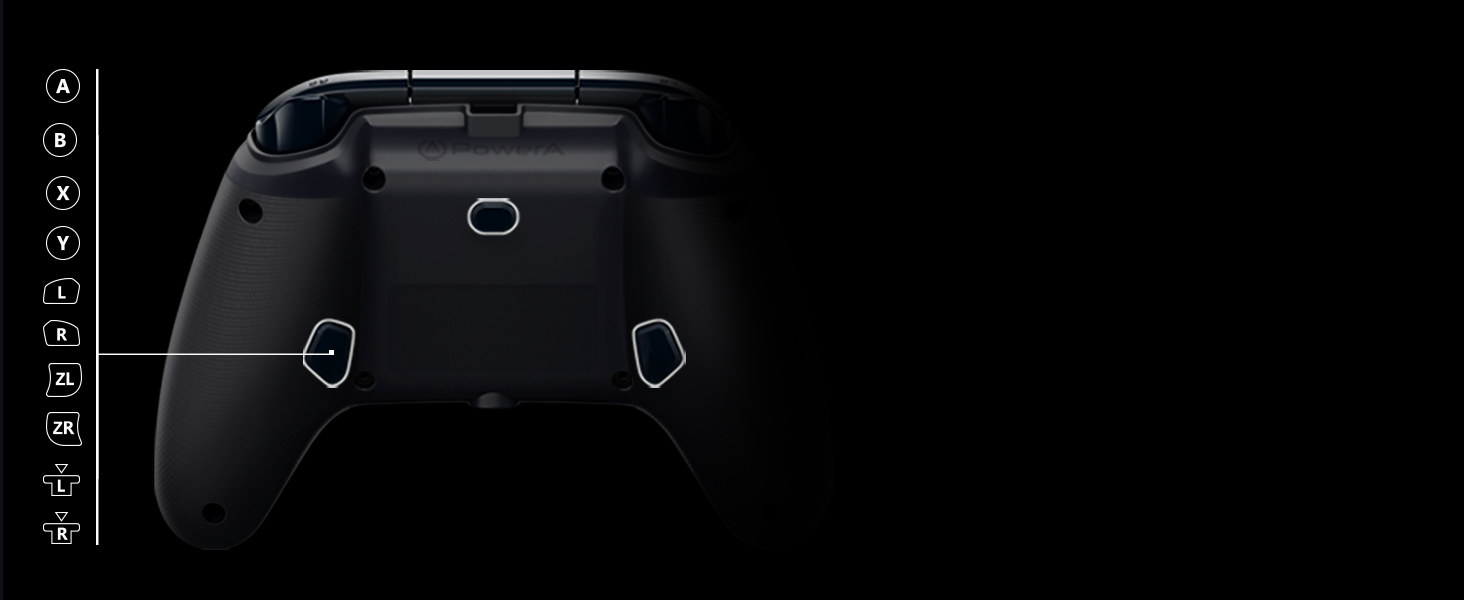
Figure 4.2: Location of Advanced Gaming Buttons and Program Button.
4.3 Illuminazzjoni LED
The controller features vibrant LED edge lighting in 7 colors (Red, Orange, Yellow, Green, Blue, Indigo, Violet). Use the Color-Cycle Button (located on the back, near the center) to adjust the lighting.
- Ibdel il-Kulur: Press the Color-Cycle Button to cycle through the 7 available colors.
- Auto-Cycle: Hold the Color-Cycle Button for 2 seconds to activate auto-cycle mode, where the colors will continuously fade and change.
- Itfi l-LEDs: Press and hold the Color-Cycle Button again for 2 seconds to turn off the LED illumination.

LED aħdar

LED blu

LED vjola

Ċjan LED

LED oranġjo
4.4 3-Way Trigger Locks
The controller features 3-way trigger locks for the Left Trigger (LT) and Right Trigger (RT). These switches allow you to adjust the travel distance of the triggers, enabling quicker response times in certain games.
- Full Travel: Default position for maximum trigger movement.
- Medium Travel: Reduces trigger travel for a faster response.
- Short Travel: Minimizes trigger travel for the quickest possible input.
Adjust the physical switches on the back of the controller to select your preferred trigger travel setting.

Figure 4.3: Location of 3-way trigger locks.
4.5 3.5mm Stereo Headset Jack
A 3.5mm stereo headset jack is located on the bottom of the controller, allowing you to connect your gaming headset for audio and chat functionality.

Figure 4.4: Location of the 3.5mm stereo headset jack.
5. Manutenzjoni
- Tindif: Use a soft, dry cloth to clean the controller. Avoid using abrasive cleaners or solvents, as these can damage the surface.
- Kura tal-Cable: Handle the detachable USB cable with care. Avoid sharp bends or excessive pulling. Always disconnect the cable by gripping the connector, not the cable itself.
- Ħażna: Store the controller in a cool, dry place away from direct sunlight and extreme temperatures when not in use.
6 Issolvi l-problemi
| Ħruġ | Soluzzjoni Possibbli |
|---|---|
| Il-kontrollur ma jirrispondix |
|
| LEDs not illuminating or changing color |
|
| Advanced Gaming Buttons not mapping |
|
| Headset audio issues |
|
If you continue to experience issues, please visit the official PowerA support websit għal aktar għajnuna.
7. Speċifikazzjonijiet
- Numru tal-Mudell: 1510523-01
- Kompatibilità: Xbox One, Xbox Series X|S, Windows 10/11
- Konnettività: USB bil-fili
- Tul tal-Cable: 9.8 ft (3 meters) braided, detachable
- Illuminazzjoni: 7-color LED edge lighting
- Karatteristiċi Speċjali: 2 mappable Advanced Gaming Buttons, 3-way Trigger Locks, Dual Rumble Motors, 3.5mm Stereo Headset Jack, Anti-friction Rings on thumb sticks
- Dimensjonijiet (Ippakkjar): Madwar 7.76 x 7.76 x 11.14 pulzieri
- Piż: Madwar 15.8 uqija
- Manifattur: QawwaA
8. Garanzija u Appoġġ
The PowerA Spectra Enhanced Illuminated Wired Controller comes with a Garanzija limitata ta 'sena mid-data tax-xiri. Din il-garanzija tkopri difetti fil-materjal u l-abbilità taħt użu normali.
For warranty claims, technical support, or further product information, please visit the official PowerA support webis-sit jew ikkuntattja lis-servizz tal-klijenti tagħhom direttament.
PowerA Official Websit: www.powera.com


