1. Introduzzjoni
This instruction manual provides comprehensive guidance for the setup, operation, maintenance, and troubleshooting of your VMAI 2.1 Sound Bar with Subwoofer. Please read this manual thoroughly before using the product to ensure optimal performance and longevity.
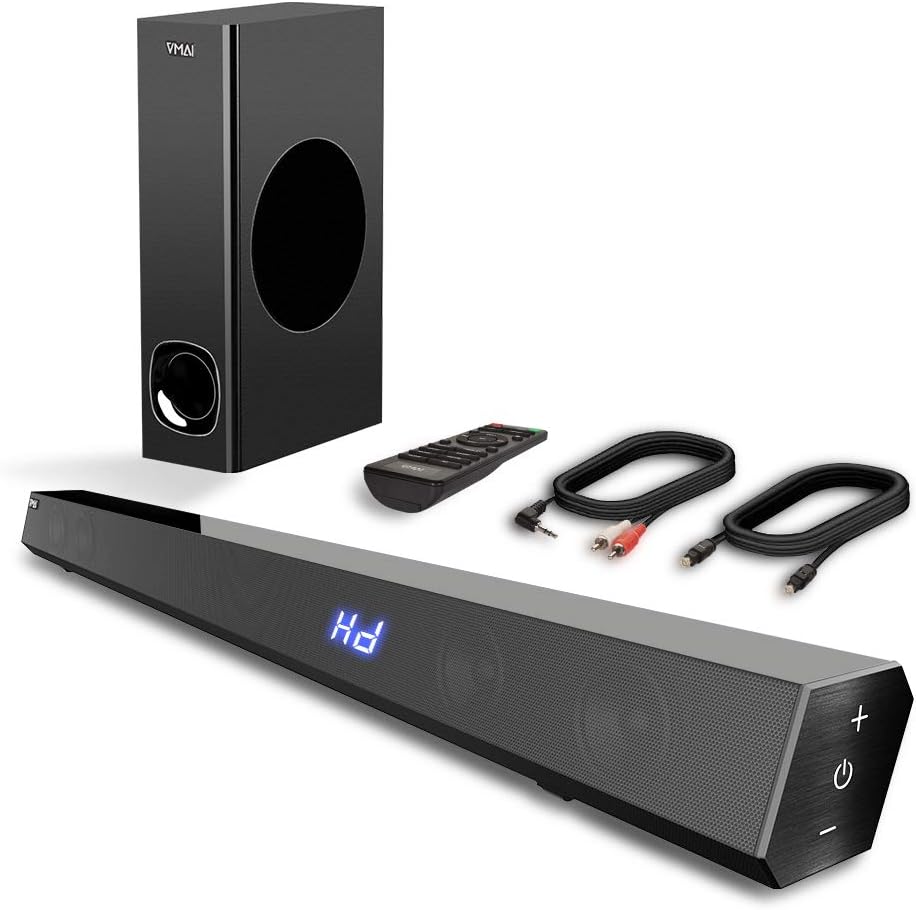
Figure 1.1: VMAI 2.1 Sound Bar with Subwoofer, remote control, and included cables.
2. Karatteristiċi tal-prodott
- 2.1 Channel Immersive Sound: Delivers 120W of power for clear audio, powerful bass, and surround sound, enhancing your home audio experience. Features 110dB sound level pressure for detailed midrange and crisp treble.
- Konnettività Bluetooth 5.0: Ensures faster transmission speeds, stable connectivity, and smooth transmission over long distances with low power consumption. Allows wireless streaming from smartphones, tablets, and PCs.
- Modi tal-Ħsejjes Multipli: Includes Music, Movie, News, and 3D modes, adjustable via the included remote control. Treble and bass levels can also be customized.
- Għażliet ta' Input versatili: Supports wired connections including HDMI ARC, Optical, USB (flash drive only), and AUX input, compatible with various devices like TVs, projectors, computers, and gaming consoles.
- Sleek and Mountable Design: Engineered to be less than 2.5 inches high with a jet-black surface. Features luxury touch-button controls on the side. Includes a mount bracket for wall installation.

Figure 2.1: The VMAI Sound Bar and Subwoofer provide strong bass and immersive sound for an enhanced viewing esperjenza.

Figure 2.2: Internal speaker configuration of the 2.1 channel sound bar, highlighting its full-range frequency speakers.
3. Kontenut tal-Pakkett
Jekk jogħġbok immarka l-kaxxa għall-oġġetti li ġejjin:
- VMAI 2.1 Sound Bar
- Subwoofer bil-fili
- Kontroll mill-bogħod
- Adapter tal-Enerġija
- Kejbil Ottiku Premium ta' 5 piedi
- 5 ft RCA to 3.5 mm Cable
- Kit tal-parentesi tal-muntaġġ tal-ħajt
- Manwal għall-Utent (dan id-dokument)
4. Setup
4.1 Tqegħid
Is-Sound Bar VMAI toffri għażliet flessibbli ta' tqegħid:
- Fuq tal-mejda: Place the sound bar on a flat surface below your TV.
- Muntaġġ tal-ħajt: Use the included mount bracket to secure the sound bar to the wall. Ensure it is securely fastened.

Figura 4.1: Eżamples of sound bar placement: on a TV stand or wall-mounted.
4.2 Konnessjonijiet
Connect your sound bar to your audio source using one of the following methods:
- HDMI ARC: For optimal audio quality and control, connect an HDMI cable (not included) from the sound bar's HDMI (ARC) port to your TV's HDMI ARC port.
- Ottiċi: Use the provided optical cable to connect the sound bar's OPTICAL input to your TV's optical output. Importanti: When using Optical Mode, ensure PCM settings are enabled on your TV. Refer to your TV's manual for specific instructions (e.g., Audio Format settings, HDMI Audio Format settings).
- AUX: Use the provided RCA to 3.5 mm cable to connect the sound bar's AUX input to your device's audio output.
- USB: Insert a USB flash drive (formatted to FAT32, max 32GB) into the USB port to play audio files direttament.
- Bluetooth: For wireless connection, enable Bluetooth on your device and pair with "VMAI Sound Bar".

Figure 4.2: Available input options on the VMAI Sound Bar.
Video 4.1: An official VMAI video demonstrating the sound bar's features, including its 120W power, 2.1 channel sound, and various connectivity options like Bluetooth 5.0, HDMI (ARC), Optical, AUX, and USB. It also highlights the slim design and touch-button controls.
5. Istruzzjonijiet Operattivi
5.1 Power On/Off
Agħfas il- Buttuna tal-qawwa on the sound bar's side panel or the remote control to turn the unit On or Off.
5.2 Għażla tal-Input
Agħfas il- Buttuna tad-dħul on the remote or the touch panel to cycle through available input sources: Bluetooth, HDMI ARC, Optical, AUX, and USB.
5.3 Kontroll tal-Volum
Uża l- Volum + u Volum - buttons on the sound bar or remote to adjust the master volume.
5.4 Modi tal-Ħsejjes
The remote control allows you to select from four distinct sound modes:
- Modalità Mużika: Ottimizzat għall-daqq tal-mużika.
- Modalità tal-Film: Enhances cinematic audio for films.
- Modalità Aħbarijiet: Clarifies dialogue for news and spoken content.
- Modalità 3D: Provides an immersive, three-dimensional audio experience.
5.5 Aġġustament tal-Bass u t-Treble
Uża d-dedikat Baxx +/- u Treble +/- buttons on the remote control to fine-tune the audio output to your preference.

Figure 5.1: Sound bar touch controls and remote control for comprehensive operation.

Figure 5.2: The VMAI Sound Bar system creating a live surround sound experience in a home environment.
6. Manutenzjoni
Biex tiżgura l-lonġevità u l-prestazzjoni ottimali tas-Sound Bar VMAI tiegħek, segwi dawn il-linji gwida tal-manutenzjoni:
- Tindif: Use a soft, dry cloth to wipe the surfaces of the sound bar and subwoofer. Do not use liquid cleaners or abrasive materials, as they may damage the finish.
- Ventilazzjoni: Ensure proper ventilation around the sound bar and subwoofer. Do not block any ventilation openings.
- Ħażna: Jekk se taħżen l-unità għal perjodu estiż, skonnettjaha mill-elettriku u aħżenha f'post frisk u niexef 'il bogħod mix-xemx diretta u minn temperaturi estremi.
- Evita l-umdità: Keep the sound bar and subwoofer away from water, humidity, and any liquids. They are not waterproof.
7 Issolvi l-problemi
Jekk tiltaqa' ma' problemi bis-Sound Bar VMAI tiegħek, jekk jogħġbok irreferi għall-problemi u s-soluzzjonijiet komuni li ġejjin:
| Problema | Kawża Possibbli | Soluzzjoni |
|---|---|---|
| Ebda Ħoss |
|
|
| Falliment tal-Imqabbad tal-Bluetooth |
|
|
| Il-Kontroll Remot Mhux Jaħdem |
|
|
For further assistance, please contact VMAI customer support.
8. Speċifikazzjonijiet
| Karatteristika | Dettall |
|---|---|
| Isem tal-Mudell | 2.1 Sound Bar |
| Tip ta' Kelliem | Subwoofer |
| Qawwa tal-Ħruġ Massimu tal-Ispeaker | 120 Watts |
| Teknoloġija tal-Konnettività | Bluetooth, Auxiliary, USB, Optical, HDMI (ARC) |
| Teknoloġija tal-Komunikazzjoni mingħajr Fili | Bluetooth 5.0 |
| Medda Bluetooth | 50 Pied (madwar 15 metru) |
| Modalità tal-Ħruġ tal-Awdjo | Surround, Stereo |
| Kulur | Ġett Iswed |
| Dimensjonijiet tal-Prodott | 2.7"D x 34"W x 2.5"H |
| Piż tal-oġġett | 13 Liri |
| Tip ta 'Immuntar | Wall Mount, Table Top |
| Metodu ta' Kontroll | Remot, Pannell tat-Touch |
| Livell ta 'Reżistenza għall-Ilma | Mhux Reżistenti għall-Ilma |
9. Garanzija u Appoġġ
VMAI joffri 12-il xahar garanzija for this product, covering manufacturing defects and ensuring quality performance. Every VMAI sound bar undergoes a strict quality test process before shipment.
For any questions, technical support, or warranty claims, please refer to the official VMAI support channels or the contact information provided in the original product packaging. You can also find the full user manual in PDF format hawn.


