1. Introduzzjoni
This manual provides essential information for the safe and effective operation, setup, and maintenance of your KERN DB 50-2 Digital Torque Meter. Please read this manual thoroughly before using the device and keep it for future reference.
The KERN DB 50-2 is designed for precise torque testing of various tools, including torque wrenches, electric manual screwdrivers, and cordless screwdrivers. It features a robust metal housing suitable for demanding industrial environments.
2. Informazzjoni dwar is-Sigurtà
Dejjem osserva l-prekawzjonijiet ta' sigurtà li ġejjin biex tevita korrimenti u ħsara lill-apparat:
- Ensure the device is placed on a stable, level surface during operation.
- Do not exceed the maximum measuring range of 50 Nm.
- Avoid exposing the device to extreme temperatures, humidity, or corrosive substances.
- Tippruvax tiżżarma jew issewwi l-apparat int stess. Irreferi għal persunal tas-servizz kwalifikat.
- Żomm l-apparat nadif u ħieles mit-trab u l-fdalijiet.
3. Prodott Aktarview
The KERN DB 50-2 Digital Torque Meter is equipped with several features to ensure accurate and convenient torque measurement:
- Rotary Transducer System: Enables dynamic testing of electric screwdrivers.
- Djar tal-metall: Provides durability for rugged environmental conditions.
- Wiri tal-Kapaċità: A visual strip indicates the remaining measurement range.
- Backlit Graphic LCD Display: Ensures clear readability in various lighting conditions.
- Anti-slip Rubber Feet: Jipprovdi stabbiltà waqt l-użu.
- Sturdy Mounting Plate: For solid mounting.
- Interfaces tad-Data: USB and RS-232 are included for data transfer.
- Memorja Interna tad-Dejta: Jaħżen sa 500 punt tad-dejta tal-kejl.
- Peak Hold Funzjoni: Captures and displays the maximum torque value.
- Track Function: Provides continuous measurement display.
- Kejl Bidirezzjonali: Can be used in both clockwise and counter-clockwise directions.
- Tolerance Range (Limit Function): Allows programming of upper and lower limit values with acoustic and optical signals for measurement process support.
- Funzjoni ta' mitfi awtomatiku: Jikkonserva l-ħajja tal-batterija.
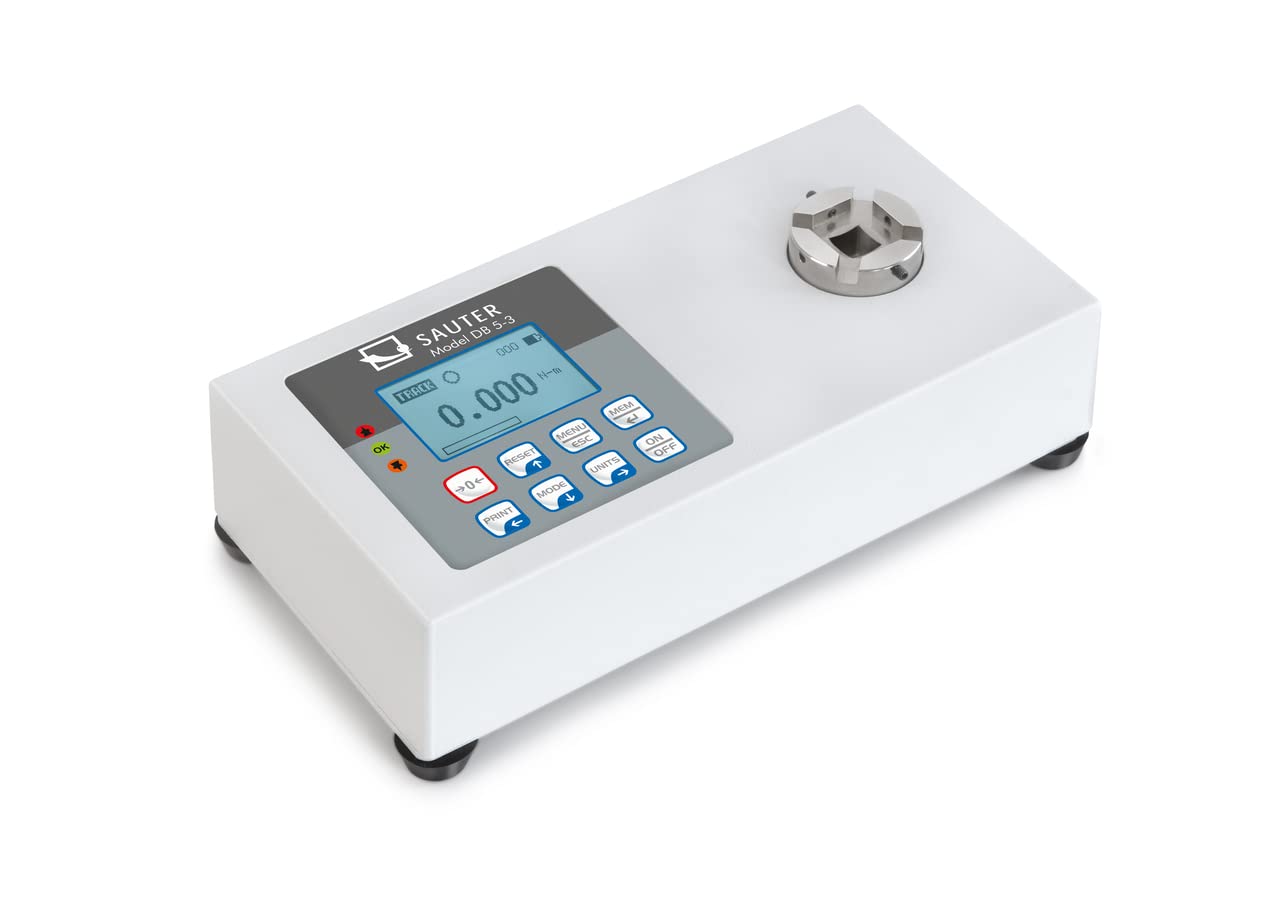
4. Setup
- Spakkjar: Carefully remove the torque meter and all accessories from the packaging. Inspect for any signs of damage.
- Pjazzament: Place the device on a stable, vibration-free surface. Ensure adequate space for operation and connection of tools.
- Konnessjoni tal-Enerġija: Connect the appropriate power adapter (if applicable) or ensure batteries are correctly installed.
- Immuntar (Mhux obbligatorju): If using the sturdy mounting plate, secure the device firmly to a workbench or designated testing station.
- Qawwa Inizjali Mixgħula: Agħfas il- ON/OFF button to power on the device. The display should illuminate and show the initial measurement screen.
5. Operazzjoni
5.1 Kejl Bażiku
- Qawwa Mixgħul: Agħfas il- ON/OFF buttuna.
- Żero: Ensure no load is applied to the transducer and press the RESET buttuna biex iżero l-wiri.
- Agħżel l-Unità: Agħfas il- UNITÀ button to cycle through available measurement units (e.g., N-m, lbf-ft).
- Applika t-Torque: Carefully apply torque to the transducer using the tool to be tested. The display will show the real-time torque value.
- Aqra l-Kejl: For peak hold, the maximum value will be displayed. For track mode, the value updates continuously.
5.2 Peak Hold and Track Function
The device supports both Peak Hold and Track functions. Use the MODALITÀ buttuna biex taqleb bejn dawn il-modi.
- Peak Hold: Displays and holds the maximum torque value reached during a measurement cycle.
- Track: Displays the torque value in real-time as it is applied.
5.3 Tolerance Range (Limit Function)
To set upper and lower tolerance limits:
- Enter the menu by pressing MENU/ESC.
- Navigate to the "Limits" or "Tolerance" setting using the arrow buttons.
- Set the desired upper and lower torque values.
- Confirm settings. During measurement, an acoustic and optical signal will indicate if the applied torque is within, above, or below the set limits.
5.4 Ħażna u Trasferiment tad-Data
The device can store up to 500 measurement data points internally. To access and transfer data:
- Agħfas il- MEM buttuna biex terġaview data maħżuna.
- Connect the device to a PC using the provided USB or RS-232 interface cable.
- Use optional software (not included) to transfer the memory content to the PC for analysis and archiving.
6. Manutenzjoni
- Tindif: Imsaħ l-apparat b'artab, damp drapp. Tużax tindif jew solventi li joborxu.
- Ħażna: When not in use, store the torque meter in its robust carrying case in a dry, dust-free environment.
- Kalibrazzjoni: Regular calibration by authorized service personnel is recommended to maintain measurement accuracy. Refer to the manufacturer's guidelines for calibration intervals.
- Sostituzzjoni tal-batterija: If the device uses batteries, replace them as indicated by the low battery warning on the display. Ensure correct polarity.
7 Issolvi l-problemi
Din it-taqsima tindirizza kwistjonijiet komuni li tista’ tiltaqa’ magħhom. Għal problemi mhux elenkati hawn, ikkuntattja l-appoġġ għall-klijenti.
| Problema | Kawża Possibbli | Soluzzjoni |
|---|---|---|
| L-apparat ma jixgħelx. | No power, dead batteries, or faulty power adapter. | Check power connection, replace batteries, or try a different power source. |
| Qari mhux preċiż. | Device not zeroed, overload, or needs calibration. | Press RESET button, ensure load is within range, or schedule calibration. |
| Id-displej juri messaġġ ta' żball. | Overload, internal fault, or incorrect operation. | Refer to specific error codes in a more detailed manual (if available) or contact support. Remove load and restart. |
8. Speċifikazzjonijiet
- Mudell: KERN DB 50-2
- Medda ta' Kejl: 50 Nm
- Dimensjonijiet tal-Prodott: 3.94 x 7.87 x 1.97 pulzieri
- Piż tal-Prodott: 7.39 Liri
- Manifattur: KERN & SOHN GmbH
- Interfaces tad-Data: USB, RS-232
- Memorja Interna: Up to 500 measurement data points
9. Kontenut tal-Kaxxa
Meta tneħħi l-ippakkjar, għandek issib l-oġġetti li ġejjin:
- KERN DB 50-2 Digital Torque Meter (Torque Gauge)
- Transducer li jdur
- Kaxxa tal-Ġarr Robusta
- Pjanċa tal-Immuntar
- Cable USB
- Kejbil RS-232
- Manwal għall-Utent (dan id-dokument)
10. Garanzija u Appoġġ
For warranty information, technical support, or service inquiries, please contact KERN & SOHN GmbH directly or your authorized dealer. Keep your purchase receipt as proof of purchase.
Manufacturer: KERN & SOHN GmbH
For the most up-to-date support information, please visit the official KERN websit.


