1. Introduzzjoni
The Audiolab 8300XP is a high-performance stereo power amplifier designed to deliver exceptional audio fidelity and power. It can operate in stereo mode, providing 280 Watts per channel, or be bridged to deliver 480 Watts as a monoblock amplifier. This manual provides essential information for the safe and optimal use of your 8300XP ampaktar ħaj.

Figure 1.1: Audiolab 8300XP Power Amplifier, angolat minn quddiem view. This image shows the sleek black chassis with the power button and Audiolab logo visible on the front panel.
2. Informazzjoni dwar is-Sigurtà
Please read all safety instructions carefully before operating the amplifier. Żomm dan il-manwal għal referenza futura.
- Sors tal-Enerġija: Connect the unit only to an AC power source of the type marked on the rear panel. Ensure the voltage taqbel mal-provvista tal-enerġija lokali tiegħek.
- Ventilazzjoni: Timblokkax xi fetħiet tal-ventilazzjoni. Kun żgur li jkun hemm fluss tal-arja adegwat madwar l-unità biex tevita li tisħon iżżejjed.
- Ilma u Umdità: Tesponix l-unità għax-xita jew għall-umdità. Tpoġġix oġġetti mimlija b'likwidi, bħal vażuni, fuq l-unità.
- Sħana: Tpoġġix l-unità ħdejn sorsi tas-sħana bħal radjaturi, reġistri tas-sħana, stufi, jew apparat ieħor (inkluż amplifiers) li jipproduċu sħana.
- Servizzi: Tippruvax isservi dan il-prodott int stess. Irreferi l-manutenzjoni kollha lil persunal tas-servizz kwalifikat.
- L-ertjar: Ensure the power cord is properly grounded to prevent electric shock.
3. Żpakkjar u Kontenut
Ippakkja b'attenzjoni l- amplifier. Retain the packing materials for future transport. Inside the box, you should find:
- Audiolab 8300XP Power Ampaktar ħaj
- Kurdun tal-Enerġija AC
- Manwal għall-Utent (dan id-dokument)
If any items are missing or damaged, contact your dealer immediately.
4. Konnessjonijiet
4.1 Panel ta 'Quddiem

Figure 4.1: Audiolab 8300XP Power Amplifier, quddiem view. This image highlights the minimalist front panel design, featuring only the power button on the right and the Audiolab logo on the bottom right.
The front panel of the 8300XP is designed for simplicity and elegance. It features:
- Buttuna tal-Qawwa: Located on the right side, used to turn the amplifier mixgħul jew mitfi.
- LED Indikatur tal-Enerġija: A small LED (typically red) indicates the power status of the unit.
4.2 Panel ta 'wara
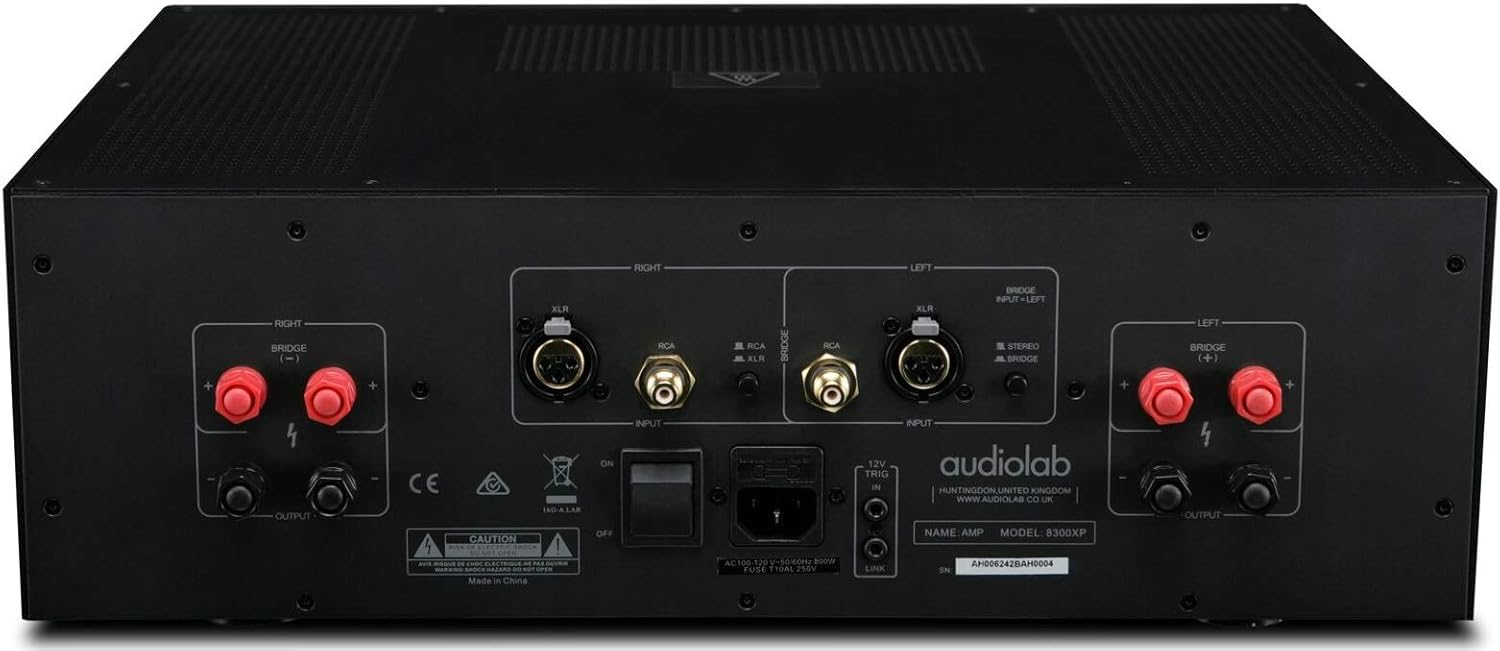
Figure 4.2: Audiolab 8300XP Power Amplifier, rear panel. This detailed view shows all input and output terminals, including XLR and RCA inputs, speaker terminals, and the power inlet.
The rear panel provides all necessary connections for integrating the 8300XP into your audio system:
- Balanced XLR Inputs (Left/Right): For connecting sources with balanced outputs, offering superior noise rejection.
- Unbalanced RCA Inputs (Left/Right): For connecting sources with unbalanced outputs.
- Speaker Outputs (Left/Right): High-quality binding posts for connecting your loudspeakers. Ensure correct polarity (+ to + and - to -).
- Bridge Mode Switch: A switch to select between Stereo and Bridged (Mono) operation. When in bridged mode, only use the designated input and speaker terminals.
- 12V Trigger In/Out: Allows for remote power control with other compatible components.
- Dħul tal-Enerġija AC: Għall-konnessjoni tal-korda tal-enerġija AC fornuta.
5. Setup
5.1 Tqegħid
Place the 8300XP on a stable, level surface away from direct sunlight, heat sources, and excessive moisture. Ensure there is adequate space around the unit for ventilation, especially above and behind it.
5.2 Konnessjoni ta' Kelliema
- Tiżgura l- amplifier is turned off and unplugged from the mains power.
- Connect your loudspeakers to the corresponding speaker output terminals on the rear panel.
- For stereo operation, connect the left speaker to the 'LEFT' terminals and the right speaker to the 'RIGHT' terminals. Ensure the positive (+) terminal on the amplifier connects to the positive (+) terminal on the speaker, and similarly for the negative (-) terminals.
- For bridged (mono) operation, set the 'BRIDGE' switch to 'ON'. Connect your single speaker to the designated bridged output terminals (refer to the markings on the rear panel).
5.3 Konnessjoni ta' Sorsi tal-Awdjo
- Connect your pre-amplifier or audio source to either the Balanced XLR Inputs or Unbalanced RCA Inputs. Do not use both simultaneously for the same channel.
- If using balanced connections, ensure the XLR cables are securely connected.
- If using unbalanced connections, ensure the RCA cables are securely connected.
5.4 Konnessjoni tal-Enerġija
- Once all audio and speaker connections are made, connect the supplied AC power cord to the AC inlet on the rear panel of the ampaktar ħaj.
- Plug the other end of the power cord into a suitable mains power outlet.
6. Istruzzjonijiet Operattivi
6.1 Tixgħel/Jitfi
- Biex titħaddem il- amplifier, press the Power button on the front panel. The power indicator LED will illuminate.
- Biex titfi l- amplifier, press the Power button again. The power indicator LED will turn off.
6.2 Stereo vs. Bridged Mode
The 8300XP can operate as a two-channel stereo amplifier or a single-channel monoblock amplifier (bridged mode).
- Mod Stereo: For typical two-channel audio systems. Ensure the 'BRIDGE' switch on the rear panel is set to 'OFF'.
- Modalità Bridged: For higher power output to a single speaker. Ensure the 'BRIDGE' switch on the rear panel is set to 'ON'. When in bridged mode, use only the designated input (typically the Left channel) and the specified bridged speaker terminals. Consult the rear panel markings for precise connections.
Caution: Ensure the amplifier is powered off before changing the Stereo/Bridge mode switch to prevent damage to the amplifier jew kelliema.
7. Manutenzjoni
- Tindif: Uża drapp ratba u niexfa biex tnaddaf il- amplifier's exterior. Do not use abrasive cleaners, waxes, or solvents.
- Ventilazzjoni: Iċċekkja perjodikament li l-fetħiet tal-ventilazzjoni jkunu ħielsa mit-trab u l-fdalijiet.
- Korda tal-Enerġija: Inspect the power cord regularly for any signs of damage. If damaged, replace it with an approved cord of the same type.
8 Issolvi l-problemi
If you experience issues with your Audiolab 8300XP, please consult the following table before contacting service personnel.
| Problema | Kawża Possibbli | Soluzzjoni |
|---|---|---|
| Ebda qawwa | Power cord not connected; Power outlet faulty; Internal fuse blown | Check power cord connection; Try a different outlet; Contact service for fuse replacement |
| L-ebda ħoss | Input cables loose/incorrect; Speaker cables loose/incorrect; Source component off/faulty; Amplifier in standby mode | Check all cable connections; Ensure source is active; Press power button to exit standby |
| Ħoss distort | Input signal too high; Speaker impedance mismatch; Faulty cables | Reduce source volume; Check speaker impedance (should be 4-16 ohms); Replace cables |
| Is-sħana żejda | Insufficient ventilation; Blocked vents | Ensure adequate space around amplifier; Clear any obstructions from vents |
9. Speċifikazzjonijiet
Key technical specifications for the Audiolab 8300XP Power Ampaktar ħaj:
- Numru tal-mudell tal-oġġett: 8300XP
- Manifattur: Audiolab
- Voltage: 100 Volts, 12 Volts (Trigger)
- Tip ta 'Immuntar: Immonta fil-wiċċ
- Numru ta' kanali: 2 (Stereo)
- Power Output (Stereo): 280 Watt għal kull kanal
- Power Output (Bridged Mono): 480 Watts
10. Garanzija u Appoġġ
Your Audiolab 8300XP amplifier is covered by a manufacturer's warranty. Please refer to the warranty card included with your product or visit the official Audiolab websit għal termini u kundizzjonijiet dettaljati tal-garanzija speċifiċi għar-reġjun tiegħek.
For technical support, service, or further inquiries, please contact your authorized Audiolab dealer or distributor. You can also find support information on the official Audiolab websit: www.audiolab.co.uk


