Introduzzjoni
This manual provides essential information for the safe and efficient operation of your HH Electronics Tessen TNP-1201 Speaker Cabinet. Please read this manual thoroughly before using the product to ensure proper setup, operation, and maintenance. Retain this manual for future reference.

Stampa 1: Quddiem view of the HH Electronics Tessen TNP-1201 Speaker Cabinet, showcasing the protective grille and HH logo.
Istruzzjonijiet Importanti dwar is-Sigurtà
- Aqra l-Istruzzjonijiet: Aqra u tifhem l-istruzzjonijiet kollha dwar is-sigurtà u l-operat qabel tuża dan il-prodott.
- Żomm Istruzzjonijiet: Żomm dawn l-istruzzjonijiet għal referenza futura.
- Oqgħod attent it-Twissijiet: Żomm mat-twissijiet kollha fuq il-prodott u fl-istruzzjonijiet tat-tħaddim.
- Segwi l-Istruzzjonijiet: Segwi l-istruzzjonijiet kollha tat-tħaddim u l-użu.
- Ilma u Umdità: Tużax dan l-apparat ħdejn l-ilma.
- Tindif: Naddaf biss b'ċarruta niexfa.
- Ventilazzjoni: Timblokkax il-fetħiet tal-ventilazzjoni. Installa skont l-istruzzjonijiet tal-manifattur.
- Sħana: Tinstallax ħdejn xi sorsi tas-sħana bħal radjaturi, reġistri tas-sħana, stufi, jew apparat ieħor (inkluż amplifiers) li jipproduċu sħana.
- Protezzjoni tal-Kard tal-Enerġija: Ipproteġi l-korda tad-dawl milli timxi fuqha jew maqrusa, partikolarment fil-plakek, ir-reċipjenti tal-konvenjenza, u l-punt fejn joħorġu mill-apparat.
- Annessi: Uża biss aċċessorji/aċċessorji speċifikati mill-manifattur.
- Immuntar: Uża biss mal-karrettun, stand, tripod, bracket, jew mejda speċifikati mill-manifattur, jew mibjugħa mal-apparat. Meta jintuża karrettun, uża l-kawtela meta ċċaqlaq il-kombinazzjoni tal-karrettun/apparat biex tevita korriment minn qlib.
- Spluggja: Aqla’ dan l-apparat waqt maltempati tas-sajjetti jew meta ma jintużax għal perjodi twal ta’ żmien.
- Servizzi: Irreferi l-manutenzjoni kollha lil persunal tas-servizz kwalifikat. Is-servizz huwa meħtieġ meta l-apparat ikun ġie bil-ħsara b'xi mod, bħal korda tal-provvista tal-enerġija jew plagg ikun bil-ħsara, likwidu jkun inxtered jew oġġetti jkunu waqgħu fl-apparat, l-apparat ikun ġie espost għax-xita jew umdità, ma jaħdimx b'mod normali , jew twaqqgħet.
Prodott Overview
The HH Electronics Tessen TNP-1201 is a high-performance speaker cabinet designed for live sound and stage applications. It features robust construction and advanced audio components to deliver clear and powerful sound reproduction.
Karatteristiċi ewlenin:
- 1 x 12” Precision engineered high efficiency HH woofer with Kevlar fiber reinforced cones, highly detailed mid range for vocal clarity.
- Italian designed LaVoce 1” throat compression drivers, high open area steel grille with acoustic foam backing for maximum protection of drivers without compromising sound.
- High power handling without compression for dynamic performance, High quality, High power passive x-overs, with bi-amp bypass switch.
- 35 mm pole mount, 35° monitor angle, asymmetric profile to prevent standing wave distortion.
- High open area steel grille with acoustic foam backing for maximum protection of drivers without compromising sound.
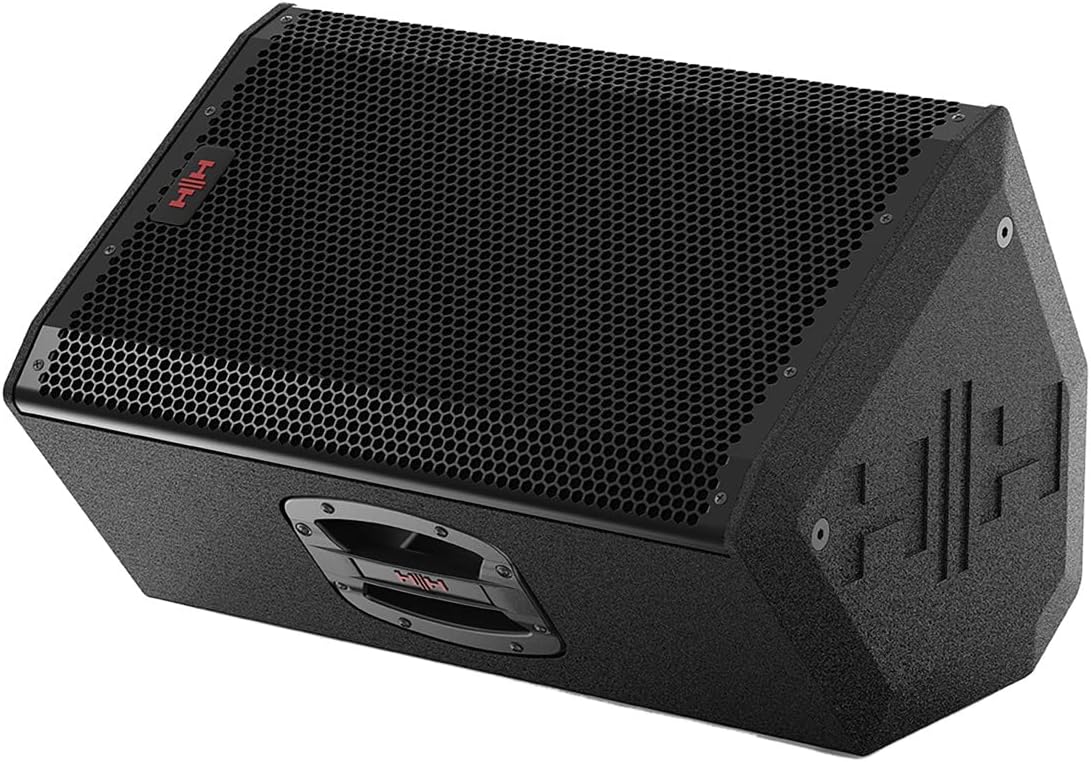
Immaġni 2: Quddiem angolat view of the Tessen TNP-1201 speaker, highlighting its robust grille and cabinet design.
Setup u Konnessjonijiet
Follow these steps to properly set up your Tessen TNP-1201 speaker cabinet:
- Pjazzament: Position the speaker on a stable, flat surface or mount it using a compatible 35mm pole mount. Ensure adequate ventilation around the unit. The asymmetric profile allows for a 35° monitor angle when placed on its side.
- Konnessjoni tal-Enerġija: Connect the power cord to the AC inlet on the rear panel of the speaker and then to a suitable power outlet. Ensure the power switch is in the OFF position before connecting.
- Input Awdjo: Connect your audio source (e.g., mixer, instrument) to the input connectors on the rear panel. The TNP-1201 typically uses standard XLR or 1/4" TRS connectors for audio input.
- Output (if applicable): If linking multiple speakers, use the output connectors to send the audio signal to another speaker.
- Qawwa Inizjali Mixgħula: Once all connections are secure, switch the power ON. Start with volume levels at minimum and gradually increase to the desired level.

Stampa 3: Wara view of the Tessen TNP-1201, detailing the input/output panel, power connection, and integrated handles.
Istruzzjonijiet Operattivi
The Tessen TNP-1201 is designed for straightforward operation. Familiarize yourself with the controls on the rear panel:
- Kontroll tal-Livell tal-Input: Adjusts the overall input sensitivity of the speaker. Start low and increase gradually to avoid distortion.
- EQ Controls (if present): Some models may include basic EQ adjustments (e.g., Bass, Treble) to fine-tune the sound to your environment.
- Bi-Amp Swiċċ tal-bypass: This speaker features a high-quality passive crossover with a bi-amp bypass switch. Consult advanced audio guides if you intend to use bi-amplification. For standard operation, ensure it is set correctly for passive mode.
- Indikatur tal-Enerġija: An LED indicator typically illuminates when the unit is powered on.
- Clip/Limit Indicator: This LED illuminates when the input signal is too high, indicating potential distortion. Reduce the input level if this light frequently activates.
Always ensure that the input signal is clean and not overdriven from your source device to achieve optimal sound quality and prevent damage to the speaker.
Manutenzjoni u Kura
Proper maintenance ensures the longevity and performance of your Tessen TNP-1201 speaker cabinet.
- Tindif: Clean the exterior of the cabinet with a soft, dry cloth. Do not use abrasive cleaners, solvents, or waxes. Avoid spraying liquids directly onto the speaker.
- Kura tal-gradilja: The steel grille with acoustic foam backing protects the drivers. Ensure it remains free of dust and debris. Do not attempt to remove the grille unless necessary for servicing by qualified personnel.
- Ħażna: When not in use for extended periods, store the speaker in a dry, temperature-controlled environment, away from direct sunlight and extreme temperatures.
- Spezzjoni: Periodically inspect the power cord and all cables for any signs of damage. Replace damaged cables immediately.

Immaġni 4: Ġenb view of the Tessen TNP-1201, illustrating its asymmetric cabinet profile designed to prevent standing wave distortion and allow for monitor use.
Issolvi l-problemi
If you encounter issues with your Tessen TNP-1201, refer to the following common problems and solutions:
| Problema | Kawża Possibbli | Soluzzjoni |
|---|---|---|
| Ebda Ħoss |
|
|
| Ħoss Mgħawġ |
|
|
| Hum jew Buzz |
|
|
If the problem persists after attempting these solutions, please contact HH Electronics customer support or a qualified service technician.
Speċifikazzjonijiet
Detailed technical specifications for the HH Electronics Tessen TNP-1201 Speaker Cabinet:
| Karatteristika | Dettall |
|---|---|
| Brand | Elettronika HH |
| Isem tal-Mudell | TNP-1201 |
| Tip ta' Kelliem | Woofer |
| Daqs tal-Kelliem | 12 Pulzier |
| Speaker AmpTip ta' lifikazzjoni | Passive (with bi-amp bypass switch) |
| Output Wattage | 800 Watts (Power Handling) |
| Sors tal-Enerġija | Corded Elettriku |
| Tip ta 'Immuntar | Floor Standing, 35 mm Pole Mount |
| Piż tal-oġġett | 33 liri |
| Dimensjonijiet tal-Pakkett | 23 x 15 x 14 pulzieri |
| Manifattur | Elettronika HH |
| ASIN | B07RTSFYG4 |
| Data L-Ewwel Disponibbli | 12 ta’ Mejju, 2019 |
| Huwa Waterproof | FALZ |
Informazzjoni dwar Garanzija
HH Electronics products are manufactured to high standards and are warranted against manufacturing defects. Specific warranty terms and conditions may vary by region and retailer. Please retain your proof of purchase. For detailed warranty information, please refer to the official HH Electronics webis-sit jew ikkuntattja lin-negozjant awtorizzat tiegħek.
Appoġġ għall-Klijent
For technical assistance, service inquiries, or further information regarding your HH Electronics Tessen TNP-1201 Speaker Cabinet, please visit the official HH Electronics website or contact their customer support department. Contact details can typically be found on the manufacturer's websit jew fl-ippakkjar tal-prodott.


