1. Introduzzjoni
This manual provides detailed instructions for the Inateck BK2005 Keyboard Case. Please read this manual thoroughly before using the product to ensure proper operation and to maximize its lifespan.
1.1 Kompatibilità
The Inateck BK2005 Keyboard Case is specifically designed for the following iPad models:
- iPad Air 2019 (3rd Generation)
- iPad Pro 10.5-il pulzier
This keyboard case is NOT compatible with the iPad 10.2-inch (7th Generation) or other iPad models.
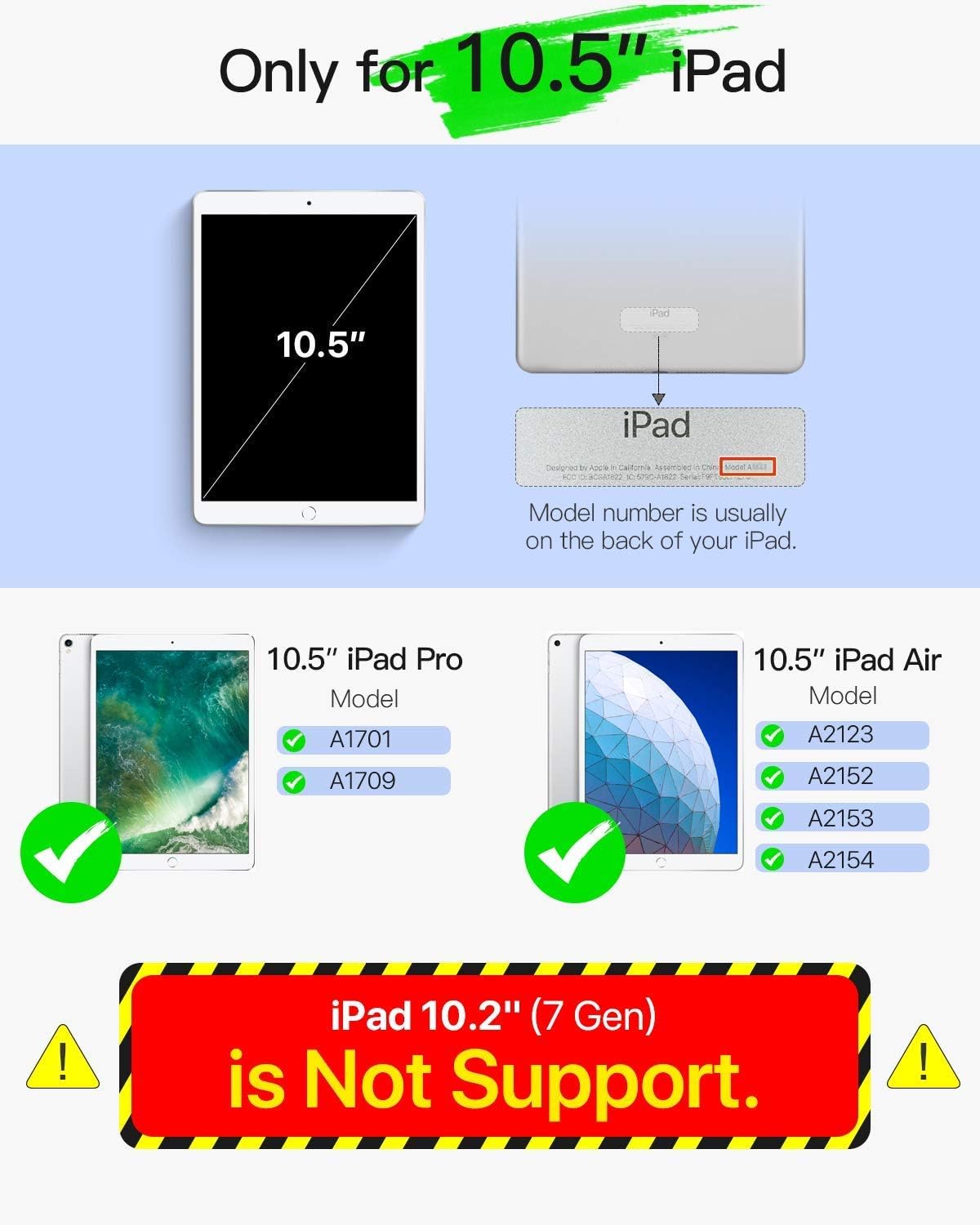
Image 1.1: Compatibility Guide. This image illustrates the specific iPad models compatible with the Inateck BK2005 Keyboard Case, highlighting that it supports 10.5-inch iPad Pro and iPad Air models, but not the 10.2-inch iPad (7th Gen).
2. Kontenut tal-Pakkett
Jekk jogħġbok iċċekkja l-pakkett għall-oġġetti li ġejjin:
- Inateck BK2005 Keyboard Case
- Cable tal-Iċċarġjar tal-USB
- Manwal għall-Utent (dan id-dokument)
3. Karatteristiċi tal-prodott
3.1 Ultra-Light and Thin Design
The BK2005 keyboard is engineered for portability. It measures only 0.5 cm in thickness, and the combined keyboard and cover are 1.5 cm thick. The total weight is approximately 360g, making it significantly lighter than many comparable products.

Image 3.1: Ultra-Light and Thin Profile. This image demonstrates the slim design of the keyboard case, highlighting its minimal thickness and light weight for enhanced portability.
3.2 Automatic Power On/Off
The BK2005 features an intelligent magnetic sensor that automatically powers the keyboard on when your iPad is securely positioned in the typing stand. When the iPad is removed or the case is closed, the keyboard powers off. This eliminates the need for a physical power switch.

Image 3.2: Automatic Power On. This image shows the magnetic strip where the iPad connects, triggering the keyboard to power on automatically, indicated by a green light.

Image 3.3: iPad Placement for Auto Power On. This image illustrates the action of placing the iPad into the case, activating the automatic power-on function of the keyboard via magnetic connection.
3.3 Ħajja Estiża tal-Batterija
The keyboard is equipped with a long-lasting battery. A full charge, typically taking 2-3 hours, can provide up to 90 days of standby time. This means the device may only require charging approximately four times per year with typical usage.

Image 3.4: Extended Battery Life. This image depicts the keyboard case in use, emphasizing its long battery life with a claim of 90-day standby time from a single charge.
3.4 Convenient Shortcut Keys
The keyboard features a 6-row layout, including an additional row dedicated to function shortcut keys. These keys allow for quick access to common functions such as taking screenshots, locking the screen, or adjusting volume with a single press, eliminating the need for complex key combinations.
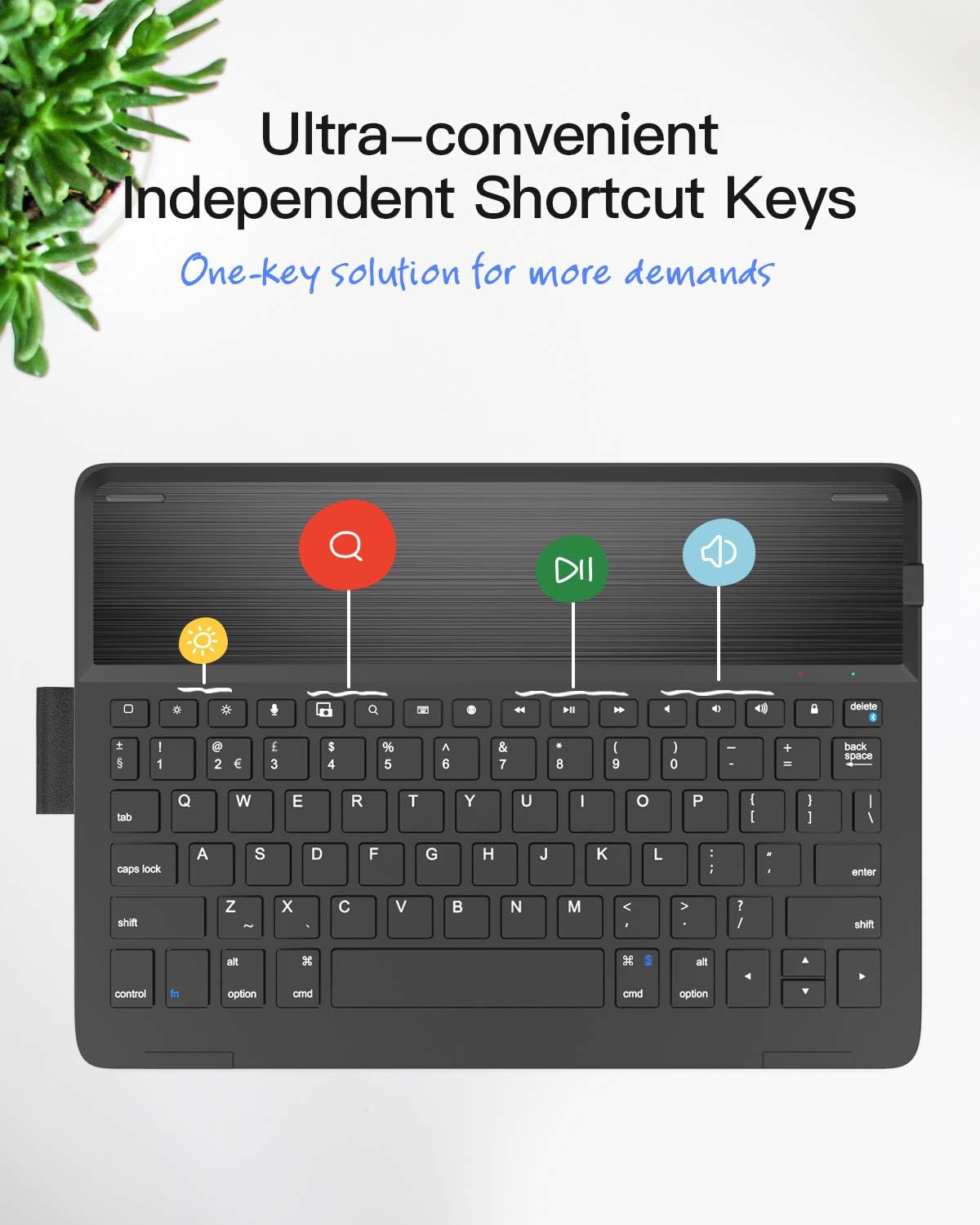
Image 3.5: Dedicated Shortcut Keys. This image highlights the top row of the keyboard, showcasing the independent shortcut keys for various functions like screen brightness, search, and media playback controls.
3.5 Aġġustabbli Viewing Angoli
The case design allows for multiple viewing angles, enabling users to find a comfortable position for typing, viewing, jew tpinġija.

Image 3.6: Adjustable Angles. This image demonstrates the flexibility of the case, allowing the iPad to be positioned at various angles for optimal viewing u interazzjoni.
4. Istruzzjonijiet ta' Setup
4.1 Iċċarġjar tat-Tastiera
- Sib il-port tal-iċċarġjar fuq it-tastiera.
- Connect the provided USB charging cable to the keyboard's charging port.
- Qabbad it-tarf l-ieħor tal-kejbil USB ma' adapter tal-enerġija USB (mhux inkluż) jew mal-port USB tal-kompjuter.
- The charging indicator light will illuminate. A full charge typically takes 2-3 hours.
- Ladarba tkun iċċarġjata kompletament, skonnettja l-kejbil tal-iċċarġjar.
4.2 Tqabbil tal-Bluetooth
- Kun żgur li t-tastiera hija ċċarġjata.
- Place your compatible iPad into the keyboard case's stand. The keyboard will automatically power on.
- Fuq l-iPad tiegħek, mur fuq Settings > Bluetooth u ixgħel il-Bluetooth.
- On the Inateck keyboard, press and hold the Fn ċavetta u l- Del key (which has a chain-link symbol) simultaneously for 3-5 seconds. The Bluetooth indicator light on the keyboard will start flashing, indicating it is in pairing mode.
- On your iPad, locate "Inateck BK2005" or a similar name in the list of available devices and tap to connect.
- Once paired, the Bluetooth indicator light on the keyboard will stop flashing and remain solid for a moment, then turn off. Your keyboard is now ready for use.
5. Istruzzjonijiet Operattivi
5.1 Automatic Power On/Off
- To power on the keyboard, simply place your iPad into the magnetic stand groove of the case. The keyboard will activate automatically.
- To power off the keyboard, remove your iPad from the stand groove or close the case. The keyboard will automatically deactivate.
5.2 Using Shortcut Keys
The top row of keys provides quick access to various iPad functions. Press these keys directly to activate their respective functions:
- Dar: Returns to the iPad home screen.
- Fittex: Activates the iPad's search function.
- Brightness Down/Up: Jaġġusta l-luminożità tal-iskrin.
- Kontrolli tal-Midja: Daqq/Pawża, Trakka Preċedenti, Trakka Li Jmiss.
- Kontrolli tal-Volum: Mute, Volum 'l isfel, Volum 'il fuq.
- Lock Screen: Locks the iPad screen.
- Screenshot: Captures a screenshot.
6. Manutenzjoni
6.1 Tindif
To clean the keyboard case, use a soft, lint-free cloth. For stubborn marks, slightly dampen the cloth with water or a mild, non-abrasive cleaner. Avoid using harsh chemicals or abrasive materials, as these can damage the surface.
6.2 Kura tal-Batterija
- Charge the keyboard regularly, even if not in frequent use, to maintain battery health.
- Avoid exposing the keyboard to extreme temperatures (hot or cold) for extended periods, as this can affect battery performance and lifespan.
- Do not attempt to replace the internal battery yourself. Contact customer support if battery issues arise.
7 Issolvi l-problemi
7.1 Keyboard Not Connecting/Reconnecting
- Iċċekkja l-batterija: Ensure the keyboard is sufficiently charged.
- Bluetooth Mixgħul: Iċċekkja li l-Bluetooth huwa attivat fuq l-iPad tiegħek.
- Erġa 'par: If the connection is lost frequently, try unpairing the keyboard from your iPad's Bluetooth settings (forget this device) and then re-pairing it following the instructions in Section 4.2.
- Wake Keyboard: If the iPad has been idle for a while, the keyboard may enter sleep mode. Tap any key a couple of times to wake it up and re-establish the connection.
- Erġa' ibda l-iPad: Sometimes, restarting your iPad can resolve connectivity issues.
7.2 Iċ-Ċwievet Ma Jirrispondux
- Ensure the keyboard is powered on and successfully connected via Bluetooth.
- Check if the iPad is properly seated in the magnetic stand, as this triggers the keyboard's power.
- If specific keys are not working, try cleaning around them to ensure no debris is obstructing their movement.
8. Speċifikazzjonijiet
| Karatteristika | Dettall |
|---|---|
| Numru tal-Mudell | BK2005-BCK |
| Dimensjonijiet (Prodott) | 25.5 x 18.49 x 1.5 ċm |
| Piż | 476 g |
| Ħxuna tat-Tastiera | 0.5 ċm |
| Apparati Kompatibbli | iPad Air 2019 (3rd Gen), iPad Pro 10.5-inch |
| Ħajja tal-batterija (Standby) | Sa 90 jum |
| Ħin tal-Iċċarġjar | 2-3 sigħat |
| Layout tat-Tastiera | QWERTY |
| Numru ta' Ċwievet | 78 |
9. Garanzija u Appoġġ
Inateck products come with a standard warranty. For detailed warranty information, product support, or to report any issues, please refer to the warranty card included with your purchase or visit the official Inateck websit. Jekk jogħġbok żomm il-prova tax-xiri tiegħek għal talbiet ta' garanzija.


