Introduzzjoni
This manual provides detailed instructions for the Superior Electronics Ready5 Smart Universal Remote Control, Model SUPTRB019. This remote is designed for immediate use with a wide range of LG, Samsung, Sony, Philips, and Panasonic televisions, eliminating the need for complex programming.
Il-karatteristiċi ewlenin jinkludu:
- Universal compatibility with major TV brands (LG, Samsung, Sony, Philips, Panasonic).
- Ready-to-use functionality; no programming required.
- Full Smart TV compatibility for enhanced control.
- Dedicated quick access buttons for popular streaming services like Netflix and Prime Video.
- Ergonomic design with intuitive button layout for comfortable and immediate operation.
- Mibnija minn materjali durabbli għal prestazzjoni fit-tul.

Image: The Superior Electronics Ready5 Smart Universal Remote Control shown in its retail packaging, highlighting its "Ready to Use" feature and compatibility with various TV brands.
Setup
1. Daħħal Batteriji
The remote control requires two (2) AAA batteries (not included). Follow these steps to insert them correctly:
- Sib l-għatu tal-kompartiment tal-batterija fuq wara tal-kontroll remot.
- Żerżaq l-għatu 'l isfel jew agħfas il-lukkett (jekk preżenti) biex tiftaħ il-kompartiment.
- Insert two AAA batteries, ensuring that the positive (+) and negative (-) terminals align with the indicators inside the compartment. Incorrect polarity can prevent the remote from functioning.
- Żerżaq l-għatu tal-kompartiment tal-batterija lura f'postu sakemm tikklikkja sew.

Immaġni: Wara view of the remote control, illustrating the location of the battery compartment for easy access and battery insertion.
2. Użu Inizjali
The Superior Electronics Ready5 Smart remote control is designed for immediate use with compatible LG, Samsung, Sony, Philips, and Panasonic TVs. Once the batteries are correctly inserted, the remote is ready to operate your television without any additional programming or setup. Simply point the remote at your TV and begin using its functions.
Istruzzjonijiet Operattivi
This section details the primary functions of the buttons on your Ready5 Smart remote control.

Immaġni: Quddiem view of the Superior Electronics Ready5 Smart remote control, displaying all buttons and their layout for easy identification.
Funzjonijiet Button Overview
| Buttuna | Funzjoni |
|---|---|
| Qawwa (●) | Ixgħel jew jitfi t-TV. |
| Input | Jagħżel is-sors tad-dħul (HDMI, AV, eċċ.). |
| Smart Video / NET.TV | Direct access to Smart TV features or specific streaming apps. |
| 3D | Jattiva jew jiddiżattiva l-modalità 3D (jekk it-TV ikun appoġġjat). |
| Gwida | Juri l-gwida elettronika tal-programmi. |
| Menu | Jiftaħ il-menù prinċipali tat-TV. |
| Subt. | Jixgħel jew jitfi s-sottotitli. |
| Fav | Aċċessa l-lista tal-kanali favoriti. |
| Info | Juri informazzjoni dwar il-programm jew l-input kurrenti. |
| Navigazzjoni ('Il fuq, 'l isfel, Xellug, Lemin, OK) | Jinnaviga fil-menus u jikkonferma l-għażliet. |
| Lura | Terġa' lura għall-iskrin jew il-menu preċedenti. |
| Ħruġ | Joħroġ mill-menù jew mill-applikazzjoni kurrenti. |
| Vol +/- | Jaġġusta l-volum 'il fuq jew 'l isfel. |
| Mute | Jitfi jew jattiva l-ħoss tat-TV. |
| Ch +/- | Tibdel il-kanal 'il fuq jew 'l isfel. |
| Numru Pad (0-9) | Directly enters channel numbers or numerical inputs. |
| Lista | Juri lista ta' kanali jew midja. |
| Netflix | Directly launches the Netflix application. |
| Prim Video | Directly launches the Amazon Prime Video application. |
| Buttuni tal-Kulur (Aħmar, Aħdar, Isfar, Blu) | Functions vary depending on the TV model and current menu/application. |
| Media Control (Play, Pause, Stop, Rewind, Fast Forward, Record) | Controls media playback (e.g., USB, streaming apps). |
Smart TV and Streaming Access
The Ready5 Smart remote is designed to seamlessly integrate with your Smart TV's functionalities. Use the navigation buttons to browse Smart TV menus and applications. The dedicated Netflix and Prime Video buttons provide instant access to these popular streaming platforms, allowing you to start watching your favorite content with a single press.
Manutenzjoni
Tindif tal-Kontroll mill-bogħod
Biex tiżgura prestazzjoni ottimali u lonġevità tal-kontroll remot tiegħek, segwi dawn il-linji gwida għat-tindif:
- Dejjem neħħi l-batteriji qabel it-tindif.
- Uża drapp artab u niexef biex timsaħ il-wiċċ tar-remote.
- Għal ħmieġ iebes, neħħi ftitampLaħlaħ id-drapp bl-ilma jew b'tindif ħafif u mhux abrażiv. Evita umdità eċċessiva.
- Tużax kimiċi ħarxa, prodotti tat-tindif li joborxu, jew solventi, għax dawn jistgħu jagħmlu ħsara lill-finitura jew lill-komponenti interni tar-remote.
- Ensure the remote is completely dry before reinserting batteries.
Battery Care and Replacement
Replace batteries when the remote's response becomes sluggish or it stops functioning. Always replace both batteries at the same time with new AAA batteries. Do not mix old and new batteries, or different types of batteries. Dispose of used batteries responsibly according to local regulations.
Issolvi l-problemi
If you encounter issues with your Ready5 Smart remote control, refer to the following common problems and solutions:
Remote Mhux Jirrispondi
- Iċċekkja Batteriji: Kun żgur li l-batteriji huma mdaħħla sew bil-polarità korretta (+/-) u li mhumiex eżawriti. Ibdel b'batteriji AAA ġodda jekk meħtieġ.
- Linja tal-Vista: Make sure there are no obstructions between the remote control and the TV's infrared receiver. Point the remote directly at the TV.
- Distanza: Ensure you are within the effective operating range (up to 10 meters).
- Qawwa tat-TV: Confirm that your TV is powered on and not in standby mode.
Buttuni Speċifiċi Mhux Jaħdmu
- Funzjonalità Ġenerali: If most buttons work but a few do not, it might indicate a specific TV model's lack of support for that particular function via universal remote, or a dirty contact under the button.
- Smart TV/Streaming Buttons: Ensure your TV is a Smart TV and has the respective applications (Netflix, Prime Video) installed and updated.
Kwistjonijiet ta' Kompatibbiltà
The Ready5 Smart remote is pre-programmed for LG, Samsung, Sony, Philips, and Panasonic TVs manufactured from 2000 onwards. If your TV is from a different brand or an older model, full functionality may not be guaranteed. No programming is required for the listed compatible brands.
Speċifikazzjonijiet
| Karatteristika | Dettall |
|---|---|
| Isem tal-Mudell | Ready5 Smart |
| Numru tal-Mudell | SUPTRB019 |
| Brand | Elettronika Superjuri |
| Apparati Kompatibbli | LG, Samsung, Sony, Philips, Panasonic Televisions (models from 2000 onwards) |
| Teknoloġija tal-Konnettività | Infra-aħmar (IR) |
| Sors tal-Enerġija | 2 x Batteriji AAA (mhux inklużi) |
| Medda Massimu | 10 metri (madwar 33 piedi) |
| Dimensjonijiet tal-Prodott | 5 x 1.5 x 19 ċm (madwar 1.97 x 0.59 x 7.48 pulzieri) |
| Piż | 100-il gramma (madwar 3.53 uqija) |
| Kulur | Iswed |
| Karatteristika Speċjali | Universal, immediately ready for use (no programming) |
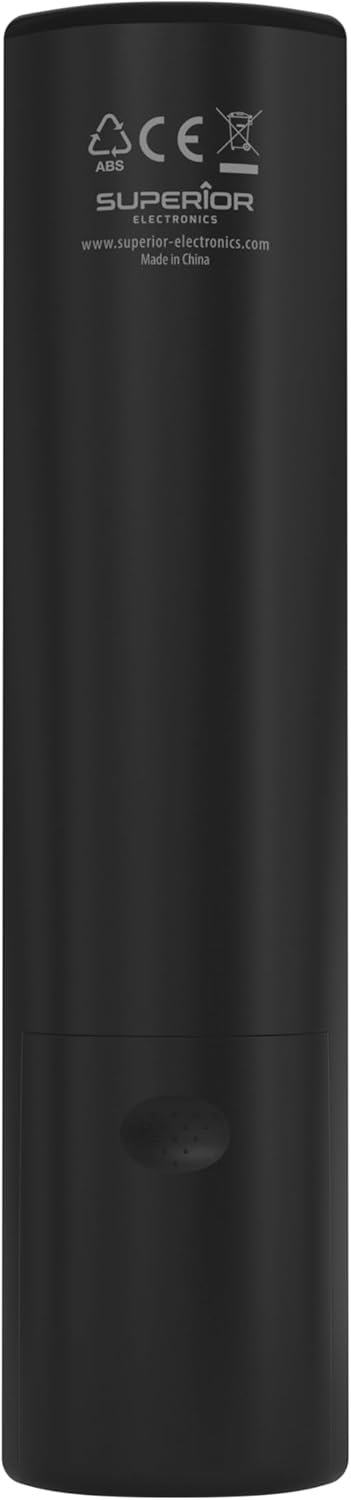
Image: The remote control with its approximate dimensions (4.8 cm width, 19.5 cm length) highlighted for reference.
Informazzjoni dwar Garanzija
Specific warranty details for the Superior Electronics Ready5 Smart Universal Remote Control are typically provided with your purchase documentation or can be found on the official Superior Electronics websit. Jekk jogħġbok irreferi għal dawn ir-riżorsi għal informazzjoni komprensiva dwar il-kopertura tal-garanzija, it-termini u l-kundizzjonijiet.
Appoġġ
For further assistance, technical support, or additional product information, please visit the official Superior Electronics website or contact their customer service department. Contact details are usually available on the product packaging or the manufacturer's websit.
Manufacturer: Superior Electronics
Għal aktar informazzjoni, tista' żżur il- Superior Electronics Store on Amazon.


