1. Introduzzjoni
This manual provides instructions for the MERCUSYS MS105G 5-Port Gigabit Desktop Switch. The MS105G is designed to expand your wired network capacity, offering five 10/100/1000 Mbps auto-negotiation RJ45 ports. It is a plug-and-play device, requiring no configuration, making it ideal for home and small office network expansion.
2. Kontenut tal-Pakkett
Iċċekkja li l-oġġetti li ġejjin huma inklużi fil-pakkett tiegħek:
- MERCUSYS MS105G 5-Port Gigabit Desktop Switch
- Adapter tal-Enerġija
- Gwida ta 'Installazzjoni Mgħaġġla

Image: The MERCUSYS MS105G switch, power adapter, and quick installation guide as found in the product packaging.
3. Prodott Aktarview
3.1 Panel ta 'Quddiem
The front panel of the MS105G features five RJ45 ports and LED indicators for status monitoring.

Immaġni: Quddiem view of the MERCUSYS MS105G switch, showing the five RJ45 ports and the power input.
- Portijiet RJ45 (1-5): These ports support 10/100/1000 Mbps Ethernet connections. They automatically detect the speed of the connected device and adjust accordingly.
- Indikaturi LED: Each port has an associated LED. A solid green light indicates a stable link at 1000 Mbps. A solid orange light indicates a stable link at 10/100 Mbps. A blinking light indicates data activity.
3.2 Panel ta 'wara
Il-pannell ta' wara tipikament ikun fih il-port tad-dħul tal-enerġija.
- Port tal-Enerġija: Qabbad l-adapter tal-enerġija pprovdut hawn.
4. Setup
The MS105G switch is designed for simple plug-and-play installation. Follow these steps to set up your device:
- Apparat mitfi: Disconnect the power from your router, modem, and any devices you plan to connect to the switch.
- Qabbad is-Swiċċ:
- Connect your modem or router to any of the RJ45 ports on the MS105G using an Ethernet cable.
- Connect your network devices (e.g., computers, smart TVs, game consoles, network printers) to the remaining RJ45 ports on the MS105G using Ethernet cables.
- Qabbad l-Enerġija: Connect the provided power adapter to the power port on the MS105G, then plug the adapter into a standard electrical outlet.
- Apparat ta' Qawwa: Power on your modem, then your router, and finally your connected network devices.
The switch will automatically detect and configure the connections. The corresponding LED indicators for active ports will illuminate.
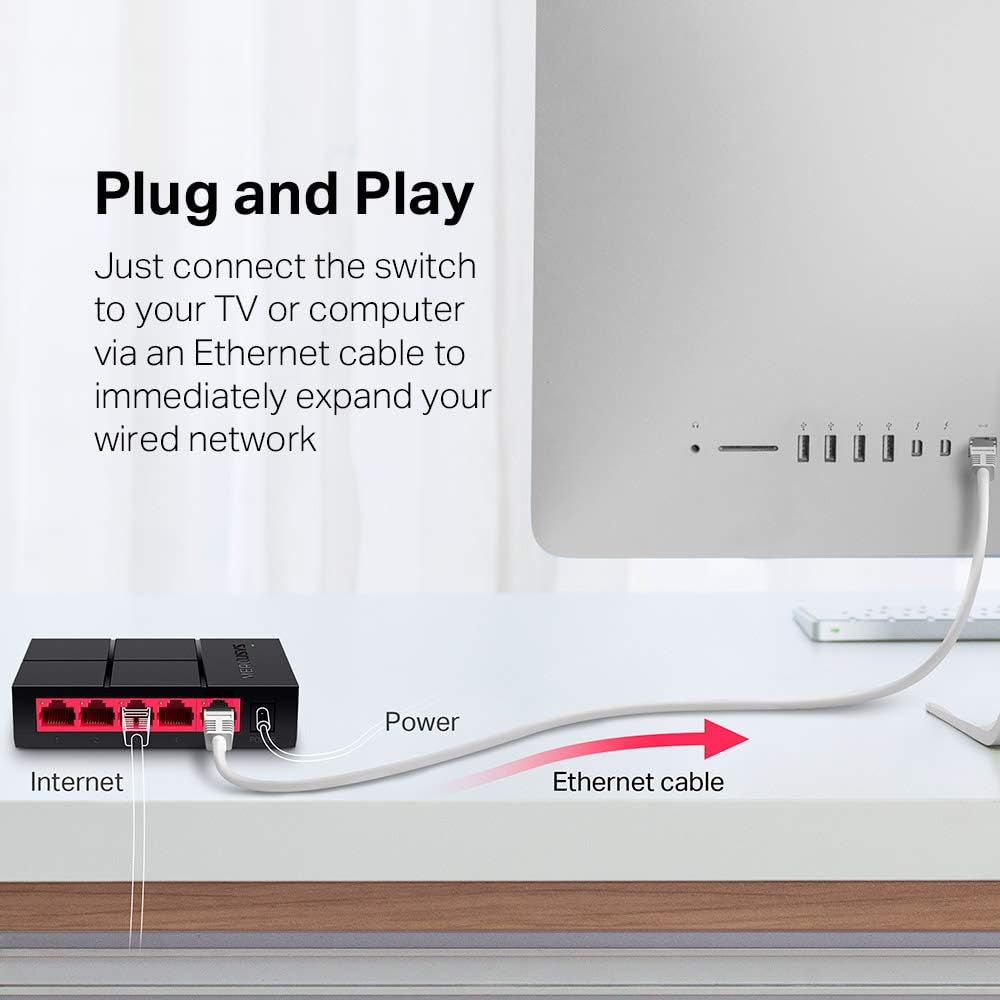
Image: Diagram illustrating the plug-and-play setup of the MERCUSYS MS105G switch, connecting it to an internet source and a computer.
5. Istruzzjonijiet Operattivi
The MERCUSYS MS105G is a non-managed switch, meaning it operates automatically without requiring any user configuration. Once connected as described in the Setup section, it will begin forwarding data between connected devices.
- Negozjar Awtomatiku: Each port automatically detects the speed (10/100/1000 Mbps) and duplex mode (Half/Full Duplex) of the connected device.
- MDI/MDIX Awtomatiku: The switch automatically detects if a straight-through or crossover cable is needed, eliminating the need for specific cable types.
- Indikaturi LED: Observe the LED indicators on the front panel to confirm link status and activity for each port.
6. Manutenzjoni
To ensure optimal performance and longevity of your MS105G switch, consider the following maintenance guidelines:
- Pjazzament: Place the switch in a cool, dry location away from direct sunlight, heat sources, and excessive moisture. Ensure adequate ventilation around the device.
- Tindif: Uża drapp artab u niexef biex tnaddaf il-barra tas-swiċċ. Tużax prodotti tat-tindif likwidi jew aerosol.
- Ġestjoni tal-Kejbil: Żomm il-kejbils tal-Ethernet organizzati pulit biex tevita t-tħabbil u l-iskonnessjonijiet aċċidentali.
- Provvista tal-Enerġija: Uża biss l-adapter tal-enerġija pprovdut mal-apparat.
7 Issolvi l-problemi
If you encounter issues with your MS105G switch, refer to the following common troubleshooting steps:
- Ebda Qawwa:
- Kun żgur li l-adapter tal-enerġija huwa konness sew mas-swiċċ u ma' sokit elettriku li jaħdem.
- Ivverifika li s-sokit tal-enerġija jaħdem billi tqabbad apparat ieħor.
- Ebda Link/Attività fuq Port:
- Iċċekkja li l-kejbil Ethernet huwa konness sew kemm mal-port tas-swiċċ kif ukoll mat-tagħmir konness.
- Ipprova kejbil Ethernet differenti biex teskludi kejbil difettuż.
- Kun żgur li l-apparat imqabbad huwa mixgħul u li l-adapter tan-netwerk tiegħu qed jaħdem sew.
- Ipprova qabbad l-apparat ma 'port differenti fuq is-swiċċ.
- Veloċità baxxa tan-Netwerk:
- Kun żgur li l-apparati u l-kejbils kollha konnessi jappoġġjaw Gigabit Ethernet (kejbils Cat5e jew Cat6 huma rakkomandati għal veloċitajiet Gigabit).
- Check the LED indicator for the port; a green light indicates a Gigabit connection, while an orange light indicates 10/100 Mbps.
- Restart your modem, router, and the switch.
If problems persist, consult the MERCUSYS support websit għal aktar għajnuna.
8. Speċifikazzjonijiet
| Karatteristika | Deskrizzjoni |
|---|---|
| Mudell | MS105G |
| Portijiet | 5 x 10/100/1000 Mbps RJ45 Ports (Auto-Negotiation, Auto MDI/MDIX) |
| Rata ta' Trasferiment tad-Data | 1000 Megabit Kull Sekonda (Gigabit Ethernet) |
| Dimensjonijiet (W x D x H) | 10.5 x 7 x 2.5 ċm (4.1 x 2.8 x 1.0 pulzieri) |
| Piż | 0.08 Kilogrammi (80 g) |
| Konsum tal-Enerġija | Max 5W |
| Adapter tal-Enerġija | Input: 100-240VAC, 50/60Hz; Output: 5VDC/0.6A (typical) |
| Materjal | Plastik Ċasing |
| Immuntar | Desktop (Plug-In Mount) |

Image: Dimensions of the MERCUSYS MS105G switch, showing its compact size of 10.5 cm by 7 cm by 2.5 cm.
9. Garanzija u Appoġġ
MERCUSYS products typically come with a manufacturer's warranty. For specific warranty terms and conditions, please refer to the warranty card included with your product or visit the official MERCUSYS website. Technical support and additional resources can also be found on the MERCUSYS support page.
For the latest drivers, manuals, and support information, please visit: www.mercusys.com/support


