1. Introduzzjoni
Thank you for choosing the Hama TH-130 Thermo/Hygrometer. This device provides accurate measurements of indoor temperature and humidity, helping you maintain a comfortable and healthy environment. Please read this instruction manual carefully before using the device to ensure proper operation and to prevent damage.
2. Istruzzjonijiet tas-Sigurtà
- Żomm l-apparat 'il bogħod mill-umdità, mid-dawl tax-xemx dirett, u minn temperaturi estremi.
- Tiftaħx l-apparat. It-tiswijiet għandhom isiru biss minn persunal kwalifikat.
- Keep packaging materials away from children due to choking hazards.
- Use only the specified battery type. Incorrect battery usage can lead to leakage or explosion.
- Neħħi l-batteriji jekk l-apparat mhux se jintuża għal perjodu estiż.
3. Kontenut tal-Pakkett
- Hama TH-130 Thermo/Hygrometer
- 1 x batterija tal-metall tal-litju CR2025 (inkluża)
- Dan il-Manwal ta' Istruzzjoni
4. Device Overview
The Hama TH-130 features a clear digital display for temperature and humidity readings. It is designed for tabletop placement.
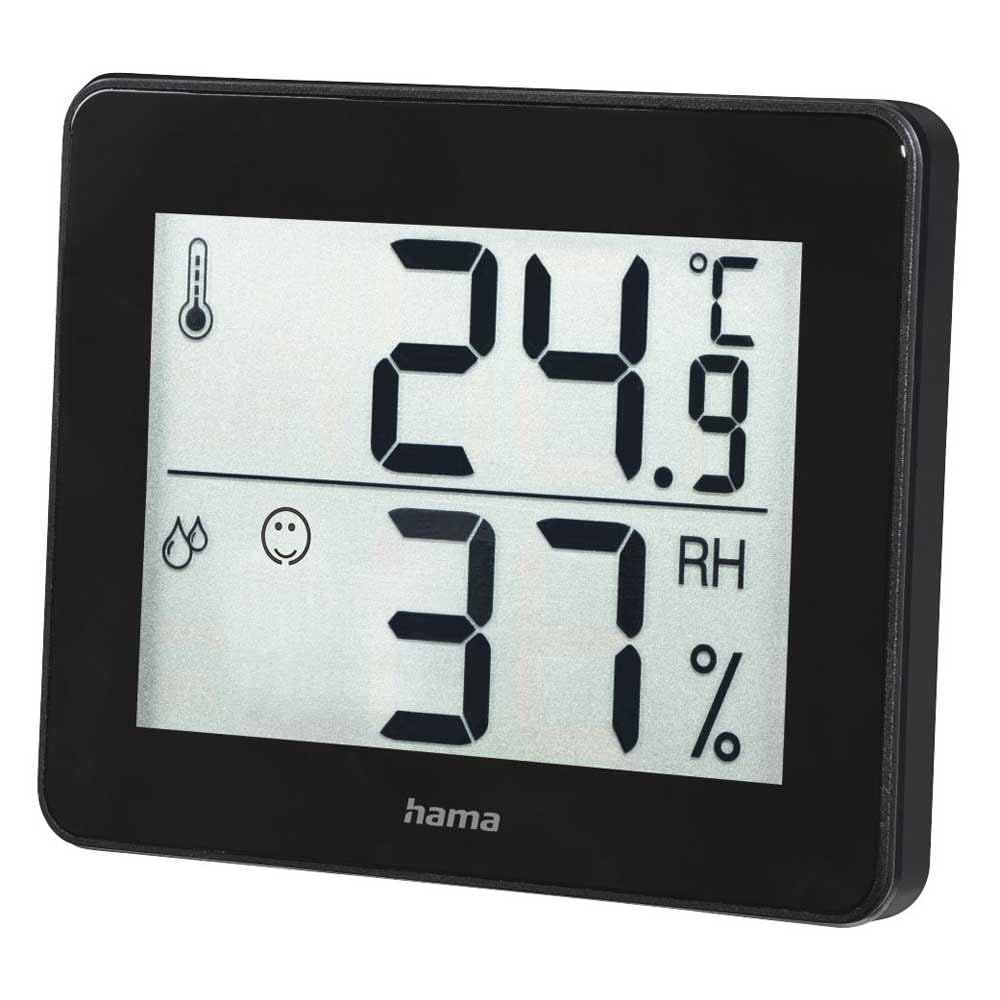
Figura 1: Quddiem view of the Hama TH-130 Thermo/Hygrometer. The display shows temperature in Celsius (24.9°C) at the top and relative humidity (37% RH) at the bottom. A thermometer icon indicates temperature, and a droplet icon with a smiley face indicates humidity levels.
4.1 Elementi tal-Wiri
- Wiri tat-Temperatura: Shows current temperature in degrees Celsius (°C).
- Wiri tal-Umdità: Shows current relative humidity in percentage (RH%).
- Indikatur tal-Kumdità: A smiley face icon indicates comfort levels based on humidity and temperature.
- Kompartiment tal-batterija: Jinsab fuq wara tal-apparat.
5. Setup
5.1 Installazzjoni tal-batterija
- Sib il-kompartiment tal-batterija fuq wara tal-apparat.
- Iftaħ l-għatu tal-kompartiment tal-batterija.
- Insert one CR2025 Lithium Metal battery, ensuring correct polarity (+/-). The positive (+) side should face upwards.
- Agħlaq l-għatu tal-kompartiment tal-batterija sew.
- The display should now activate, showing current temperature and humidity readings.
5.2 Tqegħid
- Place the thermo/hygrometer on a flat, stable surface, such as a tabletop.
- For accurate readings, avoid placing the device near heat sources (e.g., radiators, direct sunlight), air conditioning vents, or in areas with high drafts.
- Ensure the device is placed in the area where you wish to monitor temperature and humidity.
6. It-tħaddim tal-Apparat
The Hama TH-130 is designed for straightforward operation. Once batteries are installed, it automatically begins displaying current temperature and humidity.
6.1 Qari tad-Displej
- The upper large digits indicate the current temperature in degrees Celsius (°C).
- The lower large digits indicate the current relative humidity in percentage (RH%).
- The comfort indicator (smiley face) provides a quick visual reference for indoor climate comfort.
6.2 Comfort Level Interpretation
The comfort indicator typically changes based on the humidity level, sometimes also considering temperature. Refer to the following general guidelines:
- Happy Face: Indicates optimal comfort (e.g., 20-25°C and 40-70% RH).
- Wiċċ Newtrali: Indicates acceptable but not optimal conditions.
- Wiċċ Imdejjaq: Indicates uncomfortable conditions (e.g., too dry or too humid).
7. Manutenzjoni u Kura
- Naddaf l-apparat biss bi ftit damp, lint-free cloth. Do not use abrasive cleaning agents.
- Kun żgur li ma tidħol l-ebda umdità fl-apparat.
- Replace the battery when the display becomes dim or stops functioning.
8 Issolvi l-problemi
| Problema | Kawża Possibbli | Soluzzjoni |
|---|---|---|
| L-ebda wiri jew wiri mudlam | Il-batterija hija eżawrita jew imdaħħla ħażin. | Replace the battery (CR2025) and ensure correct polarity. |
| Qari mhux eżatt | Device placed near heat/cold sources or in a drafty area. | Relocate the device to a more stable environment. Allow 15-30 minutes for readings to stabilize. |
| Display shows "---" | Temperature or humidity is outside the measurable range. | Move the device to an environment within the specified operating range. |
9. Speċifikazzjonijiet
- Mudell: Hama TH-130 (00186361)
- Dimensjonijiet tal-Prodott: 11.5 x 10.5 x 2 ċm
- Piż tal-oġġett: 92 g
- Provvista tal-Enerġija: 1 x batterija tal-metall tal-litju CR2025 (inkluża)
- Tip ta 'Immuntar: Mejda
- Optimal Operating Humidity: 30-70% RH (for comfort indication)
- Kulur: Iswed
10. Informazzjoni dwar ir-Rimi
Do not dispose of the device or batteries with household waste. Electronic devices and batteries must be collected separately and recycled in an environmentally sound manner. Contact your local authorities for information on proper disposal facilities.
11. Garanzija u Appoġġ
Hama GmbH & Co KG assumes no liability and provides no warranty for damage resulting from improper installation/mounting, improper use of the product, or failure to observe the operating instructions and/or safety notes. For technical support or warranty claims, please contact your retailer or Hama customer service. Please retain your proof of purchase.
Nota: It-termini speċifiċi tal-garanzija jistgħu jvarjaw skont ir-reġjun.


