1. Introduzzjoni
Grazzi tax-xiriasing the UHAPPY U18 Portable Mini HD LED Projector. This manual provides essential information for the safe and efficient operation of your device. Please read it thoroughly before use and retain it for future reference.
Prekawzjonijiet tas-Sigurtà
- Tħarisx direttament fil-lenti tal-proġettazzjoni meta tkun qed taħdem.amp hija mixgħula.
- Żgura ventilazzjoni xierqa madwar il-proġekter biex tevita sħana żejda.
- Tesponix il-proġettazzjoni għax-xita jew għall-umdità.
- Uża biss l-adapter tal-enerġija li jiġi mal-proġettur.
- Tippruvax tiftaħ jew issewwi l-proġettur int stess. Irreferi għal kull manutenzjoni f'idejn persunal kwalifikat.
2. Prodott Aktarview
Familiarize yourself with the components and ports of your UHAPPY U18 projector.
Kontenut tal-Pakkett
The following items are included in your projector package:

Image: Contents of the UHAPPY U18 projector package, including the projector, power adapter, AV cable, remote control, and user manual.
- UHAPPY U18 Mini LED Projector
- Adapter tal-Enerġija
- AV Cable
- Kontroll mill-bogħod
- Manwal għall-Utent (dan id-dokument)
Projector Components and Ports

Image: Angled top-down view of the UHAPPY U18 projector, highlighting the lens, focus adjustment, and control panel.

Immaġni: Fuq view of the UHAPPY U18 projector, showing the integrated control buttons.

Immaġni: Quddiem view of the UHAPPY U18 projector, focusing on the projection lens.
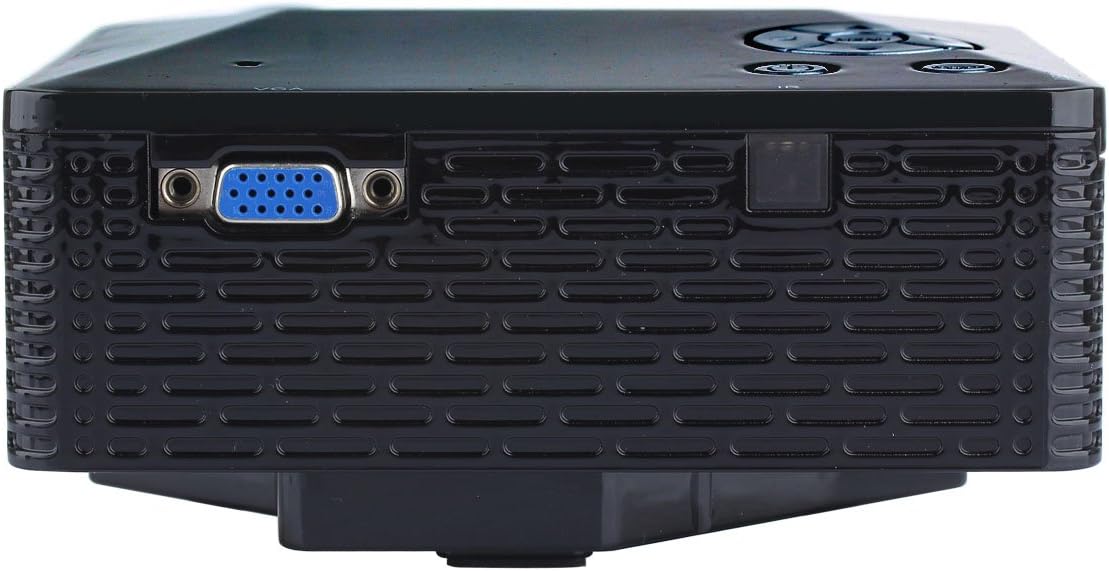
Immaġni: Ġenb view of the UHAPPY U18 projector, illustrating the VGA input port.
The projector features various input ports for connectivity:
- Input HDMI: For connecting devices like laptops, gaming consoles, or media players.
- Port USB: For connecting USB storage devices to play media directly.
- Slot tal-Kard SD: For inserting SD memory cards to play media directly.
- Input AV: Għall-konnessjoni ta' apparati eqdem bl-użu tal-kejbil AV inkluż.
- Input VGA: For connecting computers or laptops with a VGA output.
- DC-IN: Port tad-dħul tal-enerġija.
- Ħruġ tal-headphones: Għall-konnessjoni ta' apparati awdjo esterni jew headphones.
- Pum tal-fokus: Located near the lens for adjusting image clarity.
3. Setup
3.1 Tqegħid
Place the projector on a stable, flat surface. Ensure there is adequate space around the projector for ventilation. The ideal projection distance is between 1 to 4 meters, yielding an image size of 20 to 80 inches.
3.2 Konnessjoni tal-Enerġija
- Connect the power adapter to the DC-IN port on the projector.
- Ipplaggja l-adapter tal-enerġija fi żbokk tal-elettriku adattat.
3.3 Konnessjoni ta' Apparati ta' Input
Choose the appropriate cable and port based on your source device:
- HDMI: Connect an HDMI cable from your device (e.g., laptop, DVD player) to the projector's HDMI port.
- VGA: Qabbad kejbil VGA mill-kompjuter tiegħek mal-port VGA tal-proġettazzjoni.
- TA’: Use the provided AV cable to connect devices with AV output (e.g., older DVD players, set-top boxes) to the projector's AV port.
- Karta USB/SD: Daħħal USB drive fil-port USB jew SD card fl-islott tal-SD card.
4. Istruzzjonijiet Operattivi
4.1 Tixgħel/Jitfi
- Biex Tixgħel: Press the power button on the projector or the remote control. The LED indicator will light up.
- Biex Tifi: Press the power button again. It is recommended to allow the projector to cool down for a few minutes before unplugging it.
4.2 Għażla tas-Sors
After powering on, you may need to select the input source:
- Press the 'Source' button on the projector or the remote control.
- Use the navigation buttons to select the desired input (HDMI, VGA, AV, USB, SD) and press 'OK' or 'Enter'.
4.3 Aġġustament tal-Focus
Jekk l-immaġni pproġettata tidher imċajpra:
- Rotate the focus knob located near the projector lens until the image becomes clear and sharp.
4.4 Navigazzjoni tal-Menu
Use the 'Menu' button on the projector or remote to access settings. Use the navigation arrows to move through options and 'OK' or 'Enter' to confirm selections. The projector supports multiple languages including English, Czech, Slovak, Danish, German, Spanish, French, Croatian, Italian, Hungarian, Dutch, Norwegian, Polish, Portuguese, Romanian, Slovene, Serbian, Finnish, Swedish, Bulgarian, Greek, Russian, and Chinese.
4.5 Formati tal-Midja Appoġġjati
When playing media directly from USB or SD card, the projector supports the following formats:
- Immaġni: BMP, JPEG, PNG
- Vidjow: MPEG1, MPEG2, MPEG4, RM, RMVB, AVI, FLV, WMV
5. Manutenzjoni
5.1 Tindif tal-Lenti
Uża drapp artab u mingħajr suf iddisinjat speċifikament għal lentijiet ottiċi biex timsaħ bil-mod il-lenti tal-proġettazzjoni. Evita li tuża materjali li joborxu jew kimiċi ħarxa.
5.2 Tindif Ġenerali
Wipe the projector's exterior with a soft, dry cloth. Do not use liquid cleaners directly on the device. Ensure ventilation openings are free from dust and obstructions.
5.3 Ħażna
When not in use, store the projector in a cool, dry place, away from direct sunlight and extreme temperatures. It is advisable to cover the lens to protect it from dust.
6 Issolvi l-problemi
Jekk tiltaqa' ma' problemi bil-proġettur tiegħek, irreferi għall-problemi u s-soluzzjonijiet komuni li ġejjin:
| Problema | Kawża Possibbli | Soluzzjoni |
|---|---|---|
| L-ebda immaġni fuq l-iskrin | Sors ta' input magħżul mhux korrett Konnessjoni tal-kejbil maħlula L-apparat tas-sors mhux mixgħul | Agħżel is-sors ta' input korrett. Iċċekkja l-konnessjonijiet kollha tal-kejbil. Kun żgur li l-apparat tas-sors ikun mixgħul u qed joħroġ sinjal. |
| L-immaġni hija mċajpra | Fokus mhux aġġustat | Rotate the focus knob until the image is clear. |
| L-ebda ħoss | Volum baxx wisq External audio device not connected Is-settings tal-awdjo tal-apparat tas-sors | Żid il-volum tal-proġettazzjoni. Connect external speakers/headphones to the audio output. Iċċekkja s-settings tal-awdjo fuq l-apparat tas-sors tiegħek. |
| Il-proġettur jisħon iżżejjed u jintefa | Ventilazzjoni mblukkata Prolonged use in hot environment | Kun żgur li l-fetħiet tal-ventilazzjoni huma ċari. Allow the projector to cool down. Operate in a well-ventilated area. |
7. Speċifikazzjonijiet
Technical specifications for the UHAPPY U18 Portable Mini HD LED Projector:
- Sistema tal-Immaġini: LCD
- Riżoluzzjoni Nattiva: 320x240
- Lamp: LED
- Ħajja LED: 20,000 sigħat
- Luminożità: 60 LM
- Kuntrast: 300:1
- Lenti: F=125
- Daqs tal-Immaġni: 20-80 pulzier
- Distanza ta' Projezzjoni: 1-4 metri
- Modalità ta' Projezzjoni: Projezzjoni ta 'quddiem
- Modalità ta' Operazzjoni: Manwal/Kontroll mill-bogħod
- Terminali tal-Input: AV, VGA, USB, SD, HDMI
- Output: Headphone
- Qawwa: 24W
- Kulur: 16.77 Miljun kulur
- Kelliem: 1.0W * 2
- Temperatura tax-Xogħol: 10-35°C
- Dimensjonijiet: 135 x 132 x 52 mm
- Piż: 0.44 kg
8. Garanzija u Appoġġ
This product is manufactured by Generic. For warranty information and technical support, please refer to the documentation provided at the time of purchase or contact your retailer. Keep your purchase receipt as proof of purchase.


