1. Introduzzjoni
This manual provides comprehensive instructions for the setup, operation, and maintenance of your Drawmer CMC2 Compact Monitor Controller. Please read this manual thoroughly before using the device to ensure proper functionality and to maximize its performance.
2. Informazzjoni dwar is-Sigurtà
- Provvista tal-Enerġija: Use only the factory-supplied 15V DC power supply. Using an incorrect power supply may damage the unit and void the warranty.
- Ventilazzjoni: Aċċerta ruħek li jkun hemm ventilazzjoni adegwata madwar l-unità. Timblokkax il-fetħiet tal-ventilazzjoni.
- Umdità: Tesponix l-unità għax-xita, umdità, jew umdità eċċessiva.
- Tindif: Disconnect power before cleaning. Use a dry, soft cloth. Do not use liquid cleaners or aerosols.
- Servizzi: Irreferi l-manutenzjoni kollha lil persunal tas-servizz kwalifikat. Tippruvax tiftaħ jew issewwi l-unità int stess.
3. Kontenut tal-Pakkett
Ivverifika li l-pakkett tiegħek fih l-oġġetti li ġejjin:
- Drawmer CMC2 Compact Monitor Controller
- Unità tal-Provvista tal-Enerġija ta' 15V DC
- Manwal għall-Utent (dan id-dokument)
4. Prodott Aktarview
4.1 Kontrolli ta' Front Panel
The front panel provides all primary controls for audio monitoring and source selection.

Figura 4.1: Quddiem view of the Drawmer CMC2 Compact Monitor Controller, showing all knobs and buttons for input selection, speaker selection, master volume, headphone control, and mix check functions.
- AUX INPUT Knob: Adjusts the level of the auxiliary input.
- SOURCE SELECT Buttons (I/P1, I/P2, AUX): Selects the active audio input source.
- SPEAKER SELECT Buttons (A, B, SUB): Activates the selected speaker outputs.
- MASTER VOLUME Knob: Controls the overall output level to the selected speakers.
- Buttuna MUTE: Mutes all speaker outputs.
- HEADPHONE Knob: Jaġġusta l-volum għall-output tal-headphones.
- MIX CHECK Buttons (ØREV, MONO, DIM): Provides phase reverse, mono sum, and dim functions for mix analysis.
- AUX INPUT (3.5mm Jack): Front panel auxiliary input for portable devices.
- HEADPHONE Output (6.35mm Jack): Front panel headphone output.
4.2 Konnessjonijiet tal-Panew ta' wara
The rear panel houses all audio input and output connectors, along with the power input.

Figura 4.2: Wara view of the Drawmer CMC2 Compact Monitor Controller, displaying the DC power input, speaker outputs (Mono/Sub, R-B-L, R-A-L), and inputs (R-2-L, R-1-L).
- DC=15V Input: Qabbad l-adapter tal-enerġija 15V DC fornut hawn.
- Swiċċ tal-Enerġija: Toggles the unit's power on/off.
- SPEAKER OUTPUTS (MONO/SUB, R-B-L, R-A-L): Balanced XLR outputs for connecting up to two pairs of stereo monitors (A and B) and a mono subwoofer.
- INPUTS (R-2-L, R-1-L): Balanced XLR inputs for two stereo audio sources.
5. Setup
Follow these steps to set up your CMC2 controller:
- Konnessjoni tal-Enerġija: Connect the supplied 15V DC power adapter to the 'DC=15V' input on the rear panel. Plug the adapter into a suitable power outlet. Do not power on the unit yet.
- Konnessjonijiet tad-dħul:
- Connect your primary audio source (e.g., audio interface, mixer) to the 'INPUTS R-1-L' using balanced XLR cables.
- Connect a secondary audio source to the 'INPUTS R-2-L' using balanced XLR cables.
- For portable devices, connect to the front panel 'AUX INPUT' (3.5mm jack) or the rear panel RCA auxiliary inputs (if available on your model, refer to specific product documentation).
- Konnessjonijiet tal-Ispeaker:
- Connect your main studio monitors to the 'SPEAKER OUTPUTS R-A-L' using balanced XLR cables.
- If using a second pair of monitors, connect them to 'SPEAKER OUTPUTS R-B-L'.
- If using a subwoofer, connect it to the 'SPEAKER OUTPUTS MONO/SUB'.
- Konnessjoni tal-headphone: If desired, connect your headphones to the front panel 'HEADPHONE' 6.35mm jack.
- Qawwa Mixgħul: Once all connections are secure, press the power switch on the rear panel to turn on the CMC2.
6. Istruzzjonijiet Operattivi
This section details the functions of the CMC2's controls.
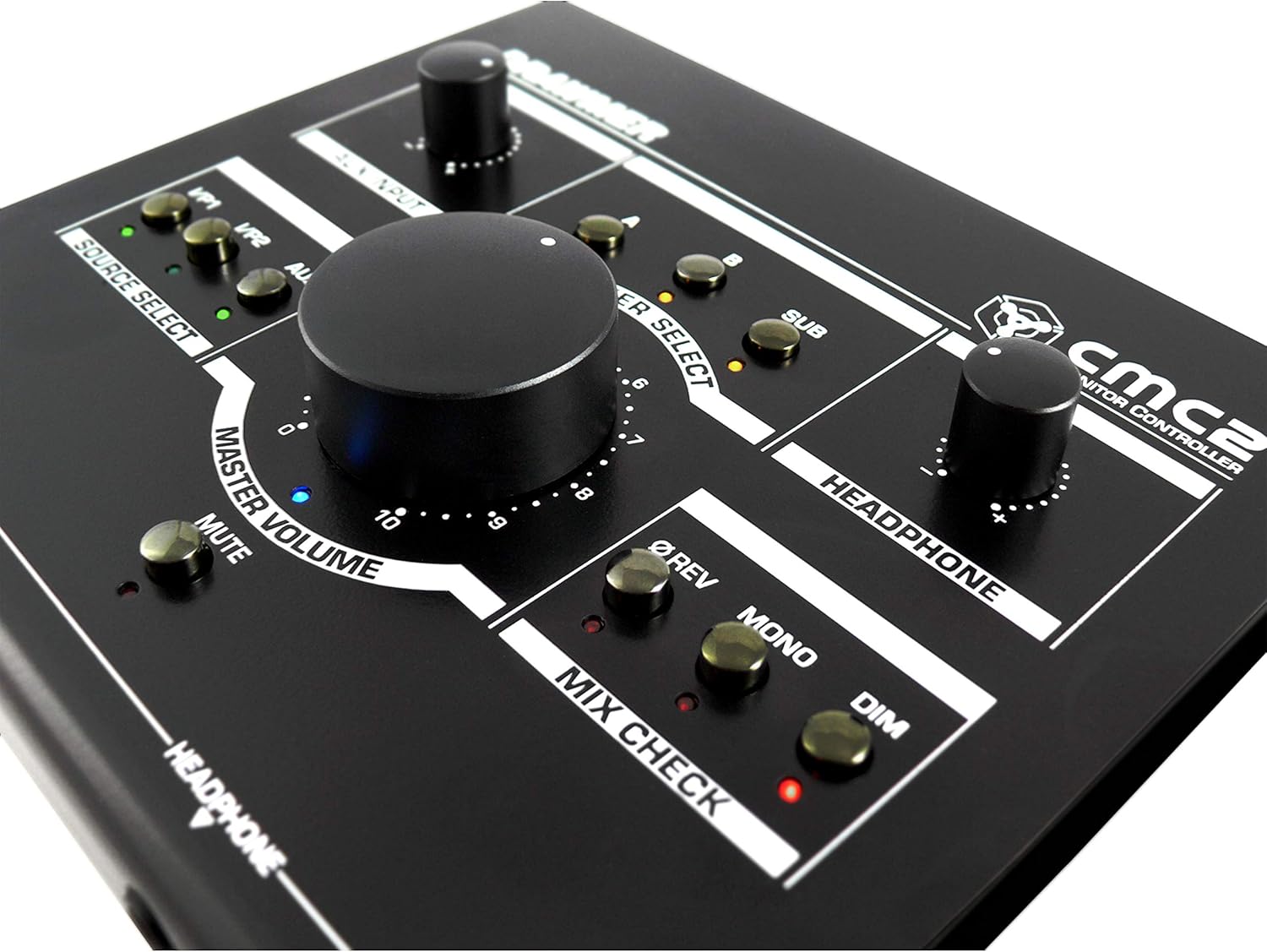
Figura 6.1: Close-up view of the Drawmer CMC2 front panel, highlighting the master volume, source select, speaker select, headphone, and mix check controls.
6.1 Għażla tas-Sors
- Agħfas il- I/P1 button to select the audio source connected to Input 1.
- Agħfas il- I/P2 button to select the audio source connected to Input 2.
- Agħfas il- AUX button to select the auxiliary input (front panel 3.5mm jack).
- Only one source can be active at a time. The LED next to the selected button will illuminate.
6.2 Għażla tal-Ispeaker
- Agħfas il- A button to route the selected source to Speaker Output A.
- Agħfas il- B button to route the selected source to Speaker Output B.
- Agħfas il- SUB button to route the selected source to the Subwoofer Output.
- Multiple speaker outputs can be active simultaneously (e.g., A and SUB). The LEDs indicate active outputs.
6.3 Kontroll tal-Volum
- Dawwar il-kbir VOLUM MASTER knob clockwise to increase the output level to the selected speakers, and counter-clockwise to decrease it.
- Dawwar il- HEADPHONE knob to adjust the listening level for connected headphones.
- Dawwar il- DĦUL AUX knob to adjust the input level of the auxiliary source.
6.4 Mix Check Functions
- Agħfas il- ØREV button to reverse the phase of the right channel, useful for checking phase compatibility.
- Agħfas il- MONO button to sum the stereo signal to mono, allowing you to check for mono compatibility issues in your mix.
- Agħfas il- DIM button to temporarily reduce the output volume by a fixed amount, useful for quick listening level changes without losing your main volume setting.
6.5 Funzjoni Mute
- Agħfas il- MUTE button to instantly silence all active speaker outputs. The LED will illuminate when mute is active. Press again to unmute.
7. Manutenzjoni
The Drawmer CMC2 is designed for reliable operation with minimal maintenance.
- Tindif: Keep the unit clean by wiping it with a dry, soft, lint-free cloth. Avoid abrasive cleaners or solvents.
- Ambjent: Operate the unit in a clean, dry environment, away from direct sunlight, heat sources, and excessive dust.
- Ventilazzjoni: Kun żgur li l-islottijiet tal-ventilazzjoni ma jkunux ostakolati biex tevita li s-sħana tisħon iżżejjed.
8 Issolvi l-problemi
If you encounter issues with your CMC2, refer to the following common problems and solutions:
- Ebda Qawwa:
- Ensure the 15V DC power adapter is securely connected to the unit and a working power outlet.
- Check that the rear panel power switch is in the 'ON' position.
- Ebda Output Awdjo:
- Verify that the correct input source (I/P1, I/P2, or AUX) is selected and its LED is illuminated.
- Ensure that at least one speaker output (A, B, or SUB) is selected and its LED is illuminated.
- Check that the MASTER VOLUME knob is turned up and the MUTE button is not active (LED off).
- Confirm all audio cables are securely connected to both the CMC2 and your speakers/audio sources.
- Test with different cables or audio sources to isolate the problem.
- Awdjo Mgħawġ:
- Naqqas il-livell tad-dħul mis-sors awdjo tiegħek.
- Lower the MASTER VOLUME on the CMC2.
- Iċċekkja jekk hemmx kejbils tal-awdjo bil-ħsara.
- Headphone Output Not Working:
- Ensure headphones are fully plugged into the front panel jack.
- Adjust the HEADPHONE volume knob.
- Ittestja b'par ta' headphones differenti.
If the problem persists, contact Drawmer customer support or your authorized dealer for assistance.
9. Speċifikazzjonijiet
| Isem tal-Mudell | CMC2 |
| Brand | Drappur |
| Użi Rakkomandati | Monitoraġġ tal-Awdjo |
| Teknoloġija tal-Konnettività | XLR, RCA (Auxiliary) |
| Modalità tal-Ħruġ tal-Awdjo | Stereo |
| Tip ta' Kelliem | Monitor |
| Dimensjonijiet tal-Prodott | 13 x 9 x 3 pulzieri (33 x 22.86 x 7.62 ċm) |
| Piż tal-oġġett | 3 liri (1.36 kg) |
| Manifattur | Drappur |
10. Garanzija u Appoġġ
The Drawmer CMC2 Compact Monitor Controller is covered by a manufacturer's warranty. Please refer to the warranty card included with your product or visit the official Drawmer websit għal termini u kundizzjonijiet dettaljati tal-garanzija.
For technical support, service, or further inquiries, please contact your authorized Drawmer dealer or the Drawmer customer support team through their official channels.


