1. Introduzzjoni
Thank you for choosing the Diyeeni USB Wired Mini Speaker. This manual provides essential information for the proper setup, operation, and maintenance of your speaker. Please read it thoroughly before use to ensure optimal performance and longevity of the product.
2. Informazzjoni dwar is-Sigurtà
- Tesponix l-ispiker għall-ilma jew għal umdità eċċessiva.
- Evita li twaqqa’ jew tissuġġetta lill-kelliem għal impatti qawwija.
- Tippruvax tiżżarma jew issewwi l-ispiker int stess. Irreferi għal kull manutenzjoni f'idejn persunal kwalifikat.
- Żomm l-ispiker 'il bogħod minn sorsi ta' sħana u dawl tax-xemx dirett.
- Aċċerta ruħek li jkun hemm ventilazzjoni xierqa madwar l-ispiker waqt l-użu.
3. Kontenut tal-Pakkett
Ivverifika li l-oġġetti kollha huma preżenti fil-pakkett:
- 1 x Diyeeni USB Wired Mini Speaker
- 1 x Integrated USB Power & Audio Cable (attached to speaker)
4. Prodott Aktarview
The Diyeeni USB Wired Mini Speaker is designed for use with desktop and notebook computers, offering a compact and portable audio solution. It features dual speakers for clear sound output and an integrated USB cable for both power and audio transmission.

Stampa 1: Quddiem view of the Diyeeni USB Wired Mini Speaker, highlighting its compact design.

Image 2: Diagram illustrating the internal dual speaker components of the Diyeeni USB Wired Mini Speaker.

Image 3: A hand holding the Diyeeni USB Wired Mini Speaker, demonstrating its portable and compact size.
5. Setup
Follow these steps to connect your Diyeeni USB Wired Mini Speaker to your computer:
- Qabbad il-Cable USB: Locate an available USB port on your desktop or notebook computer. Insert the integrated USB cable from the speaker into the USB port. This single cable provides both power to the speaker and transmits audio signals.
- Installazzjoni Awtomatika tas-Sewwieq: Your computer should automatically detect the new audio device and install the necessary drivers. This process may take a few moments.
- Select as Audio Output: Once installed, you may need to manually select the Diyeeni USB Wired Mini Speaker as your default audio output device in your computer's sound settings.
- Windows: Right-click the speaker icon in the taskbar, select 'Sound settings' or 'Playback devices', and choose the USB speaker from the list.
- macOS: Go to 'System Preferences' > 'Sound' > 'Output' and select the USB speaker.
- Pjazzament: Place the speaker on a stable, flat surface near your computer for optimal sound projection.
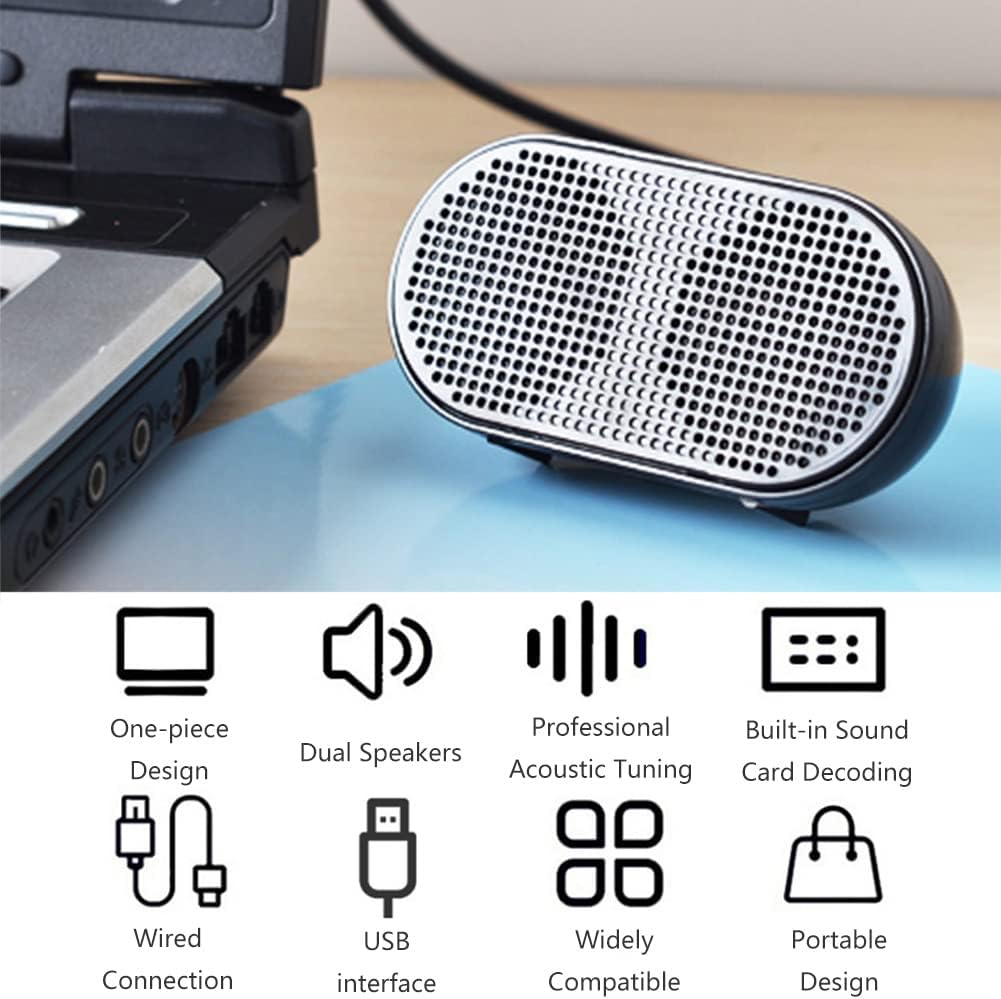
Image 4: The Diyeeni USB Wired Mini Speaker connected to a laptop via its integrated USB cable, ready for use.

Image 5: The Diyeeni USB Wired Mini Speaker positioned next to a desktop monitor, illustrating its compact size and simple USB connection.
6. Operazzjoni
Once connected and selected as the audio output device, the Diyeeni USB Wired Mini Speaker operates automatically with your computer's audio. There are no physical controls on the speaker itself.
- Kontroll tal-Volum: Adjust the volume directly from your computer's operating system or the media player application you are using.
- Power On/Off: The speaker powers on automatically when connected to a powered USB port and powers off when disconnected or when the computer is shut down.
- Kompatibilità: The speaker is compatible with various devices, including desktop computers, notebook computers, and other devices that support USB audio output.

Image 6: A collage demonstrating the wide application of the Diyeeni USB Wired Mini Speaker with various devices such as laptops and desktop computers.
7. Manutenzjoni
To ensure the longevity and proper functioning of your speaker, follow these maintenance guidelines:
- Tindif: Use a soft, dry cloth to wipe the exterior of the speaker. Do not use liquid cleaners or abrasive materials.
- Ħażna: Meta ma tkunx qed tuża l-ispiker, aħżen l-ispiker f'post frisk u niexef 'il bogħod mix-xemx diretta u minn temperaturi estremi.
- Kura tal-Cable: Avoid bending or twisting the integrated USB cable excessively to prevent internal damage.
8 Issolvi l-problemi
If you encounter issues with your Diyeeni USB Wired Mini Speaker, refer to the following common problems and solutions:
- Ebda Ħsejjes:
- Kun żgur li l-kejbil tal-USB huwa mdaħħal sew f'port USB li jaħdem fuq il-kompjuter tiegħek.
- Check your computer's volume settings and ensure it is not muted or set too low.
- Verify that the Diyeeni USB Wired Mini Speaker is selected as the default audio output device in your computer's sound settings (refer to Section 5, Step 3).
- Try connecting the speaker to a different USB port or another computer to rule out a port or computer-specific issue.
- Ħoss Mgħawġ:
- Reduce the volume on your computer. High volume levels can sometimes cause distortion.
- Kun żgur li s-sors tal-awdjo (eż., mużika file, video) is of good quality.
- Speaker Not Recognized by Computer:
- Skonnettja u qabbad mill-ġdid il-kejbil USB.
- Ibda mill-ġdid il-kompjuter tiegħek.
- Check your computer's Device Manager (Windows) or System Information (macOS) to see if the USB audio device is listed without errors.
9. Speċifikazzjonijiet
| Karatteristika | Dettall |
|---|---|
| Tip ta' Prodott | Mini Wire Speaker |
| Tip ta' Kelliem | Multimedia |
| Konfigurazzjoni tal-Ispeaker | Dual Speakers (2.0 Channel) |
| Daqs tal-Kelliem | 6 Ċentimetru |
| Qawwa tal-Ħruġ Massimu tal-Ispeaker | 1.5 Watts (each) |
| Teknoloġija tal-Konnettività | USB (Integrated Power Supply & Audio Cable) |
| Apparati Kompatibbli | Desktop, Laptop |
| Sors tal-Enerġija | Elettriku bil-fili (permezz tal-USB) |
| Piż tal-oġġett | 3.17 uqija (0.09 Kilogrammi) |
| Dimensjonijiet tal-Prodott | 3.35 x 1.18 x 1.65 pulzieri |
| UPC | 754959887068 |
10. Garanzija u Appoġġ
For warranty information or technical support, please refer to the documentation provided at the time of purchase or contact Diyeeni customer service through their official channels. Keep your purchase receipt as proof of purchase.


