Introduzzjoni
Thank you for choosing the ONIKUMA K1B Gaming Headset. This manual provides detailed instructions for setting up, operating, and maintaining your headset to ensure optimal performance and longevity. Please read this manual carefully before use.
Kontenut tal-Pakkett
- 1 x ONIKUMA K1B Gaming Headset
- 1 x Conversion Line (Y-splitter cable)
- 1 x Manwal għall-Utent
Prodott Overview
The ONIKUMA K1B Gaming Headset is designed for an immersive gaming experience, featuring comfortable over-ear cups, an omnidirectional microphone, and LED lighting. It is compatible with various gaming consoles, including PS4 and Xbox One.

Figura 1: In-naħa ta' quddiem view of the ONIKUMA K1B Gaming Headset with its omnidirectional microphone extended. The headset features a camouflage design and comfortable ear cushions.
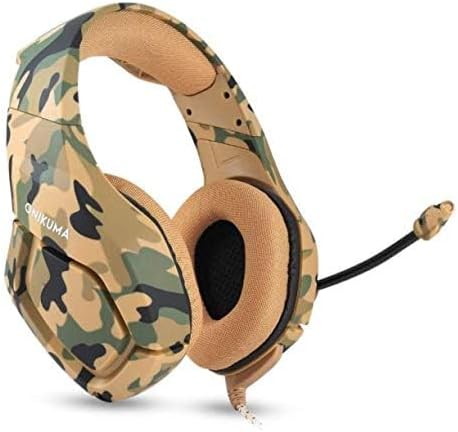
Figura 2: Angolat view of the ONIKUMA K1B Gaming Headset, showing the camouflage pattern and the microphone in a retracted position. The headset is designed for over-ear comfort.
Setup Istruzzjonijiet
- Qabbad mal-Apparat:
- For devices with a single 3.5mm audio jack (e.g., most laptops, newer controllers): Plug the 3.5mm jack directly into your device's audio port.
- For devices with separate audio and microphone jacks (e.g., older PCs): Use the included conversion line (Y-splitter cable) to connect the headset's 3.5mm jack to the separate audio and microphone ports on your device.
- For LED lighting: Plug the USB connector into an available USB port on your device (PC, console, or USB power adapter) to power the headset's LED lights. The USB connection is for lighting only, not for audio.
- Aġġusta l-Qiegħda tal-Headset: Extend or retract the headband to comfortably fit your head. Ensure the ear cups fully cover your ears for optimal sound isolation and comfort.
- Pożizzjoni tal-Mikrofonu: Adjust the flexible omnidirectional microphone to a suitable distance from your mouth for clear voice capture.
- Ikkonfigura s-Settings tal-Awdjo: After connecting, navigate to your device's audio settings to ensure the ONIKUMA K1B headset is selected as the default output and input device. Adjust volume levels as needed.
Istruzzjonijiet Operattivi
- Kontroll tal-Volum: The headset features an in-line volume control wheel on the cable. Rotate the wheel to increase or decrease the audio volume.
- Mute tal-mikrofonu: An in-line switch allows you to quickly mute or unmute the microphone. Ensure the microphone is unmuted when you wish to communicate.
- Dawl LED: The LED lights activate automatically when the USB cable is connected to a powered USB port. There is no separate switch for the LED lights.
- Kontroll tal-Ħsejjes: The headset incorporates noise control features. For optimal performance, ensure the ear cups are properly seated over your ears.
Manutenzjoni
- Tindif: Uża drapp artab u niexef biex tnaddaf il-headset. Għall-kuxxinetti tal-widnejn, imsaħ bil-mod b'ċarruta ħafifa.amp drapp jekk meħtieġ, imbagħad nixxef sew. Tużax kimiċi ħarxa jew prodotti tat-tindif li joborxu.
- Ħażna: Aħżen il-headset f'post frisk u niexef 'il bogħod mix-xemx diretta u minn temperaturi estremi. Evita li tpoġġi oġġetti tqal fuq il-headset.
- Kura tal-Cable: Avoid sharp bends or excessive pulling on the cables. Always grasp the plug, not the cable, when disconnecting.
- Reżistenza għall-Ilma: While the product description mentions "Waterproof", it is generally recommended to avoid exposing electronic devices to liquids. Protect the headset from spills and moisture to prevent damage.
Issolvi l-problemi
| Problema | Soluzzjoni Possibbli |
|---|---|
| L-ebda ħoss mill-headset |
|
| Mikrofonu mhux qed jaħdem |
|
| Dwal LED ma jaħdmux |
|
Speċifikazzjonijiet
| Karatteristika | Dettall |
|---|---|
| Mudell | K1B |
| Dijametru tal-Kelliem | 50mm |
| Impedenza | 20Ω±15% |
| Sensittività | 117dB±3dB |
| Medda ta' Frekwenzi | 20-20000Hz |
| Mic Dimension | 6.0mm x 2.7mm |
| Sensittività tal-Mic | -36dB±1dB |
| Impedenza tal-Mic | 2.2kΩ |
| Id-direttività | Omni-direzzjonali |
| LED Ħidma Voltage | DC5V±5% |
| Kurrent tax-Xogħol | Hawn taħt 100mA |
| Interface tal-headset | USB (for LED) + 3.5mm Stereo Audio and Mic Plug |
| Tul tal-Cable | 2.2m |
| Materjal | Plastik |
| Apparati Kompatibbli | Gaming Consoles (PS4, Xbox One), PC, etc. |
| Kontroll tal-Ħoss | Kanċellazzjoni Attiva tal-Ħoss |
Garanzija u Appoġġ
This product comes with a standard manufacturer's warranty. For specific warranty terms and conditions, please refer to the documentation provided at the time of purchase or contact your retailer. For technical support or further assistance, please reach out to the product seller or manufacturer's customer service.
Extended warranty options may be available from third-party providers. Please check with your retailer for details on such offerings.


