Introduzzjoni
The GoXtreme GX1 Dual Gimbal is a versatile 3-axis stabilizer designed to capture smooth, professional-quality video footage using either a smartphone or an action camera. This manual provides essential information for setting up, operating, and maintaining your GX1 Dual Gimbal to ensure optimal performance and longevity.
Prodott Overview
Karatteristiċi Ewlenin
- Stabbilizzazzjoni bi 3 Assi: Provides smooth, shake-free video recording.
- Kompatibilità Doppju: Supports both smartphones and action cameras with an included adapter.
- Disinn Ergonomiku: Qabda komda għal użu estiż.
- Kontrolli Integrati: Easy access to gimbal modes and zoom functions.
Komponenti
Familiarize yourself with the main components of your GoXtreme GX1 Dual Gimbal:
- Gimbal Handle with Control Panel
- Smartphone Clamp
- Action Camera Adapter Plate
- Batterija tal-jone tal-litju rikarikabbli
- USB Charging Cable (not explicitly listed but implied)

Figura 1: The GoXtreme GX1 Dual Gimbal with a smartphone securely mounted, ready for use. The image shows the overall design and the smartphone clamp.

Figura 2: A dettaljata view of the gimbal's control panel, showing the joystick, mode buttons (M, L, H), and zoom controls (W-T). A smartphone is mounted in the clamp.
Setup
1. Iċċarġjar tal-batterija
- Ensure the gimbal is powered off.
- Connect the USB charging cable to the gimbal's charging port.
- Qabbad it-tarf l-ieħor tal-kejbil ma' sors ta' enerġija USB (eż., adapter tal-ħajt, port USB tal-kompjuter).
- The charging indicator light will illuminate. Once fully charged, the light will change or turn off (refer to specific indicator behavior in the quick start guide if available).
Nota: For first-time use, fully charge the battery before operation.
2. Mounting a Smartphone
- Estendi bil-mod il-clutch tal-ismartphoneamp.
- Poġġi l-ismartphone tiegħek bir-reqqa fil-klampamp, ensuring it is centered and securely held.
- Aġġusta l-clamp to balance the smartphone as evenly as possible. Proper balancing is crucial for optimal gimbal performance and battery life.

Figura 3: The GoXtreme GX1 Dual Gimbal's universal mounting clamp, designed to securely hold smartphones. The image shows the clamp f'pożizzjoni miftuħa.
3. Mounting an Action Camera
- Attach your action camera to the provided action camera adapter plate. Ensure it is securely fastened.
- Insert the action camera adapter plate (with the camera attached) into the gimbal's smartphone clamp.
- Adjust the position of the adapter plate within the clamp to achieve optimal balance for your action camera.

Figura 4: The dedicated adapter plate for mounting an action camera onto the gimbal's smartphone clamp.

Figura 5: An action camera securely attached to the adapter plate, demonstrating how it prepares for gimbal mounting.
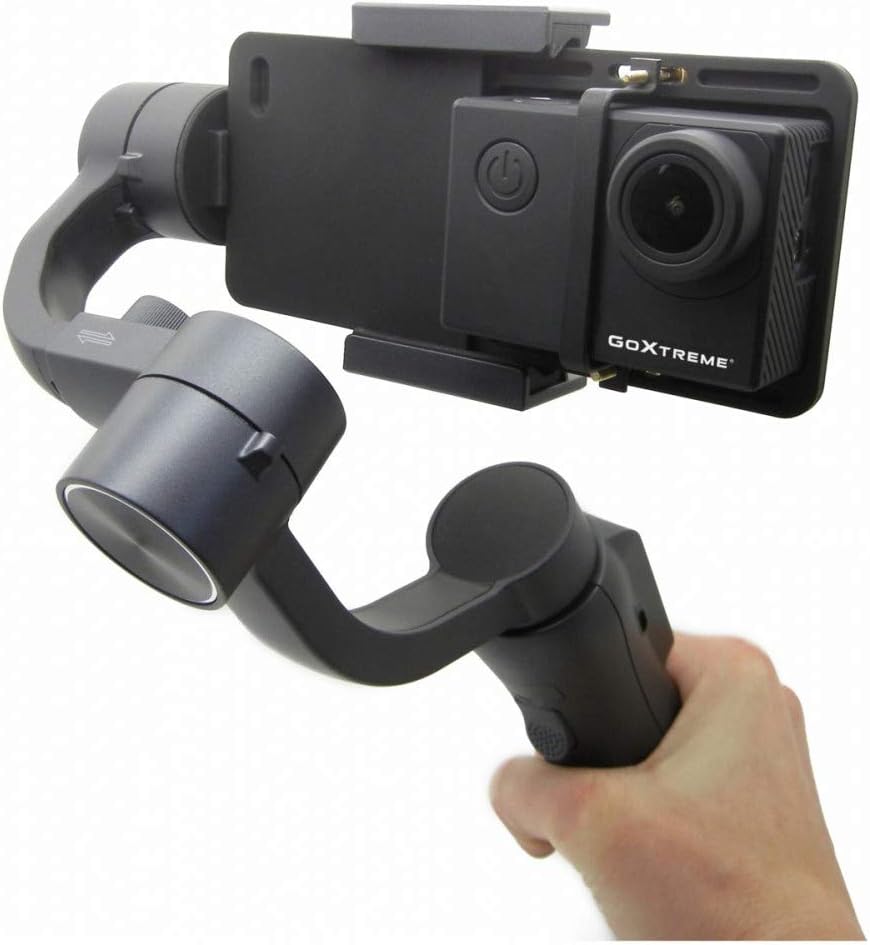
Figura 6: The GoXtreme GX1 Dual Gimbal in use with an action camera, held by a hand, illustrating its compact and portable nature.
Istruzzjonijiet Operattivi
1. Power On/Off
- Qawwa Mixgħul: Press and hold the power button (usually located on the handle) for a few seconds until the indicator lights illuminate and the gimbal initializes.
- Itfi: Agħfas u żomm il-buttuna tal-qawwa mill-ġdid sakemm id-dwal indikatur jintfew.
2. Modi tal-Gimbal
The GX1 Dual Gimbal typically offers various stabilization modes, accessible via the mode buttons (M, L, H) on the control panel:
- Pan Follow Mode (M): The camera pans left and right following your hand movements, while the tilt and roll axes remain locked.
- Modalità Lock (L): All three axes (pan, tilt, roll) are locked, keeping the camera pointed in a fixed direction regardless of your hand movements.
- Full Follow Mode (H): The camera follows both your pan and tilt movements, while the roll axis remains locked.
Nota: Specific mode names and functionalities may vary slightly. Refer to the quick start guide for precise details.
3. Funzjonijiet tal-Panew tal-Kontroll
- Joysticks: Used to manually control the pan and tilt direction of the camera.
- Mode Buttons (M, L, H): Cycle through different gimbal stabilization modes.
- Zoom Slider (W-T): Controls the digital zoom function of your connected smartphone or action camera (if supported).
- Buttuna Rekord: Initiates and stops video recording on the connected device (requires Bluetooth pairing for smartphones).
Manutenzjoni
- Tindif: Uża drapp artab u niexef biex tnaddaf il-gimbal. Evita li tuża kimiċi ħarxa jew materjali li joborxu.
- Ħażna: Store the gimbal in a cool, dry place, away from direct sunlight and extreme temperatures.
- Kura tal-batterija: Għal ħażna fit-tul, iċċarġja l-batterija sa madwar 50-60% kull tliet xhur biex iżżomm il-batterija f'saħħitha.
- Evita l-Impatt: Ipproteġi l-gimbal minn waqgħat jew impatti, għax dan jista' jagħmel ħsara lill-muturi u lill-komponenti interni.
Issolvi l-problemi
Kwistjonijiet Komuni u Soluzzjonijiet
- Il-gimbal mhux qed jixgħel: Kun żgur li l-batterija hija kompletament iċċarġjata.
- Gimbal vibrating or unstable: Check if the smartphone or action camera is properly balanced in the clamp. Recalibrate the gimbal if necessary (refer to the quick start guide for calibration steps).
- Il-kontrolli ma jirrispondux: Ensure the gimbal is powered on and properly connected (if using Bluetooth for smartphone control).
- Poor stabilization: Verify that the device is securely mounted and balanced. Avoid overloading the gimbal with excessively heavy devices.
Jekk il-problemi jippersistu, ikkuntattja l-appoġġ tal-klijent għal aktar assistenza.
Speċifikazzjonijiet
| Karatteristika | Speċifikazzjoni |
|---|---|
| Brand | easypix |
| Mudell | 55238 (GX1) |
| Kulur | Iswed |
| Apparati Kompatibbli | Mobile Phone, Action Camera |
| Dimensjonijiet tal-Prodott (L x W x H) | 10.8 x 7 x 29 ċm |
| Piż tal-oġġett | 1.1 kg |
| Tip ta 'batterija | 1 Lithium-ion (inkluża) |
| Sena Mudell | 2019 |
Garanzija u Appoġġ
For warranty information, technical support, or service inquiries, please refer to the documentation included with your purchase or visit the official Easypix websit. Żomm il-prova tax-xiri tiegħek għal talbiet ta' garanzija.


