1. Prodott Aktarview
The GameMax Optical is a mid-tower ATX PC gaming case designed for system builders. It features transparent acrylic panels on the front and both sides, providing a clear view of internal components. The case supports ATX motherboards and includes four pre-installed Rainbow Dual-Ring ARGB fans for cooling and customizable lighting effects. The design prioritizes effective airflow with multiple air intakes and support for up to eight cooling fans.
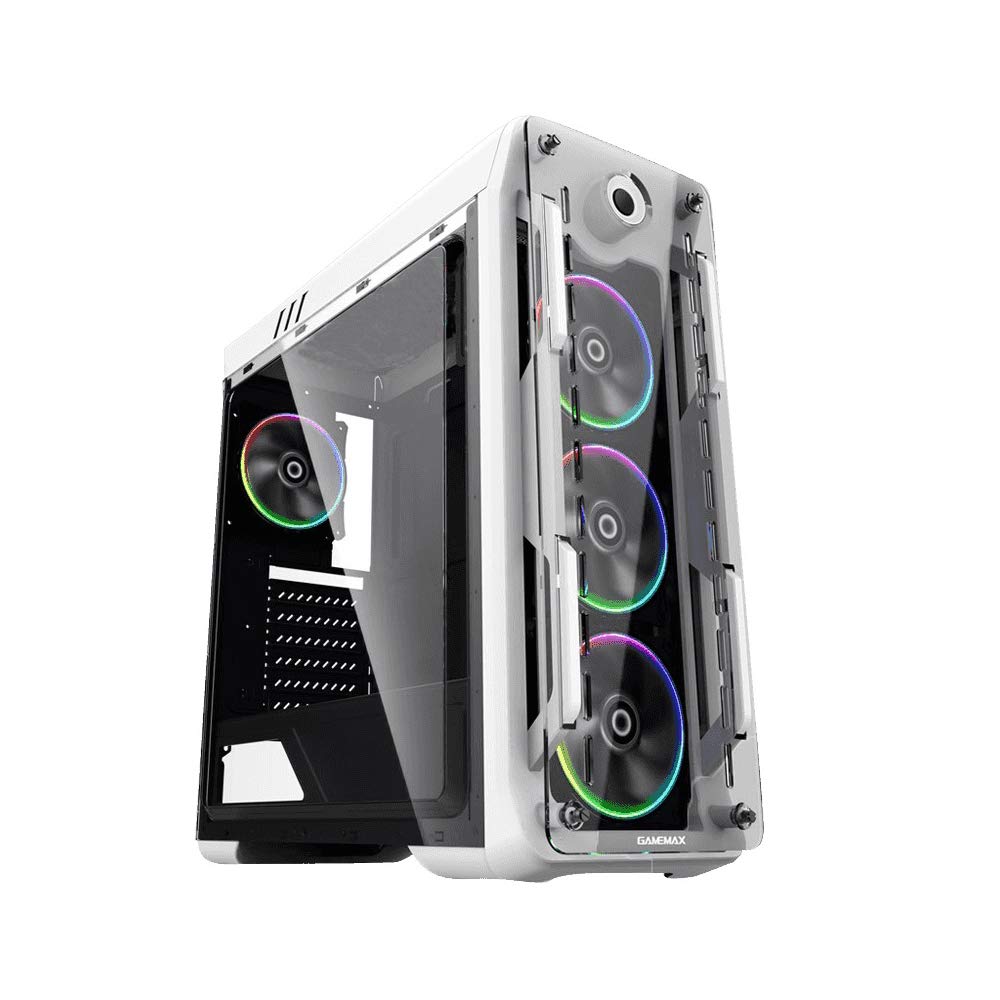
Figura 1: Quddiem u ġenb view of the GameMax Optical PC Gaming Case.
2. Karatteristiċi
- Kostruzzjoni Akrilika: Transparent acrylic panels on the front and both sides for component visibility.
- Fluss tal-Arja Ottimali: Designed with multiple air intakes and heat dissipation points, supporting up to eight fans for efficient cooling.
- Sistema tat-tkessiħ: Includes four pre-installed Rainbow Dual-Ring ARGB fans. Fan speed and ARGB lighting can be controlled via an RF remote or a manual controller on the top I/O panel.
- Struttura Interna: Mid-tower chassis compatible with ATX, Micro-ATX, and Mini-ITX motherboards. Supports four internal hard drives, CPU coolers up to 160mm in height, and graphics cards up to 360mm in length.
3. Kontenut tal-Pakkett
Ivverifika li l-oġġetti kollha huma preżenti fil-pakkett:
- GameMax Optical PC Case
- 4 x Rainbow Dual-Ring ARGB Fans (pre-installed)
- RF Remote Controller for ARGB Fans
- Kit ta' Aċċessorji (viti, standoffs, rabtiet tal-kejbil)
- Manwal għall-Utent (dan id-dokument)
4. Setup u Installazzjoni
Before beginning installation, ensure your workspace is clean and static-free. Refer to your motherboard and component manuals for specific installation instructions.
4.1. Preparazzjoni
- Iftaħ il-kaxxa tal-PC mill-pakkett u neħħi l-materjali kollha tal-ippakkjar.
- Poġġi l-kaxxa fuq wiċċ stabbli u ċatt.
- Remove the side acrylic panels by unscrewing the thumb screws.
4.2. Installazzjoni tal-Motherboard
- Install the necessary motherboard standoffs into the motherboard tray according to your motherboard's form factor (ATX, Micro-ATX, Mini-ITX).
- Poġġi l-ilqugħ tal-I/O fil-ftuħ ta' wara tal-kaxxa.
- Carefully align your motherboard with the standoffs and I/O shield, then gently lower it into place.
- Waħħal il-motherboard bil-viti. Tissikkax iżżejjed.
4.3. Installazzjoni ta 'Provvista ta' Enerġija
- Locate the power supply mounting area at the bottom rear of the case.
- Slide the power supply into the designated bay.
- Waħħal il-provvista tal-enerġija bil-viti minn wara tal-kaxxa.
4.4. Installazzjoni tad-Drajv tal-Ħażna
Install 3.5-inch HDDs and 2.5-inch SSDs into the designated drive bays. Refer to the case's internal structure for specific mounting points and methods (e.g., trays, screw-in mounts).

Figura 2: Intern view showing fan placement and component space.
4.5. Installazzjoni tal-Karta tal-Grafika u l-Karta tal-Espansjoni
- Neħħi l-għata meħtieġa tas-slott PCI-E minn wara tal-kaxxa.
- Daħħal il-karta grafika tiegħek jew karti ta' espansjoni oħra fis-slots PCI-E xierqa fuq il-motherboard.
- Waħħal il-karti bil-viti.
4.6. Konnessjonijiet tal-Fann u l-ARGB
The pre-installed ARGB fans are connected to a fan controller. Connect the fan controller to your power supply (usually via SATA power) and to your motherboard's ARGB header (if desired for software control) or use the included RF remote for control.
4.7. Ġestjoni tal-Kejbil
Route all cables (power, data, front panel I/O) through the designated cutouts and tie-down points behind the motherboard tray to ensure clean aesthetics and unobstructed airflow.

Figura 3: Wara view of the case, showing I/O and expansion slots.
5. Istruzzjonijiet Operattivi
5.1. Tixgħel
- Ensure all components are securely installed and cables are connected.
- Connect the power cable to your power supply and a wall outlet.
- Press the power button on the top I/O panel of the case.
5.2. Fan and ARGB Lighting Control
- RF Remote Controller: Use the included RF remote to change ARGB lighting modes, colors, and fan speeds.
- Manual Fan Controller: A dedicated button on the top I/O panel allows for manual adjustment of fan speed.
- Softwer tal-Motherboard: If the fan controller is connected to a compatible motherboard ARGB header, you may be able to control lighting effects via your motherboard's RGB software.
6. Manutenzjoni
Manutenzjoni regolari tgħin biex tiżgura prestazzjoni ottimali u lonġevità tal-kaxxa u l-komponenti tal-PC tiegħek.
- Filtri tat-Trab: Periodically remove and clean any dust filters (e.g., on the top, front, or bottom) to maintain good airflow.
- Pannelli akriliċi: Clean acrylic panels with a soft, damp cloth and mild cleaner. Avoid abrasive materials or harsh chemicals that can scratch or damage the acrylic.
- Tindif tal-Fann: Use compressed air to remove dust buildup from fan blades and heatsinks.
- Ġestjoni tal-Kejbil: Occasionally check cable routing to ensure no cables are obstructing airflow or fan operation.
7 Issolvi l-problemi
Jekk tiltaqa' ma' problemi, irreferi għall-passi komuni li ġejjin għas-soluzzjoni tal-problemi:
- Ebda Qawwa: Ensure the power supply is switched on, the power cable is securely connected, and all internal power connections (24-pin ATX, 8-pin CPU, GPU power) are firm.
- Fans Not Spinning / ARGB Not Lighting: Check that the fan controller is properly connected to the power supply and that all fans are securely plugged into the controller. Verify ARGB headers are correctly connected to the motherboard or controller.
- Is-sħana żejda: Ensure all fans are spinning in the correct direction for optimal airflow. Clean any dust filters and fan blades. Verify that CPU and GPU coolers are properly seated.
- Komponenti maħlula: If you hear rattling or experience instability, power down the system and check that all installed components (motherboard, GPU, drives) are securely fastened with screws.
8. Speċifikazzjonijiet
| Karatteristika | Speċifikazzjoni |
|---|---|
| Isem tal-Mudell | GMX-OPTICAL-WHT |
| Tip ta' Każ | Torri tan-Nofs |
| Kompatibbiltà tal-motherboard | ATX, Mikro-ATX, Mini-ITX |
| Dimensjonijiet (L x W x H) | 18.39 x 8.11 x 19.8 pulzieri (467 x 206 x 503 mm) |
| Piż tal-oġġett | 10.12 libbra (4.6 Kilogrammi) |
| Materjal | Akriliku |
| Fannijiet installati minn qabel | 4 x Rainbow Dual-Ring ARGB Fans |
| Max. Għoli tal-CPU Cooler | 160mm |
| Max. GPU Length | 360mm |
| Drive Bays | 4 internal (combination of 3.5" HDD and 2.5" SSD) |
| Portijiet I / O ta 'quddiem | 2 x USB 2.0, Audio In/Out, Power Button, Reset Button, Fan Controller |
9. Informazzjoni dwar Garanzija
For detailed warranty terms and conditions, please refer to the official GAMEMAX website or contact your retailer directly. Keep your proof of purchase for warranty claims.
10. Appoġġ
For technical assistance, product inquiries, or further support, please visit the official GAMEMAX websit:
You may also contact GAMEMAX customer support through the channels provided on their websit.


