Introduzzjoni
This manual provides comprehensive instructions for the safe and efficient use of your Hoco E21 Razor-Edge Wireless Headset. Please read this manual thoroughly before using the device and retain it for future reference.
The Hoco E21 is a compact and lightweight wireless headset designed for mobile communication, featuring Bluetooth V4.1 connectivity.
Kontenut tal-Pakkett
- Hoco E21 Razor-Edge Wireless Headset
- Iċċarġjar Cable
- Manwal għall-Utent
Note: Specific accessories may vary. Please check the product packaging.
Prodott Overview
Familiarize yourself with the components of your Hoco E21 headset.
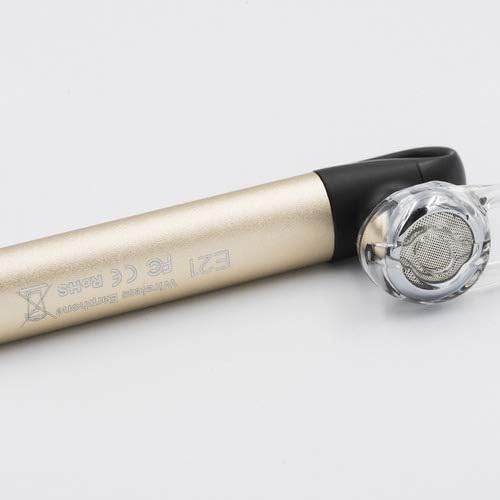
Figura 1: Hoco E21 Razor-Edge Wireless Headset, showing its compact design and gold finish.

Figura 2: Close-up view of the Hoco E21 headset, highlighting the earbud and the "E21" model engraving on the gold body.

Figura 3: Detail of the Hoco E21 headset, showing the "hoco." brand logo and the integrated clip for secure attachment.

Figura 4: Close-up of the charging port located at the end of the Hoco E21 headset, indicating where the charging cable connects.
Setup
1. Iċċarġjar tal-Headset
Before first use, fully charge the headset. Connect the charging cable to the headset's charging port and the other end to a USB power source (e.g., computer USB port, USB wall adapter).
- Iċċarġjar Voltage: DC5V
- Ħin tal-Iċċarġjar: Madwar sagħtejn
The indicator light will typically show red during charging and turn off or blue when fully charged.
2. Tqabbil ma' Apparat
The Hoco E21 uses Bluetooth V4.1 for wireless connectivity.
- Kun żgur li l-widna hija mitfija.
- Press and hold the multi-function button (usually the main button) until the indicator light flashes red and blue alternately, indicating pairing mode.
- On your mobile phone or device, enable Bluetooth and search for available devices.
- Select "Hoco E21" (or similar name) from the list of found devices.
- Jekk tintalab għal password, daħħal "0000" (erba' żerijiet).
- Once paired, the indicator light will typically flash blue slowly, and you may hear a confirmation tone.
The headset supports protocols such as headset, hands-free, A2DP, and Avrcp.
Istruzzjonijiet Operattivi
Qawwa mixgħul/mitfi
- Qawwa Mixgħul: Agħfas u żomm il-buttuna multi-funzjoni għal madwar 3 sekondi.
- Itfi: Agħfas u żomm il-buttuna multi-funzjoni għal madwar 5 sekondi.
Ġestjoni tas-Sejħiet
- Irrispondi Sejħa: Agħfas qasir il-buttuna b'ħafna funzjonijiet.
- Tmiem Sejħa: Agħfas qasir il-buttuna multi-funzjoni waqt telefonata.
- Irrifjuta Sejħa: Agħfas u żomm il-buttuna multi-funzjoni għal żewġ sekondi waqt telefonata li tkun dieħla.
- Isemmi mill-ġdid l-Aħħar Numru: Agħfas darbtejn il-buttuna multi-funzjoni.
Daqq tal-Mużika
- Play/Pawsa: Agħfas qasir il-buttuna b'ħafna funzjonijiet.
The control method is listed as "Touch". Specific touch gestures for next/previous track are not detailed in the product specifications but are typical for such devices.
Manutenzjoni
- Żomm il-headset niexef. Evita l-espożizzjoni għall-umdità, ix-xita, jew likwidi.
- Tesponix il-headset għal temperaturi estremi.
- Naddaf il-headset b'ċarruta ratba u niexfa. Tużax kimiċi ħarxa jew prodotti tat-tindif li joborxu.
- Aħżen il-headset f'post frisk u niexef meta ma tkunx qed tuża.
- Evita li twaqqa’ l-headset jew li tissottomettih għal impatti qawwija.
Issolvi l-problemi
| Problema | Kawża Possibbli | Soluzzjoni |
|---|---|---|
| Il-headset ma jixgħelx. | Batterija baxxa. | Iċċarġja l-headset kompletament. |
| Ma tistax tqabbad mat-tagħmir. | Il-headset mhux fil-modalità ta' tqabbil; il-Bluetooth mitfi fuq l-apparat; l-apparat wisq 'il bogħod. | Ensure headset is in pairing mode (flashing red/blue). Turn on Bluetooth on your device. Move headset closer to device (within 10m). |
| L-ebda ħoss jew kwalità tal-ħoss fqira. | Volume too low; headset not properly connected; interference. | Adjust volume on both headset and device. Re-pair the headset. Move away from sources of interference. |
| Il-headset jiskonnettja spiss. | Out of range; low battery. | Stay within 10m transmission range. Charge the headset. |
Speċifikazzjonijiet
| Karatteristika | Dettall |
|---|---|
| Isem tal-Mudell | E21 |
| Brand | HOCO |
| Teknoloġija tal-Konnettività | Wireless (Bluetooth V4.1) |
| Bluetooth Protocols Supported | Headset, Idejn ħielsa, A2DP, Avrcp |
| Firxa tat-Trażmissjoni | 10-il metru |
| Frekwenza tat-Trażmissjoni | 2.4GHz |
| Kapaċità tal-batterija | 45 mAh |
| Iċċarġjar Voltage | DC5V |
| Ħin tal-Iċċarġjar | Madwar sagħtejn |
| Dimensjonijiet tal-Prodott | 65 × 13 × 25 mm |
| Dimensjonijiet tal-Pakkett | 6.4 x 3.4 x 1.1 ċm |
| Piż tal-Pakkett | 60 g |
| Kulur | Deheb |
| Materjal | Plastik, Lastiku |
| Metodu ta' Kontroll | Mess |
| Apparati Kompatibbli | Cellphones |
| Komponenti Inklużi | Kuxxini tal-widnejn, Faxxa tar-ras |
| Manifattur | Ħoko |
Garanzija u Appoġġ
Specific warranty information is not provided in this manual. Please refer to the warranty card included with your product or visit the official HOCO websit għal termini u kundizzjonijiet dettaljati tal-garanzija.
For technical support or customer service inquiries, please contact your retailer or the HOCO customer support channels as indicated on the product packaging or official websit.


