1. Introduzzjoni
This manual provides detailed instructions for the proper use and maintenance of your HOPESTAR H13 Bluetooth Speaker. Please read this manual thoroughly before operating the device to ensure optimal performance and longevity. Keep this manual for future reference.
2. Kontenut tal-Pakkett
Ivverifika li l-oġġetti kollha huma preżenti fil-pakkett:
- HOPESTAR H13 Bluetooth Speaker
- Iċċarġjar Cable
- Manwal għall-Utent
3. Prodott Aktarview
Familiarize yourself with the components and controls of your HOPESTAR H13 speaker.
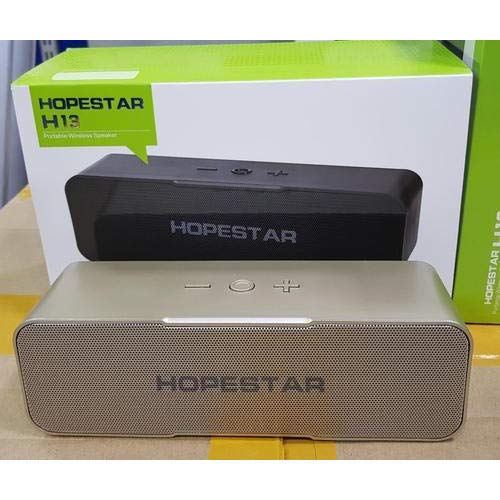
An image showing the HOPESTAR H13 portable wireless speaker in gold color, alongside its packaging box. The speaker features a mesh grille and control buttons on top, including power, volume down, and volume up.
Buttuni tal-Kontroll:
- Buttuna tal-Qawwa: Press and hold to turn the speaker ON/OFF. Press once to Play/Pause music or Answer/End calls.
- Volum 'l isfel (-): Agħfas biex tnaqqas il-volum.
- Volum 'il fuq (+): Agħfas biex iżżid il-volum.
4. Setup
Iċċarġjar inizjali:
Before first use, it is recommended to fully charge the HOPESTAR H13 speaker. Connect the provided charging cable to the speaker's charging port and a compatible USB power adapter (not included). The charging indicator light will illuminate during charging and turn off once the battery is full.
Tixgħel/Jitfi:
- Li jduru ON: Press and hold the Power Button until you hear an audible prompt.
- Li jduru OFF: Press and hold the Power Button again until you hear an audible prompt.
5. Istruzzjonijiet Operattivi
Tqabbil Bluetooth:
- Ensure the HOPESTAR H13 speaker is powered on and in pairing mode (indicated by a flashing LED light, if present).
- Attiva l-Bluetooth fuq l-apparat sors tiegħek (eż., smartphone, tablet, kompjuter).
- Fittex għal 'HOPESTAR H13' in the list of available Bluetooth devices.
- Select 'HOPESTAR H13' to initiate the pairing process.
- A confirmation sound will indicate successful pairing. The LED light will typically become solid.
Once paired, the speaker will automatically connect to the last paired device when powered on, if the device's Bluetooth is active and within range.
Daqq tal-mużika:
- Play/Pawsa: Agħfas il-Buttuna tal-Enerġija darba.
- Aġġustament tal-Volum: Use the Volume Down (-) and Volume Up (+) buttons on the speaker, or control volume directly from your connected device.
Immaniġġjar tas-Sejħiet:
- Tweġiba/Tmiem Sejħa: Press the Power Button once when a call comes in or to end an ongoing call.
6. Iċċarġjar
The HOPESTAR H13 speaker is powered by a built-in Lithium Ion battery. To charge the speaker:
- Connect the small end of the charging cable to the speaker's charging port.
- Connect the USB end of the charging cable to a USB power source (e.g., computer USB port, USB wall adapter).
- Id-dawl indikatur tal-iċċarġjar se juri l-istatus tal-iċċarġjar.
- Ladarba tkun iċċarġjata kompletament, skonnettja l-kejbil tal-iċċarġjar.
7. Manutenzjoni
- Clean the speaker with a soft, dry cloth. Do not use liquid cleaners, abrasive materials, or solvents.
- Tgħaddasx l-ispiker fl-ilma, għax mhux reżistenti għall-ilma.
- Aħżen l-ispiker f'post frisk u niexef 'il bogħod mix-xemx diretta u minn temperaturi estremi.
- Evita li twaqqa’ jew tissuġġetta lill-kelliem għal impatti qawwija.
8 Issolvi l-problemi
| Problema | Kawża Possibbli | Soluzzjoni |
|---|---|---|
| L-ispiker ma jixgħelx | Il-batterija hija eżawrita | Iċċarġja l-kelliem bis-sħiħ billi tuża l-kejbil ipprovdut. |
| L-ebda ħoss mill-kelliem | Volume too low; Not paired; Device not playing | Increase volume on both speaker and source device. Ensure speaker is paired correctly. Check if music is playing on the source device. |
| Bluetooth connection unstable or disconnects | Too far from source device; Interference | Move the source device closer to the speaker (within 10 meters). Avoid obstacles between devices. Re-pair the speaker with your device. |
| Ma tistax tqabbad mat-tagħmir | Speaker not in pairing mode; Bluetooth off on device | Ensure speaker is powered on and in pairing mode. Turn on Bluetooth on your source device and search again. |
9. Speċifikazzjonijiet
- Ditta: HOPESTAR
- Mudell: H13
- Teknoloġija tal-Konnettività: Bluetooth
- Sors tal-Enerġija: Li jaħdem bil-batterija (batterija tal-jone tal-litju inkluża)
- Metodu ta' Kontroll: Mess
- Piż tal-oġġett: 500 g
- Li ma jgħaddix ilma minnha: Nru
- Komponenti Inklużi: Speaker, Cable tal-Iċċarġjar, Manwal tal-Utent
10. Garanzija u Appoġġ
The HOPESTAR H13 Bluetooth Speaker comes with a 6-il xahar garanzija mid-data tax-xiri. Din il-garanzija tkopri difetti fil-manifattura taħt użu normali.
For technical support, warranty claims, or further assistance, please contact your original retailer or visit the official HOPESTAR websit għal informazzjoni ta' kuntatt.


