Introduzzjoni
The Nikon D7500 is a high-performance DSLR camera designed for enthusiasts, offering advanced features in a compact and robust body. This kit includes the D7500 camera body, an AF-P DX NIKKOR 18-55mm f/3.5-5.6G VR Lens, and an AF-P DX NIKKOR 70-300mm f/4.5-6.3G ED VR Lens, providing versatility for various photographic needs. This manual provides essential information for setting up, operating, and maintaining your camera and lenses.

Figure 1: Nikon D7500 Dual Zoom Lens Kit components.
Karatteristiċi Ewlenin
- Class-leading image quality, ISO range, image processing, and metering equivalent to the D500.
- Large 3.2-inch, 922K dot, tilting LCD screen with touch functionality.
- 4K Ultra HD and 1080P Full HD video recording with stereo sound, power aperture control, auto ISO, and 4K UHD time-lapse.
- Built-in Wi-Fi and Bluetooth for easy connectivity via the Nikon SnapBridge app.
- Includes the compact AF-P DX NIKKOR 18-55mm f/3.5-5.6G VR Lens and the far-reaching AF-P DX NIKKOR 70-300mm f/4.5-6.3G ED VR Lens, both featuring Nikon’s Vibration Reduction (VR) image stabilization.
- Creative features built-in, including time-lapse, multiple exposure, creative picture controls, and focus shift photography.
Setup
1. Attaching Lenses
To attach a lens, align the white mounting mark on the lens barrel with the white mounting mark on the camera body. Rotate the lens counter-clockwise until it clicks into place. To remove, press the lens release button on the camera body and rotate the lens clockwise.
2. Installazzjoni tal-batterija
Open the battery chamber cover on the bottom of the camera. Insert the EN-EL15a rechargeable lithium-ion battery with the arrow pointing towards the camera's front, ensuring the battery is correctly oriented. Close the cover securely.
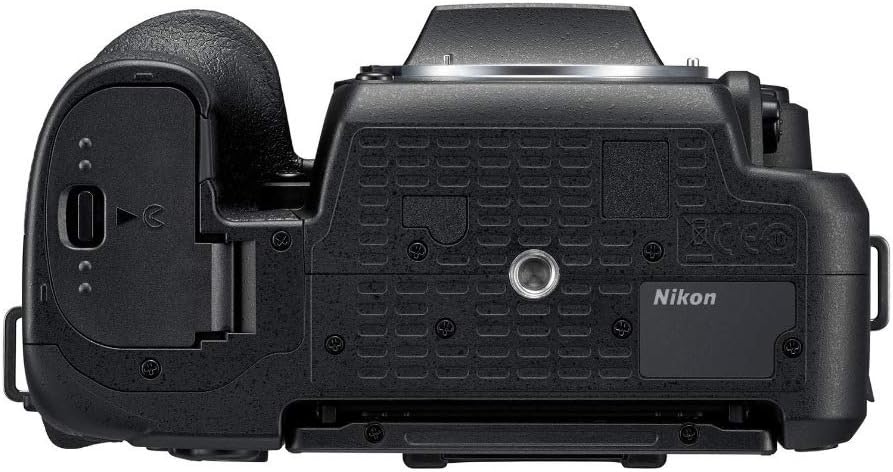
Figure 2: Battery and memory card compartment on the camera bottom.
3. Installazzjoni tal-Kard tal-Memorja
The D7500 uses SD memory cards. Open the memory card slot cover (located next to the battery compartment). Insert the SD card with the label facing the back of the camera until it clicks into place. Close the cover.
4. Konfigurazzjoni Inizjali (Data/Ħin)
Upon first power-on, the camera will prompt you to set the date, time, and time zone. Use the multi-selector and OK button to navigate and confirm your selections.
It-tħaddim tal-Kamera
1. Modi Bażiċi ta' Sparar
Id-dial tal-modalità fuq nett tal-kamera jippermetti l-għażla ta' diversi modi ta' sparar:
- AUTO: Modalità kompletament awtomatika għal sempliċità ta' "point-and-shoot".
- P (Awtomatiku Programmat): Il-kamera tissettja l-veloċità tax-xater u l-apertura għal espożizzjoni ottimali.
- S (Prijorità tax-Xatter Awtomatika): L-utent jistabbilixxi l-veloċità tax-xater, il-kamera tistabbilixxi l-apertura.
- A (Awtomatika b'Prijorità tal-Apertura): L-utent jissettja l-apertura, il-kamera tissettja l-veloċità tax-xater.
- M (Manwal): User sets both shutter speed and aperture.
- XENA: Agħżel minn diversi modi ta' xena (eż., Ritratt, Pajsaġġ) għal settings ottimizzati.
- EFFETTI: Apply special effects to photos.

Figure 3: Top controls including the mode dial.
2. Reġistrazzjoni tal-Vidjo
The D7500 supports 4K Ultra HD (2160p) and 1080p Full HD video recording. To start recording, rotate the live view selector to the movie icon and press the movie-record button. The camera offers power aperture control and auto ISO during video capture.
3. Sistema ta' Awtofokus
The camera features a 51-point autofocus system with various focus modes including Single-Servo AF (S), Continuous-Servo AF (C), and Manual Focus (M). Auto Focus Technology is Contrast Detection.
4. Connectivity (Wi-Fi & Bluetooth)
Utilize the built-in Wi-Fi and Bluetooth to connect your D7500 to smart devices via the Nikon SnapBridge app. This allows for easy image transfer and remote camera control.

Figure 4: Side ports for connectivity and external accessories.
Lenses Included
1. AF-P DX NIKKOR 18-55mm f/3.5-5.6G VR Lens
This compact and versatile standard zoom lens is ideal for everyday shooting, from wide-angle landscapes to portraits. It features Vibration Reduction (VR) for sharper images in low light or when shooting handheld.

Figure 5: AF-P DX NIKKOR 18-55mm f/3.5-5.6G VR Lens.
2. AF-P DX NIKKOR 70-300mm f/4.5-6.3G ED VR Lens
This telephoto zoom lens extends your reach, perfect for capturing distant subjects, sports, and wildlife. Its Vibration Reduction (VR) technology helps minimize camera shake for clear, steady shots.

Figure 6: AF-P DX NIKKOR 70-300mm f/4.5-6.3G ED VR Lens.
Manutenzjoni
1. Tindif
- Lentijiet: Use a lens blower to remove dust, then a soft lens brush. For smudges, use a lens cleaning solution and a microfiber cloth.
- Sensor: For stubborn dust, use a sensor cleaning kit or consult a professional. Avoid touching the sensor directly.
- Korp tal-Kamera: Imsaħ b'ċarruta ratba u niexfa. Għal ħmieġ iebes, uża ċarruta kemmxejn ratba.amp drapp u mbagħad nixxef sewwa.
2. Kura tal-batterija
Charge the battery fully before use. Store batteries in a cool, dry place. Avoid extreme temperatures. If not using the camera for an extended period, remove the battery.
3. Ħażna
Store the camera and lenses in a dry, dust-free environment, ideally in a camera bag or cabinet with desiccant to prevent mold and mildew.
Issolvi l-problemi
If you encounter issues with your Nikon D7500, consider the following general troubleshooting steps:
- Il-kamera ma tixgħel: Iċċekkja jekk il-batterija hijiex iċċarġjata u mdaħħla sew.
- L-immaġnijiet huma mċajpra: Ensure the lens is properly attached, autofocus is engaged, and shutter speed is appropriate for the lighting conditions. Check for lens or sensor smudges.
- Żball fil-karta tal-memorja: Kun żgur li l-karta tal-memorja hija mdaħħla sew u mhux mimlija. Ipprova tifformattja l-karta (dan se jħassar id-dejta kollha).
- Kwistjonijiet ta' konnettività: Ensure Wi-Fi/Bluetooth is enabled on both the camera and your smart device. Restart both devices and try reconnecting.
For more detailed troubleshooting, refer to the comprehensive user manual provided with your camera or visit the Nikon support websit.
Speċifikazzjonijiet
| Karatteristika | Dettall |
|---|---|
| Isem tal-Mudell | D7500 Dual Zoom Lens kit |
| Brand | Nikon |
| Teknoloġija tas-Sensor tar-Ritratti | CMOS |
| Riżoluzzjoni Għadha Effettiva | 20.9 MP |
| Daqs tas-Sensor tar-Ritratti | APS-C |
| Muntaturi Kompatibbli | Nikon F (DX) |
| Stabbilizzazzjoni tal-Immaġni | Ottiċi |
| Medda ISO | 100-51200 |
| Riżoluzzjoni tal-vidjo | 4K UHD 2160p |
| Daqs tal-Iskrin | 3.2 Pulzier |
| Tip ta 'Wiri | Tilting LCD with Touch Functionality |
| Punti ta' fokus awtomatiku | 51 |
| Sparar Kontinwu | 9 FPS |
| Teknoloġija tal-Konnettività | Bluetooth, WiFi |
| Piż tal-oġġett | 640 Gramm |
Garanzija u Appoġġ
The Nikon D7500 Dual Zoom Lens Kit comes with a Garanzija ta' 1 snin mill-manifattur.
For additional support, product information, or to explore other Nikon products, please visit the Ħanut Uffiċjali tan-Nikon fuq Amazon.


