1. Introduzzjoni
This manual provides detailed instructions for the installation, operation, and maintenance of your Anlapus FULL HD 1080P H.265+ Surveillance Kit. This system includes an 8-channel DVR with a pre-installed 1TB hard drive, 4 bullet cameras, and 4 dome cameras, designed to provide comprehensive security monitoring for your property.

Figure 1.1: Anlapus 8-channel DVR surveillance system components.
2. Kontenut tal-Pakkett
Iċċekkja li l-oġġetti kollha elenkati hawn taħt huma inklużi fil-pakkett tiegħek. Jekk xi oġġetti huma neqsin jew bil-ħsara, jekk jogħġbok ikkuntattja l-appoġġ għall-klijenti.
- 1x 8-Channel DVR (with 1TB HDD pre-installed)
- 4x 1080P Bullet Surveillance Cameras
- 4x 1080P Dome Surveillance Cameras
- 8x 60ft BNC Video Cables
- 3x Power Adapters (12V 2A)
- 2x 1-to-4 Power Splitters
- 1x USB Mouse
- 1x Manwal tal-Istruzzjonijiet (dan id-dokument)
- 8x Mounting Screw Bags
- 8x Warning Stickers

Figure 2.1: Contents of the Anlapus surveillance kit package.
3. Karatteristiċi tal-prodott
- Riżoluzzjoni Full HD 1080P: Captures clear and detailed images with 2.0-megapixel quality.
- Kompressjoni tal-Vidjo Avvanzata H.265+: Inaqqas file sizes by up to 50% compared to H.264, allowing for longer recording times and more efficient storage.
- Viżjoni bil-lejl imtejba: Equipped with 24 IR LEDs and an IR-CUT filter, providing clear black and white night vision up to 24 meters (80 feet).
- Klassifikazzjoni ta' Reżistenti għat-Temp IP66: Cameras are designed for both indoor and outdoor use, capable of withstanding various extreme weather conditions.
- Sejbien ta' Moviment u Twissijiet: Configurable motion detection zones with instant email alerts and push notifications to your smartphone.
- Modi ta' Reġistrazzjoni Multipli: Supports 24/7 continuous recording, motion-activated recording, scheduled recording, and manual recording.
- Aċċess mill-bogħod: View live feeds and recorded footage from anywhere using the free mobile application on your smartphone or tablet.
- Pre-installed 1TB Hard Drive: Ready for immediate use, eliminating the need to purchase and install a separate hard drive.

Figure 3.1: Day and Night Vision.
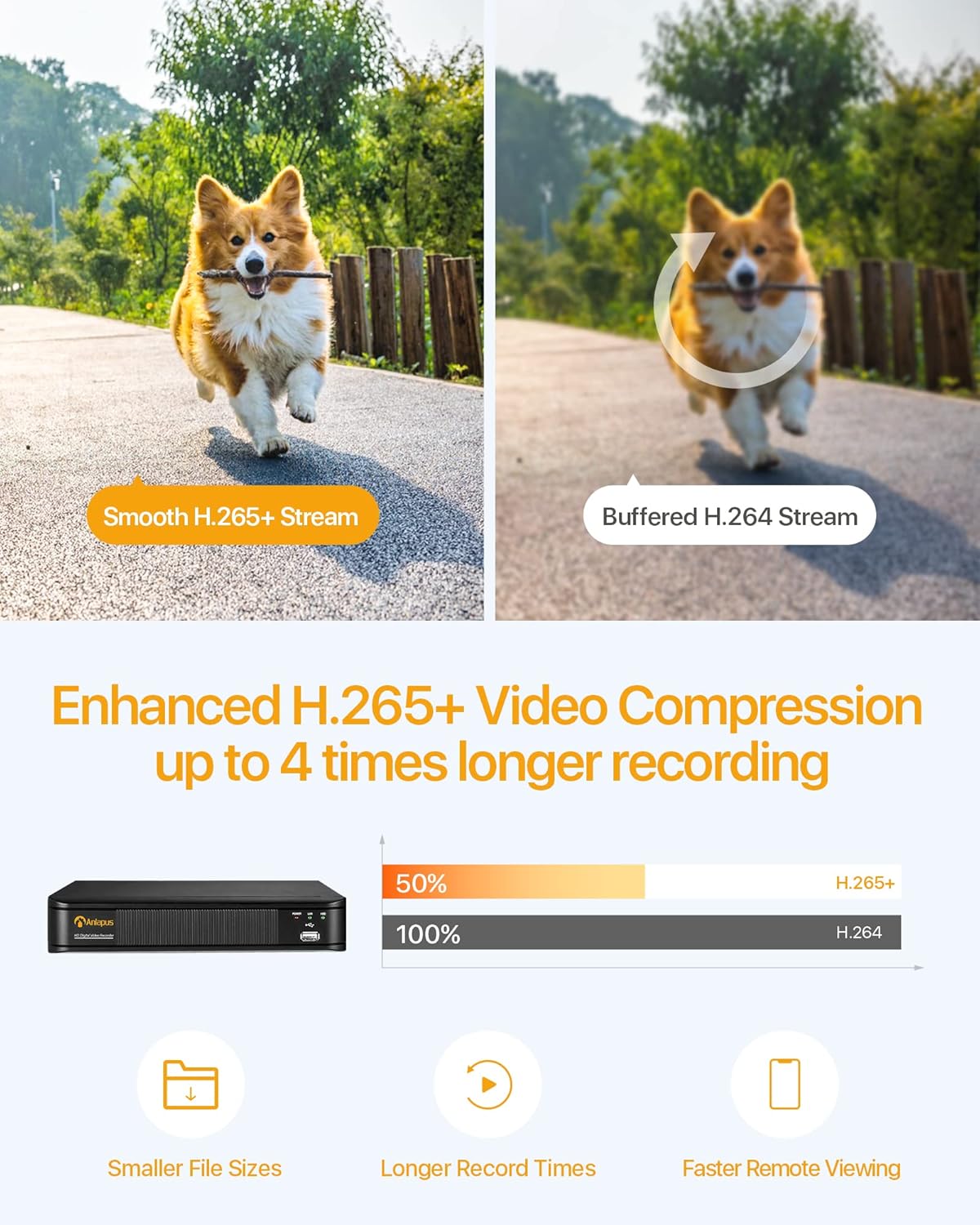
Figure 3.2: H.265+ Video Compression Benefits.

Figure 3.3: Day and Night Surveillance Example.

Figure 3.4: All-Weather Protection and Applications.
4. System Components Overview
4.1 DVR (Reġistratur tal-Vidjo Diġitali)
The DVR is the central unit for recording, storing, and managing video footage from all connected cameras. It features multiple video input ports, audio input/output, VGA and HDMI outputs for display, and USB ports for mouse control and data backup.
4.2 Surveillance Cameras
The kit includes both bullet and dome cameras. Both types offer 1080P resolution, night vision capabilities, and IP66 weatherproof housing. Bullet cameras are typically used for directional surveillance, while dome cameras offer a more discreet appearance and are often vandal-resistant.

Figure 4.1: Camera and DVR Connection Diagram.
5. Gwida ta' Setup
5.1 Konnessjoni Inizjali
- Qabbad il-Kameras: Use the provided BNC video cables to connect each camera to the 'VIDEO IN' ports on the back of the DVR.
- Kameras tal-Enerġija: Use the power adapters and 1-to-4 power splitters to provide power to all cameras.
- Connect DVR to Display: Connect the DVR to a monitor or TV using either an HDMI or VGA cable.
- Qabbad id-DVR man-Netwerk: Connect the DVR's 'NETWORK' port to your router using an Ethernet cable for remote access.
- Qabbad il-Maws USB: Plug the USB mouse into one of the DVR's USB ports for navigation.
- Ixgħel id-DVR: Connect the DVR to its power adapter and plug it into an electrical outlet. The system will boot up.

Figure 5.1: Simple Connection for Mobile Access.
5.2 Konfigurazzjoni tal-App Mobbli
- Niżżel l-App: Fittex għal the official Anlapus security app on Google Play Store or Apple App Store and install it on your smartphone.
- Irreġistra Kont: Iftaħ l-app u segwi l-istruzzjonijiet fuq l-iskrin biex tirreġistra kont ta' utent ġdid.
- Żid Apparat: Scan the QR code displayed on your DVR's monitor or manually enter the device ID to add your DVR to the app.
- View Kameras: Ladarba żżidha, tista' view live feeds from your cameras and access recorded footage mill-bogħod.
6. Istruzzjonijiet Operattivi
6.1 Modi ta' Reġistrazzjoni
Your DVR supports several recording modes:
- Continuous Recording (24/7): Jirreġistra kontinwament, u jikteb fuq l-eqdem ikeltage meta l-hard drive ikun mimli.
- Reġistrazzjoni ta 'Sejbien tal-Moviment: Jirrekordja biss meta jinstab moviment, u b'hekk jiffranka l-ispazju tal-ħażna.
- Reġistrazzjoni Skedata: Issettja ħinijiet speċifiċi għar-reġistrazzjoni.
- Reġistrazzjoni manwali: Ibda u waqqaf ir-reġistrazzjoni manwalment.
Configure these settings via the DVR's main menu using the USB mouse.

Figure 6.1: 24/7 Recording View.
6.2 Sejbien tal-Mozzjoni u Twissijiet
The system can be configured to detect motion and send alerts:
- Ikkonfigura ż-Żoni ta' Sejbien: In the DVR settings, define specific areas within the camera's view għall-iskoperta tal-moviment.
- Issettja s-Sensittività: Aġġusta s-sensittività tad-detezzjoni tal-moviment biex timminimizza l-allarmi foloz.
- Ippermetti Twissijiet: Activate email alerts and push notifications through the DVR settings and mobile app. When motion is detected, you will receive an alert on your smartphone.

Figure 6.2: Motion Detection and Smartphone Alert.

Figure 6.3: Smart Motion Detection Features.
6.3 Remote Access & Playback
Access your surveillance system from anywhere:
- Live View: Open the mobile app to view live video streams from all connected cameras.
- Daqq: Use the app's playback function to review irreġistrat footage stored on the DVR's hard drive. You can select specific dates and times.
- Multi-Apparat Viewing: The system supports simultaneous viewing on multiple devices, including smartphones, tablets, and desktop computers.

Figure 6.4: Mobile App Playback Interface.

Figure 6.5: Multi-Device Remote Viewing.
7. Manutenzjoni
- Clean Cameras: Naddaf il-lentijiet tal-kamera perjodikament b'drapp artab u dryer.amp drapp biex tiżgura kwalità ta' immaġni ċara. Evita prodotti tat-tindif li joborxu.
- Iċċekkja Kejbils: Ensure all cables are securely connected and free from damage. Replace any damaged cables immediately.
- Ventilazzjoni tad-DVR: Ensure the DVR is placed in a well-ventilated area to prevent overheating. Keep vents clear of obstructions.
- Aġġornamenti tal-Firmware: Iċċekkja l-manifattur webżur is-sit perjodikament għal aġġornamenti tal-firmware biex tiżgura prestazzjoni u sigurtà ottimali.
- Backup tad-Data: Agħmel backup regolari tal-ikel importantitage from the DVR's hard drive to an external USB device.

Figure 7.1: USB Data Backup.
8 Issolvi l-problemi
- Ebda Sinjal tal-Vidjo: Check all cable connections between cameras and DVR, and between DVR and display. Ensure cameras and DVR are powered on.
- Kwalità Fqira tal-Immaġni: Clean camera lenses. Ensure cameras are properly focused (if adjustable). Check cable integrity.
- Ebda Aċċess Remot: Verify the DVR is connected to the internet. Check network settings on the DVR and ensure your router is functioning correctly. Confirm the mobile app is properly configured and the device is added.
- Is-Sejbien tal-Moviment Mhux Taħdim: Review motion detection settings in the DVR menu. Adjust sensitivity and detection zones. Ensure alerts are enabled in both DVR and mobile app settings.
- DVR Mhux qed Jirrekordja: Check hard drive status in DVR settings. Ensure recording schedules or motion detection settings are correctly configured.
Għal aktar assistenza, jekk jogħġbok irreferi għat-taqsima tal-appoġġ jew ikkuntattja lis-servizz tal-konsumatur.
9. Speċifikazzjonijiet
| Brand | Anlapus |
| Numru tal-Mudell | AJ-AM8A4B-4W441E-106202S |
| Riżoluzzjoni tal-vidjo | Full HD ta '1080p |
| Kompressjoni tal-vidjo | H.265 + |
| Kanali tad-DVR | 8 Kanali |
| Kapaċità tal-Ħżin | HDD ta' 1 TB (installat minn qabel) |
| Tip ta' Kamera | Bullet and Dome Cameras |
| Medda tal-Viżjoni Lejl | Sa 24 metri (80 pied) |
| Klassifikazzjoni tat-temp | IP66 |
| Teknoloġija tal-Konnettività | Bil-fili |
| Sors tal-Enerġija | Cable Electric (12 Volts DC) |
| Dimensjonijiet tal-Prodott (L x W x H) | 19.99 x 19.99 x 19.99 cm (DVR) |
| Piż tal-oġġett | 7.36 kilograms (total package) |
| Manifattur | Anlapus |
10. Garanzija u Appoġġ
The manufacturer, ZOSI (parent company of Anlapus), provides the following support and warranty:
- Garanzija ta' Sodisfazzjon ta' 30 Jum: If you are not satisfied, you may be eligible for a refund or exchange within 30 days.
- Assistenza Teknika tul il-Ħajja: Comprehensive technical support is available for the lifetime of the product.
- Garanzija ta' sena: Il-prodott huwa kopert minn garanzija ta' sena kontra difetti fil-manifattura.
For technical support or warranty claims, please refer to the contact information provided with your product packaging or visit the official Anlapus/ZOSI websit.


