Prodott Overview
This manual provides detailed instructions for the Anlapus H.265+ Security System, a comprehensive wired analog surveillance camera kit designed for home and business monitoring. It features a Full HD 1080P 8-channel DVR recorder with a pre-installed 1TB hard drive and 2MP outdoor surveillance cameras.

Figure 1: Anlapus H.265+ Security System Components
Karatteristiċi ewlenin:
- H.265+ Full HD 1080p System: Includes an 8-channel 1080p DVR with a built-in 1TB hard drive and four 2.0MP surveillance cameras.
- Viżjoni bil-lejl Avvanzata: Cameras are equipped with 24 IR LEDs and an IR-CUT filter, providing clear night vision up to 24 meters (80 feet).
- Sejbien ta' Moviment Intelliġenti: Receive push alerts via the free mobile application when motion is detected, keeping you informed even when away from home.
- Kameras reżistenti għat-temp IP66: Durable plastic housing designed for both indoor and outdoor use, capable of withstanding extreme weather conditions. The cable is integrated into the camera mount for added protection.
- Pre-installed 1TB Hard Drive: Ready for immediate use, specifically designed for continuous surveillance data recording.
- Modi ta' Reġistrazzjoni Multipli: Supports 24/7 continuous recording, motion detection recording, scheduled recording, and manual recording.
- Remote Viewing: Access live and recorded footage anytime, anywhere via smartphone, tablet, or PC.
Kontenut tal-Pakkett
Qabel tibda l-installazzjoni, jekk jogħġbok ivverifika li l-komponenti kollha elenkati hawn taħt huma preżenti fil-pakkett tiegħek:

Figura 2: Kontenut tal-Pakkett Inkluż
- 1 x DVR (Digital Video Recorder) with 1TB HDD pre-installed
- 4 x 1080p Surveillance Cameras
- 4 x BNC Video Cables (approx. 18.3m / 60ft each)
- 2 x Power Adapters
- 1 x 1-to-4 Power Splitter Cable
- 1 x USB Mouse
- 1 x Manwal tal-Istruzzjonijiet (dan id-dokument)
- 4 x Boroż tal-Viti tal-Immuntar
- 4 x Stikers ta' Twissija
Gwida ta' Setup
1. DVR Connection
- Qabbad il-Kameras: Connect each surveillance camera to the BNC video input ports on the back of the DVR using the provided BNC cables. Ensure connections are secure.
- Qabbad l-Enerġija: Use the power adapters and the 1-to-4 power splitter cable to power the cameras. Connect the DVR to a power outlet using its dedicated power adapter.
- Qabbad mal-Monitor: Connect the DVR to a monitor or TV using an HDMI or VGA cable (not included) to view the live feed and access system settings.
- Qabbad il-Maws USB: Plug the included USB mouse into a USB port on the DVR for navigation.
- Konnessjoni tan-Netwerk (Mhux Obbligatorja iżda Rakkomandata): Għal remoti viewing and email alerts, connect the DVR to your router using an Ethernet cable (not included).
2. Installazzjoni tal-Kamera
The cameras are designed for both indoor and outdoor use, with an IP66 weatherproof rating. Choose strategic locations that provide optimal coverage and are within reach of the BNC cables.
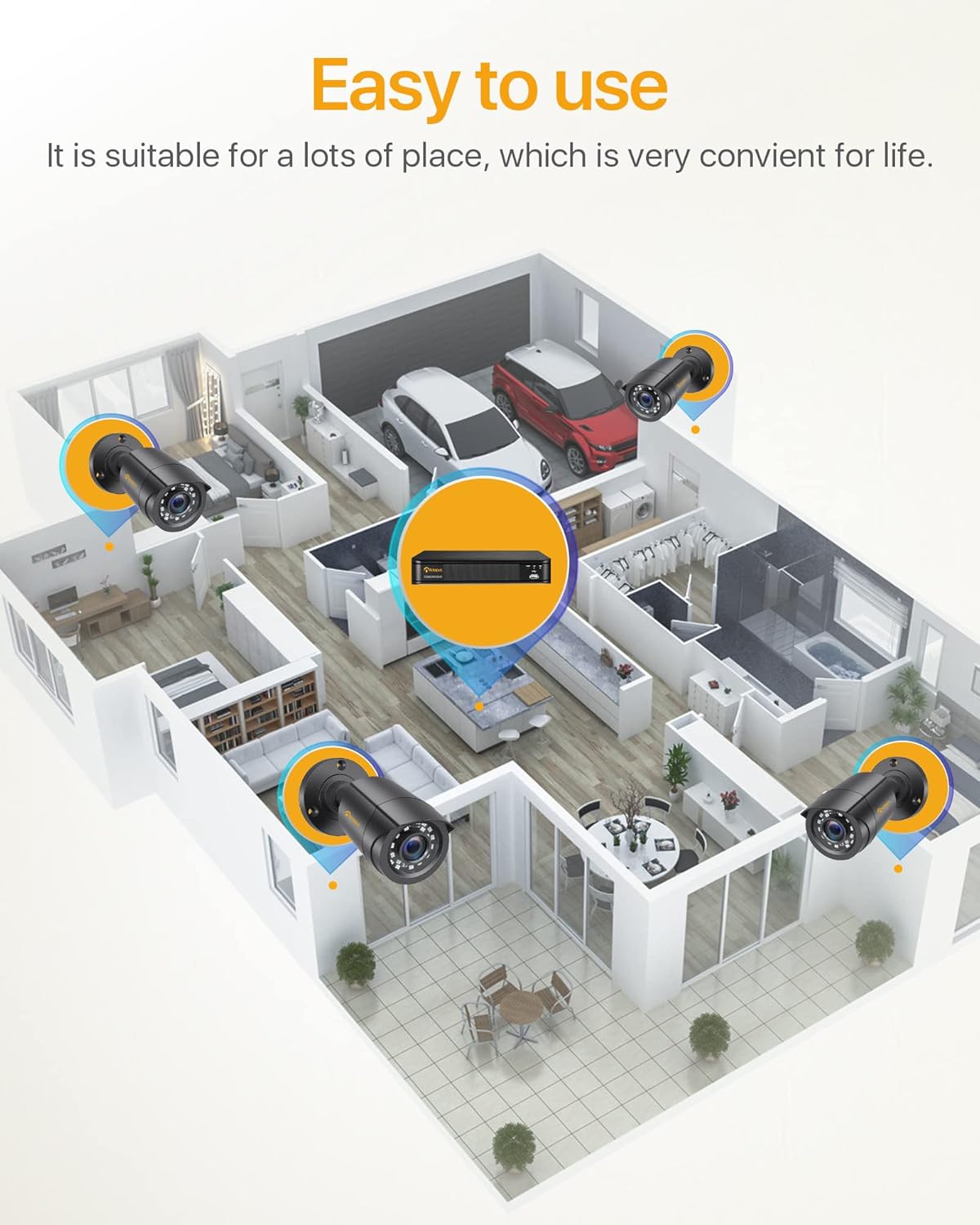
Figura 3: Eżample Camera Placement for Optimal Coverage
- Immuntar: Use the provided mounting screws and anchors to securely attach the cameras to walls or ceilings.
- Aġġusta Angolu: Adjust the camera's angle (180° horizontal, 360° vertical) to cover the desired area. Ensure the lens is clean and free from obstructions.
- Ġestjoni tal-Kejbil: Route the BNC cables neatly and securely to prevent damage and tripping hazards. The cable is integrated into the camera mount for protection.

Figure 4: Camera Features and Adjustability
Istruzzjonijiet Operattivi
1. Initial Setup and Login
Upon first power-on, the DVR will guide you through an initial setup wizard. You will be prompted to create a strong password for the administrator account. It is crucial to remember this password.
2. Ħaj View
Once logged in, the system will display the live view mill-kameras kollha konnessi fuq il-monitor. Tista' taqleb bejn kamera waħda view u grilja b'ħafna kameras view.

Figure 5: 24/7 Live Monitoring Setup
3. Modi ta' Reġistrazzjoni
- Reġistrazzjoni Kontinwa: The system is pre-configured for 24/7 continuous recording to the 1TB hard drive.
- Reġistrazzjoni ta 'Sejbien tal-Moviment: To enable, navigate to the DVR's menu, select "Record" > "Motion Detection." Configure the detection area and sensitivity for each camera.
- Reġistrazzjoni Skedata: Set specific times for recording via "Record" > "Schedule."
- Reġistrazzjoni manwali: Initiate recording manually from the live view interface.
4. Remote Viewpermezz tal-App Mobbli
Download the official Anlapus mobile application (available for iOS and Android) to view il-kameras tiegħek mill-bogħod.
- Niżżel l-App: Fittex għal "Anlapus" in your device's app store.
- Irreġistra Kont: Create a new user account within the app.
- Żid Apparat: Scan the QR code displayed on your DVR's monitor (found in Network settings) or manually enter the device ID to add your DVR to the app.
- Live View & Daqq: Ladarba żżidha, tista' view live feeds, play back recorded footage, and receive motion detection alerts on your smartphone or tablet.

Figura 6: Remot Viewing Across Devices
5. Twissijiet ta' Sejbien ta' Mozzjoni
Configure email alerts for motion detection events through the DVR's network settings. Ensure your DVR is connected to the internet.

Figura 7: Twissijiet ta' Sejbien ta' Mozzjoni Intelliġenti
Manutenzjoni
- Tindif regolari: Periodically clean the camera lenses with a soft, dry cloth to ensure clear image quality. For outdoor cameras, check for dirt, dust, or spiderwebs.
- Aġġornamenti tal-Firmware: Check the Anlapus official website for any available firmware updates for your DVR. Updates can improve performance and add new features.
- Saħħa tal-Hard Drive: The 1TB hard drive is designed for continuous recording. Monitor its health through the DVR's system settings. If the hard drive becomes full, older footage se jinkiteb fuqu awtomatikament (reġistrazzjoni f'linja).
- Spezzjoni tal-Cable: Regularly inspect all cables for any signs of wear, damage, or loose connections, especially for outdoor installations.
- Provvista tal-Enerġija: Ensure the DVR and camera power adapters are connected to stable power sources.
Issolvi l-problemi
| Problema | Kawża Possibbli | Soluzzjoni |
|---|---|---|
| L-ebda immaġni fuq il-monitor. | Kejbil tal-vidjow maħlul, input mhux korrett magħżul fuq il-monitor, DVR mhux mixgħul. | Check all BNC and HDMI/VGA cable connections. Ensure monitor input matches DVR output. Verify DVR power. |
| Cameras not displaying. | Camera power issue, BNC cable disconnected, faulty camera. | Check camera power connections and power splitter. Re-seat BNC cables. Test camera on a different port if possible. |
| Ebda remot viewing. | DVR not connected to network, incorrect network settings, app configuration issue. | Ensure DVR is connected to router via Ethernet. Check network settings on DVR (DHCP enabled or static IP configured correctly). Verify app device ID/QR code. |
| Poor night vision. | IR LEDs obstructed, camera lens dirty, insufficient ambient light. | Clean camera lens. Ensure no obstructions are blocking the IR LEDs. Consider adding external IR illuminators if needed. |
| Is-sejbien tal-moviment mhux qed jaħdem. | Motion detection not enabled, sensitivity too low, detection area not set. | Enable motion detection in DVR settings. Adjust sensitivity. Define the detection area correctly. |
Speċifikazzjonijiet
| Karatteristika | Dettall |
|---|---|
| Numru tal-Mudell | 6971627216065 |
| Kanali tad-DVR | 8-kanali |
| Riżoluzzjoni ta' Reġistrazzjoni tal-Vidjo | Full HD ta '1080p |
| Kompressjoni tal-vidjo | H.265 + |
| Kapaċità tal-Ħżin | HDD ta' 1TB (installat minn qabel) |
| Riżoluzzjoni tal-Kamera | 2.0 Megapixel |
| Tip ta' Kamera | Bullet, Wired |
| Medda tal-Viżjoni Lejl | Up to 24 meters (80 feet) with 24 IR LEDs |
| Klassifikazzjoni tat-temp | IP66 (Indoor/Outdoor use) |
| Konnettività | Wired (BNC), Ethernet for network features |
| Provvista tal-Enerġija | 12 Volts (via included power adapters) |
| Temperatura operattiva | -10°C sa 55°C (14°F sa 131°F) |
| Dimensjonijiet (DVR) | Appross. 27.94 x 35.56 x 17.78 ċm (L x W x H) |
| Weight (Total Package) | 4.56 kilogrammi |
Garanzija u Appoġġ
Anlapus products are designed for reliability and performance. For specific warranty details, please refer to the warranty card included in your package or visit the official Anlapus websit.
For technical assistance, troubleshooting, or any inquiries regarding your security system, please contact Anlapus customer support. Our team is dedicated to providing prompt and helpful solutions.
- Appoġġ onlajn: Visit the Anlapus official websit għal FAQs, artikli ta' appoġġ, u formoli ta' kuntatt.
- Appoġġ bl-Email: Irreferi għad-dokumentazzjoni tal-prodott tiegħek għall-indirizz elettroniku ddedikat għall-appoġġ.


